

Proactive IT maintenance is a structured approach to keeping business systems available and secure by identifying and resolving issues before they cause downtime. Rather than waiting for failures, it uses continuous monitoring, scheduled patching, backup verification, and health checks to reduce operational risk and keep infrastructure stable.
Most IT environments reach a tipping point: the cost of unplanned outages, security incidents, and emergency fixes starts to exceed the cost of prevention. That is the moment when organisations recognise that a break-fix model — where support only activates after something goes wrong — is not a strategy; it is a liability.
Proactive IT maintenance changes the operating model. Instead of reacting to failures, your IT function anticipates them. Monitoring surfaces early warning signals. Patch management closes vulnerabilities before they are exploited. Health checks confirm that backups are recoverable and configurations are consistent. The result is fewer incidents, faster resolution when issues do occur, and measurable evidence of IT performance that stakeholders can actually read.
This playbook covers the full picture: what proactive maintenance means in practice, the building blocks that make it work, a 30/60/90-day implementation roadmap, the KPIs that prove value, and how to choose the right tooling and operating model for your environment.
What Proactive IT Maintenance Means in Managed IT Services (and Why It Beats Break-Fix)
Proactive IT maintenance is the practice of continuously reviewing, updating, and optimising business technology so that problems are caught and resolved before they affect operations. In a managed services context, this means the provider takes ownership of system health — not just incident response.
The contrast with break-fix support is stark. Break-fix is transactional: something fails, a ticket is raised, an engineer fixes it, and the invoice follows. There is no baseline, no pattern analysis, and no prevention. Each incident is treated in isolation, which means the same underlying causes tend to recur.
At Impulso Tecnológico, the proactive computer maintenance model covers computers, servers, antivirus, backup, and communications. Every support interaction includes an ongoing proactive review of the managed environment — not just a resolution of the immediate issue. This continuous review, combined with an initial audit to establish system baselines, means that configuration drift, missing patches, and backup failures are identified systematically rather than accidentally.
| Criterion | Break-Fix / Reactive Support | Proactive IT Maintenance (MSP Model) |
|---|---|---|
| Trigger for action | System failure or user complaint | Monitoring alert or scheduled review |
| Cost structure | Variable, unpredictable per-incident billing | Fixed monthly fee with SLA-governed response |
| Security posture | Patching happens reactively or not at all | Scheduled patching and configuration hygiene |
| Backup assurance | Assumed to be working until recovery fails | Regular backup verification and recovery testing |
| Visibility for management | No structured reporting; incidents are anecdotal | Detailed service reports per intervention |
| Compliance readiness | Gaps discovered during audits or incidents | Ongoing alignment with security and access standards |
| Downtime trend | Flat or increasing as environment ages | Declining as root causes are addressed systematically |
Proactive vs reactive: what changes operationally
Reactive IT support responds after failure; proactive IT maintenance reduces the likelihood of failure through continuous review and prevention. The operational difference is not just philosophical — it changes how engineers spend their time, how incidents are logged, and how management perceives IT.
In a reactive model, engineers are permanently in triage mode. Priorities shift with each new failure, planned work is perpetually deferred, and the environment accumulates technical debt. In a proactive model, maintenance windows are scheduled, monitoring surfaces issues before users notice them, and engineers work from a prioritised queue rather than a crisis list.
For the business, the most visible change is availability. Systems stay up longer, planned outages replace unplanned ones, and the IT team shifts from being perceived as a cost centre that reacts to problems into a function that actively protects operations. This shift also affects how IT budgets are justified — predictable monthly costs replace unpredictable emergency spend.
Where proactive maintenance creates business value
Proactive maintenance strengthens security by keeping updates, patching, and configuration hygiene aligned with risk. But the business value extends beyond security alone.
When endpoints and servers are consistently patched, the attack surface shrinks. When configurations are standardised and documented, troubleshooting time drops. When backups are verified rather than assumed, recovery time objectives become achievable rather than theoretical. Each of these outcomes has a direct financial equivalent: fewer hours lost to downtime, lower incident remediation costs, and reduced exposure to regulatory penalties.
For organisations operating under frameworks such as ISO 27001, NIS2, or sector-specific regulations, proactive maintenance also supports IT compliance readiness. Audit evidence — patch logs, access control reviews, backup verification records — is generated as a byproduct of the maintenance process rather than assembled under pressure before an audit. This shifts compliance from a periodic scramble into a continuous operational state.
The managed services model: SLAs, audits, and accountability
Managed services benefit from governance: SLAs, reporting, and measurable outcomes for stakeholders. Without these, proactive maintenance becomes invisible — the business cannot distinguish between a provider that is genuinely preventing incidents and one that is simply not being called upon.
Impulso Tecnológico structures its all-inclusive support model around explicit accountability. Response targets are defined by SLA: under eight working hours for standard requests, and under four hours for urgent issues affecting the whole business or server infrastructure. Every service or repair generates a detailed report, creating a traceable record of what was done, when, and why.
This governance layer matters because it converts maintenance activity into management-readable evidence. When a stakeholder asks whether the IT environment is improving, the answer is not anecdotal — it is in the report. SLAs also create a shared language between the provider and the client, making it possible to escalate, adjust, and improve the service over time based on data rather than perception.

The Core Building Blocks (Monitoring, Patch Management, Health Checks, Automation)
Proactive IT maintenance is only as reliable as the processes that underpin it. Four building blocks determine whether a maintenance programme actually prevents incidents or merely documents them after the fact.
Impulso Tecnológico maps these building blocks directly onto its service delivery: the initial audit establishes the baseline, the ongoing proactive review with every support request keeps it current, unlimited remote support ensures rapid response when signals escalate, and detailed service reports provide the evidence trail that makes the whole programme auditable.
- Monitoring and alerting: Continuous visibility across endpoints, servers, and communications infrastructure. Alerts are triaged before they become user-impacting incidents.
- Patch management: Scheduled deployment of OS, application, and firmware updates across all managed devices, with configuration optimisation applied in the same maintenance window.
- Health checks: Structured verification of backup integrity, antivirus status, disk health, and access permissions — carried out on a defined cadence, not ad hoc.
- Automation and remediation workflows: Scripted responses to common alert types (e.g., failed backup jobs, disk threshold breaches) that resolve issues without manual intervention, reducing ticket volume and response time.
- Inventory and documentation: Accurate, maintained records of all devices, configurations, and software licences — the foundation that makes every other building block faster and more accurate.
Together, these five elements form a repeatable framework. Each one generates evidence — logs, reports, alert histories — that feeds directly into KPI tracking and stakeholder reporting.
Monitoring and alerting: from signals to actionable tickets
Monitoring detects early warning signals across endpoints, servers, and communications before they escalate into outages. The value of a monitoring programme is determined not by the volume of alerts it generates, but by how quickly those alerts are converted into actionable tickets with a defined owner and resolution path.
Effective RMM monitoring covers CPU and memory utilisation trends, disk capacity thresholds, service availability, network connectivity, and security event logs. Thresholds should be tuned to the environment — generic defaults generate noise that desensitises engineers to real signals. When an alert fires, the workflow matters: who receives it, what the expected response time is, and whether the resolution is logged against the monitored asset.
For organisations running mixed environments — on-premises servers alongside cloud workloads and remote endpoints — monitoring must span all layers. A gap in coverage is a gap in visibility, and visibility is the prerequisite for everything else in a proactive maintenance programme.
Patch management and configuration optimisation: cadence and controls
Patch management reduces vulnerability exposure and stabilises performance, but its effectiveness depends entirely on cadence and controls. A patching programme that runs quarterly is not proactive — it leaves a window of weeks or months during which known vulnerabilities remain exploitable.
A practical patch management cadence for most managed environments looks like this: critical security patches within 72 hours of release, standard OS and application updates monthly, firmware updates quarterly with pre-change testing. Each deployment should be logged with the device identifier, patch version, deployment date, and outcome — success, failure, or pending reboot.
Configuration optimisation sits alongside patching in the same maintenance window. Hardening settings, disabling unused services, reviewing firewall rules, and auditing local administrator accounts are all configuration tasks that reduce the attack surface without requiring new tooling. When Impulso Tecnológico installs and configures security software and access permissions as part of its service scope, this is exactly the work being done — systematically, not reactively.
Health checks and automation: backups, antivirus, and remediation workflows
Health checks and automation standardise configurations and speed up remediation. A backup that has not been verified is not a backup — it is an assumption. The same applies to antivirus: a signature database that has not updated in five days, or an agent that has silently stopped running, provides no protection regardless of what the dashboard shows.
Structured health checks should verify backup completion and integrity on a daily basis, confirm antivirus agent status and definition currency across all endpoints, and check disk health indicators (S.M.A.R.T. data for physical drives, volume health for virtual environments). These checks generate a pass/fail record that is both operationally useful and audit-ready.
Automation accelerates the response to common findings. When a backup verification and recovery testing workflow detects a failed job, an automated alert and remediation script can restart the job, notify the responsible engineer, and log the event — all without manual intervention. This reduces mean time to resolution and ensures that no failed backup is silently ignored until a recovery is actually needed. Impulso Tecnológico's technology partner ecosystem, including Veeam for backup and Sophos for endpoint protection, provides the tooling layer that makes these automated workflows reliable at scale.
Implementation Roadmap for IT Consulting (First 30/60/90 Days) + KPIs
Moving a client from a break-fix model to proactive IT maintenance requires a structured transition, not a big-bang deployment. The 30/60/90-day framework gives IT consultancies a repeatable onboarding sequence that delivers quick wins early, builds operational cadences in the middle phase, and reaches steady-state governance by the end of the third month.
Impulso Tecnológico's fixed-price all-inclusive support model provides the governance backbone for this transition. The initial audit — which establishes the current status of all relevant systems — is the Day 1 deliverable. From that baseline, every subsequent support interaction includes a proactive review, so the environment's health score improves incrementally with each engagement rather than only at scheduled review points.
The KPI framework connects directly to the fixed monthly cost structure. When incidents decline and resolution times shorten, the value of the proactive programme becomes quantifiable — not as a claim, but as a trend visible in the service reports. This is how predictable monthly costs translate into reduced operational risk: the data shows the direction of travel.
- Baseline before committing to targets: KPIs are meaningless without a starting point. The initial audit must capture current patch compliance rate, backup success rate, open vulnerability count, and average incident resolution time.
- Define SLA tiers before go-live: Response targets (e.g., under 8 working hours standard, under 4 hours for business-critical issues) must be agreed and documented before the first ticket is raised.
- Prioritise quick wins in the first 30 days: Address the highest-risk findings from the audit — missing critical patches, unverified backups, accounts with excessive privileges — to demonstrate immediate value.
- Establish reporting cadence by Day 60: Monthly service reports should be in place and reviewed with the client before the programme reaches steady state.
- Review and adjust by Day 90: Use the first three months of data to refine alert thresholds, patch windows, and health check frequency based on actual environment behaviour.
- Link KPIs to budget conversations: Declining incident counts and improving patch compliance rates are the evidence that justifies continued investment in proactive maintenance over reactive spend.
First 30/60/90 days: discovery, quick wins, and steady-state operations
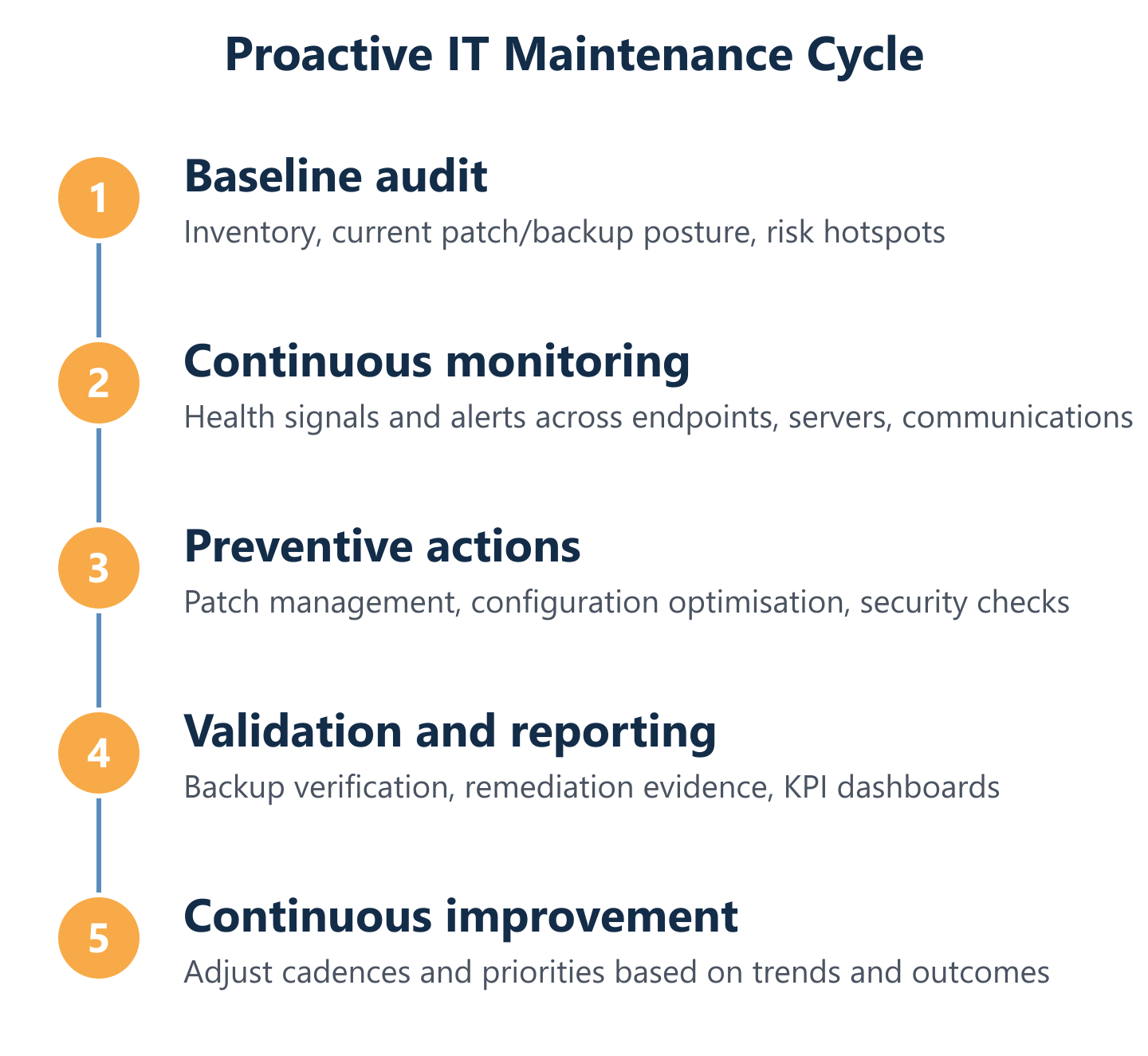
Start with discovery and baseline health: inventory, risk, and current patch and backup posture. The first 30 days are about understanding the environment, not changing it wholesale. Rushing to deploy monitoring tools or patch everything simultaneously without a baseline creates noise and risks destabilising systems that were previously stable.
Days 1–30: Complete the asset inventory. Document all endpoints, servers, NAS devices, printers, and network equipment. Run a vulnerability scan and patch compliance report. Test at least one backup recovery. Identify the three to five highest-risk findings and remediate them.
Days 31–60: Deploy monitoring with tuned thresholds. Establish the first patching maintenance window. Begin weekly health checks with documented outcomes. Deliver the first service report to the client.
Days 61–90: Review alert data and adjust thresholds. Confirm that all backup jobs are completing and verified. Present the first KPI comparison (baseline vs current) to stakeholders. Formalise the ongoing maintenance calendar — patching dates, health check cadence, and quarterly review meetings.
KPIs and reporting: what to track and how to present it to stakeholders
Define cadences, responsibilities, and SLAs so proactive work is repeatable and visible. The KPIs that matter most to business stakeholders are not technical metrics — they are operational and financial outcomes expressed in terms the business already tracks.
The core KPI set for a proactive IT maintenance programme should include: mean time to resolution (MTTR) for incidents, monthly incident ticket volume (trend, not absolute), patch compliance rate across all managed endpoints and servers, backup success rate and last verified recovery date, and open critical vulnerability count. These five metrics, presented as monthly trends, tell a clear story about whether the environment is improving.
For compliance-sensitive environments, add an IT compliance readiness score — a simple percentage of controls that are currently met against a defined framework (ISO 27001, Cyber Essentials, or sector-specific requirements). Impulso Tecnológico's detailed service reports per intervention provide the raw data that feeds these KPIs, making the reporting process a natural output of the maintenance work rather than a separate effort.
Choosing tooling and an operating model: RMM vs lightweight endpoint management
Prove value with KPIs: downtime, ticket trends, vulnerability exposure reduction, and compliance readiness. The tooling decision is secondary to the operating model — the right tool for an environment with 20 endpoints is not the same as the right tool for 500.
Full RMM platforms (such as those used by established MSPs) offer centralised monitoring, automated patch deployment, scripting, and reporting across large, heterogeneous environments. They require configuration investment upfront but deliver the broadest coverage. Lightweight endpoint management tools offer faster deployment and lower overhead, making them suitable for smaller environments or organisations that want to start proactive maintenance without a full MSP engagement.
The decision criteria should be: number of managed devices, environment complexity (on-premises vs cloud vs hybrid), existing tooling already in place, and whether the operating model is fully outsourced, co-managed, or in-house with MSP oversight. Impulso Tecnológico's flexible service structures — from fixed-price all-inclusive packages to hourly support and full outsourcing — mean the tooling and model can be matched to the client's actual environment rather than a standard template. Partners including Sophos, Fortinet, Cisco, and Aruba provide the security and network layers that integrate with whichever management platform is selected.
If your environment is still running on a break-fix model, the starting point is not a new tool — it is a baseline. An initial audit of patch status, backup integrity, and open vulnerabilities gives you the evidence to prioritise the first 30 days and set realistic targets. From there, the shift to proactive IT maintenance is incremental: monitoring, then patching cadences, then automated health checks, then KPI reporting. Each step reduces operational risk and builds the evidence base that justifies the investment. Whether you manage IT in-house, work with an MSP, or are evaluating preventive IT maintenance as a structured service, the principle is the same: measure first, then improve, then prove it.