

IT support in Valencia covers remote helpdesk, on-site assistance, proactive monitoring, security management, and backup oversight—delivered under agreed response times to keep business systems available and productive. The right provider acts as an extension of your team, not just a break-fix contact.
Most Valencia businesses that search for IT support are not simply looking for someone to restart a server. They need a structured service that prevents downtime, manages security risks, and gives them predictable monthly costs. The challenge is that many providers list services without explaining what is actually included, how incidents are handled, or what happens when something goes wrong at a critical moment. At Impulso Tecnológico, we have spent over 25 years building managed IT services around exactly these questions: scope, response times, security baseline, and continuity. This guide walks through what a well-structured IT support package in Valencia should contain, how to compare providers objectively, and what to expect during onboarding and day-to-day operations.
What IT Support in Valencia should include (and what to ask for)
Choosing an IT support provider in Valencia based on a service list alone is one of the most common mistakes SMEs make. Two providers can both claim to offer "managed IT services Valencia" while delivering completely different levels of coverage, response speed, and accountability. The only way to compare them fairly is to ask specific questions about measurable outcomes: what is covered, how incidents are handled, what is excluded, and how performance is reported.
Impulso Tecnológico structures its Valencia Computer Support around continuity and predictability. The all-inclusive model includes an initial audit of current systems—covering antivirus status, backup health, desktops, servers, and communications—followed by unlimited remote technical support under defined SLA targets. This approach means clients know exactly what they are getting before any incident occurs, rather than discovering gaps mid-crisis.
| Evaluation Criterion | Minimum Acceptable | What to Look For |
|---|---|---|
| Remote helpdesk response | Same business day | Under 8 working hours for standard; under 4 for server/critical issues |
| On-site support | Available on request | Included when a general fault is identified, with clear visit-charge policy |
| Monitoring | Reactive alerts | Proactive, real-time monitoring of servers, endpoints, and network devices |
| Security baseline | Antivirus installed | Antivirus, firewall management, OS hardening, and patch management included |
| Backup oversight | Backup configured | Active monitoring of backup jobs with restore-readiness verification |
| Reporting | Ticket closure email | Detailed resolution reports with root-cause notes and preventive recommendations |
| Contract flexibility | Annual commitment | Rolling monthly contracts with no rigid lock-in |
Service scope checklist: devices, users, and critical systems
Before comparing quotes, map your environment precisely. A well-defined scope prevents billing disputes and ensures the provider actually covers what your business depends on. Your checklist should include:
- Endpoints: number of desktops, laptops, and mobile devices under management.
- Servers: physical and virtual servers, including NAS and storage appliances.
- Network devices: routers, switches, wireless access points, and firewalls.
- Communications: email platforms, internet access permissions, and VPN configurations.
- User accounts: Active Directory or Microsoft 365 identity management.
- Printers and peripherals: often excluded by providers, so confirm explicitly.
At Impulso Tecnológico, the initial audit covers all of these layers before any service agreement is finalised. This prevents the common scenario where a business assumes its NAS or network switches are managed, only to find they fall outside the contracted scope.
SLA and escalation: how incidents move from remote triage to on-site
Response time commitments are only meaningful if the escalation path is clearly defined. Ask any prospective IT support provider in Valencia to specify: what triggers an urgent classification, how long before a technician responds remotely, and under what conditions an on-site visit is dispatched.
Impulso Tecnológico commits to response targets of under 8 working hours for standard requests and under 4 working hours for server failures or issues affecting the entire business. On-site support is dispatched whenever a general fault is identified that cannot be resolved remotely—this is included in the all-inclusive package rather than charged as an extra. Every incident also includes a proactive review to identify whether the same fault could recur, which reduces the volume of repeat tickets over time. For businesses comparing managed IT services in Valencia, the absence of a documented escalation path is a significant red flag.
Proactive maintenance: preventing repeat issues and unnecessary costs
Reactive IT support—fixing problems after they occur—is consistently more expensive than preventing them. A provider that only responds to tickets is not managing your IT; it is waiting for things to break. Proactive maintenance means scheduled checks, patch cycles, and monitoring alerts that catch degrading conditions before they cause downtime.
After each resolved ticket, Impulso Tecnológico provides a detailed resolution report that documents what was fixed, why it occurred, and what preventive action was taken or recommended. This reporting discipline serves two purposes: it keeps clients informed without requiring them to chase updates, and it builds a historical record that helps identify recurring patterns—such as a specific application consistently failing after Windows updates, or a server running low on storage on a predictable schedule. For SMEs without an internal IT team, this documentation also functions as a living knowledge base for the business. Comparing providers on their reporting practice is one of the most reliable indicators of service quality.

Remote vs on-site support: how coverage works day-to-day
The split between remote helpdesk and on-site visits is where many IT support contracts in Valencia create confusion. Providers that advertise "unlimited remote support" sometimes treat on-site visits as a separate billable service with no clear criteria for when they apply. Understanding the day-to-day workflow before signing a contract saves significant frustration later.
At Impulso Tecnológico, remote support and on-site assistance are not two separate products—they are phases of the same incident-resolution process. Remote triage handles the majority of issues efficiently, but on-site visits are dispatched as a matter of course when a general fault is identified. Clients receive detailed resolution reports at each stage and ongoing technical advice to prevent recurrence. The model is designed to treat each client environment as an internal project, not a ticket queue.
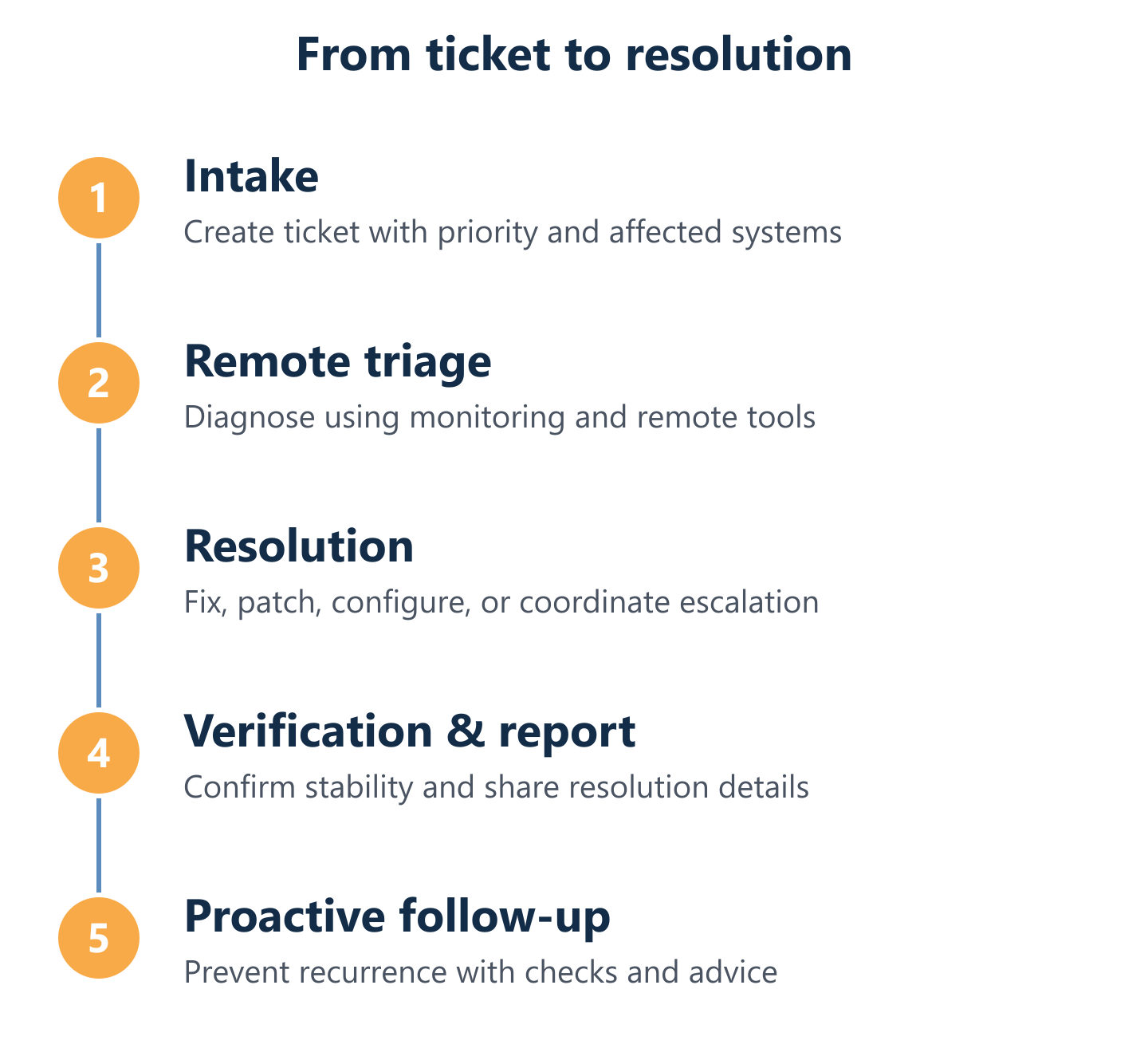
- Incident intake: The user submits a request via the helpdesk system; the ticket is logged, categorised, and assigned a priority level based on business impact.
- Remote triage: A technician connects remotely to diagnose the issue, applying fixes where possible and gathering data for escalation if needed.
- Escalation decision: If the fault cannot be resolved remotely—or if it affects multiple users or a server—an on-site visit is scheduled without additional negotiation.
- On-site resolution: The technician attends the Valencia premises, resolves the hardware or environmental issue, and documents findings.
- Proactive review: After resolution, the ticket is reviewed for root cause and preventive recommendations are logged and communicated to the client.
- Resolution report: A written summary is delivered, covering what occurred, what was done, and any follow-up actions required.
Ticket workflow: intake, prioritisation, diagnosis, and resolution reporting
A structured ticket workflow is what separates a professional IT support provider from an informal arrangement. When a user in your Valencia office reports a problem, the process should be immediate and transparent: the request is logged, assigned a severity level, and acknowledged within the agreed response window. Remote diagnosis covers the majority of common issues—software faults, configuration errors, connectivity problems, and user account issues—without requiring a technician on-site.
Impulso Tecnológico's helpdesk process includes a proactive review at each ticket closure. This means the technician does not simply mark the issue as resolved; they assess whether the same fault is likely to recur and flag any related risks. For businesses managing outsourced IT support, this level of documentation also provides audit-ready records of what was done and when—useful for compliance purposes and internal reporting to management.
Escalation and site visits: criteria, timing, and cost transparency
On-site visits become necessary in specific, predictable scenarios: hardware failure requiring physical replacement, network infrastructure faults that cannot be accessed remotely, environmental issues such as cabling or power supply problems, or situations where a general fault is affecting the entire site. The key question to ask any IT support provider in Valencia is not whether they offer on-site visits, but under what conditions they are included versus charged separately.
In Impulso Tecnológico's all-inclusive model, on-site support is dispatched whenever a general fault is identified—it is not a separately negotiated extra. For businesses that prefer an hourly or per-visit model, the charge structure is agreed in advance, removing the risk of unexpected invoices. This transparency is particularly important for SMEs managing tight IT budgets, where a surprise site-visit charge can disrupt monthly expenditure planning. For context on how pricing models compare across managed IT services, our guide on IT maintenance pricing covers the main structures in detail.
Operational continuity: keeping employees productive while issues are resolved
Downtime is rarely just a technical problem—it is a business cost. Every hour an employee cannot access their systems, email, or shared files has a direct impact on output. A well-run IT support service in Valencia minimises this cost not only by resolving incidents quickly, but by communicating clearly throughout the process so employees know what is happening and when to expect resolution.
Impulso Tecnológico provides status updates during active incidents and detailed resolution reports at closure. This communication discipline means business managers are not left chasing their IT provider for updates during a critical outage. For multi-site or multi-country businesses—a common profile among Impulso Tecnológico's clients operating across Spain, Portugal, and internationally—clear communication protocols are especially important, as incidents in one location can affect operations elsewhere. The goal is always the same: systems available when employees need them, with minimal disruption to the working day.
Security, backups and managed IT: what "standard" should mean
Any IT support provider in Valencia that treats security and backup monitoring as optional add-ons is not offering a managed service—it is offering break-fix support with a monthly retainer. In 2024, the baseline expectation for a professional managed IT services Valencia package should include security configuration, active monitoring, and verified backup readiness as standard components of the service, not premium upgrades.
Impulso Tecnológico delivers security and backup management with an external IT department mindset. This means the security environment is adapted according to established IT criteria, industry standards, and each client's specific requirements—not applied as a generic template. The scope includes:
- Operating system hardening: security configuration applied to Windows servers and endpoints as part of onboarding and maintained through patch cycles.
- Security software installation and configuration: antivirus, antimalware, and endpoint protection deployed and monitored—Impulso Tecnológico works with Sophos and Fortinet technologies.
- Firewall management: ongoing configuration review and maintenance of perimeter and internal firewall rules.
- Backup system oversight: backup jobs monitored for completion and integrity, with restore readiness verified rather than assumed.
- Network management: router, switch, and wireless access point configuration maintained and reviewed.
- Internet and email access permissions: user-level controls configured and updated as staff roles change.
- GDPR compliance alignment: data protection considerations integrated into access controls and backup policies.
For SMEs without a dedicated internal security team, this bundled approach eliminates the risk of security gaps appearing between separately managed tools.
Security and patch management: Microsoft-focused hardening for servers and PCs
Microsoft patch management is one of the most consistently neglected areas in SME IT environments. Unpatched servers and endpoints remain the most common entry point for ransomware and credential-theft attacks—not because businesses are unaware of the risk, but because patch deployment without proper testing can itself cause instability. A professional IT support provider manages this cycle: testing updates in a controlled sequence, deploying to servers and endpoints on a defined schedule, and monitoring for post-patch issues.
Impulso Tecnológico includes Microsoft security and patch management as a standard component of its managed service, covering both servers and PCs. This is paired with antivirus and antimalware management using Sophos technology, and firewall maintenance using Fortinet where applicable. The combination means clients are not relying on auto-update mechanisms that may fail silently—they have a managed, documented patch cycle with a technician accountable for the outcome. For businesses running Microsoft 365 environments, identity and licence management is also included within the broader service scope.
Backups and recovery monitoring: reducing downtime with tested restore readiness
A backup that has never been tested is not a backup—it is an assumption. Many SMEs discover this only when they need to restore data after a hardware failure or ransomware incident, and find that backup jobs have been failing silently for weeks. Backup and recovery monitoring means actively verifying that backup jobs complete successfully, that data integrity is maintained, and that restore procedures have been tested and documented.
Impulso Tecnológico uses Veeam for backup and disaster recovery management, monitoring backup jobs across servers and endpoints and flagging failures before they become critical. The service includes restore-readiness verification, so clients have confidence that recovery is actually possible within a defined timeframe—not just that a backup file exists somewhere. For businesses assessing their current exposure, our article on preventive IT maintenance covers how proactive monitoring reduces recovery time and operational risk.
Managed infrastructure: servers, PCs, networks, and communications permissions
Server and PC management goes beyond keeping hardware running. It includes configuration control—ensuring that settings remain consistent and secure as the environment changes—and ongoing oversight of network devices such as routers and switches that are often left unmanaged between incidents. Communications permissions, including email access controls and internet filtering, also require active management as staff join, leave, or change roles.
Impulso Tecnológico manages infrastructure using Cisco and Aruba networking technologies alongside HP, Lenovo, and Dell hardware, giving clients access to enterprise-grade configuration expertise without the cost of an in-house team. For businesses that have grown organically and accumulated a mix of devices and configurations over time, the initial audit that precedes every managed service agreement identifies inconsistencies and risks before they cause problems. This is particularly relevant for Valencia SMEs that have expanded rapidly and whose IT infrastructure has not kept pace with their operational complexity. Our approach to corrective IT maintenance explains how we handle inherited environments and legacy configurations.
Selecting an IT support provider in Valencia is ultimately a decision about operational risk. When scope, SLAs, security baseline, and onboarding process are clearly defined and aligned with your business needs, the provider capable of protecting your availability and productivity will be immediately apparent. Impulso Tecnológico has supported businesses across Spain and internationally for over 25 years, resolving thousands of IT incidents annually with a consistent focus on continuity, transparency, and practical security. If you are ready to assess your current IT environment or compare support options for your Valencia operation, the next step is a structured conversation about your specific requirements.