

IT maintenance for businesses is the set of proactive and preventive activities—monitoring, patching, backups, security hardening, and performance tuning—that keep systems stable, secure, and available. Unlike reactive support, maintenance is scheduled and structured to prevent failures before they disrupt operations.
Most businesses discover the real cost of inadequate IT maintenance only after an incident: unplanned downtime, a security breach, or a failed backup when recovery is urgently needed. By that point, the disruption is already affecting productivity, customer experience, and potentially compliance obligations. The alternative is a structured maintenance model that addresses vulnerabilities before they become crises.
This guide covers what IT maintenance services typically include, how to measure their scope against your business risk, and how to decide between keeping maintenance in-house or working with a managed services provider. Impulso Tecnológico has been delivering IT maintenance for businesses across Spain, Portugal, and internationally for over 25 years—the frameworks and criteria here reflect real operational decisions, not theoretical ones.
IT maintenance for businesses: what it is (and what it isn't)
The term "IT maintenance" is frequently used interchangeably with "IT support," but conflating the two creates real gaps in how businesses plan and budget for technology resilience. Maintenance is a planned, ongoing discipline: it encompasses monitoring infrastructure health, applying patches and updates, managing backups, hardening security configurations, and running preventive routines designed to catch problems before they cause downtime. Support, by contrast, is demand-driven—it activates when something breaks or a user raises a ticket.
For business continuity, both matter, but maintenance is the foundation. A business that only invests in reactive support is essentially waiting for failures to accumulate until they become critical. Impulso Tecnológico structures its service model around proactive monitoring and preventive routines as the primary layer, with responsive incident assistance as a secondary capability—so continuity is the default, not the exception.
| Dimension | IT Maintenance | IT Support |
|---|---|---|
| Trigger | Scheduled / proactive | Reactive / on demand |
| Primary goal | Prevent failures and degradation | Resolve incidents and user issues |
| Typical activities | Monitoring, patching, backups, audits, security hardening | Helpdesk tickets, troubleshooting, break-fix |
| Cost model | Predictable monthly contract | Variable (per incident or time-and-materials) |
| Business impact | Reduces downtime frequency and severity | Reduces time-to-resolution when issues occur |
| SLA relevance | Defines response and resolution times by criticality | Defines ticket response and escalation windows |
Maintenance vs support: the practical difference for operations
Maintenance is proactive: monitoring, preventive care, updates, and security hardening. In operational terms, this means that a well-maintained environment has fewer incidents to support in the first place. When a server is patched on schedule, firmware is current, and backup jobs are verified weekly, the volume of reactive helpdesk calls drops measurably. Businesses that treat maintenance and support as interchangeable tend to underinvest in the preventive layer and then overspend on reactive fixes. The IT helpdesk vs maintenance distinction is not semantic—it determines whether your IT budget is spent preventing problems or constantly firefighting them. For organisations managing IT maintenance services under a managed services model, the split between proactive maintenance tasks and reactive support tickets is a key performance indicator in itself.
What "business continuity" means in IT maintenance terms
Business IT continuity is not just about disaster recovery—it is about the daily reliability of systems that employees, customers, and suppliers depend on. In IT maintenance terms, continuity means that critical systems remain available within agreed thresholds, that recovery procedures are tested and documented, and that no single component failure can cascade into a full operational outage. Backup and disaster recovery planning is a core maintenance function, not an optional add-on: without verified, offsite, regularly tested backups, a ransomware event or hardware failure becomes an existential threat rather than a recoverable incident. Maintenance routines that include scheduled backup validation, failover testing, and documented recovery time objectives (RTOs) are what translate "we have backups" into "we can actually recover."
Common gaps that cause downtime and security exposure
A good maintenance plan reduces downtime, risk, and surprise costs through planned routines—but the gaps in poorly structured plans are predictable. The most common are: deferred patch management and security updates (leaving known vulnerabilities open for months), undocumented asset inventories (so no one knows what is actually running on the network), backup jobs that run but are never verified (silent failures that only surface during recovery), and security configurations that were set once and never reviewed as the environment evolved. Each of these gaps is individually manageable but collectively they create compounding exposure. Impulso Tecnológico addresses these specifically through system audits, asset inventory management, and GDPR-aligned security configurations as standard components of its IT maintenance offering—not optional extras.

What IT maintenance services typically include (by scope and priority)
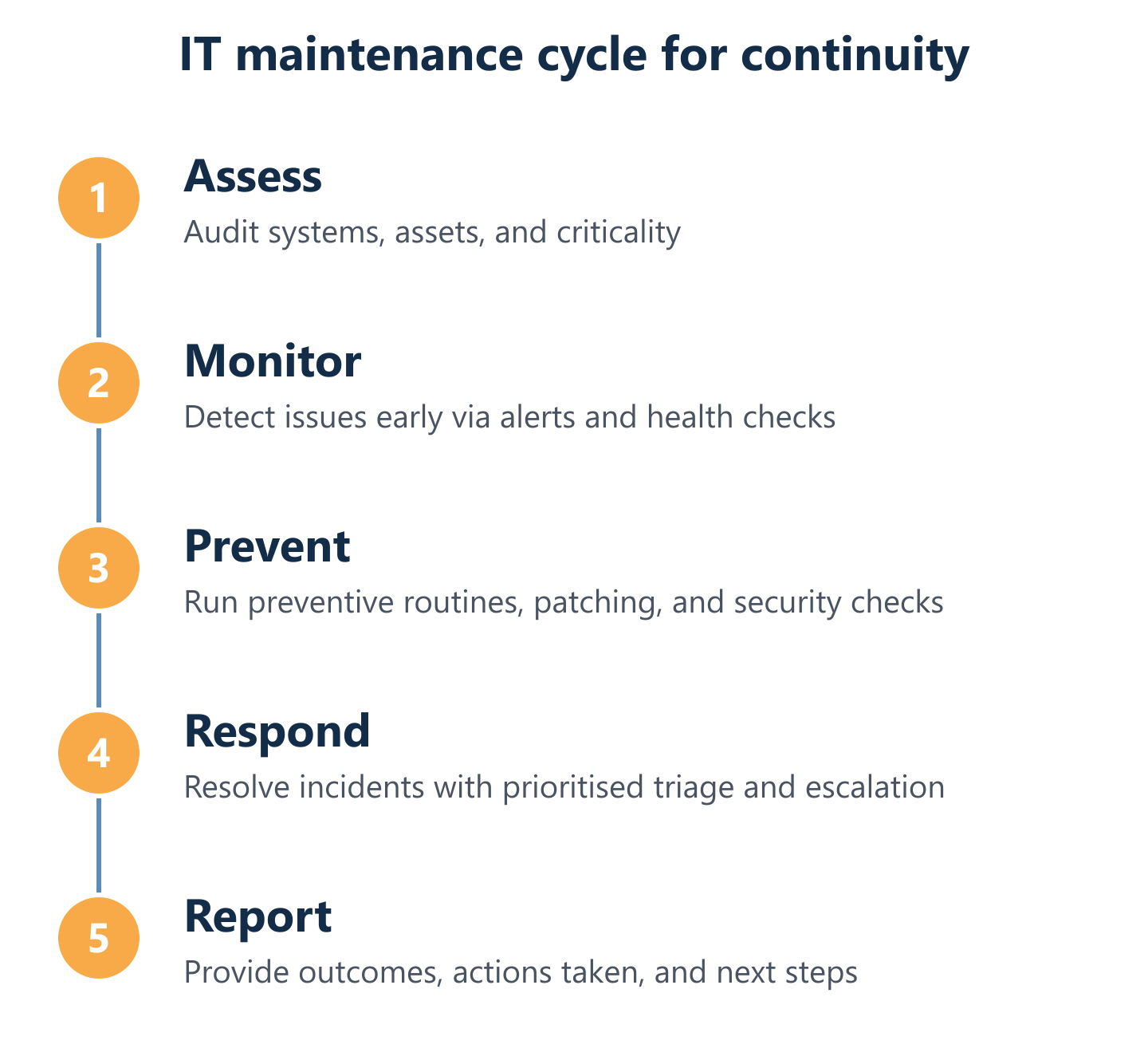
The scope of managed IT services for maintenance should be defined by the criticality of each system, not by a flat list of activities applied uniformly. A file server used occasionally by one department does not require the same maintenance intensity as the infrastructure running your customer-facing platform or ERP. Impulso Tecnológico's model reflects this: it combines regular system check-ups with remote resolution for standard issues and on-site assistance for critical problems, supported by post-service reporting, system audits, and asset inventory management—all aligned with GDPR requirements.
The core service components, ordered by operational priority, typically include:
- Continuous monitoring: Real-time visibility into system health, performance thresholds, and availability—the foundation for early detection and reduced time-to-resolution.
- Patch management and security updates: Scheduled application of OS, firmware, and software patches to close known vulnerabilities before they are exploited.
- Backup and disaster recovery: Automated, verified backups with documented recovery procedures and tested RTOs—covering both local and offsite/cloud copies.
- Preventive maintenance routines: Hardware checks, log reviews, capacity planning, and scheduled audits that identify degradation before it becomes failure.
- Security hardening and configuration management: Endpoint protection, firewall rule reviews, access control audits, and antivirus management aligned with current threat profiles.
- Performance optimisation: Identifying bottlenecks, tuning configurations, and recommending upgrades before performance degradation affects productivity.
- Asset inventory and documentation: Maintaining an accurate, up-to-date record of all hardware and software assets—essential for vulnerability management and licence compliance.
Monitoring, ticket triage, and prioritised issue resolution
Monitoring and management: detecting issues early and reducing time-to-resolution is the measurable return on investment for proactive IT maintenance. Effective monitoring goes beyond checking whether a server is online—it tracks CPU utilisation trends, storage consumption rates, network latency, and security event logs, generating alerts when thresholds are crossed rather than waiting for a user to report a problem. Ticket triage then determines whether an alert requires immediate escalation or can be queued for scheduled resolution. Prioritisation by criticality—distinguishing between a workstation performance issue and a failed backup on a production database—is what separates a reactive helpdesk from a structured IT maintenance service. Impulso Tecnológico resolves approximately 4,000 IT tickets annually across its client base, which provides a practical baseline for understanding what realistic maintenance workloads look like for businesses of varying sizes.
Updates, patching, backups, and recovery readiness
Updates, patching, and backups: keeping systems current and recoverable is where patch management and security intersects most directly with business risk. Unpatched systems are the most common entry point for ransomware and data breaches—the vulnerability exists, it is publicly documented, and attackers scan for it systematically. A structured patch management programme applies critical security updates within defined windows (typically 24–72 hours for critical vulnerabilities, longer for standard updates) and tests patches in a staging environment where feasible before production deployment. Backup readiness goes further than scheduling: it requires regular restore tests, offsite or cloud copies verified independently of the primary system, and documented recovery procedures that non-technical staff can follow under pressure. Impulso Tecnológico uses Veeam and other enterprise-grade tools to deliver backup and disaster recovery as a core maintenance component, not an afterthought.
Preventive maintenance, security alignment, and performance tuning
Security and optimisation—configuration hardening, vulnerability management, and performance tuning—are the components most often deferred when maintenance budgets are under pressure, and the ones whose absence is most expensive when something goes wrong. Configuration hardening means reviewing firewall rules, disabling unused services, enforcing least-privilege access, and ensuring endpoint protection is current and correctly configured. Vulnerability management means actively scanning for weaknesses, not just waiting for a patch to be released. Performance tuning addresses the gradual degradation that accumulates in any environment: fragmented storage, overloaded network segments, outdated drivers, and software conflicts that slow systems without triggering obvious alerts. Impulso Tecnológico integrates Sophos and Fortinet security technologies into its maintenance model, providing endpoint protection and network security management as part of a coherent, regularly reviewed security posture rather than a set-and-forget installation.
In-house vs outsourced IT maintenance: decision framework and provider checklist
The in-house versus outsourced decision is not primarily about cost—it is about capability, coverage, and scalability relative to your actual risk profile. A business with a stable, well-documented environment and a competent internal team may manage routine maintenance effectively in-house. The challenge arises when the environment grows, the threat landscape shifts, or key personnel leave. Outsourcing to a managed IT services provider gives access to a broader skills base, established tooling, and defined SLAs for IT maintenance without the overhead of recruiting, training, and retaining specialist staff.
With over 25 years of experience, Impulso Tecnológico offers flexible, customisable maintenance models with clear communication, monthly cost control, and scalable coverage delivered locally in Spain and Portugal and remotely across Europe, Asia, and the Americas. When evaluating any provider, the following criteria are the ones that determine real-world service quality:
- SLA definition: Are response and resolution times defined separately for standard and urgent issues, and are they contractually enforceable?
- Scope clarity: Is it explicit what is and is not covered—hardware, software, cloud services, third-party applications?
- Security ownership: Does the provider own patch management, endpoint protection configuration, and vulnerability remediation, or are these your responsibility?
- Backup and recovery accountability: Who is responsible for verifying backup success and testing restores?
- Reporting and transparency: Are post-service reports provided, and do they include actionable recommendations, not just activity logs?
- Escalation paths: Is there a defined escalation process for critical incidents, and who is the named contact at each level?
- Flexibility: Can the contract scale up or down as your environment changes, without punitive terms?
- Technology partnerships: Does the provider hold certifications with the vendors whose products they maintain (e.g., Microsoft, Sophos, Fortinet, Cisco)?
In-house vs outsourced: pros, cons, and hidden dependencies
In-house maintenance can fit stable environments, but outsourcing improves scalability and access to expertise—and the hidden dependencies of in-house models are often underestimated. When maintenance knowledge is concentrated in one or two individuals, their absence (illness, resignation, holiday) creates immediate vulnerability. In-house teams also face the challenge of staying current across a widening technology stack: cloud platforms, endpoint security, network infrastructure, and compliance requirements all evolve faster than a small internal team can track. Outsourced maintenance distributes that knowledge risk across a team and gives businesses access to specialists in each domain. The cost comparison is rarely straightforward: in-house appears cheaper until you account for training, tooling licences, recruitment, and the opportunity cost of technical staff handling routine maintenance rather than strategic projects.
How to choose a third-party provider: SLAs, ownership, escalation, reporting
Defining scope by SLA and criticality—standard versus urgent response, escalation, and coverage—is the most important contractual exercise before engaging any third-party IT maintenance provider. An SLA for IT maintenance should specify: maximum response time for urgent issues (e.g., production system down) versus standard requests (e.g., a workstation update), the escalation trigger and named escalation contact, whether on-site attendance is included or charged separately, and the geographic coverage for physical interventions. Equally important is ownership: the contract should be explicit about who is responsible for patch deployment, backup verification, and security configuration reviews. Providers that deliver post-service reports with findings and recommendations—rather than just activity logs—demonstrate the transparency that makes the relationship auditable and improvable over time.
Questions to ask before signing: backups, vulnerability handling, onboarding, and continuity
Choosing providers that own updates, reporting, security practices, and continuity planning means asking the right questions before the contract is signed. The questions that reveal most about a provider's real capability include: How do you verify that backups have completed successfully, and how often do you test restores? What is your process for critical vulnerability disclosure—how quickly are patches applied after a CVE is published? What does your onboarding process include, and how long before you have a complete asset inventory and documented environment baseline? If a critical system fails outside your standard hours, what is the response path? How do you handle a situation where a maintenance action causes an unintended outage? Providers who can answer these questions specifically—with documented processes rather than general assurances—are the ones whose SLA commitments are credible in practice.
The frameworks in this guide—maintenance versus support, scope by criticality, provider selection criteria, and pre-contract questions—give you a structured basis for aligning your IT maintenance investment with your actual business risk. The next step is translating that alignment into a concrete proposal: one that defines SLA tiers, security ownership, backup accountability, and reporting standards for your specific environment. Impulso Tecnológico offers non-binding maintenance assessments and flexible, customisable service models designed to match your operational needs without rigid contracts or unpredictable costs. If you are ready to review your current maintenance coverage or compare it against a structured alternative, the conversation starts with a straightforward scoping discussion.