

Corrective IT maintenance is the process of restoring IT systems, software, or infrastructure to a fully operational state after a failure, degradation, or security event. It covers diagnosis, remediation, verification, and root cause documentation — applied across endpoints, networks, applications, and security controls.
Most IT teams are familiar with the pattern: something stops working, pressure mounts, and the fix happens under stress. The problem is not that corrective work exists — failures are inevitable in any technology environment — but that without a structured approach, the same incidents recur, resolution times stretch, and the business absorbs costs that compound over time. According to data from Impulso Tecnológico's managed services operations, the team resolves over 4,000 IT tickets annually across 476 active clients in 25 countries, which means corrective scenarios are a daily operational reality, not an exception.
This guide provides a practical framework: how to detect and categorise incidents reliably, how to run a consistent remediation workflow, when to schedule corrective work versus acting immediately, and how to use root cause evidence to reduce future demand. Whether you manage IT in-house or work with an external provider, the goal is the same — corrective work that feels controlled, not chaotic.
Definition of Corrective IT Maintenance (and how it differs)
Corrective IT maintenance restores a system, application, or infrastructure component to its required operational state following a confirmed failure or degradation. The scope in IT is broader than in industrial asset management: it includes software bugs, security vulnerabilities requiring patching, endpoint malfunctions, network outages, configuration drift, and data integrity issues — not just physical hardware faults.
What distinguishes corrective maintenance from adjacent approaches is its trigger and intent. Preventive maintenance acts before failure occurs; reactive maintenance is an immediate, often unstructured response to a live crisis. Corrective maintenance sits between these two: it is initiated by a confirmed problem but follows a structured path — diagnosis, remediation, verification, and root cause documentation — rather than simply stopping at the first apparent fix.
At Impulso Tecnológico, corrective work is embedded within a managed-services model that covers the full remediation chain. Rather than addressing only the visible symptom, the team works end-to-end across devices, networks, security controls, and data recovery — because in practice, a single incident often has dependencies across multiple IT layers.
| Approach | Trigger | Goal | Typical IT example | Planning horizon |
|---|---|---|---|---|
| Preventive maintenance | Schedule / condition | Prevent failure before it occurs | Monthly patch cycle, firmware updates, disk health checks | Planned in advance |
| Corrective maintenance | Confirmed failure or degradation | Restore to operational state with root cause evidence | Fixing a crashed application, remediating a security breach, resolving a network outage | Planned or unplanned depending on risk |
| Reactive (break/fix) | Live crisis / user complaint | Restore service as fast as possible | Emergency restart, ad-hoc workaround without documentation | Unplanned, no structured follow-up |
| Predictive maintenance | Monitoring data / trend analysis | Anticipate failure before it manifests | Capacity alerts, anomaly detection in logs, hardware SMART data | Proactive, data-driven |
What "corrective" means in IT: incidents, remediation, and verification
In IT operations, "corrective" refers to any structured action taken to return a service or asset to its defined operational condition after a confirmed failure or performance degradation. This is not the same as a quick workaround. A genuine corrective action includes three mandatory phases: remediation (fixing the root cause or a validated interim solution), verification (confirming the system behaves as expected post-fix), and evidence capture (documenting what failed, why, and what was done).
Without verification, a fix is an assumption. Without evidence capture, the same incident repeats. This three-phase structure is what separates corrective IT maintenance from informal break/fix responses — and it is the foundation of any IT incident management workflow that aims to reduce failure frequency over time, not merely respond to it.
Corrective vs preventive vs reactive: practical differences for IT teams
The distinction matters operationally. Preventive maintenance runs on a schedule regardless of current system state — think monthly patching cycles, quarterly firmware reviews, or annual infrastructure audits. Reactive maintenance is unstructured: someone notices a problem, applies a quick fix, and moves on without documentation or follow-up. Corrective maintenance is triggered by a confirmed failure but follows a defined process.
For IT teams, the practical difference shows up in outcomes. Preventive work reduces incident frequency. Reactive work resolves the immediate pain but leaves the root cause intact. Corrective work — done properly — resolves the failure, verifies the resolution, and generates the evidence needed to improve preventive coverage. The three approaches are complementary: a mature IT operation uses all three, with corrective maintenance feeding insights back into the preventive programme. Organisations that rely exclusively on reactive responses typically see higher long-term costs and recurring incidents around the same failure points. For a detailed look at how preventive and corrective work interact in practice, see our guide on preventive IT maintenance for businesses.
Scope boundaries: software, infrastructure, endpoints, and security controls
Corrective IT maintenance applies across four primary domains, each with distinct failure modes and remediation requirements.
Software covers application bugs, compatibility failures, database corruption, and feature regressions — corrective actions here include code patches, configuration corrections, and data restoration.
Infrastructure includes servers, storage, networking hardware, and power systems. Failures may be hardware faults, firmware issues, or misconfiguration; corrective actions range from component replacement to configuration rollback.
Endpoints — workstations, laptops, mobile devices — are the most frequent source of corrective tickets in most organisations. Endpoint troubleshooting and remediation covers OS errors, driver conflicts, performance degradation, and hardware faults.
Security controls represent a distinct category: a failed firewall rule, an unpatched vulnerability, or a compromised credential all require corrective action that combines technical remediation with security patch verification and access review. Depending on severity and operational risk, corrective actions in any of these domains can be scheduled (planned corrective) or handled immediately (unplanned corrective).

Triggers and identification in IT (signals you can trust)
Corrective work begins before any technician opens a ticket. The quality of the trigger — what information is captured at the moment of detection — determines how quickly diagnosis can start and how accurately the incident is categorised. Vague triggers ("something is slow") produce slow, expensive corrective cycles. Structured triggers with asset context, affected services, and change history cut diagnosis time significantly.
At Impulso Tecnológico, triage starts with transparent communication: clients move from "something is wrong" to a structured corrective path as quickly as possible, particularly when incidents involve infrastructure, endpoint performance, connectivity, or security controls — the four areas where ambiguous symptoms most often mask complex root causes.
- Automated monitoring alert: a threshold breach (CPU, disk, availability, latency) fires an alert with asset ID, metric value, and timestamp — the highest-quality trigger for corrective work.
- User-reported incident via ticket or call: lower initial data quality, but often the first signal for application-layer or endpoint failures not covered by monitoring.
- Log anomaly or security event: SIEM or endpoint detection tools surface suspicious patterns — authentication failures, unusual outbound traffic, policy violations — that require corrective investigation even before a service impact is visible.
- Scheduled inspection finding: during preventive maintenance rounds, a degraded component or misconfiguration is identified; this generates a planned corrective action rather than an emergency.
- Post-change failure: a system behaves unexpectedly after a deployment, update, or configuration change — change history is the critical context here.
Detection sources: monitoring alerts, ticket intake, logs, and user impact
Reliable detection requires at least three overlapping sources: automated monitoring, structured ticket intake, and log analysis. Monitoring covers infrastructure and availability; ticket intake captures application and endpoint issues that monitoring misses; log analysis surfaces security and configuration anomalies that neither users nor availability checks will catch.
The gap most organisations leave is correlation. An availability alert, a user complaint about slowness, and a firewall log anomaly may all point to the same root cause — but if they enter the corrective workflow as three separate incidents, diagnosis takes three times as long. Effective IT incident management workflow design connects these sources at intake, tagging incidents with affected assets and services so that correlation happens before diagnosis begins, not during it. This is particularly relevant for network outage remediation, where multiple symptoms often share a single upstream cause.
Failure signals to prioritise: availability, performance, connectivity, and security
Not all failure signals carry the same urgency. A structured prioritisation model classifies incidents across four dimensions: availability impact (is a service completely down or degraded?), performance impact (are users able to work, or just slowly?), connectivity impact (is the failure isolated to one endpoint or does it affect a network segment?), and security impact (is there a confirmed or suspected breach, data exposure, or policy violation?).
Security signals always warrant elevated priority regardless of current availability impact — a misconfigured firewall rule may not yet have caused an outage, but the risk profile justifies immediate corrective action. Availability failures affecting multiple users or business-critical services sit at the top of the non-security queue. Performance degradation on a single endpoint, by contrast, may be deferred to a scheduled corrective window without material business impact. This classification directly informs the planned versus unplanned decision in the corrective workflow.
Incident categorisation: mapping symptoms to likely causes and next steps
Once a failure signal is captured, the next step is categorisation — mapping the symptom to a probable cause family and identifying the assets, dependencies, and change history relevant to diagnosis. This is not full root cause analysis; it is structured triage that ensures the right technician, tools, and access rights are assigned from the start.
A useful categorisation schema for IT corrective work covers five cause families: hardware fault, software or configuration error, network or connectivity failure, security event, and external dependency failure (third-party service, ISP, cloud provider). Each maps to a different diagnostic path and a different set of required evidence. Capturing recent change history at this stage — what was deployed, updated, or modified in the 48–72 hours before the incident — eliminates a significant proportion of diagnostic dead ends and accelerates root cause analysis for IT incidents considerably.
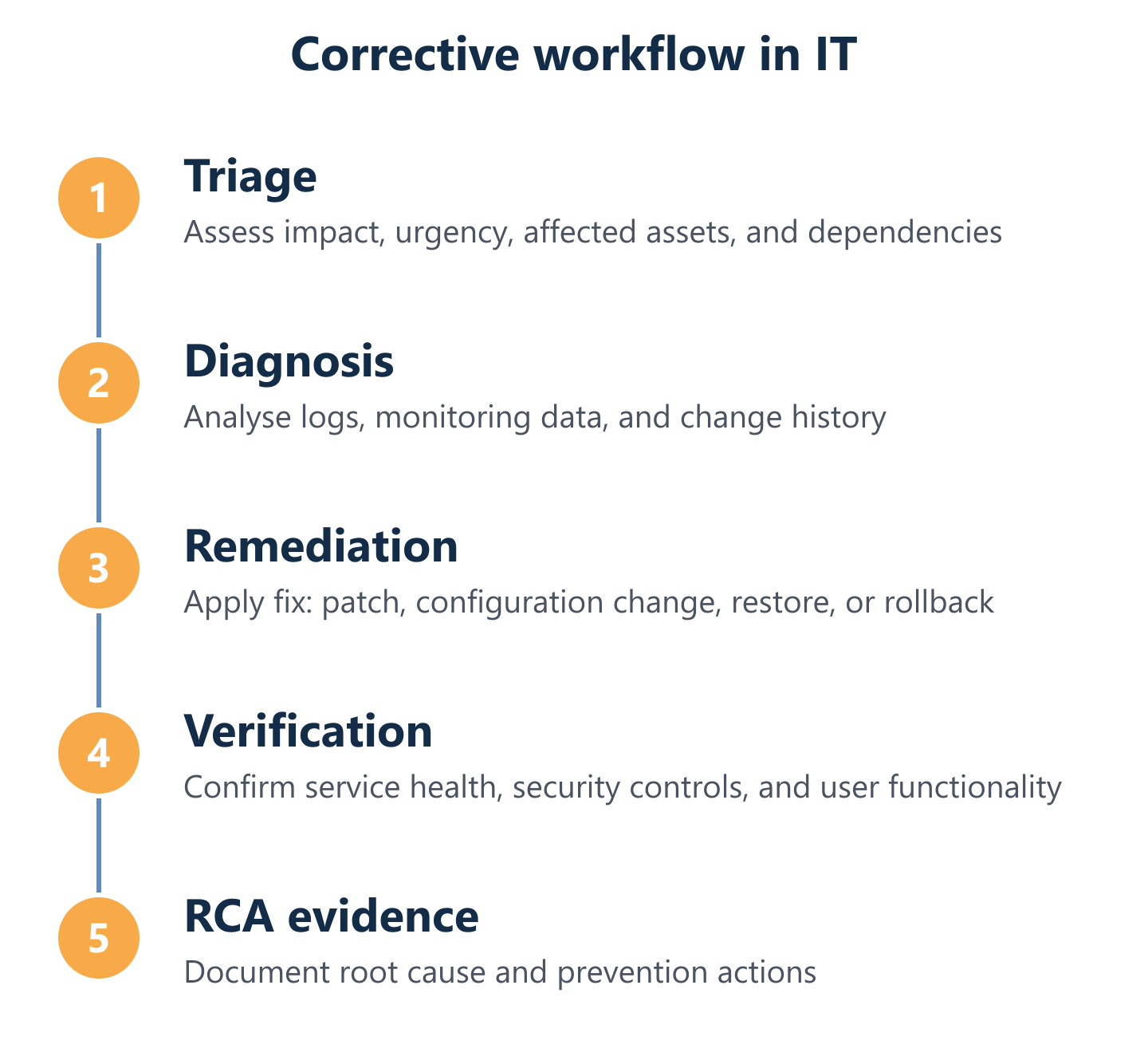
Corrective IT Maintenance workflow (triage to verification)
A repeatable corrective workflow is the difference between an IT team that resolves incidents and one that resolves the same incidents repeatedly. The workflow does not need to be complex, but it does need to be consistent: every corrective action should pass through the same sequence of steps, produce the same minimum set of deliverables, and generate evidence that feeds back into the preventive programme.
Impulso Tecnológico structures corrective work within a managed-services framework that combines on-site and remote support, specialist capabilities from a certified partner ecosystem (including Sophos, Fortinet, Veeam, Microsoft, Cisco, Aruba, and Veeam), and a remediation mindset that goes beyond the first visible symptom. The result is faster resolution and fewer repeat incidents — because the workflow is designed to close the loop, not just close the ticket.
- Consistent entry point: every corrective action starts with a structured intake record — asset, symptom, impact scope, and change history — regardless of whether the trigger is a monitoring alert or a user call.
- Defined ownership: each incident has a named owner responsible for driving it to resolution; escalation paths are pre-agreed, not improvised under pressure.
- Communication checkpoints: clients receive status updates at defined intervals — not just when the fix is complete — so business stakeholders can plan around the incident.
- Verification before closure: no ticket is closed without confirmation that the system behaves as expected post-fix, ideally validated by the affected user or an automated check.
- Root cause evidence as standard output: every corrective action produces a minimum evidence record — what failed, why, what was done, and what preventive action (if any) is recommended.
Workflow steps and deliverables: triage, diagnosis, fix, verification, RCA evidence
A five-step corrective workflow produces consistent outcomes regardless of incident type:
- Triage: classify by impact and urgency; assign ownership; confirm affected assets and dependencies. Deliverable: incident record with priority and owner.
- Diagnosis: isolate the root cause using logs, monitoring data, and change history. Deliverable: confirmed cause statement and proposed fix.
- Remediation: apply the fix — patch, configuration change, hardware replacement, or rollback. Deliverable: change record with before/after state.
- Verification: confirm service is restored to required operational state; validate with automated checks or user confirmation. Deliverable: verification record with test evidence.
- RCA evidence: document root cause, contributing factors, and recommended preventive action. Deliverable: RCA summary linked to the incident record.
This structure ensures that corrective work generates institutional knowledge, not just closed tickets — which is the foundation of any IT operation that aims to reduce breakdown maintenance in IT over time.
Planned vs unplanned corrective actions: scheduling criteria and dependency mapping
Not every confirmed failure requires immediate action. The decision to treat a corrective action as planned (scheduled within a change window) or unplanned (immediate response) depends on three factors: current business impact, security risk, and system dependencies.
Unplanned corrective actions are warranted when a service is completely unavailable, when a security event is active or confirmed, or when the failure is cascading to dependent systems. Planned corrective actions are appropriate when the failure is partial (degraded performance rather than full outage), the risk of deferral is low, and the fix requires a change window to avoid disrupting dependent services.
Dependency mapping is critical here. A fix applied to a database server without accounting for application dependencies can cause a secondary outage worse than the original. Before scheduling any corrective action — planned or unplanned — the affected asset's upstream and downstream dependencies should be confirmed. This is one of the most common gaps in organisations that treat corrective work as purely reactive, and one of the areas where unplanned corrective actions generate the highest remediation costs.
How to reduce demand: RCA-driven improvements, monitoring tuning, and patch hygiene
Reducing corrective maintenance demand is not about eliminating failures — it is about ensuring that each failure generates evidence that prevents its recurrence. Three practices deliver the most consistent reduction in corrective volume:
RCA-driven improvements: every corrective action with a documented root cause should produce at least one preventive recommendation — a monitoring threshold adjustment, a configuration standard update, or a patch hygiene rule. Without this feedback loop, the same failure recurs.
Monitoring tuning: alert fatigue is as dangerous as insufficient monitoring. Regularly reviewing alert thresholds and suppression rules ensures that genuine failure signals are not buried in noise — and that corrective work is triggered by meaningful data, not false positives.
Security patch verification: unpatched vulnerabilities are one of the most predictable sources of corrective IT work. A consistent patch cycle with post-deployment verification reduces both the frequency of security-triggered corrective actions and their severity when they do occur. Organisations that maintain strong patch hygiene typically see a measurable reduction in security-related corrective incidents within two to three patch cycles.
Corrective IT maintenance becomes manageable when it stops being improvised. Standardising the workflow, prioritising by impact rather than by who shouts loudest, and using root cause evidence to close the loop between corrective and preventive work — these three practices shift IT operations from a reactive posture to a controlled one.
Impulso Tecnológico delivers corrective IT support within a managed-services model designed around exactly this structure: fast diagnosis, transparent communication, and end-to-end remediation across devices, networks, security, and data recovery. If your organisation needs a reliable partner to handle corrective work consistently — whether on-site in Spain or Portugal, or remotely across Europe, Asia, or the Americas — explore our IT maintenance services for businesses or review our IT maintenance pricing guide to understand how a structured corrective service is costed and scoped.