

Remote backups store copies of your data at a location physically and logically separate from your primary systems. They protect against ransomware, hardware failure, fire, and human error by ensuring at least one copy survives any single-site incident — and they only deliver real value when you can restore from them reliably.
Organisations that rely on a single on-site backup are one incident away from unrecoverable data loss. The problem is not a lack of backup tools — it is a lack of strategy: backups that run but are never tested, encryption keys held by the wrong party, or retention windows too short to catch a slow-moving ransomware infection. Remote backups solve the geographic exposure, but only if they are designed with the right capabilities from the start. At Impulso Tecnológico, we have spent over 25 years helping businesses across Spain, Portugal, and internationally to move from fragile, ad-hoc backup routines to structured, validated data protection strategies. The result is measurable: shorter recovery times, predictable recovery point objectives, and the confidence that comes from actually testing your restores before an incident forces your hand.
What "Remote Backups" mean (and who they suit)
The term "remote backup" is used loosely across the industry, which creates confusion when organisations try to compare solutions. At its core, a remote backup is any copy of data stored outside the primary site — whether that is a cloud storage bucket, a managed offsite data centre, or a secondary office server. The critical distinction is not where the data goes, but how it gets there, who controls it, and what happens when you need to recover.
At Impulso Tecnológico, we frame remote backups as one pillar of an end-to-end IT protection approach that combines security, availability, and scalability. A backup that has never been restored is not a backup — it is a promise. That is why we design strategies around validated recovery rather than "set-and-forget" automation.
| Criterion | Managed Offsite Storage | Self-Hosted Remote Backup Software | Cloud Provider Native Backup |
|---|---|---|---|
| Infrastructure ownership | Provider-owned, dedicated hardware | Your hardware, remote location | Shared cloud infrastructure |
| Key management | Client-side or shared (varies) | Full client control | Provider-managed by default |
| Operational overhead | Low — provider handles maintenance | High — your team manages updates | Low to medium |
| Suitable for | SMBs, MSP-managed environments | Homelabs, technical teams, Proxmox/VM-heavy setups | Cloud-native workloads |
| Restore speed | Depends on SLA and bandwidth | Depends on link and hardware | Fast within same region |
| GDPR / data residency control | High (if EU-based provider) | Full control | Region-selectable, but shared |
Managed offsite storage vs remote backup software
Managed offsite storage means a third party holds your backup data on dedicated infrastructure, typically with SLA-backed availability, monitoring, and support included. You configure your backup jobs; they handle the hardware, redundancy, and data centre operations. This model suits organisations that want predictable costs and minimal operational overhead.
Self-hosted remote backup software flips the model: you deploy the software on hardware you control at a secondary location, giving you full visibility into every layer of the stack — from encryption keys to retention logic. Tools such as Borg, rsync, or Proxmox Backup Server fall into this category. The trade-off is that your team owns the maintenance burden. For most SMBs working with a managed services provider, the managed offsite model delivers better reliability per hour of IT effort invested.
Backup targets: files, databases, VMs, and containers
Not all remote backup solutions protect all workload types equally. File-level backups are the simplest case — they copy individual files and directories. Database backups require application-aware agents (for SQL Server, Exchange, Active Directory, or PostgreSQL) that capture a consistent state, not just raw files. VM backups, common in environments running VMware or Proxmox VE, typically use snapshot-based approaches to capture the full machine state. Container backups add another layer, often requiring persistent volume snapshots alongside configuration exports.
Before selecting a remote backup solution, map your critical workloads: which databases need point-in-time recovery, which VMs are business-critical, and which file shares contain irreplaceable data. A solution that excels at file backup but lacks VSS-aware database agents will leave gaps that only surface during an actual incident.
Where remote backups fit in the 3-2-1 protection model
The 3-2-1 rule remains the most practical starting framework for backup architecture: three copies of data, on two different media types, with one copy stored off the primary site. Remote backups fulfil that third copy requirement — they are the off-site leg of the strategy. Without it, a single site incident (fire, flood, ransomware encrypting all locally connected storage) eliminates every copy simultaneously.
At Impulso Tecnológico, we apply the 3-2-1 principle when designing backup strategies for clients, pairing local fast-restore copies with managed offsite backup for geographic separation. Modern implementations often extend this to 3-2-1-1-0: the additional "1" representing an immutable or air-gapped copy, and the "0" confirming zero errors on restore verification. That last digit is where most organisations fail — and where validated recovery becomes the differentiator between a working strategy and a false sense of security. For a deeper look at how cloud-based copies fit this model, see our guide on cloud backups for business continuity and data protection.

Core capabilities checklist for Remote Backups
Buying remote backup capacity without evaluating the underlying capabilities is like insuring a building without reading the exclusions. The features that separate a reliable solution from a risky one are not always visible in marketing materials — they surface when something goes wrong. At Impulso Tecnológico, we help clients align backup design with specific RPO (Recovery Point Objective) and RTO (Recovery Time Objective) targets, ensuring the chosen solution actually supports the recovery timeline the business requires.
The following checklist covers the capabilities that matter most when evaluating any remote backup solution:
- Encryption: Confirm whether encryption is applied in transit, at rest, and — critically — whether client-side encryption with your own key is available, so the provider cannot access your data.
- Incremental backups: Verify that the solution uses incremental or changed-block tracking after the initial full backup, rather than repeating full transfers that consume bandwidth and storage unnecessarily.
- Deduplication: Check whether deduplication operates at the source (before transfer) or at the destination, and how it interacts with encrypted data — encryption before deduplication typically reduces dedup efficiency.
- Retention policies: Confirm you can set granular retention windows (daily, weekly, monthly) and that short-term deletions do not cascade to remove all versions.
- Immutability: Establish whether the solution supports immutable backups (write-once, cannot be deleted or overwritten during the retention window), which is the primary defence against ransomware targeting backup repositories.
- Restore testing: Check whether the platform supports scheduled restore validation or integrity checks, not just backup job completion alerts.
- Monitoring and alerting: Confirm that failed jobs, storage threshold breaches, and integrity errors generate immediate notifications to your team or MSP.
Encryption ownership, key management, and access control
Client-side encryption is the strongest form of data protection in a remote backup context: your data is encrypted before it leaves your environment, using a key that only you hold. Even if the storage provider is compromised, breached, or compelled to hand over data, the encrypted payload is unreadable without your key. This matters particularly for organisations subject to GDPR, HIPAA, or sector-specific data sovereignty requirements.
When evaluating providers, ask specifically: who holds the encryption keys, can you rotate them, and what happens to your data if you terminate the contract? Some providers offer "encryption" that is actually server-side with provider-managed keys — a meaningful distinction. For environments handling personal data under GDPR, EU-based storage with client-controlled keys is the defensible baseline. Access control layered on top — role-based permissions, MFA for backup console access, and audit logs — completes the security posture.
Deduplication and incremental design: cost and performance trade-offs
Deduplication and incremental backups address the same underlying problem — transferring and storing only what has changed — but they operate at different layers. Incremental backups capture only the blocks or files modified since the last backup job, dramatically reducing daily transfer windows. Deduplication goes further by identifying identical data chunks across multiple backup sets and storing only one copy, which is especially effective for VM environments where many machines share a common OS layer.
The practical trade-off: source-side deduplication (before encryption and transfer) delivers the greatest bandwidth savings but requires more CPU on the backup client. Destination-side deduplication is simpler to deploy but transfers more data. Critically, if you encrypt before deduplicating — which client-side encryption requires — dedup ratios drop significantly because encrypted data appears random. Understand this interaction before projecting storage costs, particularly for managed offsite backup services billed on stored volume.
Retention, versioning, and restore-to-point-in-time
Retention policies define how long backup versions are kept before being purged. A common failure mode is setting retention too short: ransomware that encrypts files gradually over several weeks will not be detected until after the only clean backup versions have expired. A practical minimum for business environments is 30 days of daily versions, with weekly and monthly snapshots extending further for compliance or audit purposes.
Versioning — the ability to restore to a specific point in time rather than just the most recent backup — is what transforms a backup into a genuine recovery tool. For databases, this typically requires application-aware snapshots. For file systems, it requires that the backup solution preserves each incremental version independently rather than merging them. Before committing to a solution, test the restore-to-point-in-time workflow end-to-end: how many clicks, how long it takes, and whether granular file recovery is possible without restoring an entire volume. For guidance on selecting cost-effective options that include versioning, our article on affordable online backup services for businesses covers the key pricing and feature trade-offs.
Anti-ransomware, DR strategy, and restore testing
Ransomware has fundamentally changed the threat model for backup design. Attackers no longer simply encrypt production data — they actively target backup repositories, deleting or encrypting backup sets before triggering the main payload to maximise leverage. A remote backup strategy that does not account for this attack pattern is incomplete, regardless of how well it handles hardware failures or accidental deletion.
At Impulso Tecnológico, we structure backup and recovery as a security discipline, not a storage exercise. As an MSP supporting clients across Spain, Portugal, and internationally, we have seen the consequences of backup strategies that looked complete on paper but failed under real incident conditions. The following capabilities form the anti-ransomware and DR layer that every remote backup strategy should include:
- Immutable backup copies stored in a location where ransomware cannot reach them, using write-once retention locks that prevent deletion or modification during the retention window.
- Separation of backup credentials from production systems — backup service accounts should not have domain admin privileges, and backup console access should require MFA.
- Non-propagating deletions — confirm that deleting a file in production does not immediately remove all backup versions; retention rules must override deletion propagation.
- Geographic separation between primary and backup sites, so a regional incident (power outage, flooding, localised ransomware spread) does not eliminate both simultaneously.
- Scheduled restore tests performed at least quarterly, with documented results — not just backup job success notifications, which only confirm data was written, not that it can be read back.
- Monitoring and alerting on backup job failures, storage anomalies, and unexpected changes to retention policies, routed to your IT team or MSP outside the production environment.
Immutable backups and integrity controls that resist deletion and tampering
Immutable backups use object-lock or WORM (Write Once, Read Many) storage mechanisms to prevent any process — including backup software, administrators, or malware — from modifying or deleting a backup set during its retention window. This is the single most effective technical control against ransomware targeting backup repositories, because even if an attacker gains full access to the backup console, they cannot destroy protected copies before the lock expires.
Implementation varies by platform: S3-compatible object storage with object lock enabled, Proxmox Backup Server's datastore protection mode, and Veeam's hardened Linux repository are common approaches. The key operational requirement is that immutability must be configured at the storage layer, not just the backup application layer — application-level "delete protection" can often be overridden by someone with admin credentials. Pair immutability with integrity verification (hash checks on backup data) to detect silent corruption before a recovery attempt.
Geographic resilience: replication, edge transfer, and DR decision points
Offsite storage redundancy across multiple geographic regions protects against data centre-level failures — power outages, natural disasters, or connectivity loss affecting a single location. For most SMBs, a primary backup to one offsite location is sufficient; organisations with stricter RTO requirements or regulatory obligations may need geo-replication to a second region as a further safeguard.
Transfer performance is a practical constraint that DR planning often underestimates. Initial full backups of large datasets (multi-terabyte VM environments, for example) can take days or weeks over standard internet links. Providers that offer physical seeding — shipping an encrypted drive to pre-load the first backup — or edge transfer nodes closer to your site can dramatically reduce the initial synchronisation window. Once the baseline is established, incremental backups transfer only changed data, making daily windows manageable even over modest bandwidth. Define your RTO and RPO targets before selecting a provider, and verify that the provider's infrastructure and SLA can actually meet them.
Restore testing and monitoring: what to verify after failures
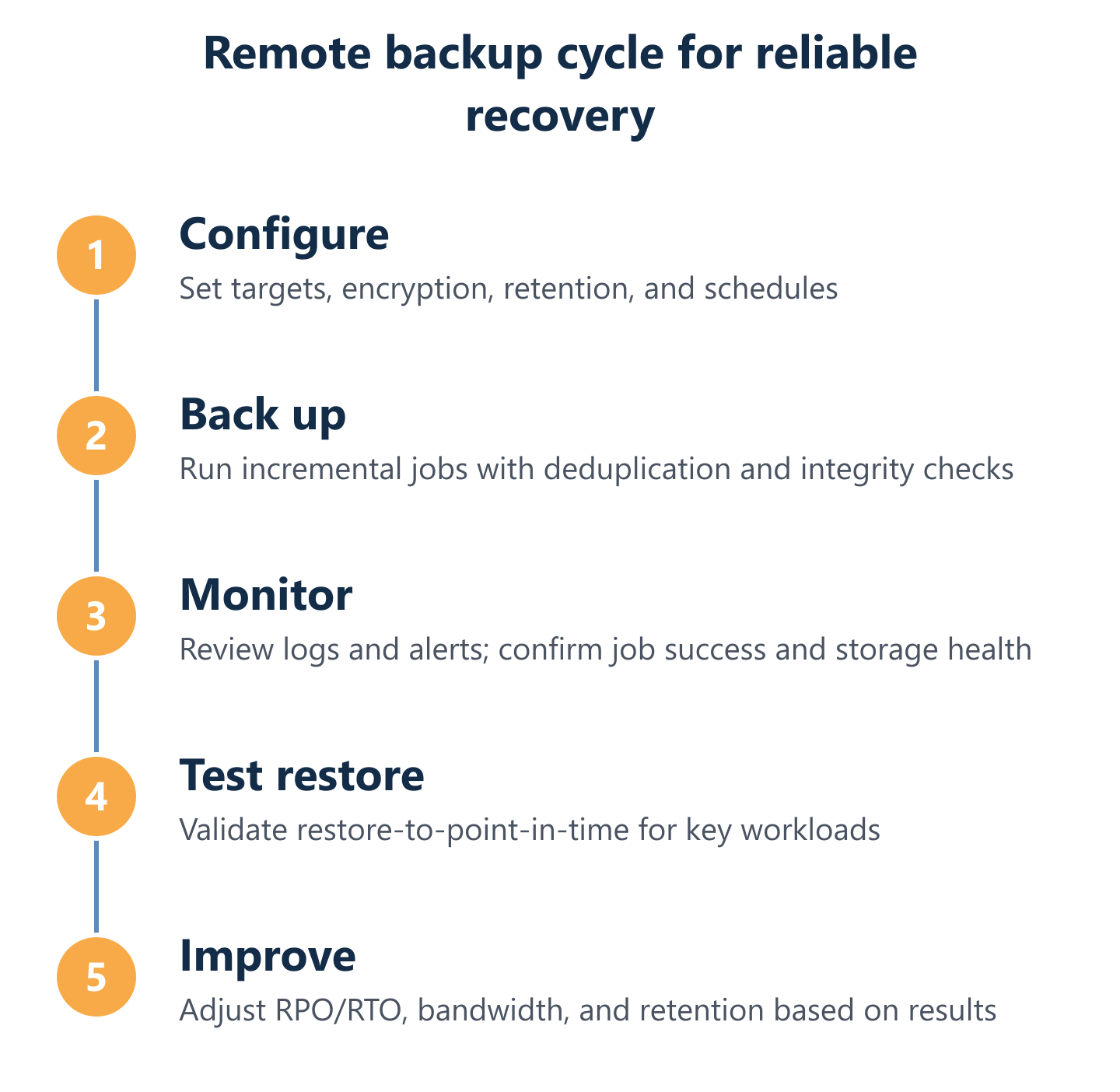
A backup job completing successfully confirms that data was written to the remote destination. It does not confirm that the data is readable, complete, or recoverable within your RTO. These are different things, and conflating them is one of the most common causes of recovery failure during an actual incident.
A practical restore testing routine should include: monthly spot-restores of individual files or database records to verify data integrity; quarterly full-volume or VM restores to an isolated test environment to validate end-to-end recovery time; and annual DR exercises that simulate a complete site failure. Document the results — actual restore time, any errors encountered, and the recovery point achieved — so you have a baseline to compare against your stated RTO and RPO targets. Monitoring should cover failed backup jobs, storage quota warnings, retention policy changes, and backup console login anomalies, with alerts routed to your IT team or MSP independently of the production environment being protected. For organisations managing this as part of a broader IT service, our overview of cloud backups for businesses covers how managed monitoring integrates with a complete data protection service.
A backup you cannot restore from is not a safety net — it is a liability. The organisations that recover quickly from ransomware, hardware failures, and human error are not those with the most storage capacity; they are those that have tested their recovery process before they needed it. Choosing remote backups with the right encryption model, immutability controls, and geographic resilience is the foundation. Building a routine of restore testing and operational monitoring on top of that foundation is what converts a backup strategy into genuine business continuity. If your current approach has gaps — untested restores, short retention windows, or no offsite copy — the time to address them is before an incident, not during one. Impulso Tecnológico can help you assess your current backup posture and design a strategy that you can rely on when it matters.