

Affordable online backup services are cloud-based solutions that protect your data with versioning, offsite storage, and tested restore capability—at a predictable monthly cost. The key distinction: genuine backup preserves multiple file versions so you can recover from ransomware, accidental deletion, or hardware failure, not just retrieve the latest copy.
Most organisations discover the gap between cheap cloud storage and real backup only when something goes wrong. A synchronised folder that mirrors your desktop looks like a backup—until ransomware encrypts your files and the sync faithfully replicates the damage to every connected device. True backup services maintain independent restore points, enforce retention policies, and let you recover data from a specific point in time. The challenge is identifying which affordable plans include these features and which quietly omit them behind attractive per-terabyte pricing.
This guide gives IT decision-makers and SMB owners a structured way to evaluate affordable online backup services on restore outcomes, security controls, and long-term cost predictability—so the plan you choose is one you can actually rely on when it matters.
Affordable doesn't mean "risky": backup vs sync explained
The word "backup" is used loosely across the industry, and that imprecision has real consequences. Cloud sync services—including the free tiers bundled with Microsoft 365 and Google Workspace—replicate your current file state across devices and to the cloud. They are excellent for availability and collaboration. They are not a substitute for backup.
True backup maintains independent, versioned copies of your data at defined intervals, stores them offsite, and allows point-in-time recovery. When evaluating affordable online backup services, the question is not "how much storage do I get?" but "how far back can I restore, and how quickly?"
At Impulso Tecnológico, we position backup as a component of a broader protection and continuity strategy. Working with technology partners including Veeam, we align backup objectives with managed service governance—so recovery readiness is treated as an ongoing operational standard rather than a one-off configuration task.
| Feature | Cloud Sync (e.g. OneDrive, Google Drive) | True Online Backup (e.g. Veeam, dedicated backup service) |
|---|---|---|
| Versioning | Limited (30–180 days, plan-dependent) | Configurable retention, often 30 days to years |
| Ransomware protection | Partial—sync replicates encrypted files | Immutable restore points survive encryption events |
| Restore granularity | File-level, limited history | File, folder, image, or bare-metal restore |
| Offsite storage | Yes, but mirrored not independent | Yes, independent of production environment |
| Admin/audit controls | Basic | Centralised policy, reporting, and alerting |
| Typical monthly cost (SMB) | Included in M365/Google licence | £5–£30 per endpoint depending on storage and features |
What "backup" really means: versioning, retention, and restore points
Versioning is the mechanism that makes backup genuinely protective. When a backup service versions your data, it stores successive snapshots of files at defined intervals—hourly, daily, or weekly—and retains them for a configurable period. Retention policy determines how many versions are kept and for how long. Restore points are the timestamps from which you can recover.
For a business, this translates directly into Recovery Point Objective (RPO): the maximum acceptable age of the data you recover after an incident. A service with daily versioning and 30-day retention gives you up to 30 restore points to choose from. A sync service with no versioning gives you one: whatever state your files were in at the moment of the last sync. When evaluating affordable online backup services, always confirm the default versioning interval, the retention period included in the base price, and whether extending retention incurs additional cost.
Why sync is not a failsafe: ransomware and accidental deletion risks
Ransomware attacks encrypted over 70% of organisations that experienced a data incident in recent years, according to industry surveys—and cloud sync is one of the fastest routes for that encryption to propagate. When a ransomware payload begins encrypting files on a workstation, a connected sync client treats those encrypted files as updated versions and uploads them immediately. Within minutes, the "backup" in the cloud contains only encrypted, unrecoverable data.
Accidental deletion follows the same logic. If a user deletes a folder and the sync client reflects that deletion before it is noticed, recovery depends entirely on whether the service retains deleted files and for how long. Backup with versioning creates restore points that are independent of the production file system—meaning they survive deletion, corruption, and encryption events. This independence is the defining characteristic of a service that qualifies as genuine offsite backup, and it is the first thing to verify before selecting any affordable online backup plan.
How to spot true backup features in service descriptions
Service descriptions frequently use "backup" and "sync" interchangeably, so you need to look for specific technical signals. Confirm the following before committing to any plan:
First, does the service explicitly state versioning with a defined retention period? Marketing copy that mentions "file history" or "previous versions" without specifying retention length is a warning sign. Second, does it support point-in-time restore—meaning you can select a specific date and time, not just the most recent version? Third, is there an immutable or air-gapped copy option that prevents the backup itself from being modified or deleted by ransomware?
Affordability should ultimately be measured by restore outcomes—specifically, whether the service supports your RPO and Recovery Time Objective (RTO)—not by price-per-terabyte alone. A plan that costs £3 per month but cannot restore your data from 72 hours ago is not affordable; it is a liability. For guidance on structuring cloud backup as part of a managed service, see our detailed overview of cloud backups for business continuity.

The affordability checklist for online backup services
Affordability is not a fixed number—it is the relationship between what you pay and what you can recover. A service priced at £10 per month that restores your business within two hours of a failure is far more affordable than a £3 plan that takes three days and recovers only 60% of your data. The checklist below turns "cheap" into a measurable set of criteria.
At Impulso Tecnológico, we help clients keep backup affordable over time by combining proactive maintenance, rapid remote support, and service-level discipline. Our fixed-price managed service model—which includes an initial audit of backup status, antivirus, desktops, servers, and communications—means clients avoid the hidden costs that accumulate when backup is treated as an afterthought. Predictable monthly costs replace unpredictable recovery expenses.
- Price model clarity: Confirm whether pricing is per device, per account, or per terabyte—and what happens to your bill as data grows.
- Versioning and retention included: Verify the default retention period and whether extending it costs extra.
- Device and platform coverage: Check that PCs, servers, and mobile devices are all supported under a single account or policy.
- Encryption standards: Confirm AES-256 encryption in transit and at rest, plus who holds the encryption keys.
- Restore testing process: Establish whether the service supports scheduled restore tests and what the documented recovery workflow looks like.
- Support responsiveness: Identify the support channel, response time, and whether human assistance is available during a live recovery event.
- Ransomware resilience: Check for immutable storage or air-gapped copies that cannot be overwritten by an infected endpoint.
Pricing models that change your real cost: per device, per account, and add-ons
Online backup services use three dominant pricing structures, and each carries different long-term cost implications. Per-device pricing is straightforward for small estates but scales linearly—backing up ten endpoints at £7 each costs £70 per month before storage overages. Per-account pricing (common in consumer-oriented services) bundles multiple devices under one subscription, which can be excellent value for home users or small teams but may impose storage caps that trigger expensive add-ons as data grows.
Per-terabyte pricing appears transparent but often obscures the real cost of retention. A service that charges £0.02 per GB per month looks cheap until you factor in 90-day versioning across ten endpoints generating 500 GB of daily change data. Always calculate cost including your expected retention period and data change rate, not just current storage consumption. Add-on charges for extended retention, bare-metal restore, or priority support can double the effective price of a nominally cheap plan.
Security and compliance basics: encryption, access control, and auditability
Encryption for online backup operates at two levels: data in transit (between your endpoint and the cloud) and data at rest (stored on the provider's infrastructure). AES-256 is the current standard for both; any service that does not explicitly confirm this should be disqualified for business use. Equally important is key management: some providers hold the encryption keys, meaning their staff—or a court order—can access your data. Private key management, where only you hold the decryption key, is the stronger option for sensitive business data.
Access control determines who can initiate a restore, modify backup policy, or delete backup sets. For SMBs and managed environments, role-based access and multi-factor authentication are baseline requirements. Auditability—the ability to generate logs of backup jobs, restore events, and policy changes—is essential for GDPR compliance and for demonstrating due diligence after an incident. Impulso Tecnológico incorporates these controls as part of its security-focused managed service approach, aligning backup configuration with industry standards and customer-specific compliance requirements.
Restore readiness: testing cadence, recovery workflow, and success criteria
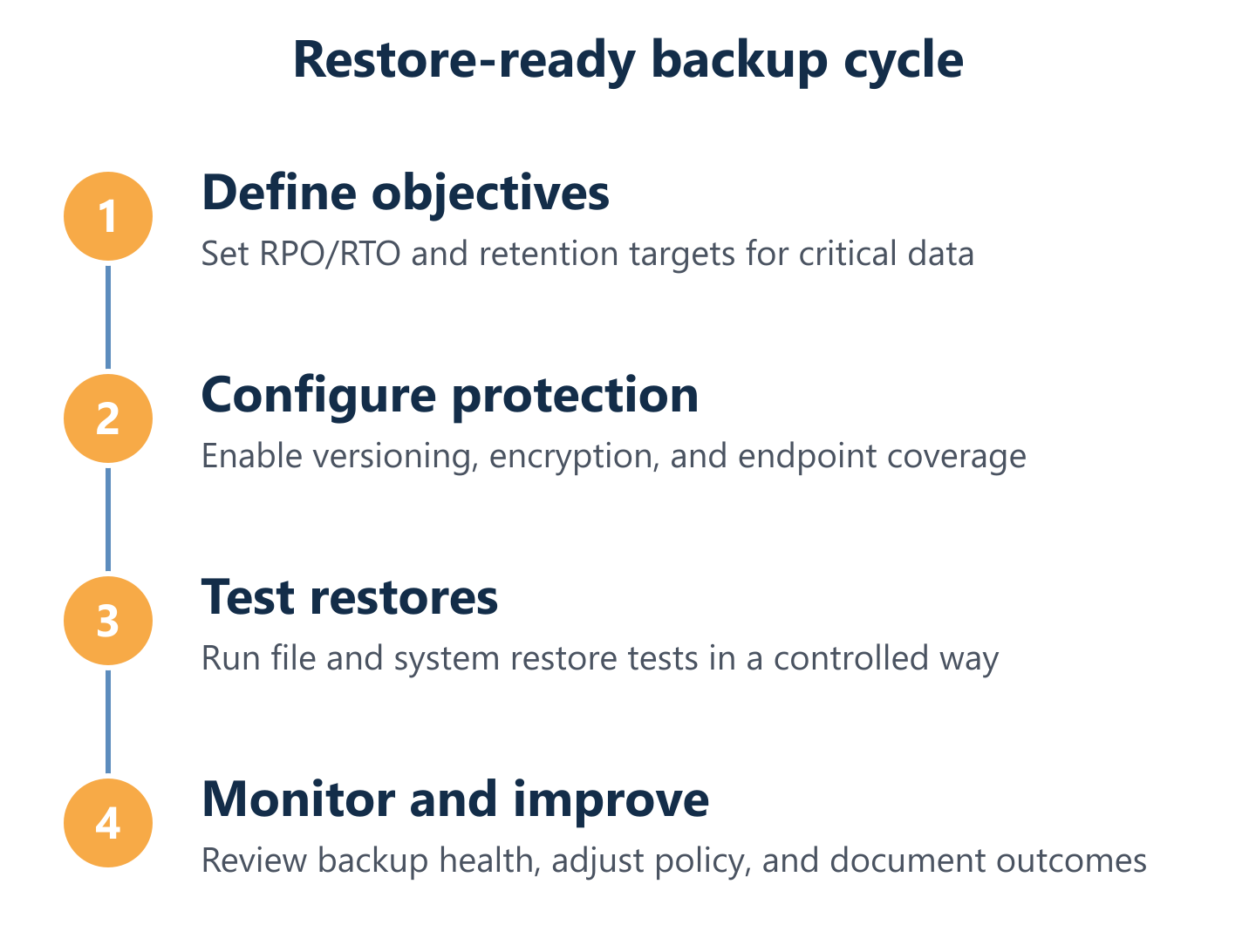
A backup that has never been tested is an assumption, not a safeguard. Restore testing should be scheduled, documented, and measured against defined success criteria—specifically, whether the recovered data is complete, consistent, and usable within your target RTO. For most SMBs, a quarterly restore test of critical systems is a minimum; monthly testing is preferable for servers and business-critical applications.
The practical restore workflow matters as much as the test frequency. Before an incident occurs, document the exact steps required to initiate a restore: who has credentials, which console or interface is used, how long a full restore is expected to take, and what the verification steps are. Services that require a support ticket to initiate a restore add hours to your RTO. Prioritise platforms with self-service restore capability and clear status reporting. For a structured approach to remote backup management and restore validation, see our resource on remote backups and data protection.
Best-value options for home, SMB, and multi-device needs
The best-value online backup service is the one that matches your environment's actual recovery requirements—not the one with the lowest headline price. A home user with two laptops and a NAS has fundamentally different needs from an SMB managing 30 endpoints across two sites. Mapping service capabilities to your scenario prevents both overspending on features you will never use and under-protecting data that your business depends on.
At Impulso Tecnológico, our managed services experience means we regularly standardise backup policy across client environments—consolidating multi-endpoint estates under consistent retention rules, encryption standards, and restore testing schedules. This reduces complexity for clients while protecting recovery capability across the entire device estate. Whether you are a growing SMB or a larger organisation with distributed infrastructure, the goal is the same: a backup policy that is operationally maintained, not just technically configured.
- Home users: Prioritise simple onboarding, clear restore steps, and predictable flat-rate pricing. Per-account plans covering 2–5 devices offer the best value.
- SMBs (5–50 endpoints): Require centralised admin, endpoint coverage including servers, defined SLAs, and restore testing that supports business continuity planning.
- Multi-device estates: Need policy standardisation across PCs, servers, and mobile; look for multi-device backup management consoles with role-based access and consolidated reporting.
- Microsoft 365 environments: M365 does not natively back up mailboxes or SharePoint with full versioning—a dedicated cloud backup layer is required for genuine protection.
- Regulated industries: Healthcare, finance, and legal sectors need GDPR-aligned retention, audit logs, and encryption key management that many consumer-grade services do not provide.
Home setups: low-friction onboarding and restore-focused evaluation
Home users typically need a service that installs in under 15 minutes, backs up automatically without manual intervention, and makes restoring a specific file version straightforward without technical expertise. The restore experience is often overlooked during the buying decision—most users evaluate backup services by the onboarding flow, not by attempting a recovery. Before committing to any plan, run a test restore of a folder during the trial period. If the process requires more than three steps or is not clearly documented, the service will likely fail you under pressure.
Pricing for home use is most predictable on flat-rate per-account plans. Services offering unlimited backup for a fixed annual fee work well for single households with multiple devices, provided you verify that "unlimited" applies to the number of devices and not just storage. Check the retention period included: 30-day versioning is the minimum acceptable; 90 days is preferable for accidental deletion scenarios.
SMB requirements: endpoint coverage, governance, and support responsiveness
Small and medium businesses face a specific challenge: they need enterprise-grade backup reliability at a cost that fits an SMB budget. The non-negotiable requirements are centralised endpoint coverage (including servers, not just workstations), an admin console with visibility into backup job status across all devices, and a support channel that responds within hours—not days—during a live recovery event.
Governance matters more than it appears in a buying decision. Without a defined backup policy—specifying which data is backed up, at what frequency, with what retention, and tested how often—backup becomes a configuration that drifts over time. New endpoints get missed, retention periods expire without review, and restore tests never happen. Impulso Tecnológico addresses this through its managed service model: proactive monitoring, regular review of backup status, and defined response targets mean that backup governance is maintained as an ongoing operational standard. For more on structuring cloud backups for businesses, our dedicated resource covers the key decisions in detail.
Multi-device strategy: standardise policies across PCs, servers, and mobile
Managing backup across a mixed device estate—Windows workstations, Linux servers, macOS laptops, and mobile devices—requires a platform that supports all of them under a single management console without forcing separate licensing agreements or inconsistent retention policies. Fragmented backup management is one of the most common causes of coverage gaps: a server that falls outside the standard backup job because it runs a different OS, or a mobile device excluded because the plan only covers desktops.
When evaluating multi-device backup management platforms, confirm that policy templates can be applied uniformly across device types, that retention and versioning settings are consistent regardless of endpoint, and that the reporting console gives a single view of backup health across the entire estate. Consolidating management reduces administrative overhead and, critically, reduces the risk that a device is unprotected without anyone noticing until a recovery is needed.
The most affordable online backup service is the one you can actually restore from—reliably, quickly, and without discovering gaps at the worst possible moment. Price matters, but it is only one variable. Versioning depth, retention period, encryption standards, restore testing cadence, and support responsiveness all determine whether a plan delivers genuine value or simply occupies a line in your IT budget.
If you want backup to function as a real safeguard rather than a compliance checkbox, it needs to be managed as an ongoing operational discipline. Impulso Tecnológico combines proactive monitoring, fixed-cost service governance, and technology partnerships with providers such as Veeam to keep recovery readiness embedded in your day-to-day IT operations—not just at the point of purchase.