

Cloud backups for businesses protect critical data by automatically copying it to remote servers, enabling recovery after ransomware, hardware failure, or accidental deletion. The right solution defines clear recovery time and recovery point targets, encrypts data in transit and at rest, and proves restore capability through regular testing.
Data loss rarely announces itself. A ransomware attack encrypts local drives in minutes; a misconfigured sync can overwrite months of work; a failed server can take an entire department offline. Businesses that rely solely on local backups or cloud storage discover too late that neither was designed for rapid, granular recovery. Cloud backup services address this gap by maintaining versioned, offsite copies of your data on a scheduled or continuous basis, accessible through a central management console. The result is a measurable reduction in downtime and data loss exposure. At Impulso Tecnológico, we have been designing and managing cloud backup strategies for organisations across Spain and Portugal for over 25 years, treating backup not as a checkbox but as a core component of operational resilience. This guide gives you the framework to evaluate providers, compare capabilities, and select a solution that matches your recovery targets.
Why cloud backups for businesses matter for continuity and ransomware resilience
Ransomware incidents now account for a significant proportion of declared IT disasters across European businesses, and the majority of affected organisations report that local or on-premises backups were either encrypted alongside production data or were simply unavailable when recovery began. The fundamental problem is proximity: if your backup lives on the same network segment as your production systems, an attacker who compromises one can compromise both. Offsite cloud backup breaks that dependency by maintaining copies on infrastructure that is logically and physically separated from your environment.
For Impulso Tecnológico's clients, the practical consequence is straightforward: when an incident occurs, recovery starts from a clean, remote copy rather than from a forensic investigation of damaged local media. We design backup schedules and retention policies around each client's operational reality — including Microsoft 365 online backup to protect collaboration data that many organisations wrongly assume Microsoft retains indefinitely on their behalf.
| Recovery scenario | Local backup only | Cloud backup (offsite) |
|---|---|---|
| Ransomware encrypts all connected drives | Backup likely encrypted or inaccessible | Clean restore from offsite copy unaffected by encryption |
| Fire or flood destroys server room | Backup media destroyed alongside hardware | Data accessible remotely from any authorised device |
| Accidental file deletion by a user | Depends on versioning; often limited | Granular file-level restore from versioned history |
| Microsoft 365 data loss (admin error) | Not covered by local backup | Covered if Microsoft 365 online backup is configured |
| Hardware failure during peak operations | Recovery time depends on physical media availability | Restore initiated remotely; RTO defined by SLA |
Business continuity outcomes: downtime, data loss, and operational disruption
Offsite data protection changes the recovery equation in a concrete way: your restore process begins from a copy that was never exposed to the incident. When local systems are encrypted, physically damaged, or simply inaccessible, a cloud backup with defined RPO and RTO targets gives your IT team a clear starting point rather than an open-ended investigation. The cost of downtime compounds quickly — halted production, missed customer commitments, and staff unable to access core systems all accumulate within hours. Organisations that have defined and tested their recovery workflows consistently return to operation faster than those treating backup as a passive archive. Offsite copies also support regulatory obligations: many data protection frameworks require demonstrable recovery capability, not just the existence of a backup.
Ransomware resilience: restoring clean data and limiting blast radius
A ransomware recovery strategy depends on two things: the integrity of your backup copy and the speed at which you can restore it. Cloud backup services that maintain immutable or air-gapped copies — versions that cannot be modified or deleted by a compromised account — provide the strongest foundation for recovery. When evaluating providers, confirm whether backup data is isolated from your production credentials: if an attacker who gains domain admin access can also delete your cloud backups, the protection is largely theoretical. Faster, tested restores reduce the window during which your business is exposed. Reputational damage from prolonged outages often exceeds the direct technical cost, particularly in client-facing industries. Backup and restore testing on a defined schedule is the only reliable way to validate that your ransomware recovery plan will work when it matters.
Restore confidence: why testing frequency and workflows matter
A backup that has never been tested is an assumption, not a recovery plan. Backup and restore testing should be a scheduled activity — not a reaction to an incident. The test should cover the full workflow: initiating a restore, verifying data integrity, confirming the restored environment is functional, and documenting the time taken against your RTO target. Cloud backups support continuity for both cyber incidents and human error, but the restore workflow for each scenario differs. A user who accidentally deletes a folder needs a granular file-level restore within minutes; a full system failure may require a bare-metal or virtual machine restore over several hours. Knowing which workflows your provider supports, and having practised them, is the difference between a recovery plan and a recovery hope. At Impulso Tecnológico, we include restore validation as part of our managed backup service rather than leaving it as a client responsibility.

What cloud backup includes (and what it does not)
Buyers frequently conflate cloud backup with cloud storage, and the confusion leads to real gaps in protection. Cloud storage — services such as OneDrive, SharePoint, or Google Drive — is designed for access and collaboration, not for structured recovery. It may retain deleted files for a limited period, but it does not provide versioned, scheduled, point-in-time restores across your entire data estate. Cloud backup is purpose-built for recovery: it captures defined data sets on a schedule, retains multiple versions, and provides a restore interface designed for IT operations rather than end-user file access.
Understanding what a cloud backup service actually covers is equally important. Coverage varies significantly between providers:
- Endpoint backup — laptops and desktops, typically via an installed agent, covering user files and system state.
- Server backup — physical servers, including databases and application data, often requiring a separate agent or licence tier.
- Virtual machine backup — VMware or Hyper-V environments, where image-level backup captures the entire VM state.
- Microsoft 365 online backup — Exchange Online, SharePoint, OneDrive, and Teams data, which Microsoft's native retention does not fully protect against accidental deletion or malicious action.
- Mobile device backup — frequently absent or limited in business-grade cloud backup services; verify explicitly if mobile coverage is a requirement.
Impulso Tecnológico specifically includes Microsoft 365 online backup as part of its managed offering, recognising that collaboration data is now as operationally critical as any server-side system. Our service uses scheduled, automated backups to a remote cloud server, with customisable options for file selection and backup frequency — avoiding the rigidity of one-size-fits-all configurations.
Cloud backup vs cloud storage: practical differences for business recovery
Cloud backup is designed for recovery; cloud storage is designed for storing and sharing. The distinction matters operationally. A SharePoint library can be accessed from anywhere, but if a user permanently deletes a document library or an admin misconfigures permissions, the native recycle bin and version history have defined limits — typically 93 days for SharePoint Online, with no guarantee of granular item-level restore beyond that window. A dedicated cloud backup service captures that data independently, retains it according to your defined policy, and provides a restore interface that IT can use without navigating the source platform's limitations. For businesses evaluating offsite data protection, the question is not whether they use cloud storage, but whether they have a separate, independent backup of the data held within it.
Coverage scope: endpoints, servers, virtual machines, and Microsoft 365
Coverage scope is one of the most consequential differences between cloud backup providers, and it is frequently underspecified in sales materials. A service that protects endpoints but not servers leaves your most critical data — databases, ERP systems, file servers — unprotected. Virtual machine backup requires image-level capture to be useful for rapid recovery; file-level backup of a VM guest is slower and more complex to restore. Microsoft 365 online backup deserves specific attention: many organisations assume that because their data is in Microsoft's cloud, it is automatically backed up. Microsoft's shared responsibility model places data recovery obligations on the customer for scenarios such as accidental deletion, ransomware affecting synced OneDrive files, and malicious insider actions. Confirm that any provider you evaluate explicitly lists Microsoft 365 as a supported backup target, and verify which workloads — Exchange, SharePoint, OneDrive, Teams — are included.
Restore expectations: what you can recover, how fast, and how you access it
Restore options determine real usability far more than backup configuration does. A service may capture data reliably but offer only a full-system restore when you need a single file, or require a lengthy download process when your RTO target demands recovery within two hours. Evaluate restore options across three dimensions: granularity (file-level, folder-level, full system image, bare-metal restore, VM restore), speed (download bandwidth, local restore appliance options, or cloud-side recovery), and access method (web console, desktop client, or API). System image backup and bare-metal restore capability are particularly important for server environments where rebuilding from scratch would take days. For Microsoft 365 data, confirm that item-level restore is available — recovering a single email or SharePoint document without restoring an entire mailbox or site collection. Explore our dedicated guide on remote backups and data protection for a deeper look at restore architecture.
Core capabilities to compare across providers (security, scope, and cost)
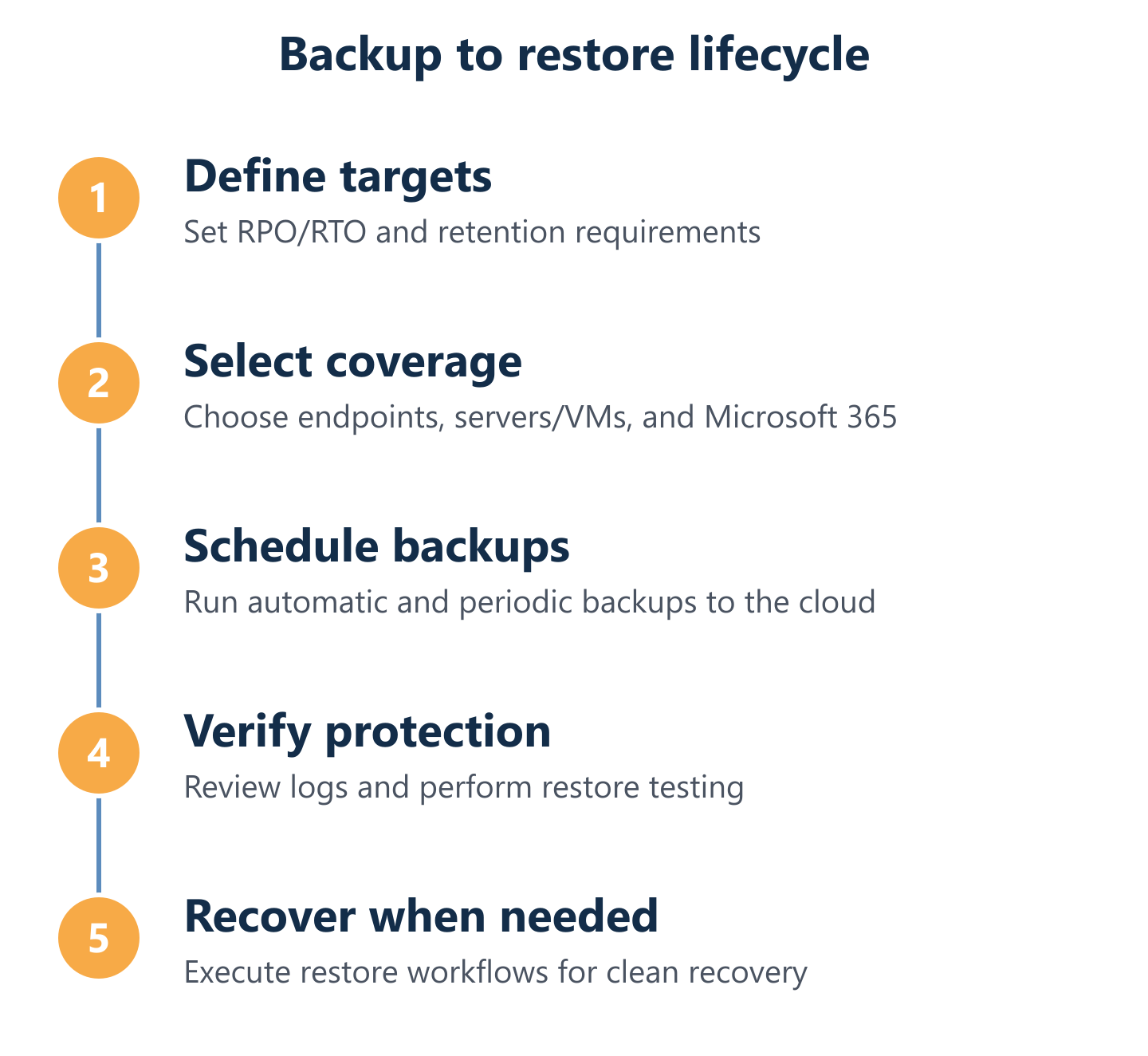
Selecting a cloud backup provider without a structured evaluation framework typically results in either over-purchasing features you will not use or under-specifying controls that matter for compliance and recovery. The comparison should cover four areas: security architecture, backup design, coverage scope, and pricing mechanics. Each area maps to a different operational risk.
At Impulso Tecnológico, we approach provider selection by aligning backup capabilities to the client's specific risk profile — the systems they cannot afford to lose, the recovery time their operations can tolerate, and the compliance obligations they carry. Our managed backup service for businesses in Spain and Portugal includes customisable backup options, scheduled automation, and clear communication about what is and is not covered, so there are no surprises when a restore is needed. For businesses looking to understand the broader cost context, our article on affordable online backup services covers budget-conscious approaches without sacrificing recovery capability.
- Encryption standard: AES-256 at rest and TLS in transit are the minimum acceptable standard for business data.
- Encryption key ownership: Does the provider hold your encryption keys, or do you? Provider-held keys simplify recovery but reduce privacy control; customer-managed keys (zero-knowledge) increase security but require careful key management.
- Ransomware protection: Immutable backup copies, anomaly detection, and isolation from production credentials are the key indicators.
- Audit logs and compliance: GDPR-relevant organisations need documented access logs, data residency options, and demonstrable retention controls.
- RPO and RTO definitions: The provider should state these explicitly; if they do not, treat it as a gap.
- Restore testing support: Does the service include tools or processes for scheduled restore validation, or is testing left entirely to the customer?
- Pricing model transparency: Understand whether cost is based on data volume, device count, or a combined model — and how costs scale as your storage grows.
Security and compliance checklist: encryption, audit logs, access controls, and key responsibility
Security controls in cloud backup services vary more than marketing materials suggest. The baseline — AES-256 encryption at rest and TLS in transit — is now standard among reputable providers, but the details of implementation matter significantly. Encryption key ownership is the most consequential variable: if your provider holds the decryption keys, a breach of their infrastructure or a legal request directed at them could expose your data. Customer-managed or zero-knowledge encryption eliminates that exposure but requires you to safeguard the keys independently. Audit logs and compliance capabilities are equally important for regulated industries: GDPR obligations require demonstrable data access controls, documented retention periods, and the ability to respond to subject access requests. Confirm that your provider offers granular audit logs, role-based access controls, and multi-factor authentication for the backup management console. For businesses operating under HIPAA or similar frameworks, verify specific certifications rather than accepting general compliance claims.
Backup design and restore options: RPO/RTO, versioning, and restore testing evidence
RPO and RTO targets are the two numbers that should drive every backup design decision. RPO — Recovery Point Objective — defines how much data loss is acceptable, expressed as time: an RPO of four hours means you can tolerate losing up to four hours of data. RTO — Recovery Time Objective — defines how quickly systems must be restored to operation. A backup service that runs once daily cannot meet an RPO of two hours; a restore process that requires downloading terabytes over a standard broadband connection cannot meet an RTO of one hour. When evaluating providers, map their backup frequency options and restore delivery mechanisms directly against your defined targets. Versioning policy — how many versions are retained and for how long — determines whether you can recover from a slow-burn incident such as gradual file corruption or a ransomware variant that encrypted data weeks before triggering. Request documented restore testing evidence or case studies; providers that cannot supply them have not validated their own recovery claims. See also our overview of cloud backups for business continuity for a broader architectural perspective.
Pricing models and cost estimation: storage growth, device coverage, and retention policies
Cloud backup pricing typically combines a software or service licence component with a storage consumption component, and the interaction between the two is where cost surprises originate. A per-device licence model is predictable when your device count is stable but scales poorly during rapid growth. A pure storage-based model appears cheap initially but can become expensive as data volumes grow and retention periods extend — retaining 90 days of versioned backups for a 10 TB data set requires significantly more storage than the raw data size suggests. Evaluate the following cost drivers before committing: number of protected devices or workloads, total data volume including all versions and retention copies, egress fees for restoring large data sets, and any additional charges for premium features such as immutable storage or extended retention. Request a cost projection at two or three times your current data volume to understand the trajectory, not just the entry price.
Choosing a cloud backup service is a risk management decision, not a procurement exercise. Build a shortlist based on coverage scope, security controls, and pricing transparency, then validate each candidate against your defined RPO and RTO targets. Ask for restore testing evidence — not promises — and confirm that encryption key ownership, audit logs, and compliance capabilities match your regulatory obligations. The provider that fits your recovery targets and operational reality is the one worth investing in. If you would like a structured assessment of your current backup posture and recovery capability, Impulso Tecnológico's managed services team is available to review your environment and recommend a solution aligned to your specific risk profile.