

Cloud backups copy your business data to secure remote servers automatically, protecting it from deletion, ransomware, hardware failure, and outages. A well-designed cloud backup strategy defines what data is protected, how quickly it can be restored, and how far back you can recover — giving IT teams confidence that operations can continue after any incident.
Most organisations discover the true value of their backup strategy only when something goes wrong. By then, gaps in coverage, untested restore paths, or misconfigured retention policies become costly problems. The real question is not whether you have cloud backups, but whether those backups are genuinely recoverable under pressure. That means verifying encryption, testing restores on a schedule, setting realistic RPO and RTO targets, and ensuring backups are isolated from the threats — such as ransomware — that could otherwise compromise them. At Impulso Tecnológico, we treat cloud data protection as a managed operational discipline, not a one-time configuration task, integrating it within a broader IT resilience strategy for clients across Spain, Portugal, and internationally.
What Cloud Backups should achieve for IT teams
Cloud backups exist to solve a specific operational problem: ensuring that data can be recovered accurately and quickly after any failure mode — whether accidental deletion, hardware fault, ransomware encryption, or a site-level outage. Storage capacity is incidental; recoverability is the metric that matters. IT teams that treat backup as a storage task rather than a recovery discipline consistently underestimate the gap between having a backup and being able to use it.
Defining what a cloud backup must achieve starts with two questions: what is the maximum acceptable data loss (RPO — Recovery Point Objective), and what is the maximum tolerable downtime before systems must be restored (RTO — Recovery Time Objective)? These figures drive every subsequent decision — backup frequency, retention depth, restore method, and provider selection.
At Impulso Tecnológico, cloud backups are positioned within a managed IT resilience model: proactive monitoring, reliable automated routines, and incident visibility so teams can act quickly when recovery is needed. This approach means backups are not just configured and forgotten; they are actively verified and integrated with the broader continuity posture of the organisation.
| Backup Objective | What It Measures | Typical Target (SMB) | Typical Target (Enterprise / Regulated) |
|---|---|---|---|
| RPO (Recovery Point Objective) | Maximum acceptable data loss window | 24 hours | 1–4 hours or less |
| RTO (Recovery Time Objective) | Maximum tolerable downtime for restoration | 4–8 hours | Under 2 hours |
| Retention depth | How far back you can restore versions | 30–90 days | 1–7 years (compliance-driven) |
| Restore test frequency | How often recovery is validated end-to-end | Quarterly | Monthly or per-system |
Backup goals: availability, integrity, and recoverability
Three properties define a trustworthy backup: availability (the backup exists and is accessible when needed), integrity (the data has not been corrupted or tampered with), and recoverability (the restore process works within the required timeframe). Protecting against common failure modes — accidental deletion, file corruption, ransomware encryption, and infrastructure outages — requires all three to hold simultaneously.
Ransomware is the failure mode that has most exposed weaknesses in traditional backup strategies. Attackers routinely target backup repositories before triggering encryption, meaning a backup that is not isolated or write-protected can be rendered useless. Integrity checks (hash verification on backup completion) and isolated storage are therefore not optional extras — they are baseline requirements for any encrypted cloud backup service that claims to support business continuity.
Who Cloud Backups are for: SMB, enterprise, and regulated teams
Cloud backup requirements differ substantially by organisation size and regulatory context. An SMB protecting Microsoft 365 mailboxes and a handful of file servers has different retention, compliance, and budget constraints than a healthcare provider subject to HIPAA or a financial services firm with GLBA obligations. The mistake many organisations make is selecting a solution based on price or feature lists rather than aligning it to their specific recovery objectives.
For SMBs, the priority is typically simplicity, cost control, and reliable daily backups with a reasonable restore window. For enterprise and regulated teams, the focus shifts to granular retention, audit trails, role-based access, and documented restore testing. Online backup for business must be scoped to the data that is actually critical — servers, cloud workloads, endpoints, and databases — rather than defaulting to a blanket approach that protects everything equally regardless of value or risk.
Core components to confirm: agents, storage, retention, and restore paths
Before committing to any cloud backup platform, IT teams should confirm four operational components. First, agents: does the solution cover all required sources — Windows and macOS endpoints, physical and virtual servers, cloud workloads (Microsoft 365, Azure), and mobile devices? Second, storage: where is data held, under what jurisdiction, and what redundancy model applies? Third, retention: what are the actual limits on version history and how are they enforced? Fourth, restore paths: can you restore individual files, full systems, and cloud data independently, and how long does each method take in practice?
Treating backup as an operational process — rather than a set-and-forget configuration — means scheduling regular monitoring, automated alerts for failed jobs, and documented restore procedures. Impulso Tecnológico incorporates these checks into its managed service routines, ensuring clients are not discovering backup failures at the moment they need to recover.

Security and ransomware resilience in Cloud Backups
Backup security is a distinct discipline from backup storage. A repository that is accessible, unencrypted, or connected to the same network segment as production systems provides minimal protection against a determined attacker. Evaluating whether cloud backups can be trusted during an incident requires assessing four security layers: encryption, access control, isolation, and restore verification.
At Impulso Tecnológico, backup security is integrated into a broader protection mindset. Working with technology partners including Veeam, Sophos, and Fortinet, the team helps clients build backup environments where data is encrypted end-to-end, access is restricted to authorised roles, and backup repositories are isolated from the threat vectors most likely to compromise them. Centralised alerting practices — consistent with the managed security approach applied across other services — ensure that anomalies such as failed backup jobs or unexpected access attempts are visible and actionable.
- Confirm encryption in transit and at rest — require AES-256 as a minimum standard for stored data and TLS 1.2 or higher for data in transit.
- Assess key management — determine whether encryption keys are held by the provider, the client, or a third-party key management service, and what happens to keys if the provider relationship ends.
- Review access controls — multi-factor authentication and role-based permissions for backup administration are non-negotiable in any business-grade deployment.
- Verify immutability settings — confirm that backup data can be written once and cannot be modified or deleted by ransomware or insider action during the retention window.
- Require documented restore tests — security is only meaningful if recovery actually works; scheduled restore drills with recorded outcomes are the final validation layer.
Encryption standards and verification questions for providers
AES-256 encryption at rest and TLS 1.2+ in transit are the baseline standards to require from any cloud data protection provider. Some platforms, such as Carbonite, advertise 128-bit encryption — which is technically sound but below the current enterprise standard. When evaluating providers, ask three specific questions: (1) What algorithm and key length is used for data at rest? (2) Is encryption applied before data leaves the client environment, or only at the provider's storage layer? (3) Who holds the encryption keys, and can the client manage their own keys?
Client-side encryption — where data is encrypted before transmission — provides stronger protection than server-side encryption, because the provider never has access to plaintext data. For regulated industries, this distinction can determine whether a backup solution meets compliance requirements.
Anti-ransomware controls: immutability, versioning, and isolation
Immutable backups — where stored data cannot be modified or deleted for a defined retention period — are the most effective technical control against ransomware compromising backup repositories. Object lock features (available in platforms such as Veeam with S3-compatible storage) enforce write-once-read-many (WORM) policies that prevent even administrator-level accounts from altering backup data. This matters because ransomware operators frequently attempt to delete or encrypt backups before triggering the main payload.
Versioning complements immutability by maintaining multiple point-in-time copies, allowing recovery to a state prior to infection. Isolation — keeping backup infrastructure on a separate network segment or air-gapped environment — reduces the attack surface further. Least-privilege access for backup administration accounts (separate credentials, MFA enforced, no shared passwords with production systems) closes the most common lateral movement path attackers use to reach backup repositories.
Restore assurance: how to test recovery without surprises
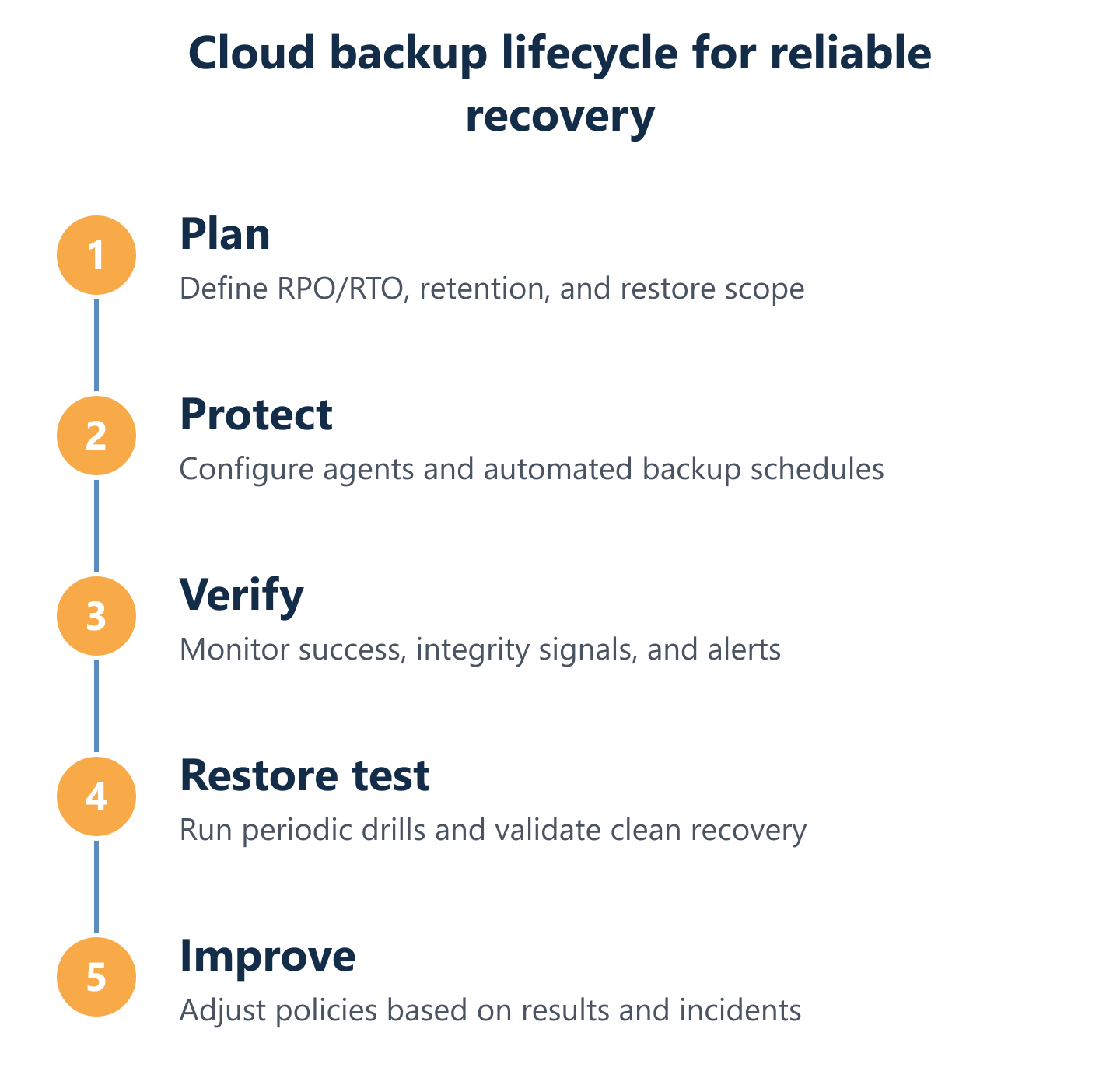
A backup that has never been tested is an assumption, not a safeguard. Restore testing should be scheduled, documented, and cover the full recovery path — not just confirming that a backup job completed successfully. The test should verify that a specific file, mailbox, database, or server image can be restored to a usable state within the RTO defined for that asset.
For ransomware resilience specifically, the test scenario should simulate restoring from an immutable backup copy to a clean environment, confirming that the restored data is free of malicious payloads. Quarterly restore drills are a reasonable minimum for most SMBs; monthly testing is appropriate for critical systems in regulated environments. Recording test outcomes — including restore time, data completeness, and any issues encountered — creates the audit trail that compliance frameworks and cyber insurance underwriters increasingly require.
Choosing and deploying Cloud Backups: criteria and rollout
Selecting a cloud backup provider is a procurement decision with long-term operational consequences. The criteria that matter to IT decision-makers are not the same as those that drive consumer backup choices — price per terabyte and ease of installation are secondary to retention depth, compliance coverage, restore performance, and the provider's ability to support the full scope of your environment.
"Unlimited backup" claims require particular scrutiny. Most providers that advertise unlimited storage apply fair-use policies, throttle restore speeds for large datasets, or limit the number of versions retained. Understanding the real constraints before signing a contract prevents the unpleasant discovery that a full-server restore takes 72 hours because of bandwidth caps, or that version history beyond 30 days requires an upgraded plan.
At Impulso Tecnológico, the managed approach to cloud backup deployment is built around SLA-based services and flexible monthly contracts. This structure gives clients cost predictability without locking them into rigid multi-year agreements, while ensuring that backups are operationally validated — not just provisioned — from day one. Clients across Spain, Portugal, and internationally benefit from a single managed IT provider handling backup alongside security, infrastructure, and cloud services, reducing the complexity of managing multiple vendor relationships.
- Coverage scope: confirm the solution protects endpoints, servers, virtual machines, Microsoft 365 / Azure workloads, and any databases relevant to your environment.
- Retention granularity: verify that retention policies can be set per data source or criticality tier, not just as a blanket account-level setting.
- Restore performance: request documented restore speed benchmarks for full-server and individual-file recovery at your expected data volume.
- Compliance evidence: ask for SOC 2 Type II reports, data residency documentation, and any sector-specific certifications relevant to your regulatory context.
- Monitoring and alerting: confirm that failed backup jobs generate immediate alerts and that a centralised dashboard provides visibility across all protected assets.
- Exit and portability: understand how data can be exported if you change providers, and whether restore access is maintained during a transition period.
Retention, limits, and "unlimited" explained in plain terms
"Unlimited" backup storage rarely means unlimited in every dimension that matters. Most providers that use the term apply constraints in at least one of three areas: total data volume (throttled above a threshold), version history depth (limited to 30, 90, or 180 days by default), or restore speed (full restores of large datasets are rate-limited). Reading the fair-use or acceptable-use policy before committing is not optional.
For compliance-driven retention — where regulations require data to be retained for one, three, or seven years — confirm that the provider's retention architecture supports long-term archival at a defined cost, not just short-term versioning. Tiered storage models (hot for recent backups, cold for long-term archival) can significantly reduce costs for organisations with deep retention requirements. Aligning retention policy to data classification — critical systems versus general file storage — is more cost-effective than applying the same retention depth to everything.
Compliance requirements: HIPAA, FERPA, GLBA-style checklists
Regulated industries face specific backup requirements that go beyond standard IT best practice. HIPAA requires covered entities to implement backup procedures for electronic protected health information (ePHI) and to test restoration capability. GLBA mandates safeguards for customer financial data, including access controls and audit trails that apply directly to backup environments. FERPA places obligations on educational institutions handling student records, including data integrity and access restriction requirements.
When evaluating cloud backup solutions for regulated environments, confirm the following: data residency (where backups are stored and whether that jurisdiction is acceptable), access logging (full audit trail of who accessed or restored data and when), encryption key management (client-controlled keys for maximum compliance evidence), and business associate or data processing agreements (required under HIPAA and GDPR respectively). For European organisations, GDPR adds requirements around data subject rights and cross-border transfer that affect backup architecture directly.
Rollout plan: pilot, validation, and operational handover
Deploying cloud backups without a structured pilot phase is the most common cause of gaps in coverage. A practical rollout follows three stages. First, pilot: select a representative subset of assets — one server, one endpoint group, one cloud workload — and deploy the backup solution with defined success criteria: backup completion rate, restore time for a test dataset, and alert functionality. Run the pilot for two to four weeks before expanding scope.
Second, validation: perform a documented restore drill covering each asset type in the pilot. Record the time taken, data completeness, and any issues. Use this data to refine retention policies, alert thresholds, and restore procedures before full deployment. Third, operational handover: document the backup architecture, assign ownership for monitoring and escalation, and schedule the first quarterly restore test. Impulso Tecnológico supports clients through each stage as part of its managed IT service model, ensuring backups are operationally embedded rather than left as an unmonitored background process. For further context on remote backup approaches, see our guidance on remote backups and data protection.
Cloud backups deliver genuine business value only when they are designed, tested, and managed as an operational discipline. The checklist-driven evaluation approach covered in this guide — spanning encryption standards, immutable backup controls, restore testing cadence, retention policy alignment, and compliance evidence — gives IT teams a structured basis for selecting and deploying solutions that hold up under real incident conditions. If your current backup strategy has not been tested end-to-end recently, that is the most important action to take before any other change. For organisations looking to explore cost-effective options, our overview of affordable online backup services provides additional context. Impulso Tecnológico is available to assess your current backup posture and design a managed, secure approach aligned to your recovery objectives and risk profile.