

Preventive IT maintenance is planned, proactive work carried out on hardware, software, network infrastructure and security controls before failures occur. It replaces reactive "fix it when it breaks" habits with scheduled inspections, patch cycles, backup verification and health checks that keep systems reliable and secure.
Most IT failures are not random. Disk degradation, unpatched vulnerabilities, misconfigured backups and overloaded network links all give warning signals long before they cause downtime. The problem is that organisations without a structured maintenance programme only notice those signals after an incident has already disrupted operations, compromised data or triggered an emergency repair bill.
A well-designed preventive IT maintenance programme addresses this by establishing a baseline of your environment, assigning maintenance tasks to specific assets and risk levels, and scheduling work around operational patterns rather than crises. The result is measurable: fewer unplanned outages, longer equipment lifespan, a stronger security posture and IT costs that are predictable rather than volatile. This guide covers strategy, checklists, scheduling logic, evidence collection and ROI measurement — everything needed to build a programme that works in practice.
What preventive IT maintenance means (and what it isn't)
Preventive IT maintenance is the practice of performing scheduled, targeted work on IT assets — servers, endpoints, network devices, storage systems and security controls — to reduce the probability of failure before it affects operations. Unlike reactive maintenance, which responds to incidents after they occur, preventive work is planned in advance and tied to specific failure modes: a patch cycle targets known vulnerabilities, a disk health check targets early-stage media degradation, a backup verification targets silent restore failures.
At Impulso Tecnológico, preventive maintenance begins with an exhaustive audit that establishes a baseline across hardware age and health, software versions, security configuration and network topology. From that baseline, a structured schedule is built around real risk — not generic templates. Clients receive clear SLAs for response times and regular reporting on system health, maintenance activities and incident trends, so stakeholders can see the programme's impact without needing to interpret raw technical data.
| Approach | Trigger | Typical IT example | Cost profile | Risk exposure |
|---|---|---|---|---|
| Reactive (run-to-failure) | Asset fails | Replace failed disk after data loss | Unpredictable, high emergency cost | High: downtime, data loss, security gaps |
| Corrective | Fault detected | Fix misconfiguration after user complaint | Moderate, reactive labour cost | Medium: issue already affecting users |
| Preventive (time/usage-based) | Schedule or threshold | Monthly patch cycle, quarterly firmware update | Predictable, planned labour cost | Low: addresses failure modes before impact |
| Condition-based | Telemetry alert | Disk replacement triggered by SMART reallocated sectors | Efficient: work only when signals appear | Very low: acts on early warning data |
| Predictive / Prescriptive | Risk model or AI recommendation | Proactive NIC replacement based on error-rate trend | Optimised: minimal unnecessary work | Lowest: anticipates failure before signals degrade |
Preventive vs reactive: why IT reliability depends on planning
Reactive maintenance treats every failure as a surprise. Preventive IT maintenance treats failures as predictable events that can be delayed, mitigated or avoided entirely through planned intervention. The practical difference is significant: an organisation running purely reactive IT support faces unpredictable downtime windows, emergency vendor call-out fees, rushed hardware procurement and, in security incidents, potential regulatory exposure under GDPR.
Planning changes the economics. When patch management runs on a defined cycle, vulnerabilities are closed before they are exploited. When disk health is monitored and checked on schedule, drives are replaced during a maintenance window rather than during a business-critical process. Reliability in IT is not accidental — it is the direct output of consistent, evidence-based preventive work carried out before failure modes escalate. For a deeper comparison of how preventive and corrective approaches interact in practice, see our guide to corrective IT maintenance.
Scope in IT: endpoints, servers, network, storage and security controls
Preventive IT maintenance is not "maintenance for maintenance's sake". Every task in the programme must target a specific failure mode and a measurable risk. Cleaning a server room air filter targets thermal throttling and hardware failure from overheating. Verifying backup integrity targets silent restore failures that only surface during a disaster recovery event. Applying security patches targets known exploit paths that attackers actively scan for.
Scope should cover all layers of the IT environment: endpoints (laptops, desktops, workstations), servers (physical and virtual), network infrastructure (switches, routers, firewalls, wireless access points), storage systems (NAS, SAN, cloud storage), and security controls (endpoint protection, firewall rules, access policies, MFA configurations). Omitting any layer creates blind spots. A patched server connected to an unmanaged, firmware-outdated switch still carries significant network-level risk. Comprehensive IT asset management is the foundation for knowing what exists, what version it runs and when it was last serviced.
Key outcomes: uptime, performance stability, data integrity and safer operations
The measurable outputs of a structured preventive IT maintenance programme fall into four categories. First, uptime: fewer unplanned outages because failure modes are addressed before they trigger incidents. Second, performance stability: systems running on current firmware, with clean configurations and adequate capacity, perform consistently rather than degrading unpredictably over time. Third, data integrity: verified backups, healthy storage media and tested restore procedures mean that when a recovery is needed, it succeeds.
Fourth, and increasingly important, safer operations: patch management and security hardening close the vulnerabilities that ransomware, credential attacks and supply-chain exploits rely on. Preventive maintenance complements monitoring and incident response — it does not replace them. Monitoring detects anomalies in real time; incident response contains and resolves them. Preventive maintenance reduces the frequency and severity of the anomalies that monitoring has to catch. Together, they form a coherent IT reliability strategy rather than a collection of disconnected tools.

Preventive IT maintenance strategy map (time, usage, condition, predictive, prescriptive)
Choosing the right maintenance strategy for each asset type is what separates an efficient programme from one that wastes engineering time on low-risk tasks while missing high-risk signals. Five strategies apply directly to IT environments, each with different triggers, data requirements and appropriate asset classes. Impulso Tecnológico's methodology starts with an audit baseline to map assets, risk levels and existing data sources, then assigns each asset to the most appropriate strategy — or a combination — before building the maintenance schedule.
- Time-based maintenance: Work is triggered by calendar intervals (daily, weekly, monthly, quarterly, annual). Appropriate for patch management, scheduled backups, antivirus definition updates and periodic hardware inspections where usage patterns are consistent.
- Usage-based maintenance: Work is triggered by operational thresholds — hours of operation, number of print cycles, data throughput or power-on hours. Useful for high-utilisation servers, printers and network appliances where calendar time is a poor proxy for wear.
- Condition-based monitoring: Telemetry from SMART data, event logs, interface error counters and temperature sensors triggers targeted work only when readings cross defined thresholds. Reduces unnecessary interventions on healthy assets.
- Predictive maintenance: Historical performance data and failure records are analysed to forecast when an asset is likely to fail, enabling pre-emptive replacement or servicing before the P-F interval closes.
- Prescriptive maintenance: Risk-scoring models or AI-assisted tools recommend specific actions — not just "check this asset" but "replace this NIC before the next backup window" — based on combined risk signals and operational context.
Time-based and usage-based: calendars, thresholds and operational patterns
Time-based maintenance is the backbone of most IT preventive programmes because many critical tasks have natural calendar rhythms. Microsoft's Patch Tuesday defines a monthly patching cycle for Windows environments. Annual firmware reviews align with vendor release schedules. Quarterly capacity assessments match financial planning cycles. The key discipline is ensuring that calendar intervals are set based on the actual failure rate of the task target — not on convenience or habit.
Usage-based rules add precision where calendar time is misleading. A server running at 90% CPU utilisation for 18 hours a day ages faster than one running at 40% for eight hours. Tracking power-on hours via SMART data or monitoring platform telemetry allows maintenance intervals to reflect real wear. For IT asset management purposes, usage-based thresholds are especially valuable for storage media, UPS battery systems and network appliances in high-throughput environments, where time-based schedules alone would either over-service low-use assets or under-service high-use ones.
Condition-based: telemetry triggers for disks, network links and system health
Condition-based monitoring for IT uses real-time telemetry to trigger maintenance work only when an asset shows signs of degradation. This avoids the waste of servicing healthy equipment on a fixed schedule while ensuring that degrading assets receive attention before they fail. Practical triggers include: SMART reallocated sector counts rising above baseline (indicating disk media degradation), network interface error rates exceeding defined thresholds (indicating cabling, SFP or port issues), event log patterns showing repeated application crashes or driver errors, and CPU or memory utilisation consistently approaching capacity limits.
Implementing condition-based maintenance requires a monitoring platform capable of collecting and alerting on these signals — tools such as RMM (Remote Monitoring and Management) platforms, SNMP-based network monitoring or dedicated CMMS for IT maintenance environments. The discipline is in defining meaningful thresholds: too sensitive and engineers respond to noise; too loose and the system misses early degradation. Calibrating thresholds against historical incident data from your own environment produces the most reliable triggers.
Predictive and prescriptive: from risk signals to recommended maintenance actions
Predictive maintenance in IT applies statistical models or machine learning to historical performance data — failure records, SMART trends, error log frequencies, replacement histories — to estimate when an asset is likely to fail and recommend intervention before the failure window opens. For organisations with sufficient historical data and asset populations, this approach reduces both unnecessary preventive work and unexpected failures simultaneously.
Prescriptive maintenance takes the next step: rather than flagging a risk, it recommends a specific action with context. A prescriptive system might recommend replacing a specific server's NIC before the next scheduled backup window because error-rate trends, combined with the backup schedule and business impact data, indicate that waiting until the next quarterly review carries unacceptable risk. While fully prescriptive IT maintenance typically requires mature tooling and data pipelines, elements of it are achievable by combining RMM telemetry with structured risk scoring during regular maintenance reviews. Impulso Tecnológico applies this logic during periodic service reviews with clients, using monitoring data and incident history to refine maintenance priorities rather than following static schedules indefinitely.
The IT preventive maintenance checklist, scheduling and evidence
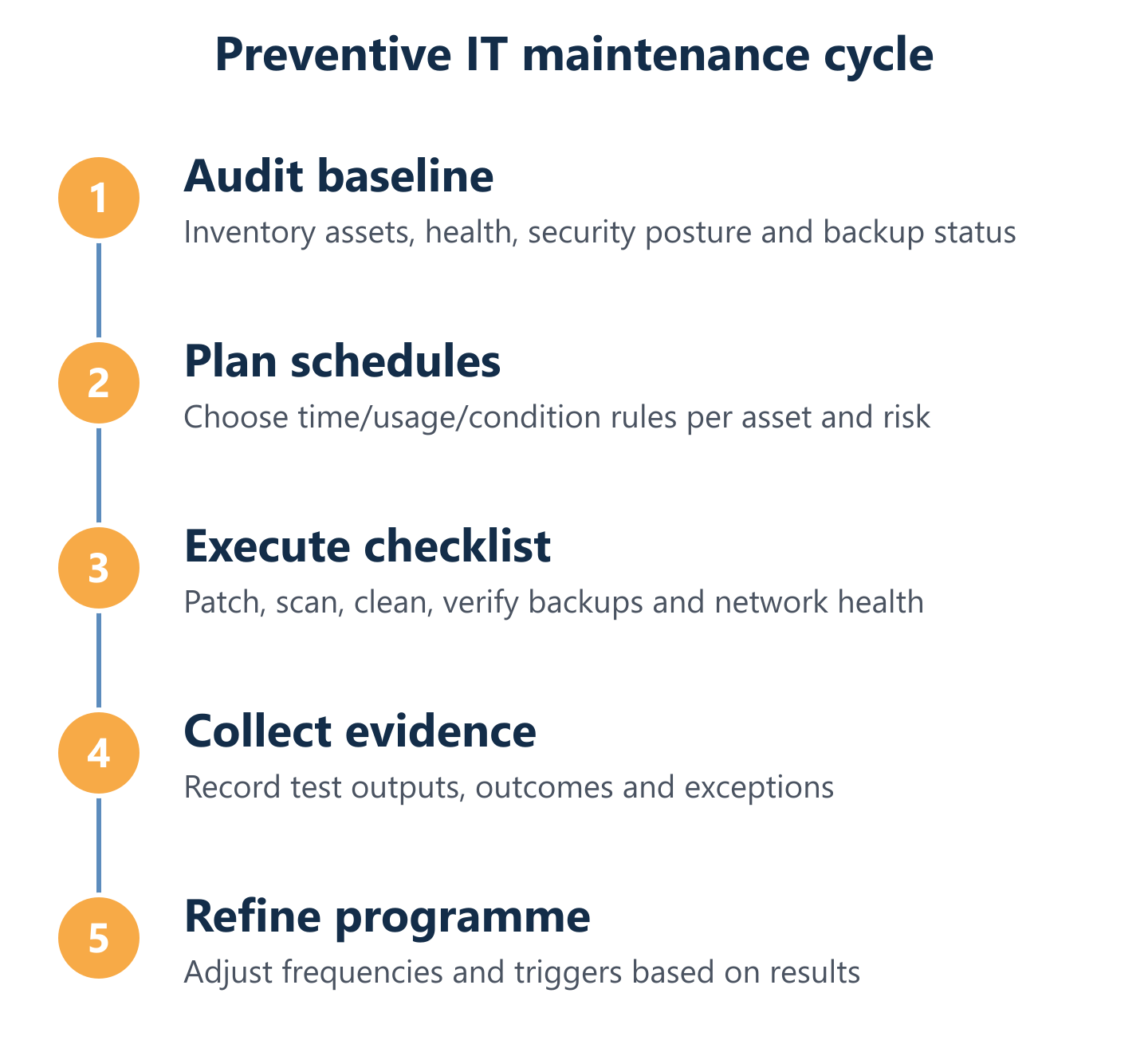
A checklist without a schedule is a wish list. A schedule without evidence is an assumption. Effective preventive IT maintenance requires all three: a structured checklist covering every layer of the environment, a scheduling logic that assigns the right frequency to each task, and a verification process that produces evidence of risk reduction — not just records of task completion.
Impulso Tecnológico structures preventive maintenance plans around an initial audit that identifies all assets, their current state and their risk profile. From that baseline, scheduled maintenance covers patch management and security hardening, antivirus configuration and definition verification, backup integrity checks, disk health monitoring, network hygiene and user account reviews. Both on-site and remote delivery are supported: for critical server issues, on-site response targets four hours; for other equipment, eight business hours within the agreed service window. Regular reporting keeps stakeholders informed about what was done, what was found and what was resolved.
Key elements of a complete preventive IT maintenance programme:
- Hardware layer: physical inspection, dust removal from servers and network equipment, cable integrity checks, UPS battery tests, temperature and airflow verification.
- OS and software layer: operating system patches, application updates, firmware updates for servers and endpoints, removal of unused software and profiles, licence compliance checks.
- Network layer: switch and router firmware updates, firewall rule review, wireless access point health checks, interface error log review, VLAN and segmentation verification.
- Security layer: patch management and security hardening, antivirus/EDR configuration and definition currency, access control review, MFA status verification, GDPR-relevant data handling checks.
- Backup and recovery layer: backup job completion verification, backup integrity checks and test restores, offsite or cloud copy confirmation, recovery time objective (RTO) alignment review.
IT checklist by layer: hardware, OS/software, network and security
A layered checklist ensures that no part of the IT environment is maintained in isolation. Hardware tasks include physical inspection of servers and network equipment, cleaning of air filters and fans, cable integrity verification, and testing of UPS systems and power distribution units. For endpoints, this extends to checking for physical damage, keyboard and screen condition, and port functionality.
OS and software tasks cover operating system patch status, application version currency, firmware updates for BIOS/UEFI and peripheral firmware, removal of unused user profiles and applications, and verification that auto-update policies are functioning as configured. Network tasks address switch and router firmware, firewall rule sets (removing obsolete rules, verifying segmentation), wireless controller health and interface error counters. Security tasks — the most time-sensitive layer — include patch management and security hardening reviews, endpoint protection status, MFA enforcement checks, and scanning for malware or indicators of compromise. Calibration tasks apply where relevant: monitor colour profiles, printer alignment and environmental sensor accuracy.
Scheduling and frequency: how to prevent over-maintenance and duplication
Every maintenance task should pass four criteria before it is added to the schedule: it must have a clear purpose (which failure mode does it target?), it must be cost-effective (does the cost of the task justify the risk it mitigates?), it must not duplicate another task already addressing the same failure mode, and its frequency must be validated against actual failure data rather than assumed.
Over-maintenance is a real problem. Performing weekly full-system scans on endpoints that already have real-time endpoint detection running wastes engineering time and can degrade system performance. Conversely, annual-only patch reviews on internet-facing systems are dangerously infrequent given current exploit timelines. IT maintenance scheduling should be reviewed at least annually — or after any significant incident — to adjust frequencies based on what the evidence shows. Assets nearing end-of-life may require increased frequency; recently replaced assets may allow reduced frequency for a period. A CMMS for IT maintenance or an RMM platform with scheduling capabilities makes this review process systematic rather than ad hoc. For guidance on budgeting these activities, see our overview of IT maintenance pricing.
Testing and evidence: what to verify (disks, memory, interfaces, backups)
Completing a maintenance task is not the same as reducing risk. Evidence that the work achieved its objective is what distinguishes a professional programme from a tick-box exercise. For disk health, SMART data should be read and recorded before and after intervention, with particular attention to reallocated sector counts, pending sector counts and uncorrectable error counts — rising values indicate media degradation that warrants replacement regardless of age.
Memory testing using tools such as MemTest86 should produce a clean pass with zero errors; any errors indicate hardware fault. Network interface testing should confirm that error counters (CRC errors, input/output drops, interface resets) are within acceptable bounds after any firmware or configuration change. Backup verification and integrity checks must go beyond confirming that backup jobs completed: a test restore of representative data to an isolated environment is the only reliable evidence that backups are recoverable. PCI and USB interface response tests confirm that peripheral connectivity is functional. All results should be logged with timestamps, asset identifiers and technician records to support audit trails and trend analysis over time.
Preventive IT maintenance is not a project with a completion date — it is a living programme that improves with every cycle. Start with a baseline audit to understand what you have, where the risks are and what is already being done. Build a schedule that assigns the right strategy and frequency to each asset class. Collect evidence that proves risk reduction, not just task completion. Then review the programme annually — or after significant incidents — and refine it based on what the data shows.
Organisations that treat preventive maintenance as an ongoing discipline rather than a periodic exercise consistently achieve fewer unplanned outages, more predictable IT costs and a stronger security posture. If you want to build or improve a preventive IT maintenance programme for your business, Impulso Tecnológico's IT maintenance service for businesses provides the structured approach, certified partnerships and transparent reporting to make it work in practice.