

Madrid Computer Support refers to professional IT assistance—remote or on-site—that keeps business devices, operating systems, and communication tools running without disruption. It covers everything from helpdesk incident resolution and hardware setup to preventive maintenance and security configuration.
Most companies in Madrid reach a point where ad hoc IT fixes stop working. A server goes down on a busy morning, a new hire's laptop isn't configured correctly, or a Zoom room fails minutes before a client call. These aren't isolated events—they're symptoms of a support model that reacts rather than prevents. The real cost isn't the incident itself; it's the hours of lost productivity and the compounding risk of unresolved underlying issues.
Structured computer support changes that equation. By combining a managed helpdesk with scheduled preventive checks, documented resolutions, and defined response targets, businesses in Madrid can move from firefighting to genuine operational stability. Impulso Tecnológico has been delivering exactly this model for over 25 years, supporting organisations across Spain with both remote assistance and in-person intervention—structured around clear service expectations and measurable outcomes.
What "Madrid Computer Support" includes (remote and on-site)
The term "computer support" covers a wider scope than most buyers initially expect. At its core, it means having a structured mechanism to resolve IT incidents, handle user requests, and prevent failures before they affect operations. For businesses in Madrid, that mechanism needs to work across two delivery modes—remote assistance for speed, and on-site intervention for physical problems that cannot be resolved over a connection.
At Impulso Tecnológico, the starting point for any new client is an initial systems audit. This baseline assessment covers antivirus status, backup integrity, server health, and communications infrastructure. From there, the support model is built around the organisation's real environment—not a generic template. The result is a service that functions as an external IT department, or as a structured complement to an existing internal team, with every resolution documented so that stakeholders understand what was done and why.
| Support Element | Remote Delivery | On-Site Delivery |
|---|---|---|
| Helpdesk incident resolution | ✓ Primary channel | ✓ When remote fails |
| Server failure response | ✓ Initial triage | ✓ Target: <4 working hours |
| Workstation / endpoint issues | ✓ Most cases resolved remotely | ✓ Target: <8 working hours |
| Device setup and imaging | ✗ Physical presence required | ✓ Standard delivery |
| Preventive maintenance checks | ✓ Scheduled and automated | ✓ Periodic site visits |
| Network and infrastructure work | ✓ Configuration and monitoring | ✓ Cabling, hardware, access points |
Service scope: incidents, requests, and preventive maintenance
A well-structured computer support service operates across three distinct layers. The first is reactive: resolving incidents as they occur—a user cannot log in, an application crashes, a printer stops responding. The second is request-based: handling planned tasks such as creating a new user account, configuring a device, or adjusting access permissions. The third, and most valuable, is preventive: scheduled checks that identify deteriorating hardware, outdated software, or misconfigured security settings before they cause downtime.
Impulso Tecnológico integrates all three layers into a single managed service. During each assistance, the team performs preventive checks across the wider environment—not just the reported issue. This approach reduces repeat incidents and avoids the compounding costs that come from problems left undetected. For Madrid-based organisations with limited internal IT resources, this three-layer model is the difference between a stable environment and one that lurches from crisis to crisis.
Remote vs on-site support: when each is the right option
Remote support resolves the majority of day-to-day IT incidents faster than any on-site visit could. A technician can access a device, diagnose the issue, apply a fix, and close the ticket within minutes—without travel time or scheduling delays. This is the default channel for software faults, configuration errors, user account issues, and most application problems.
On-site intervention becomes necessary when the problem has a physical dimension: a failed hard drive, a network switch that needs replacing, a new workstation to be set up, or a server room issue that requires hands-on access. Impulso Tecnológico's service conditions target on-site response in under four working hours for server-related failures, and under eight working hours for other equipment—giving Madrid clients a concrete expectation rather than a vague promise. The two channels are not alternatives; they work in sequence, with remote triage determining whether physical attendance is required.
Reporting and documentation: what you should receive after support
Every support interaction should leave a paper trail. A resolution report is not a formality—it is the mechanism by which an organisation learns what happened, what was done, and what risk remains. Without it, the same incident recurs, and the provider has no accountability for the quality of their work.
Impulso Tecnológico documents each assistance with detailed reports that explain the root cause, the actions taken, and any follow-up recommendations. This matters particularly for compliance-conscious organisations that need to demonstrate due diligence around data protection or infrastructure management. Beyond individual tickets, periodic summary reports give IT managers and business owners a clear view of incident trends, recurring issues, and the overall health of their environment—turning support history into actionable intelligence for future investment decisions.

Devices, OS, and business tools covered in Madrid support
Effective computer support in Madrid must reflect the actual device and software mix that businesses use today—which is rarely homogeneous. A typical SME might run Windows workstations alongside MacBooks, rely on Microsoft 365 for email and documents, use Google Workspace for collaboration, and depend on Zoom for client-facing video calls. Support that only covers one operating system or one productivity suite creates gaps that surface at the worst possible moment.
Impulso Tecnológico approaches device and tool coverage as a structured process rather than a reactive checklist:
- Baseline audit: Identify every device, OS version, and application in the environment before committing to a support scope.
- Security configuration: Apply OS-level security settings, antivirus deployment, and access permission controls aligned with current standards.
- Backup and recovery setup: Configure backup policies for both Windows and MacOS endpoints, ensuring data is protected regardless of device type.
- Tool integration: Validate that productivity suites (Microsoft 365, Google Workspace) and communication platforms (Zoom, Teams) are correctly licensed, configured, and functioning across all supported devices.
- Ongoing monitoring: Track device health, software updates, and security status continuously—not just when something breaks.
This structured approach means support improves availability and reduces risk over time, rather than simply patching problems as they appear.
Windows and MacOS support: typical scenarios and outcomes
Windows and MacOS support covers a broad range of scenarios that affect end users daily. On the Windows side, common issues include update failures, Active Directory authentication problems, driver conflicts, and performance degradation on ageing hardware. On MacOS, typical requests involve compatibility issues with business applications, profile migration when replacing a device, and integration with Windows-based network resources such as shared drives or printers.
Beyond incident resolution, OS support includes configuration hardening—ensuring that security policies are applied consistently, that automatic updates are managed rather than left to chance, and that local administrator rights are assigned appropriately. Impulso Tecnológico supports both platforms within the same managed-services contract, which is particularly relevant for Madrid organisations that have moved to a mixed-device environment following remote and hybrid working arrangements. Standardising support across both operating systems eliminates the coverage gaps that arise when providers specialise in only one.
Hardware support: setup, configuration, and device imaging
Device setup and imaging—known in Spanish IT environments as "plataformado"—is the process of preparing a workstation or laptop with a standardised software configuration before it reaches the end user. Done properly, it means every device arrives with the correct OS version, security tools, productivity applications, and network settings already in place, reducing onboarding time from hours to minutes.
Hardware support extends beyond initial setup. It includes physical fault diagnosis (identifying whether a slow device needs a RAM upgrade, an SSD replacement, or full retirement), peripheral configuration (printers, monitors, docking stations), and lifecycle management to help organisations plan replacements before hardware failure causes downtime. Impulso Tecnológico handles HP and other major hardware brands as part of its standard support scope, working with certified partners including HP, Lenovo, and Dell to source and configure equipment that meets the client's operational requirements.
Business communications and productivity: Zoom, video rooms, Google Workspace, Office 365
Communication tool failures have an outsized impact on business operations. A Zoom session that drops during a client presentation, or a Google Workspace account that stops syncing the morning of a deadline, creates immediate, visible disruption. Support for these platforms requires understanding both the application layer and the underlying infrastructure—network bandwidth, firewall rules, DNS configuration, and licence management all affect how these tools perform.
Impulso Tecnológico supports Zoom and video conferencing room setups, including troubleshooting audio/video hardware, network routing issues, and room system configurations. For productivity suites, the team covers Microsoft 365 (Exchange Online, SharePoint, Teams, and licence management) as well as Google Workspace (Gmail, Drive, Meet, and admin console tasks). Rather than treating these as separate support silos, the approach integrates communication and productivity tool support into the broader managed-services model—so when an issue crosses platform boundaries, there is one provider accountable for the resolution.
How to request help and choose the right provider in Madrid
Getting computer support right in Madrid starts before the first incident occurs. The quality of the intake process—how you report a problem and what information you provide—directly affects how quickly it gets resolved. Equally, the criteria used to select a provider determine whether you end up with a reactive break-fix arrangement or a genuinely managed service that reduces incidents over time.
When evaluating providers, these are the factors that separate structured managed IT services from informal IT help:
- Defined response targets: A credible provider publishes specific intervention times—not vague commitments. Look for targets stated per incident type (server failures vs. workstation issues).
- Coverage model clarity: Understand whether remote-only support is included, or whether on-site visits are part of the contract. Ambiguity here creates disputes during incidents.
- Tool and platform compatibility: Confirm the provider supports your actual environment—both operating systems, your productivity suite, and your communication tools.
- Reporting and documentation: Ask to see a sample resolution report. If a provider cannot show you what documentation looks like, they probably do not produce it consistently.
- Security baseline: A quality provider will align your environment with current security standards as part of standard support, not as an optional add-on.
- Scalability of the contract: Maintenance packs and flat-rate models suit different organisations. Ensure the pricing structure matches your incident volume and budget predictability requirements.
Impulso Tecnológico's managed-services model is designed for organisations with three to 150 devices, offering both monthly hour packs and flat-rate support contracts—giving Madrid businesses a predictable cost structure without locking them into inflexible arrangements.
Request workflow: what to send, how triage works, and expected turnaround
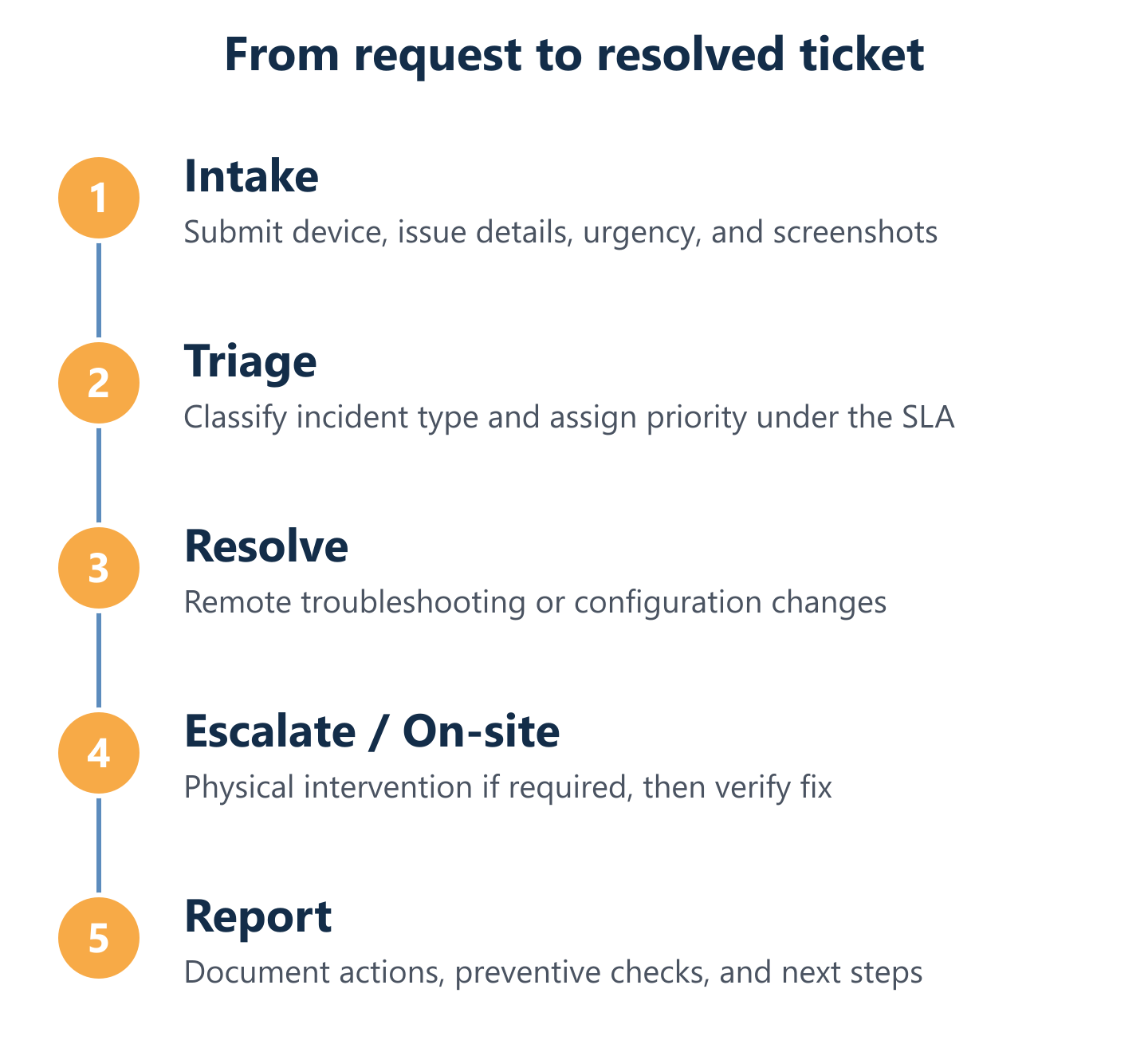
The speed of any support resolution depends heavily on the quality of the initial report. When contacting a helpdesk, include the following as a minimum: the affected device (model, operating system, and version), a clear description of the problem and when it started, any error messages (exact text or a screenshot), and an indication of business impact—whether the issue is blocking one user or an entire team.
Once a request is received, triage determines priority and assigns the appropriate response channel. Low-impact issues (a single user, non-critical application) are queued for remote resolution within the agreed SLA window. High-impact issues—particularly anything affecting servers, shared infrastructure, or multiple users simultaneously—are escalated immediately. Impulso Tecnológico's maintenance system enables remote access to client environments, which means triage and initial diagnosis can begin within minutes of a ticket being raised, regardless of whether on-site attendance is ultimately required.
Selection criteria: SLAs, coverage model, and compatibility with your stack
A service-level agreement is only as useful as the metrics it contains. When reviewing an SLA from a Madrid computer support provider, focus on three specific numbers: the initial response time (how quickly they acknowledge the ticket), the time-to-triage (when diagnosis begins), and the resolution target (when the issue should be closed). Providers who bundle all three into a single vague "response time" are obscuring accountability.
Coverage model compatibility is equally important. If your organisation operates across multiple Madrid locations, or has remote employees, confirm whether on-site support extends to all sites or only a primary address. Check whether the provider's helpdesk SLA applies equally to remote and on-site incidents. Finally, verify technology stack compatibility: a provider certified with Microsoft, Cisco, and Fortinet—as Impulso Tecnológico is—will resolve issues in those environments faster and with greater accuracy than a generalist with no formal vendor relationship.
Commercial options: maintenance packs vs flat-rate support models
Two commercial structures dominate the Madrid computer support market. Monthly hour packs allocate a fixed number of support hours per month, with additional hours billed at an agreed rate. This model suits organisations with predictable, low-volume support needs and some internal IT capacity. Flat-rate managed services, by contrast, cover an unlimited scope of support activity for a fixed monthly fee per device or user—making costs entirely predictable regardless of incident volume.
The right choice depends on your organisation's incident history and risk tolerance. If your environment is stable and well-maintained, a pack model may be cost-efficient. If you are managing a complex, multi-site environment with legacy systems or rapid headcount growth, flat-rate managed IT services eliminate the financial uncertainty of unexpected incident spikes. Impulso Tecnológico offers both structures, with the option to include flexible on-site coverage depending on the selected plan—a practical arrangement for Madrid SMEs that need on-site support occasionally but cannot justify a full-time internal technician. For organisations in nearby areas, similar managed service structures are available through IT support in Alcobendas and IT support in San Fernando de Henares.
Choosing the right Madrid computer support provider is not about finding the cheapest option—it is about matching your organisation's real environment, incident volume, and risk profile to a provider with the scope, response targets, and reporting quality to back it up. Start by auditing your current pain points: recurring incidents, slow resolution times, or gaps in OS and tool coverage. Then request a tailored proposal that addresses those specifics, with documented SLAs and a clear on-site coverage model. If you want to understand how preventive IT maintenance can reduce your incident volume before committing to a full managed-services contract, that is a sensible first step. Impulso Tecnológico is available to assess your environment and propose a support structure built around your actual needs.