

Madrid computer outsourcing means delegating the management, maintenance and support of your company's PCs and endpoints to a specialist IT provider. This covers hardware, software, helpdesk and lifecycle management, giving your team reliable technical coverage without the overhead of in-house hiring.
Most Madrid businesses reach a point where internal IT capacity cannot keep pace with operational demands. Incidents pile up, equipment ages without structured maintenance, and the cost of reactive fixes quietly exceeds what a managed contract would have cost. Computer outsourcing solves this by replacing ad-hoc firefighting with a structured service: defined scope, agreed response times and a technical team that knows your environment. At Impulso Tecnológico, we have spent over 25 years helping organisations across Spain and internationally to make this transition cleanly, matching technician profiles and engagement formats to what each business actually needs — not a generic package. The result is a more stable IT environment, lower operational risk and internal teams freed to focus on their core work.
What Madrid Computer Outsourcing Means for Your PCs
Computer outsourcing is not simply hiring a technician on demand. For a Madrid organisation, it means transferring responsibility for a defined set of IT assets — typically PCs, laptops, peripherals and the associated user support — to a provider who manages them under a structured agreement. The scope can be narrow (helpdesk only) or broad (full endpoint lifecycle, from procurement to decommission), and getting that scope right before signing is what separates a cost-effective contract from one full of surprises.
At Impulso Tecnológico, we align the outsourcing scope with each client's real operational needs. Rather than offering a single rigid package, we combine technician subcontracting with broader managed IT capabilities, so organisations can start with what they need and expand as requirements grow. This approach keeps costs predictable while ensuring coverage scales with the business.
| Scope Element | Basic Package | Standard Package | Full Managed |
|---|---|---|---|
| Helpdesk (remote) | ✓ | ✓ | ✓ |
| On-site PC support | — | ✓ | ✓ |
| Preventive maintenance | — | ✓ | ✓ |
| Hardware lifecycle management | — | — | ✓ |
| Endpoint security (hardening, AV) | — | ✓ | ✓ |
| Software patching and updates | — | ✓ | ✓ |
| Reporting and SLA tracking | Basic | Monthly | Weekly / real-time |
Core components: endpoints, helpdesk and maintenance
Outsourced "computers" in a business context means endpoints: the PCs, laptops, workstations and peripherals that employees use daily. The core service components are helpdesk (the first point of contact for user issues), incident resolution (diagnosing and fixing faults, whether hardware or software), and preventive maintenance (scheduled checks, updates and cleaning that reduce failure rates). Together, these three pillars keep the endpoint fleet operational and reduce the unplanned downtime that disrupts productivity. A well-structured preventive IT maintenance programme is what separates reactive support from genuinely managed IT coverage.
What is included vs what is excluded (scope clarity)
A common source of friction in outsourcing contracts is ambiguous scope. Standard coverage typically includes helpdesk support, incident resolution, software updates, antivirus management and periodic preventive maintenance visits. What is frequently excluded — unless explicitly agreed — is server administration, network infrastructure changes, procurement of replacement hardware, and application development or customisation. Before signing any agreement, request a written scope document that lists inclusions, exclusions and the process for handling out-of-scope requests. This protects both parties and prevents the "that's not in our contract" conversations that erode trust. For a detailed breakdown of what to expect financially, reviewing an IT maintenance price guide can help you benchmark proposals accurately.
Common outsourcing outcomes for Madrid teams
Organisations that move to structured computer outsourcing in Madrid typically report three consistent outcomes: fewer unplanned interruptions, lower per-incident cost, and internal staff who can focus on business tasks rather than chasing IT faults. Depending on the agreement, scope can extend beyond pure endpoint support to include software licence management, identity and access administration, and first-level troubleshooting for email or network connectivity issues. These extensions are particularly valuable for teams without a dedicated IT department. Impulso Tecnológico resolves over 4,000 IT tickets annually across its active client base, which gives the support team pattern recognition that a single in-house technician rarely accumulates — translating directly into faster diagnosis and resolution for Madrid clients.

On-Site vs Off-Site Outsourcing: Choosing the Right Model
Choosing the wrong delivery model is one of the most common and avoidable mistakes in IT outsourcing. The decision should be driven by your incident patterns, the physical nature of your IT environment and your internal capacity — not by which option is cheaper on paper.
- Audit your incident history: Count how many issues in the last six months required physical intervention (hardware swap, cable fault, peripheral replacement) versus those resolved remotely. If more than 40% needed a technician on-site, a purely remote model will frustrate your team.
- Map your business hours: Identify the hours during which IT failures cause the most operational damage. This determines the coverage window you need to negotiate in the SLA.
- Assess internal capacity: If you have no internal IT staff, on-site presence is usually essential for the first months. If you have a junior technician, remote escalation support may be sufficient.
- Define your locations: Madrid's geography matters. Impulso Tecnológico covers districts including Centro, Chamberí, Chamartín, Salamanca, Tetuán, Moncloa, Retiro, Arganzuela and Carabanchel, as well as surrounding towns such as Móstoles, Alcalá de Henares, Getafe, Leganés, Alcorcón, Pozuelo de Alarcón and Las Rozas — so field response times are realistic, not theoretical.
- Select technician profiles and engagement format: Available profiles include Junior Systems Technician, Senior Systems Technician, Systems Administrator, Server Administrator and Network Technician. Engagement formats range from outsourcing by days or weeks through to monthly, indefinite or vacation-cover arrangements — giving you precise control over commitment and cost.
For a broader view of how flexible IT outsourcing structures work in the Madrid market, our guide on IT outsourcing in Madrid covers the decision framework in detail.
Operational differences: response, escalation and coverage hours
On-site support is the right choice when incidents require physical access: replacing a failed hard drive, reconfiguring a workstation, installing hardware or diagnosing a cabling fault. Response time for on-site visits depends on technician location and traffic — in central Madrid districts, a committed provider should reach most clients within two to four hours of ticket escalation. Off-site support handles the majority of software, configuration and user-error incidents faster, because there is no travel time. Escalation rules should be written into the SLA: which incident categories trigger remote resolution, which trigger an on-site visit, and what the maximum elapsed time is for each. Coverage hours — typically business hours Monday to Friday — must be agreed explicitly, as most Madrid MSPs do not operate outside standard working hours without a premium arrangement.
Pros and cons: cost control, speed and internal workload
Off-site support reduces cost per incident because technician time is not consumed by travel, and a single remote engineer can handle multiple clients simultaneously. This makes it efficient for high-volume, low-complexity tickets — password resets, software errors, connectivity checks. The limitation is physical: some faults simply cannot be resolved without hands on the hardware. On-site support costs more per visit but eliminates the productivity loss caused by extended downtime when remote resolution fails. A hybrid model — remote first, on-site escalation when needed — balances both. For Madrid businesses evaluating the financial case, comparing your current reactive IT spend against a structured outsourcing contract with defined SLAs is the most reliable way to quantify the saving. Our article on the benefits of IT outsourcing provides a practical framework for that comparison.
How to structure technician profiles and engagement formats
Hybrid outsourcing models are the standard for Madrid organisations that need both fast local action and scalable remote support. The practical structure involves a remote helpdesk handling first-line tickets, a defined escalation path to on-site technicians for physical interventions, and a senior profile (Systems Administrator or Server Administrator) available for complex infrastructure work. Impulso Tecnológico's technician subcontracting model allows clients to mix profiles: for example, a Junior Systems Technician for day-to-day endpoint support combined with a Senior Systems Technician or Network Technician for periodic infrastructure reviews. Engagement formats — by day, week, month or on an indefinite basis — mean you are not locked into capacity you do not need. This flexibility is particularly useful for covering planned absences or peak workload periods without committing to permanent headcount.
SLA, Security and Onboarding: How Outsourcing Works in Practice
A signed outsourcing contract without a clear SLA, a documented security baseline and a structured onboarding plan is a risk, not a solution. These three elements determine whether the service delivers what was promised or generates new problems.
- SLA definition: Agree response and resolution targets by incident priority (critical, high, medium, low). Without priority tiers, every ticket competes equally and genuinely urgent issues are delayed.
- Ticket workflow: Confirm the channel for raising incidents (email, portal, phone), the acknowledgement time, and the escalation path when first-line resolution fails.
- Reporting cadence: Monthly reports should cover ticket volume, resolution times, SLA compliance and recurring fault patterns. This data lets you hold the provider accountable and identify systemic issues.
- Security baseline: Outsourced endpoints must meet a defined security standard from day one — antivirus, patch status, access controls and encryption where applicable.
- Onboarding plan: A written transition plan with milestones, responsibilities and acceptance criteria prevents the chaotic handovers that leave gaps in coverage.
- Partner ecosystem: At Impulso Tecnológico, security is embedded in the outsourcing relationship through certified partnerships with Sophos, Fortinet, Veeam and Microsoft — meaning endpoint protection, backup and identity management are handled by the same team managing your PCs, not bolted on separately.
Support process and SLA expectations: tickets, targets and reporting
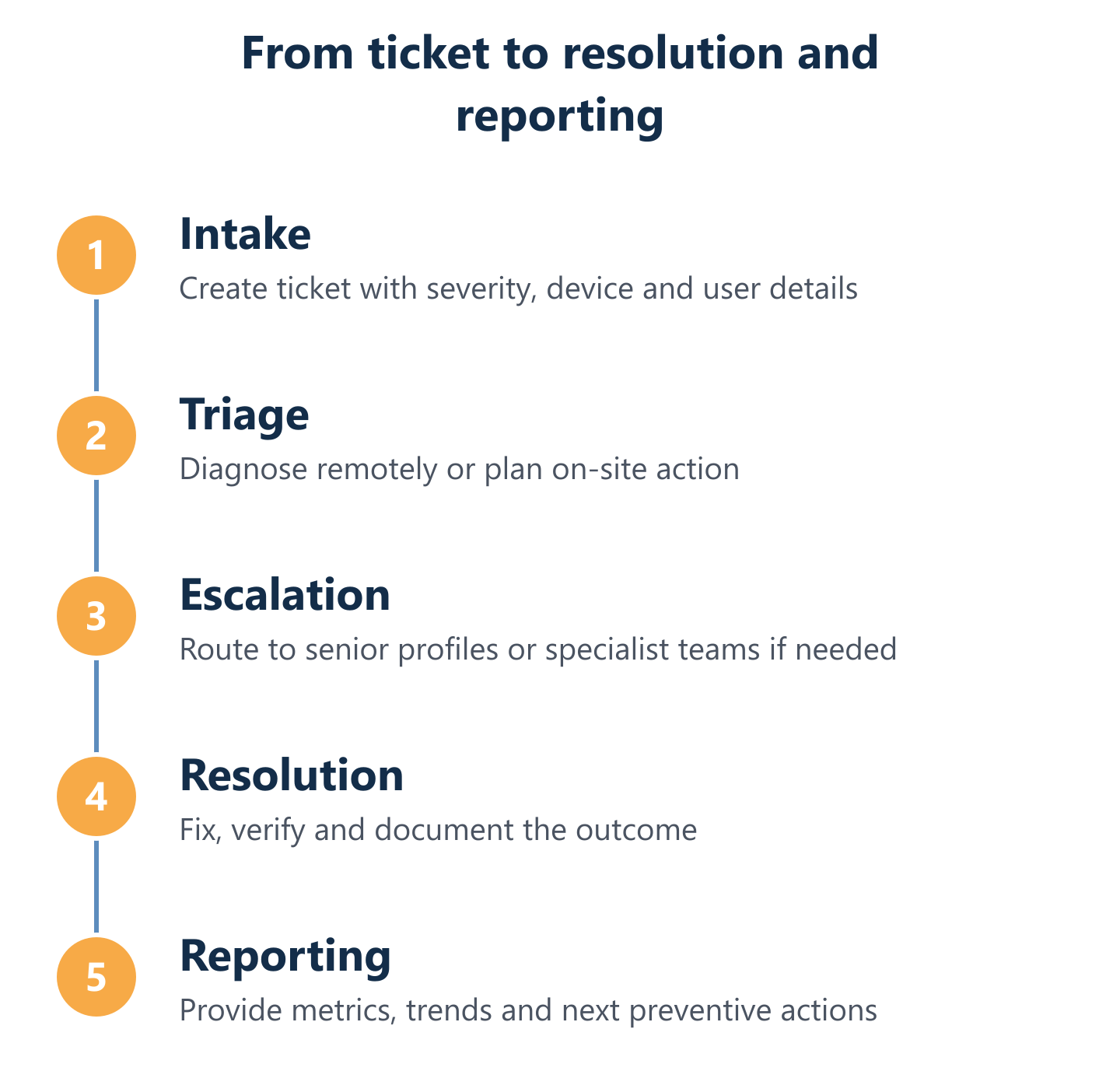
A transparent ticket workflow is what separates professional outsourced helpdesk support from informal arrangements that leave users uncertain about resolution timelines. The process should follow a clear sequence: incident reported → acknowledged within a defined window → categorised by priority → assigned to the appropriate technician profile → resolved or escalated → closed with user confirmation. SLA targets should be specific: for example, critical incidents (system down, no workaround) acknowledged within 30 minutes and resolved within four hours; high-priority incidents resolved within one business day. Monthly reporting should present ticket volume by category, average resolution time, SLA compliance rate and a list of recurring issues. This reporting discipline is what allows management to assess the real value of the outsourcing relationship and make informed decisions about scope adjustments.
Security and risk reduction for outsourced endpoints
Endpoint security is not optional in a computer outsourcing agreement — it is a core deliverable. Every PC and laptop under management should have a defined security baseline: up-to-date antivirus and endpoint detection (Sophos or equivalent), operating system patches applied within an agreed window, local administrator rights restricted to authorised users, and disk encryption enabled on portable devices. Access control is equally important: the outsourcing provider's technicians should operate under a least-privilege model, with access to client systems logged and auditable. For organisations subject to GDPR, the outsourcing agreement must include a Data Processing Agreement (DPA) that defines how personal data on managed endpoints is handled. Impulso Tecnológico integrates these security controls as standard, using its certified partner ecosystem — Sophos, Fortinet and Veeam — to cover endpoint protection, network security and backup continuity within the same managed service.
Onboarding in Madrid: assessment to go-live with minimal disruption
A structured onboarding process is what prevents the coverage gaps that typically occur when switching IT providers. The sequence should follow four phases: first, an asset and environment assessment (inventory of all endpoints, current software, network topology and existing security posture); second, a transition plan with agreed milestones and a parallel-running period if the previous provider is being replaced; third, full documentation of the environment (asset register, configuration baseline, escalation contacts); and fourth, formal acceptance criteria that both parties sign off before the contract moves to steady-state operation. In Madrid, Impulso Tecnológico conducts this assessment before committing to a scope or price, ensuring the proposal reflects the actual environment rather than assumptions. This approach reduces the risk of scope creep and gives the client a clear reference point for measuring service quality from day one. For a broader view of how this fits into a full outsourcing strategy, our guide on IT services outsourcing covers the end-to-end process.
Before requesting proposals, build a simple comparison checklist: scope inclusions and exclusions, SLA targets by priority tier, technician profiles available, security baseline commitments, onboarding process and reporting format. Providers who cannot answer these points in writing are unlikely to deliver consistent service. Impulso Tecnológico offers a straightforward starting point — you can compare your current IT costs against a detailed budget, review the technician profiles available for your Madrid location, and request a proposal that matches your actual coverage and security requirements. The goal is a contract you understand fully before you sign it.