
IT technical support for businesses covers the ongoing management, troubleshooting, and resolution of technology issues that affect day-to-day operations — including help desk access, proactive monitoring, security management, and backup. A structured support model reduces downtime, controls costs, and keeps systems reliable.
Without a defined support structure, businesses face a familiar pattern: issues escalate before anyone acts, resolution times are unpredictable, and costs spike whenever something breaks. A single unplanned server outage or ransomware incident can cost far more than a year of managed support. The difference between reactive IT spending and a predictable monthly model comes down to one thing: having a defined scope, clear SLAs, and a provider who treats your infrastructure as their own responsibility.
Impulso Tecnológico has been delivering IT technical support for businesses across Spain, Portugal, and internationally for over 25 years, operating as an external IT department or as a specialist extension of your existing team. With more than 4,000 IT tickets resolved annually and 476 active clients, the model is built around proactive maintenance, transparent monthly costs, and measurable outcomes — not generic fixes billed by the hour when things go wrong.
What "IT Technical Support for Businesses" includes (and what it doesn't)
Most businesses discover the limits of their IT support contract only when something goes wrong. A provider may advertise "full technical support" but exclude server-level incidents, security response, or backup restoration from the base package. Setting clear expectations before signing is not a formality — it is the single most effective way to avoid operational disruption and unexpected costs.
At Impulso Tecnológico, IT technical support is structured as an external IT department model: the scope covers proactive maintenance, defined SLAs, help desk access, and security and backup as routine operational responsibilities — not optional add-ons. For businesses with existing IT staff, the same framework applies as a supplement, filling gaps in capacity or specialist expertise without replacing what already works.
| Support Element | Typically Included | Often Excluded (check your contract) |
|---|---|---|
| Help desk access | Remote troubleshooting, ticket intake, user support | After-hours coverage unless explicitly stated |
| Proactive monitoring | System health checks, patch management, alerts | Application-level monitoring for bespoke software |
| Security management | Endpoint protection, firewall management, access controls | Incident response retainer, penetration testing |
| Backup and recovery | Scheduled backups, restore testing, disaster recovery planning | Long-term archiving, off-site tape management |
| On-site support | Hardware intervention, network cabling, urgent deployments | Routine visits unless included in SLA tier |
| Cloud platform support | Microsoft 365 administration, licence management, migrations | Third-party SaaS applications outside agreed scope |
Core support scope: help desk, troubleshooting, and monitoring
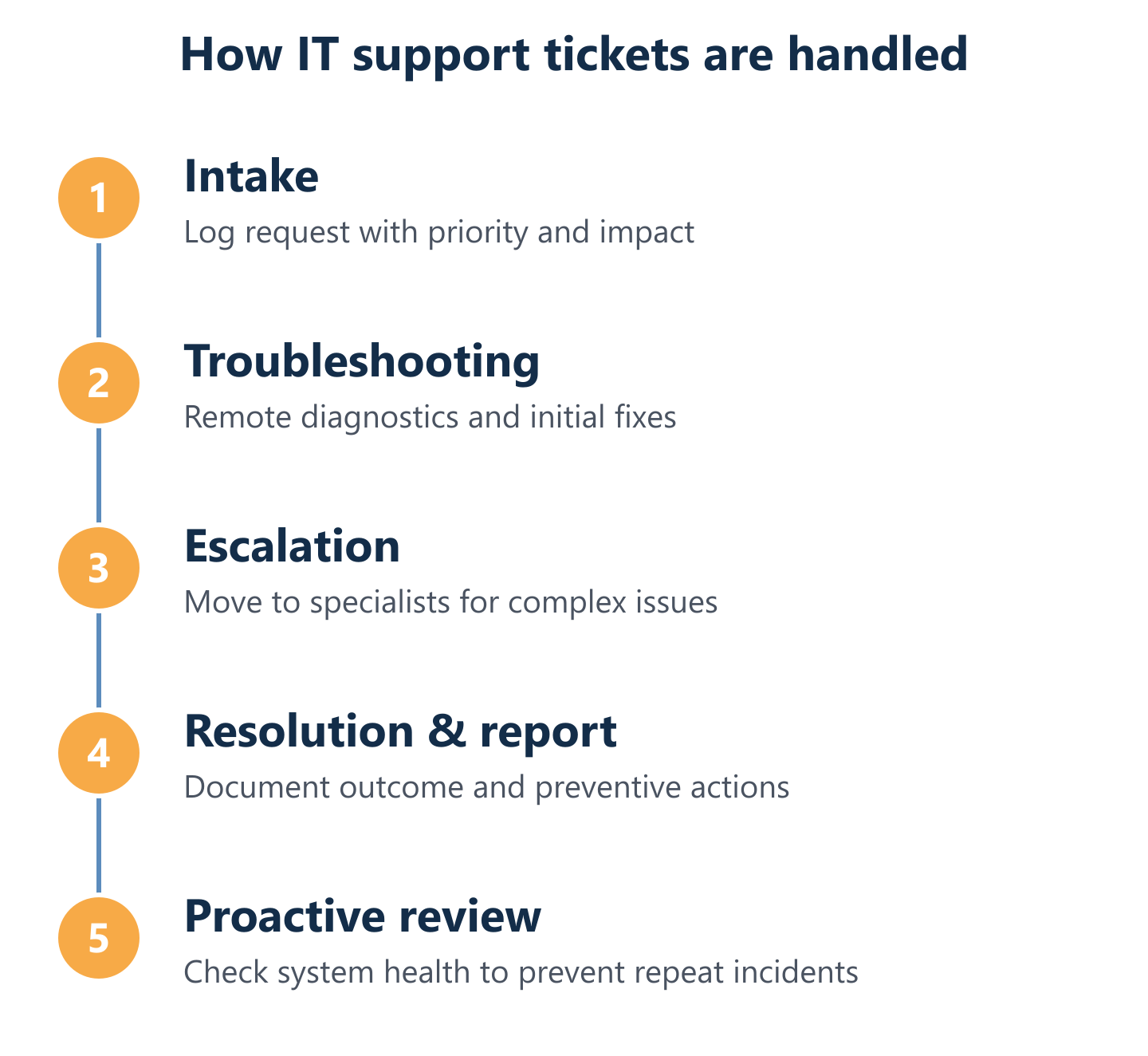
A well-structured IT support workflow follows a consistent path: ticket intake, initial diagnosis, escalation where needed, resolution, and a follow-up report that documents what happened and how to prevent recurrence. This last step — the proactive review — is what separates managed IT technical support from a simple break-fix service.
Impulso Tecnológico includes a proactive system review with every support request, identifying conditions that could cause further damage or unnecessary costs before they materialise. Each resolution is documented with a detailed report, giving clients a clear record of what was resolved and what was recommended. For businesses managing remote IT support for SMEs, this approach means fewer repeat incidents and a steadily improving baseline rather than a constant cycle of firefighting.
Operational responsibilities: patching, device lifecycle, and user/account support
Patch management, device lifecycle tracking, and user account administration are operational tasks that directly affect security posture and system availability. Leaving them outside the support scope creates vulnerabilities: unpatched endpoints are the most common entry point for ransomware, and unmanaged device lifecycles lead to hardware failures at the worst possible time.
Impulso Tecnológico's all-inclusive computer support package begins with an initial audit covering antivirus status, backup configuration, desktops, servers, and communications infrastructure. This produces a verified inventory of everything under management, ensuring that patching schedules, device refresh planning, and user/account provisioning are aligned to the actual environment — not an assumed one. Business cybersecurity management and data backup and disaster recovery are handled as part of this day-to-day operational layer, not as separate projects.
Common exclusions: what "support" may not include without a defined package
The phrase "unlimited support" is only meaningful when it is bounded by specific parameters: coverage hours, ticket handling rules, response time targets, and escalation thresholds. Without these, "unlimited" can mean very little in practice — particularly for server incidents or business-critical failures that require immediate specialist intervention.
Impulso Tecnológico defines SLA targets explicitly: under eight working hours for standard requests, and under four hours for server issues or urgent incidents affecting the whole business. Reactive hourly packages are also available for organisations that prefer a different engagement model. The key point for any buyer evaluating managed services IT support is to request the specific SLA matrix and confirm which incident categories fall under each response tier — before an incident occurs, not during one. For a detailed breakdown of how IT maintenance pricing is structured, our IT maintenance pricing guide covers the main cost drivers and package models.

Delivery model: remote-first, co-managed support, and when on-site matters
Choosing the right delivery model is not simply a question of preference — it affects response speed, cost, and the types of incidents that can be resolved without disrupting operations. Impulso Tecnológico delivers support remotely or on-site depending on the nature of the request, with SLA-based response targets that differentiate between standard user issues and urgent server or business-impact incidents. After each request, a proactive review is carried out to prevent repeat damage and identify underlying risks before they escalate.
- Remote-first delivery: The default model for most incidents — ticket raised, remote diagnostics initiated, resolution delivered without physical presence. Covers the majority of help desk, user, and software issues.
- Co-managed escalation: When a business has internal IT staff, Impulso Tecnológico acts as the specialist escalation layer — handling infrastructure, security, or cloud issues that exceed in-house capacity, with clearly defined handoff points.
- Ad hoc on-site intervention: Reserved for hardware failures, network cabling, physical deployments, or complex incidents where remote access is insufficient. Governed by the same SLA framework as remote support.
- Proactive review after each request: Every resolved ticket includes a system review to identify conditions that could cause further incidents — turning reactive support into a continuous improvement loop.
- Flexible engagement scope: Impulso Tecnológico supports SMEs from 3 to 150 computers and users, with or without existing IT staff, adjusting the delivery mix to match the organisation's actual needs and IT maturity level.
Remote support mechanics: ticketing, remote diagnostics, and fast resolution loops
Remote IT support for SMEs works best when the ticketing system, diagnostic tools, and escalation paths are integrated into a single workflow. When a user raises a ticket, the support team should be able to access the affected system, run diagnostics, apply fixes, and close the request with a resolution report — all without requiring the user to wait for a physical visit.
This model reduces disruption significantly: most software, configuration, and connectivity issues can be resolved within a single remote session. Impulso Tecnológico's IT ticketing and SLA framework ensures that every request is tracked from intake to resolution, with response time targets applied consistently. The result is a measurable support operation rather than an informal arrangement where response times vary depending on who picks up the phone.
Co-managed escalation: how issues move from help desk to specialist teams
Co-managed IT support escalation addresses a specific operational gap: the internal IT team handles day-to-day requests, but lacks the specialist depth to resolve infrastructure failures, security incidents, or complex cloud migrations. Without a defined escalation path, these issues either stall or get resolved inconsistently.
In a co-managed model, Impulso Tecnológico integrates with the existing IT team as a specialist second line. Escalation triggers are defined in advance — for example, any server-level incident, security alert, or issue affecting more than a set number of users — so the handoff is automatic rather than negotiated under pressure. This structure is particularly valuable for businesses that have grown beyond what a small internal team can manage alone, without the budget or need for a fully outsourced IT department.
On-site triggers: when physical intervention is needed and how SLAs apply
On-site support is not a premium option reserved for large enterprises — it is a necessary component of any complete IT technical support framework, triggered by specific conditions that remote access cannot resolve. Hardware replacement, structured cabling, physical network configuration, and access control system installation all require physical presence.
Impulso Tecnológico applies the same SLA structure to on-site requests as to remote ones: under four working hours for server incidents and urgent business-impact issues, under eight hours for standard requests. This parity matters because businesses should not face longer resolution windows simply because an issue requires a physical visit. For clients in Spain and Portugal, on-site support is available directly; for international clients, remote assistance covers most scenarios with on-site coordination arranged where needed. Our preventive IT maintenance guide details how scheduled on-site visits fit into a proactive support model.
Core capabilities to look for: security, backup, cloud support, and measurable SLAs
Evaluating an IT technical support provider requires more than comparing price per user. The capabilities that determine whether support actually protects your business — rather than simply responding to it — fall into four areas: integrated security management, operational backup and recovery, cloud platform support, and transparent SLA-driven coverage. Impulso Tecnológico builds all four into its managed services IT support model, using industry-standard technologies and aligning each capability to the client's specific environment rather than applying a one-size-fits-all configuration.
- Endpoint and network security: Sophos and Fortinet-based protection covering endpoints, firewalls, and access controls — configured to the client's risk profile, not a generic template.
- Backup and disaster recovery: Veeam-based backup with defined recovery objectives, encrypted storage, and tested restore processes — not just scheduled jobs that are never verified.
- Microsoft 365 and Azure support: Licence management, migration support, identity management, and day-to-day cloud platform administration included as part of the support scope.
- Proactive monitoring and patching: Continuous system health monitoring with patch management applied on schedule, reducing the attack surface before incidents occur.
- Defined SLA matrix: Response and resolution targets published per incident category — not a single "best efforts" commitment that covers everything equally regardless of business impact.
- Resolution reporting: Every closed ticket accompanied by a detailed report documenting the root cause, resolution steps, and preventive recommendations.
- Scalable scope: Support packages designed for SMEs from 3 to 150 users, with the ability to add services such as network infrastructure (Cisco, Aruba), access control, or video surveillance (Verkada) as the business grows.
Security as part of support: endpoint protection, network controls, and hardening
Business cybersecurity management should not be a separate workstream from day-to-day IT support — it should be embedded in it. Every patching cycle, every new user account, and every device added to the network is a potential security event. When security is managed separately from support, gaps appear at the handoff points.
Impulso Tecnológico integrates endpoint protection, firewall management, and access control configuration into the standard support model. Using Sophos for endpoint and cloud security and Fortinet for network-level controls, the security environment is adapted to each client's operational context. GDPR compliance requirements are also addressed within this framework, ensuring that data handling and access policies align with regulatory obligations rather than being treated as a separate compliance project.
Backup and continuity: recovery objectives, restore processes, and disaster readiness
A backup that has never been tested is not a backup — it is an assumption. Data backup and disaster recovery must be treated as operational disciplines: scheduled jobs, encrypted storage, defined recovery time objectives (RTO) and recovery point objectives (RPO), and regular restore tests that confirm the backup is actually usable when needed.
Impulso Tecnológico implements Veeam-based backup and disaster recovery as part of its managed services framework. This covers automated backup scheduling, encrypted off-site or cloud storage, and documented restore procedures. For businesses that have experienced data loss or near-misses, the shift from ad hoc backup management to a structured, tested continuity plan is one of the most measurable improvements a managed IT support provider can deliver. Our corrective IT maintenance guide explains how recovery procedures integrate with broader incident response workflows.
Cloud productivity support: Microsoft 365 and Azure integration expectations
Microsoft 365 and Azure are now core infrastructure for most businesses — not peripheral tools. Support for these platforms should cover licence management, user provisioning, conditional access policies, Teams and SharePoint administration, and migration planning, not just password resets and email troubleshooting.
Impulso Tecnológico manages Microsoft 365 and Azure environments as part of its standard cloud support scope, including identity management, backup of cloud data, and integration with on-premises infrastructure where applicable. For businesses planning a migration from on-premises Exchange or legacy file servers, the support team handles the transition plan, cutover, and post-migration stabilisation — reducing the risk of productivity loss during the changeover. Cloud platform health is monitored on an ongoing basis, with licence optimisation reviewed periodically to avoid unnecessary expenditure.
Aligning scope, SLAs, and escalation paths with your business objectives turns IT technical support from an unpredictable cost into a measurable operational advantage. The businesses that get the most value from managed IT support are those that define expectations clearly at the outset — and choose a provider capable of delivering against them consistently. Whether you need a fully outsourced IT department, a specialist escalation layer for your existing team, or a structured package for a growing SME, the starting point is always the same: an honest assessment of your current environment and a support model built around your actual needs, not a generic one.