

Businesses in San Martin de la Vega looking for IT support need a local provider that covers helpdesk, device troubleshooting, network assistance and proactive maintenance — with defined response times and a clear service model, not just a phone number to call when things break.
Most IT problems do not announce themselves in advance. A server goes unresponsive on a Monday morning, a user cannot access a critical application before a client meeting, or the office Wi-Fi drops during a video call. Each of these incidents costs time, and without a structured support model in place, they also cost money and trust. The real question is not whether IT issues will happen — they will — but how quickly they are resolved and how many are prevented in the first place.
At Impulso Tecnológico, we have spent over 25 years building IT support models that reduce the frequency of incidents and shorten recovery times when they do occur. For companies in San Martin de la Vega, that means access to unlimited phone, remote and on-site assistance, a free IT audit on onboarding, and defined SLA response times — all structured around the operational reality of your business, not a generic contract template.
What "IT Support San Martin de la Vega" includes for local businesses
When a business searches for IT support in San Martin de la Vega, the expectation is usually practical and immediate: someone who can fix a broken printer, restore access to a locked account, diagnose a slow network, or get a new employee set up without a week's delay. The scope of IT support that genuinely serves a local business goes well beyond software development maintenance or a directory listing — it covers the day-to-day operational layer that keeps people productive.
At Impulso Tecnológico, we structure IT managed services so that companies can scale support from a single device up to environments with up to 200 computers, without changing provider or losing continuity. The service includes unlimited phone support, unlimited remote assistance and unlimited on-site assistance, with no caps on intervention hours or travel within the agreed coverage area.
| Support Area | What It Covers | Delivery Method |
|---|---|---|
| Helpdesk & Ticketing | Incident logging, triage, user requests, escalation | Phone, remote, on-site |
| Device Support | PCs, laptops, printers, peripherals — setup, repair, replacement | Remote & on-site |
| Software & Accounts | Business applications, OS issues, user account management | Remote & on-site |
| Network & Connectivity | Wi-Fi issues, LAN configuration, access control, VPN | Remote & on-site |
| Security & Backups | Antivirus status, backup verification, patch management | Remote (proactive) |
| Server Support | Server health, availability, critical incident response | Remote & on-site (4h SLA) |
Helpdesk vs ad-hoc support: what you should expect
A structured helpdesk is not the same as calling a technician and hoping they are available. A proper helpdesk logs every incident as a ticket, assigns it a priority level, routes it to the right technician, and tracks it through to resolution. This matters because it creates accountability — you can see what was reported, when it was picked up, and how long it took to resolve.
Ad-hoc support, by contrast, relies on informal contact and has no built-in escalation path. It may work for very small environments with minimal IT dependency, but for any business where downtime has a direct operational cost, a ticketed helpdesk with defined response targets is the baseline expectation. Our IT technical support for businesses model is built around exactly this structured approach.
Device, software and user support in plain language
Endpoint support covers the physical and software layer that employees interact with every day: computers that will not start, printers that drop off the network, business applications that throw errors, and user accounts that get locked or misconfigured. These are the most frequent IT support requests in any office environment, and they are the ones that cause the most visible disruption when left unresolved.
Effective on-site IT assistance for these issues means a technician who can diagnose hardware faults, reinstall or reconfigure software, manage Active Directory or Microsoft 365 accounts, and coordinate replacements when devices reach end of life. At Impulso Tecnológico, we work across the full endpoint stack — from HP and Lenovo hardware to Microsoft 365 environments — so support does not stop at the edge of one product category.
On-site and remote coverage for San Martin de la Vega
Connectivity problems are consistently among the top five IT support requests for SMEs. A user who cannot connect to the company VPN, a meeting room with unreliable Wi-Fi, or a misconfigured switch that takes down a segment of the network — each of these requires both diagnostic skill and physical access when remote resolution is not possible.
For businesses in San Martin de la Vega, having a local IT support provider that can attend on-site within a defined timeframe is not a luxury — it is a practical requirement for issues that cannot be resolved remotely. Our coverage combines remote support for fast-resolution incidents with on-site attendance for infrastructure, cabling, Wi-Fi access points (Cisco, Aruba) and network configuration work. Remote IT support handles the majority of daily requests; on-site IT assistance covers what remote cannot.

Managed IT support vs break-fix: which model fits your needs
The choice between managed IT support and break-fix is fundamentally a question of risk appetite. Break-fix means you call someone when something stops working and pay for the intervention. Managed IT means you pay a predictable monthly fee for continuous monitoring, maintenance and support — and the provider is incentivised to prevent problems rather than wait for them.
For most businesses with more than five employees and any dependency on IT for daily operations, the managed model delivers better outcomes on every measurable dimension: fewer incidents, faster recovery, lower total cost of ownership and stronger security posture. At Impulso Tecnológico, we offer three flexible contract formats so businesses can choose the structure that matches their operational patterns:
- Flat-rate total: A fixed monthly fee covering all support activity — the most predictable option for businesses that want full cost control with no surprises.
- Flat-rate plus per visit: A lower base fee covering remote support and monitoring, with a defined cost per on-site visit — suited to businesses with occasional on-site needs.
- Flat-rate plus per hour: A base fee covering core managed services, with additional hours billed at an agreed rate — flexible for environments with variable support demand.
All three formats are backed by our partner technologies — Sophos, Fortinet, Veeam, Microsoft, Cisco and Aruba — ensuring that the managed service is not just administrative oversight but technically substantive. You can also explore how these options compare on cost in our detailed IT maintenance pricing guide.
Pros and cons: predictability, cost control and downtime risk
Managed IT support is built around prevention. Monthly monitoring catches disk failures before they become data loss events, patch management closes vulnerabilities before they are exploited, and proactive maintenance extends hardware lifespan. The financial argument is straightforward: a managed contract with a fixed monthly cost is budgetable; an emergency server recovery at an unplanned hourly rate is not.
Break-fix support has one apparent advantage — you only pay when something goes wrong. In practice, this means you absorb the full cost of downtime (lost productivity, delayed operations, potential data loss) before any support engagement begins. For businesses where IT is central to revenue generation or client delivery, that hidden cost consistently exceeds the cost of a managed contract. IT incident management becomes reactive rather than controlled, and recovery times lengthen accordingly.
Security and continuity outcomes (not just "secure messaging")
Security in the context of everyday IT support is not a product you install once — it is a continuous operational discipline. Patch management, backup verification, antivirus status monitoring and access control reviews are all support activities that directly reduce the probability of a security incident. When these are included in a managed IT contract, they happen on a schedule, not only when a problem surfaces.
Break-fix models create security gaps by definition. If no one is monitoring backup status, a failed backup goes unnoticed until a restore is needed. If patch cycles are not enforced, endpoints accumulate vulnerabilities over months. At Impulso Tecnológico, our managed service includes a free IT audit on onboarding that specifically reviews antivirus coverage, backup integrity and server and communications status — establishing a security baseline before ongoing support begins. This is the foundation of business IT security and backups done properly.
Service formats and pricing options that fit your operations
Choosing the right service format depends on two variables: how frequently your business generates IT support requests, and how much internal IT capacity you already have. A business with a part-time internal IT coordinator has different needs from one with no dedicated IT resource at all.
Our flat-rate total model suits businesses that want a single monthly line item covering everything — no surprises, no negotiation per incident. The flat-rate plus per-visit or per-hour formats suit businesses that want managed monitoring and remote support as a base, with on-site attendance priced separately. All formats include defined IT support SLA response times and access to our full technical team. If you are comparing providers, our guide on preventive IT maintenance for businesses explains the operational difference between proactive and reactive service models in more detail.
Response times, SLAs and how support requests are handled
An SLA is only meaningful if it maps to real operational impact. A four-hour response target for a server issue means something very different from an eight-hour target for a single-user printer problem — and both are different from a provider that simply says "we respond quickly" without committing to a number.
At Impulso Tecnológico, our IT support SLA response times are defined and contractual:
- 4 working hours for server issues and general infrastructure incidents that affect multiple users or critical systems.
- 8 working hours for other assistance requests — individual device issues, software queries, user account problems.
- Unlimited channels: phone, remote and on-site support are all included without caps on intervention hours or travel.
- Free IT audit on onboarding: covers antivirus, backups, and server and communications status — establishing the baseline before SLA monitoring begins.
- Scalable coverage: the same SLA framework applies whether you have 1 device or 200, with no degradation in response commitment as your environment grows.
These figures matter because they allow you to calculate the maximum operational exposure of any given incident before it is resolved. A business running time-sensitive logistics or client-facing operations in San Martin de la Vega can plan around a four-hour server response window; it cannot plan around "as soon as possible."
How tickets are logged, triaged and assigned
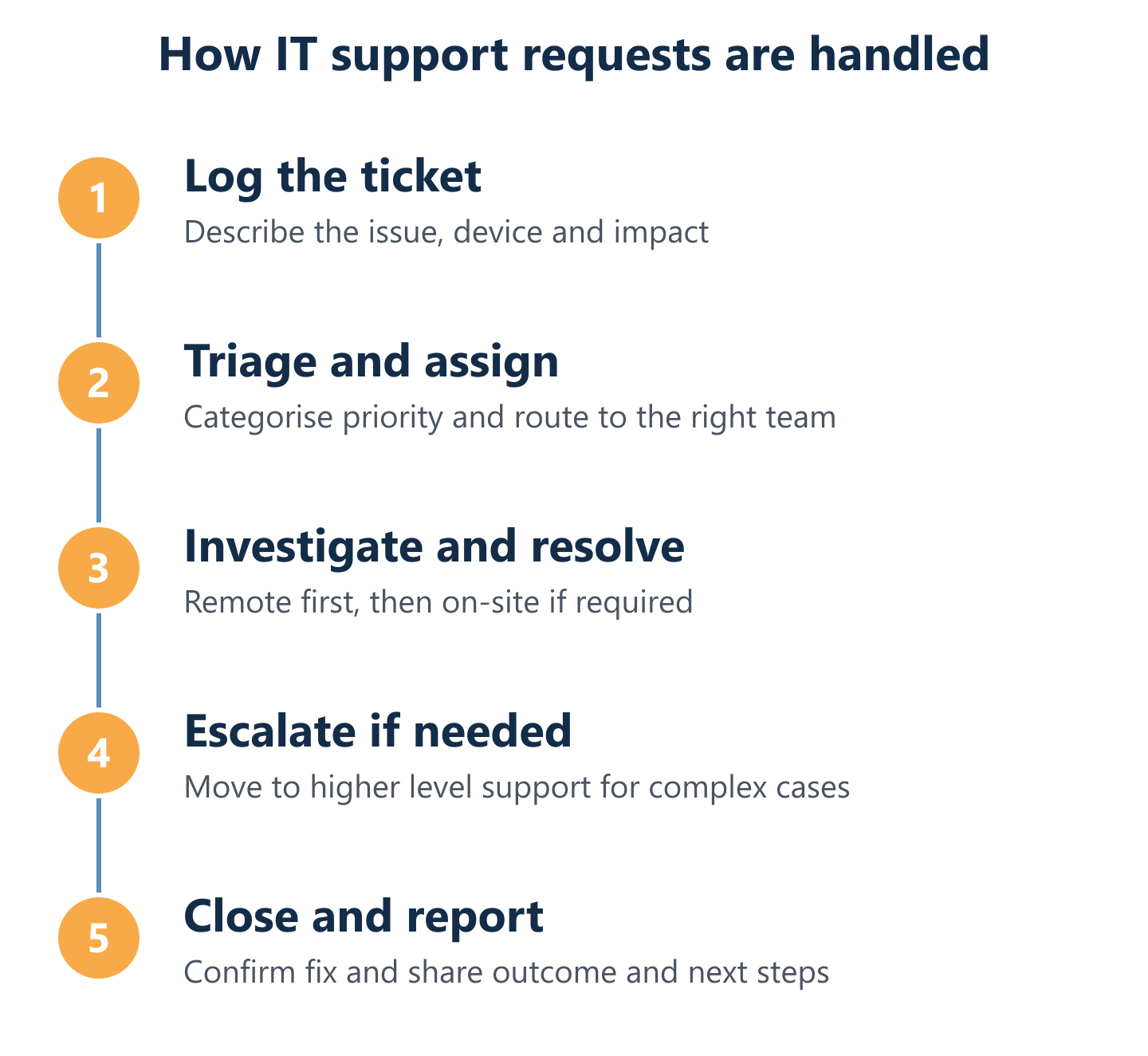
Every support request enters the system as a ticket — whether it arrives by phone, email or a dedicated support portal. Triage assigns a priority level based on business impact: a server down affecting all users is a P1; a single user unable to print is a P3. Priority determines which SLA clock applies and which technician resource is allocated.
This structured approach eliminates the ambiguity of informal support. There is no question of whether a request was received, who is handling it, or what the expected resolution window is. For businesses managing multiple simultaneous incidents — common during infrastructure changes or after a security event — ticket triage ensures that the highest-impact issues are addressed first, not simply the ones that were reported most recently.
Escalation and resolution workflow for faster recovery
Not every incident is resolved at first contact. A structured escalation path defines what happens when a first-line technician cannot resolve an issue within the initial response window: the ticket escalates to a second-line specialist, and if necessary, to senior engineers or vendor support channels. This path is defined in advance, not improvised under pressure.
At Impulso Tecnológico, our team includes specialists across networking (Cisco, Aruba, Fortinet), security (Sophos), cloud (Microsoft 365, Azure) and backup (Veeam) — which means escalation stays within the same provider rather than requiring you to manage multiple vendors simultaneously. For complex incidents, this single-provider model significantly reduces time-to-resolution. Our approach to IT incident management covers this escalation structure in full detail.
What "unlimited assistance" should practically include
"Unlimited assistance" is a claim that requires scrutiny. In practice, it should mean no caps on the number of support tickets, no limits on remote session duration, no additional charge for on-site visits within the agreed coverage area, and no restriction on intervention hours. If any of these have a hidden ceiling, the contract is not genuinely unlimited.
At Impulso Tecnológico, unlimited assistance covers phone, remote and on-site support with no limits on intervention hours or travel. Alongside this, transparent reporting gives you visibility into ticket volumes, resolution times and recurring issue patterns — so you can see whether the service is reducing your incident rate over time, not just resolving individual tickets. This reporting layer is what turns IT support from a cost centre into a measurable operational asset.
Fewer disruptions, faster recovery and a clearer picture of your IT environment — these are the outcomes that a well-structured IT support model delivers. If you are evaluating local IT support providers in San Martin de la Vega, the practical next step is to confirm the scope you need, the response times your operations require, and the service format that fits your budget. Impulso Tecnológico offers a free IT audit as the starting point for any new engagement — giving you an honest baseline before any contract is signed. Our team supports businesses across Spain and beyond; if you want to see how we work in comparable local environments, our IT support in Madrid and IT support in San Sebastian de los Reyes pages provide further context.