
IT support in Pozuelo de Alarcon covers remote helpdesk, on-site computer maintenance, incident management, and proactive monitoring — giving businesses a single point of contact for every technical issue, with defined response times and no unexpected costs.
For most companies operating in Pozuelo de Alarcon, the real problem is not a lack of technology — it is the absence of a reliable partner who can resolve issues quickly, prevent recurring failures, and keep systems secure without requiring a full in-house IT team. Whether you manage a team of five or a workforce of 150, unresolved IT incidents translate directly into lost productivity and operational risk.
Impulso Tecnológico approaches this as an external IT department: combining unlimited remote desktop support as the default channel with structured on-site visits when hardware or network complexity demands a physical presence. The result is a service model built around continuity — not reactive break-fix — supported by SLA-based response targets, detailed post-intervention reports, and a security-by-design mindset that addresses vulnerabilities before they become incidents.
What's included in IT Support Pozuelo de Alarcon
Most businesses searching for IT support in Pozuelo de Alarcon are not looking for software dashboards — they need someone who picks up the phone, fixes the problem, and documents what happened. A professional managed IT service covers three operational layers: reactive support for day-to-day incidents, structured user onboarding, and preventative maintenance that reduces the frequency of failures in the first place.
Impulso Tecnológico positions itself as an external IT department for companies with between 3 and 150 PCs or users. The service starts with a complete audit of existing systems — antivirus status, backup copies, server health, and communications infrastructure — before any support contract is activated. This baseline assessment ensures that the team is not inheriting hidden problems that will generate unnecessary tickets from day one.
| Service layer | What it covers | Delivery model | Typical frequency |
|---|---|---|---|
| Reactive helpdesk | Incidents, access issues, device troubleshooting | Remote (primary), on-site (escalation) | As needed, unlimited remote |
| User onboarding | New starter setup, account provisioning, device configuration | Remote or on-site depending on hardware | Per hire / organisational change |
| Proactive maintenance | Patching, antivirus health, backup verification, system review | Remote monitoring + scheduled checks | Monthly / per intervention |
| Security baseline | Firewall configuration, endpoint protection, secure remote access | Remote configuration + on-site for hardware | Ongoing, reviewed quarterly |
Helpdesk coverage: incidents, access issues and device troubleshooting
The helpdesk is the operational core of any managed IT service. For businesses in Pozuelo de Alarcon, this means a single point of contact for every technical issue a user encounters — from a locked account or a slow workstation to a failed application or a connectivity problem. Impulso Tecnológico handles IT incident management through a remote maintenance system that allows engineers to connect securely to affected devices without requiring a physical visit in most cases. This approach resolves the majority of day-to-day issues within the same session, reducing idle time for users and keeping ticket volumes manageable. Every incident is logged, categorised by severity, and tracked through to resolution — giving both the support team and the client a clear record of what occurred and what was done to fix it.
User onboarding and IT onboarding checks for new starters
Each time a new employee joins, IT onboarding generates a predictable cluster of tasks: device provisioning, account creation, access rights configuration, email setup, and security policy enforcement. When these steps are handled inconsistently — or left to the user — the result is delayed productivity and avoidable security gaps. Impulso Tecnológico includes structured onboarding checks as part of its managed IT services scope, ensuring new starters have correctly configured devices, appropriate access levels, and working connectivity from their first day. For companies on Microsoft 365 environments, this also covers licence assignment and identity management. Where hardware needs to be physically prepared or delivered, an on-site visit is scheduled within the service conditions, keeping the process efficient without creating unnecessary disruption to the wider team.
Proactive maintenance: patching basics, antivirus health and backup verification
Reactive support solves problems after they appear; proactive maintenance prevents many of them from appearing at all. Impulso Tecnológico's approach includes regular patch and vulnerability management to close known security gaps before they can be exploited, antivirus health checks to confirm endpoint protection is active and up to date, and backup verification to ensure recovery copies are complete and restorable. This last point is frequently overlooked: a backup that has never been tested is not a backup — it is an assumption. Beyond these three pillars, each support intervention includes a review of the broader system environment, so that an isolated incident does not mask a deeper infrastructure issue. This preventative layer is what separates a genuine managed IT service from a simple break-fix arrangement. For further context on what structured preventive maintenance looks like in practice, see our overview of preventive IT maintenance for businesses.

Response times, SLAs and escalation process
When a server goes down at 9 a.m. on a Monday, the question is not whether your provider has an SLA document — it is whether they can meet it. Impulso Tecnológico operates with defined response targets that are agreed before the contract starts, not negotiated after an incident. The service resolves around 4,000 IT tickets annually, which provides a realistic operational baseline for the team's capacity and process discipline.
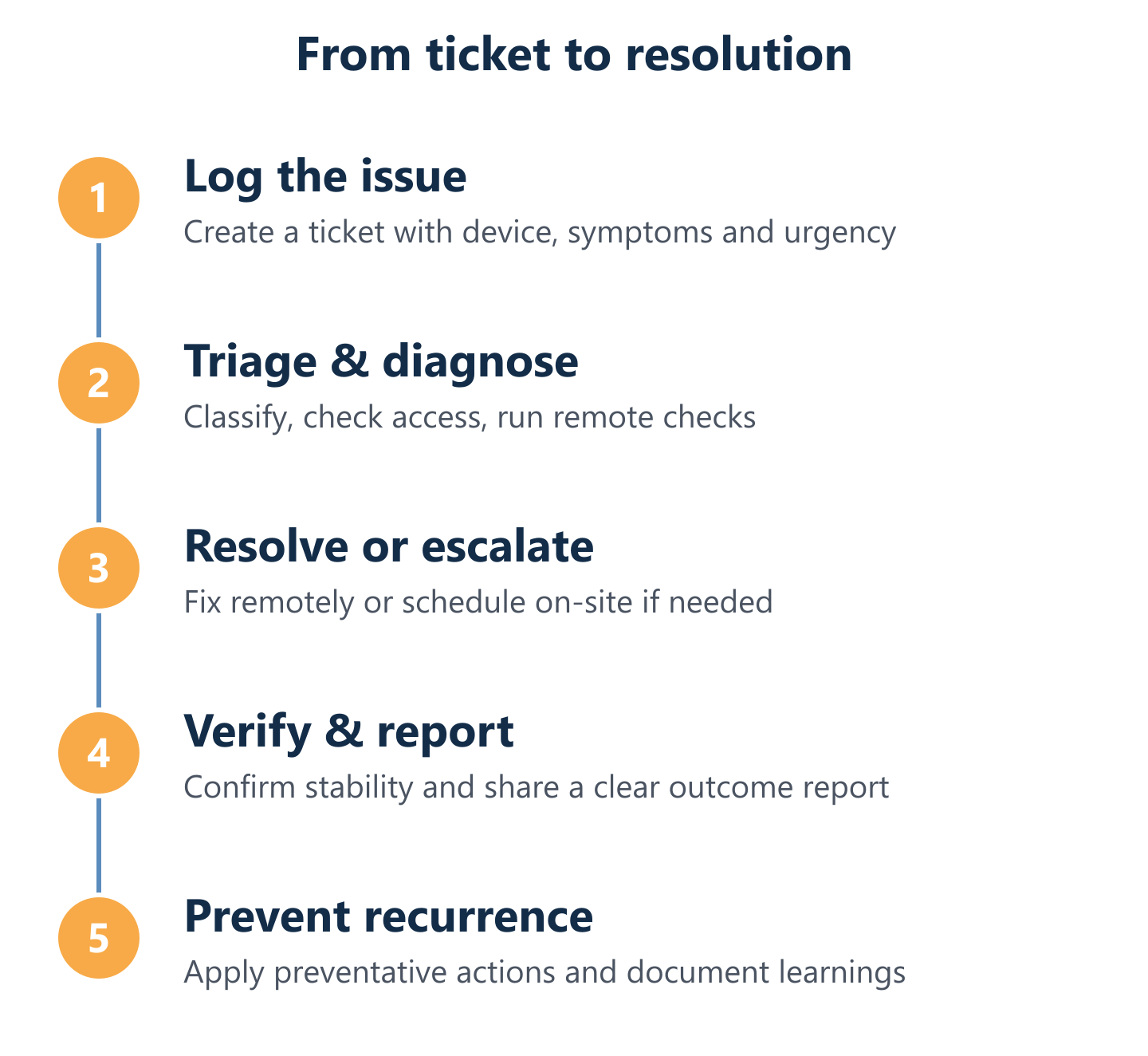
The escalation model follows a structured sequence:
- Ticket registration: The incident is logged via the support channel, categorised by severity (server failure, workstation issue, connectivity problem, or user request), and assigned to the appropriate engineer.
- Initial remote diagnosis: The engineer connects remotely to assess the issue, confirm the scope, and attempt resolution within the first contact where possible.
- Escalation decision: If remote resolution is not achievable — due to hardware failure, network complexity, or physical access requirements — an on-site visit is scheduled according to the contracted SLA tier.
- On-site intervention: The engineer arrives within the agreed response window: under 4 business hours for server breakdowns, under 8 business hours for general workstation issues.
- Post-intervention review: After resolution, the engineer reviews the surrounding system environment to identify related risks, then delivers a detailed report of the actions taken and any recommended follow-up steps.
This sequence ensures that no ticket is closed without a documented resolution and a forward-looking check — reducing the likelihood of the same issue recurring within weeks.
SLA options and what they mean for your operations
An SLA for IT support is only meaningful when it maps to real operational risk. A server failure that keeps your entire team offline is categorically different from a single user's printer issue — and your service agreement should reflect that distinction. Impulso Tecnológico structures response targets accordingly: critical infrastructure failures (servers, core network components) carry a response commitment of under 4 business hours from ticket registration; general workstation and device issues are addressed within 8 business hours. These targets apply to on-site response when remote resolution is not sufficient. For companies that need tighter coverage during specific operational windows — for example, logistics or industrial clients with shift-based schedules — the service model can be discussed during the initial scoping conversation to ensure the SLA aligns with actual business hours and risk tolerance.
Escalation workflow: ticket triage, diagnosis, resolution and follow-up
Effective IT incident management depends on triage quality — the faster and more accurately an issue is classified, the faster it reaches the right engineer at the right level. Impulso Tecnológico's escalation workflow begins at ticket registration, where severity and category are assigned immediately. Low-complexity incidents (password resets, software errors, connectivity checks) are handled at first-contact level via remote desktop support. Medium-complexity issues that require deeper diagnosis — application failures, configuration errors, partial network outages — are escalated to senior engineers within the same session or queued for a scheduled remote session. Hardware-dependent or site-specific problems trigger an on-site dispatch. At every stage, the client receives communication on status and expected resolution time, removing the uncertainty that makes IT incidents feel more disruptive than they need to be.
Reporting that business users can understand: trends, root causes and actions
Technical reports written for engineers are not useful for business owners or operations managers. Impulso Tecnológico delivers post-intervention documentation that explains what failed, why it failed, what was done to fix it, and what actions — if any — are recommended to prevent recurrence. Over time, this reporting layer builds a picture of recurring incident types, affected systems, and resolution patterns that enables smarter infrastructure decisions. A company that sees the same workstation generating five tickets per quarter has a hardware replacement case, not a support problem. Monthly summaries consolidate ticket volume, resolution times, system health indicators, and pending recommendations into a format that non-technical stakeholders can act on — making IT accountability a practical tool rather than a compliance exercise.
Remote vs on-site support: how to choose the right model
The default assumption that on-site support is always better is outdated and expensive. Remote desktop support resolves the majority of business IT incidents faster than dispatching an engineer — there is no travel time, no scheduling delay, and no disruption to the wider office. Impulso Tecnológico uses remote access as the primary delivery channel for all managed IT services, reserving on-site visits for situations where physical presence genuinely changes the outcome.
For businesses in Pozuelo de Alarcon and surrounding areas, this model works well because the local coverage allows on-site response within SLA windows when it is needed — without inflating the cost of routine support. The service scales from 3-user micro-businesses to 150-user mid-market organisations, with or without an existing internal IT function.
Key signals that determine which model applies:
- Remote support is the right call when: the issue is software-based, the user can operate their device, connectivity is functional, and the engineer can replicate the problem through a remote session.
- On-site support is necessary when: hardware has physically failed, network cabling or infrastructure requires hands-on work, a device cannot connect to the remote maintenance system, or a security incident requires physical access control.
- Hybrid model works best when: a company has a mix of remote workers and office-based staff, or when the IT environment includes both cloud-managed systems and on-premises servers that require periodic physical checks.
- Security-by-design applies to both models: whether the engineer connects remotely or visits in person, all access is authenticated, sessions are logged, and post-intervention reports document every action taken on the system.
Decision criteria: complexity, urgency, and whether hardware is involved
Three variables determine whether an incident warrants remote or on-site IT troubleshooting: technical complexity, business urgency, and hardware dependency. A slow laptop running a misconfigured application is a remote job — diagnosable and fixable in a single session without anyone leaving their desk. A server with a failed drive, a switch that needs replacing, or a network cabinet that requires recabling is a physical job regardless of urgency. Urgency affects response time, not delivery model: a critical server failure triggers the fastest available on-site response under the SLA, but a non-critical hardware swap can be scheduled without disrupting the rest of the support queue. Impulso Tecnológico's engineers assess these variables at triage stage, ensuring that the right resource is deployed without over-engineering simple fixes or under-resourcing complex ones.
Cost predictability: monthly hours or flat-rate maintenance options
Unpredictable IT costs are a genuine operational risk for small and medium businesses. A single complex incident handled on a time-and-materials basis can generate an invoice that was not in the budget. Impulso Tecnológico offers two primary structures to address this: monthly hour-rate packages, where a defined block of support hours is available each month at a fixed cost, and flat-rate maintenance options that include unlimited remote assistance with on-site visits structured by the selected package tier. Both models provide cost predictability without requiring a company to forecast exactly how many incidents they will have. For businesses that already have internal IT staff handling routine tasks, a lower-tier package covering escalation support and proactive maintenance may be sufficient. For those without any internal IT resource, a comprehensive flat-rate arrangement functions as a full external IT department. The right fit is confirmed during the initial scoping and audit phase. You can also compare how similar service structures are applied in nearby areas such as our IT support service in Alcobendas.
Security and continuity: backups, monitoring mindset and secure remote access
Security and business continuity are not add-ons to a managed IT service — they are structural requirements. Impulso Tecnológico applies a multi-layer security approach across all service models: firewall configuration and endpoint protection as the perimeter layer, patch and vulnerability management to close known attack surfaces, and verified backup copies to ensure recovery is possible when prevention fails. Secure remote access is enforced for all engineer connections, with authenticated sessions and full activity logging. Backup verification goes beyond confirming that a copy exists — it confirms that the copy is complete, recent, and restorable within an acceptable recovery time. For companies in Pozuelo de Alarcon operating in regulated sectors such as healthcare, education, or financial services, this approach also supports GDPR compliance requirements. The monitoring mindset means that system health is reviewed continuously, not only when a user reports a problem. For a broader view of how this model applies across the Madrid region, see our IT support coverage in San Fernando de Henares.
Before committing to any IT support contract in Pozuelo de Alarcon, align three things: the response times your operations genuinely require, the security and backup standards your sector demands, and the service model — remote-first, flat-rate, or hybrid — that matches your team size and internal IT capacity. Impulso Tecnológico begins every engagement with a complete system audit, so the service is built on verified facts rather than assumptions. The right conversation to have is not "how much does IT support cost?" but "what does my infrastructure actually need?" — and that starts with a no-obligation assessment.