
IT Support Parla covers the day-to-day technical assistance, preventative maintenance, security monitoring and helpdesk services that keep business systems running without interruption. It typically includes remote and on-site support, endpoint protection, backup management and structured response times agreed in a service level agreement.
Most businesses in Parla do not experience IT problems as abstract risks — they experience them as a printer that stops mid-morning, a Microsoft 365 account that locks out a salesperson, or a server that slows down the entire office. Each incident costs time, and repeated incidents cost credibility. The challenge is not just fixing faults quickly; it is preventing them from recurring.
At Impulso Tecnológico, our IT Support Parla service is built around exactly that operational reality. We start with a complete audit of your systems — antivirus status, backup health, server condition, network configuration and a full device inventory — and from that baseline we deliver structured remote and on-site support with clear response targets. Businesses get fewer interruptions, predictable monthly costs and a team that treats every incident as an opportunity to strengthen the wider environment.
What "IT Support Parla" typically includes (and what it does not)
Searching for IT Support Parla returns results that range from industrial engineering catalogues to software repositories — none of which reflect what a business actually needs: a local provider with defined scope, clear response commitments and the technical depth to handle mixed environments. Before signing anything, it is worth understanding what a well-structured managed IT support contract covers and where the gaps typically appear.
A complete IT support offering for SMEs in Parla should address four operational layers: day-to-day helpdesk and incident resolution, preventative maintenance and system monitoring, security controls (endpoint protection, patching, firewall management), and backup and recovery. When any of these layers is missing, businesses end up paying for reactive fixes rather than stable infrastructure.
Impulso Tecnológico structures its IT Support Parla service to cover all four layers from the outset, beginning with a real audit of the environment before any maintenance plan is activated.
| Service Layer | Included in Managed IT Support | Often Missing in Basic Contracts |
|---|---|---|
| Helpdesk & incident resolution | Unlimited remote support hours, ticketing system | Hour caps, no ticketing, slow email-only contact |
| Preventative maintenance | Scheduled checks, updates, health monitoring | Reactive-only model, no scheduled reviews |
| Endpoint security | Antivirus, patching, OS-level security controls | Security left to the client, no remediation workflow |
| Backup & recovery | Backup health checks, recovery testing, offsite copies | Backup assumed to be running but never verified |
| Reporting & consultancy | Post-resolution reports, permanent technical consultancy | No documentation, no strategic advice |
Core services: helpdesk, maintenance and remote support
Managed IT support for businesses in Parla typically revolves around three interconnected services. Helpdesk covers user-reported incidents — from application errors to access problems — resolved through a ticketing system with defined priorities. Preventative maintenance involves scheduled checks on devices, servers and network equipment to catch degradation before it causes downtime. Remote support, delivered through a secure maintenance system, handles the majority of incidents without requiring a physical visit, reducing resolution times significantly.
Impulso Tecnológico's IT maintenance plan includes unlimited remote support hours for all devices covered under the contract. Every assistance session also triggers a wider system review, so a single reported fault does not become a missed signal for a larger underlying problem. This approach reduces repeat incidents and keeps the IT environment stable between scheduled maintenance windows.
Security and continuity: backups, patching and endpoint protection
Endpoint security and backup and recovery are not optional add-ons — they are the foundation that determines whether a business can recover from a ransomware attack, a hardware failure or accidental data deletion. Patching alone closes the majority of known vulnerabilities exploited in SME environments, yet it is routinely delayed or skipped when there is no managed process in place.
Impulso Tecnológico applies a multi-layer security approach across all supported environments: OS-level security configuration, antivirus and endpoint protection (using technologies including Sophos and Fortinet), firewall management and vulnerability remediation. Backup health is verified as part of every maintenance cycle — not assumed. For businesses in Parla that handle client data or operate under GDPR obligations, this structured approach to security and continuity is a compliance requirement as much as an operational one.
Common exclusions: what to ask before you commit
Not every contract labelled "IT support" delivers the same scope. The most common gaps that generate frustration after signing include: hour caps on remote assistance that run out mid-month, no defined service level agreement for response times, security responsibilities left entirely to the client, and backup monitoring that is listed as a service but never actively verified.
Before committing to any IT support provider in Parla, ask these specific questions: Are remote support hours unlimited or capped? What is the on-site response target for server failures versus workstation issues? Does the contract include proactive security patching or only reactive fixes? Who is responsible for verifying backup integrity? Is there a formal ticketing system with status updates?
Impulso Tecnológico addresses each of these points explicitly in its service conditions, with flexible contracting options — hourly packages, monthly hour rates or flat-rate models — so businesses can match the model to their actual risk profile and budget.

Common issues we resolve fast (helpdesk in plain language)
The incidents that drive most IT Support Parla searches are not complex infrastructure projects — they are the everyday faults that stop employees working. Slow computers, printers that drop off the network, email accounts that will not sync, Wi-Fi that cuts out in a meeting room. Each one feels minor in isolation; collectively, they represent hours of lost productivity every week.
What differentiates a managed helpdesk from ad-hoc break-fix is the diagnostic discipline applied to each incident. At Impulso Tecnológico, every assistance session includes a review of the wider system — not just the reported fault. This means a slow PC call may also surface an overdue antivirus update or a backup job that has been silently failing. The result is fewer repeat incidents and a more stable environment over time.
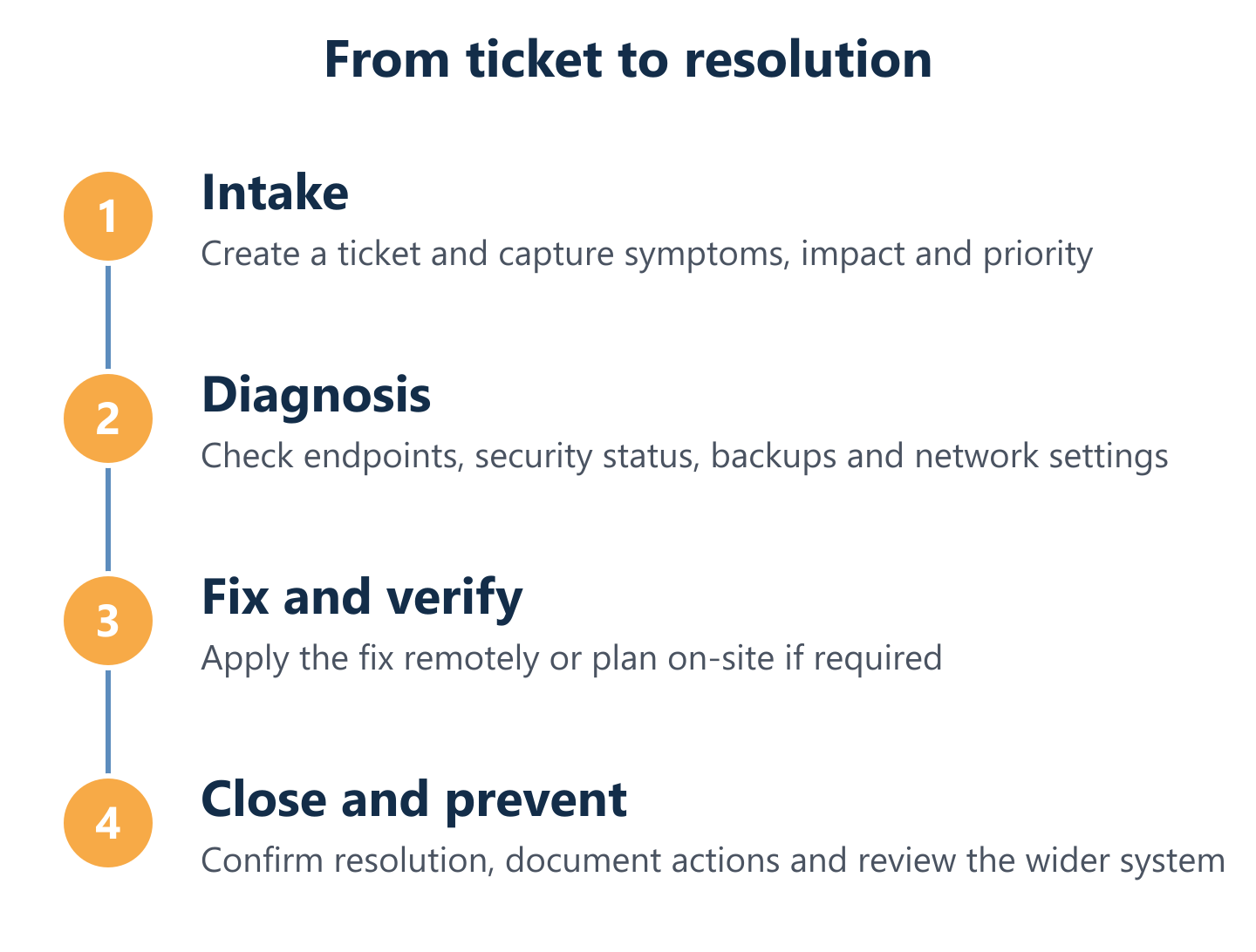
- Incident reported: User logs a ticket via the support system, describing the fault and its business impact.
- Remote triage: A technician connects remotely to diagnose the root cause — covering the device, relevant software and any network dependencies.
- Wider system check: While connected, the technician reviews antivirus status, backup health and any pending updates on the affected machine.
- Resolution or escalation: Most issues are resolved remotely within the same session; hardware faults or network problems are escalated to an on-site visit with a defined response target.
- Documentation and follow-up: A post-resolution report is issued, and any patterns across the environment are flagged for the next preventative maintenance cycle.
PCs, printers and everyday workplace problems
Slow PCs are the most common complaint in SME environments, and the causes are rarely mysterious: accumulated startup programmes, fragmented storage, outdated drivers, or a malware process consuming resources in the background. A structured diagnostic — covering storage health, running processes, antivirus status and Windows update state — typically resolves the symptom and identifies the underlying cause within a single remote session.
Printers and peripheral devices generate a disproportionate number of helpdesk tickets relative to their complexity. Driver conflicts after Windows updates, IP address changes on the network, and misconfigured print queues account for the majority of cases. Impulso Tecnológico's network troubleshooting approach covers device discovery, driver management and queue configuration, reducing the time between fault report and resolution for these everyday workplace problems.
Wi‑Fi, access and remote connectivity troubleshooting
Connectivity problems in business environments usually have one of three root causes: misconfigured access rules, hardware degradation in switches or access points, or interference and coverage gaps in the wireless infrastructure. The difficulty for end users is that all three present identically — the connection drops or slows — which makes self-diagnosis unreliable.
Impulso Tecnológico's network troubleshooting process starts at the infrastructure layer: reviewing switch and access point health (using Cisco and Aruba equipment where deployed), checking DHCP and DNS configuration, and verifying access control settings. For remote access issues — VPN connectivity, remote desktop access — the diagnostic extends to firewall rules and user authentication settings. Where coverage gaps are identified, we can propose infrastructure improvements as part of a broader IT maintenance plan rather than treating each fault as an isolated incident.
Email, Microsoft 365 and user access support
Microsoft 365 support accounts for a significant share of helpdesk volume in businesses that have migrated to cloud-based productivity tools. The most frequent issues include account lockouts triggered by multi-factor authentication misconfigurations, mailbox sync failures on mobile devices, shared calendar and permissions errors, and licence assignment problems after staff changes.
Impulso Tecnológico provides Microsoft 365 support as part of its managed IT offering, covering account access, mailbox configuration, Teams and SharePoint permissions, and licence management. Security configuration within Microsoft 365 — including conditional access policies and email filtering — is also reviewed as part of the service, ensuring that the platform is not only functional but appropriately hardened. For businesses in Parla that rely on Microsoft 365 as their primary collaboration environment, this level of support directly reduces the risk of both productivity loss and security incidents.
Our support process: from ticket to resolution (with SLAs and options)
A support process is only as reliable as the structure behind it. Businesses that have experienced break-fix IT support — where you call when something breaks and wait for someone to become available — understand the cost of an undefined process. Managed IT support replaces that uncertainty with a documented workflow, agreed response targets and a contracting model that matches the business's actual needs.
Impulso Tecnológico's IT Support Parla process is built around the following operational commitments:
- Initial audit: Before any maintenance plan begins, we conduct a complete review of your environment — antivirus status, backup copies, server health, network configuration and a full device inventory — to establish a verified baseline.
- Unlimited remote support: All devices covered under the contract receive unlimited remote assistance hours through our secure maintenance system, with no monthly caps.
- On-site response targets: Server breakdowns are attended on-site in under 4 hours from ticket registration; other device faults within 8 business hours.
- Post-resolution reporting: Every resolved incident generates a written report detailing the fault, root cause and actions taken — essential for audit trails and recurring issue analysis.
- Permanent consultancy: Clients have access to technical consultancy throughout the contract to clarify questions, plan changes or evaluate new requirements.
- Flexible contracting: Choose from hourly packages, monthly hour-rate models or flat-rate plans with unrestricted remote assistance — matched to your budget and risk profile.
Remote vs on-site in Parla: when each approach is best
The decision between remote and on-site support is not a preference — it follows a diagnostic logic. Remote support resolves the majority of software, configuration and user access issues faster than any physical visit, because the technician can connect within minutes of ticket registration. For businesses in Parla, this means most helpdesk incidents are closed the same day without waiting for a van to arrive.
On-site intervention is warranted when the fault is hardware-related (failed drive, damaged network port, faulty access point), when the network itself is the problem and remote access is unavailable, or when the complexity of the environment requires physical inspection. Impulso Tecnológico's response targets reflect this logic: server hardware faults receive an on-site response in under 4 hours; workstation and peripheral issues within 8 business hours. This structure gives businesses in Parla a predictable framework rather than an open-ended wait.
SLAs, response times and availability: what you should expect
A service level agreement is the contractual mechanism that converts a support promise into a measurable commitment. Without defined SLAs, response times are informal and unenforceable — which is precisely the situation many SMEs find themselves in with informal IT arrangements.
For IT Support Parla, Impulso Tecnológico operates with defined response targets: under 4 hours on-site for server failures, under 8 business hours for other covered devices. Service is delivered Monday to Friday, 09:00–17:00 CET — a realistic and transparent availability window that allows proper planning for both the client and the support team. Clients receive detailed reports after each intervention, creating a documented record of system health over time. This reporting discipline also feeds into the preventative maintenance cycle, allowing patterns to be identified and addressed before they generate further incidents.
Request a quote: the information we need to assess your IT needs
Getting an accurate quote for IT Support Parla requires a clear picture of the environment to be covered. Vague requests generate vague proposals — and proposals that do not reflect your actual infrastructure will not hold up once the contract begins.
To provide a free, non-binding maintenance quote, Impulso Tecnológico typically needs the following information:
- Number and type of devices to be covered (workstations, laptops, servers, network equipment).
- Operating systems and key business applications in use (including whether Microsoft 365 is deployed).
- Current backup arrangements and whether a disaster recovery plan exists.
- Any known recurring issues or recent incidents that have caused downtime.
- Preferred contracting model (hourly, monthly rate or flat-rate) and urgency of the requirement.
Where useful, we can also propose an on-site IT audit to determine the optimal state of your systems before committing to a maintenance plan — giving both parties a verified baseline rather than assumptions.
Fewer interruptions and predictable support costs start with the right scope. Businesses in Parla that take the time to define their environment — devices, software, response expectations and security requirements — before requesting a quote end up with contracts that actually reflect their needs. Whether you are looking to complement an existing internal IT team or to externalise the function entirely, the first step is a conversation grounded in your real operational context. For businesses across the Madrid region, our approach to IT support in Aranjuez and IT maintenance in Arganda del Rey follows the same structured methodology — local coverage, verified baselines and flexible service models. Contact Impulso Tecnológico to request your free, non-binding quote and take the first step towards a more stable IT environment.