

IT support in Móstoles covers remote helpdesk assistance, on-site technical visits, proactive computer maintenance, and network and server support — delivered as a structured service with defined response times, not just ad-hoc repairs when something breaks.
For SMEs operating in Móstoles, the real cost of poor IT support is not the repair bill — it is the downtime. A server failure during business hours, a ransomware incident that encrypts shared drives, or a misconfigured network switch can halt operations for hours or days. The challenge most businesses face is not finding someone who can fix a computer; it is finding a partner who prevents problems before they escalate, responds within agreed timeframes, and keeps systems secure and documented.
Impulso Tecnológico approaches IT support in Móstoles as an external IT department: starting with a complete audit of your environment, then combining unlimited remote assistance with structured on-site response targets, and closing every intervention with a detailed report. The result is a support model that reduces recurring incidents, controls costs, and gives your team the confidence to focus on the business rather than chasing technical issues.
IT Support in Móstoles: what's included and how support works
Most businesses searching for IT support in Móstoles want a concrete answer: who handles the call when something breaks, how fast will someone respond, and what does the service actually cover day-to-day? The scope goes well beyond fixing broken hardware. A complete IT support service covers remote helpdesk for software and access issues, on-site visits for hardware faults and infrastructure changes, proactive computer maintenance to prevent failures, and ongoing consultancy so your team always has a technical reference point.
Impulso Tecnológico structures this as an external IT department model. The engagement starts with a full audit of your systems — servers, workstations, network equipment, antivirus and backup status — and an inventory of all devices under contract. From that baseline, the service runs as a combination of unlimited remote support via a dedicated maintenance system and on-site interventions with defined response targets.
| Support Type | Scope | Response Target | Typical Use Case |
|---|---|---|---|
| Remote helpdesk | Software, access, configuration, troubleshooting | Within business hours (9:00–17:00 CET) | User cannot access email, VPN issue, application error |
| On-site — server critical | Server hardware failure, network outage | Under 4 business hours after ticket registration | Server down, critical connectivity loss |
| On-site — workstation/general | PC/laptop faults, peripheral issues, hardware setup | Under 8 business hours after ticket registration | Workstation failure, printer fault, hardware upgrade |
| Preventive maintenance | Health checks, patching guidance, backup verification | Scheduled (monthly/quarterly) | Routine system review, update cycle, backup test |
| Consultancy | Technical guidance, recommendations, planning | Ongoing, included in contract | Technology decisions, security queries, capacity planning |
Remote vs on-site support: when each one is used
Remote IT support resolves the majority of day-to-day incidents without requiring a physical visit. Software errors, access and permission problems, email configuration, VPN connectivity, application crashes, and device troubleshooting via remote maintenance tools are all handled this way — typically faster than waiting for an engineer to travel. For businesses in Móstoles, remote helpdesk means that a user blocked from a critical system at 9:15 on a Monday morning can have the issue diagnosed and resolved within the same hour, without any delay tied to geography.
On-site support is deployed when the fault cannot be resolved remotely: physical hardware replacement, structured cabling changes, server room interventions, network equipment installation, or situations where hands-on access is essential. Defining this boundary upfront — and having both options available under the same contract — is what separates a professional IT support service from a reactive repair shop.
Typical incidents handled in Móstoles businesses
The most frequent IT incidents in SMEs across Móstoles follow a predictable pattern: workstation failures (hardware faults, operating system errors, storage issues), connectivity problems (router or switch faults, Wi-Fi drops, VPN failures), server alerts (disk health warnings, backup failures, performance degradation), and end-user issues (password resets, software licensing, peripheral setup). Security-related incidents — malware detections, suspicious login attempts, phishing clicks — are increasingly common and require immediate containment.
On-site coverage in Móstoles is particularly critical for server breakdowns, where a sub-4-hour response target can mean the difference between a minor disruption and a full-day outage. Hardware faults on critical workstations, network reconfiguration after an office move, and urgent fixes following a security incident are all scenarios where remote support alone is insufficient. Having a provider with defined on-site response commitments for your Móstoles location removes the ambiguity that comes with ad-hoc repair services.
Support workflow: ticket, diagnosis, fix and follow-up
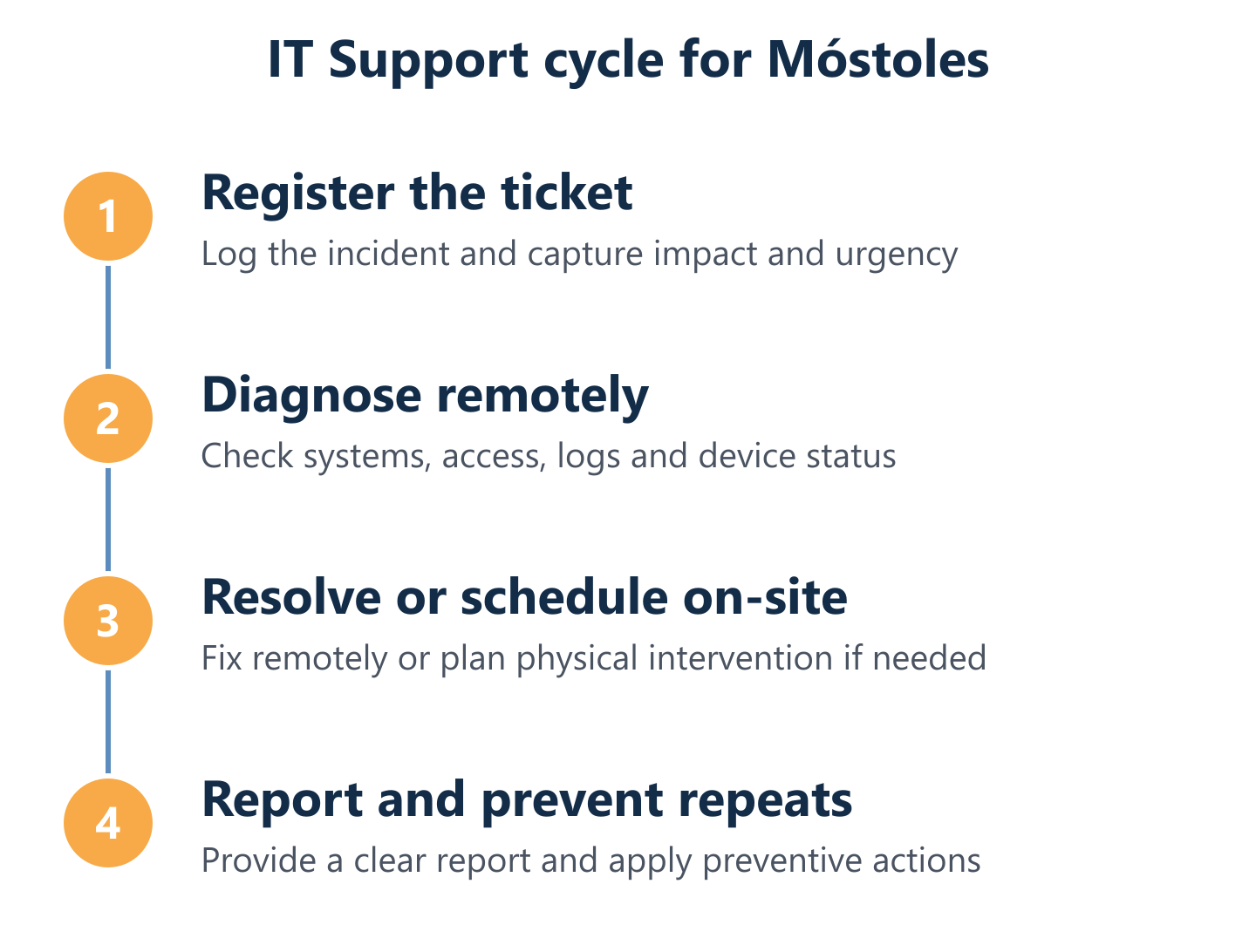
A professional IT support workflow does not start with a phone call and end with a verbal confirmation that "it's fixed." Each incident should follow a structured path: ticket registration (logging the issue with priority classification), remote diagnosis (initial triage to determine whether the fault can be resolved remotely or requires on-site attendance), resolution (applying the fix with the user confirmed back to normal operation), and a written follow-up report detailing what was done, what was found, and any recommendations.
Impulso Tecnológico provides detailed reports after each intervention, which serve two purposes: accountability for the work performed, and a growing knowledge base of your environment's recurring issues. Over time, these reports inform preventive actions — if the same workstation generates three tickets in two months, the data justifies a hardware review rather than another repair. This closed-loop approach is what distinguishes managed IT support from a break-fix relationship where every incident starts from zero.
Managed IT Support vs break-fix: choosing the right model
The choice between a managed IT support contract and a break-fix arrangement is not simply about cost — it is about how much operational risk you are willing to absorb. Break-fix means you pay for support only when something fails; managed services means you pay a predictable monthly or annual fee for continuous coverage, prevention and defined response times. For most SMEs in Móstoles with between 3 and 150 devices, the break-fix model tends to be cheaper on paper until the first serious incident.
Impulso Tecnológico's engagement process for managed IT support follows a clear sequence:
- Initial audit: A complete, real-world assessment of your existing systems — servers, workstations, network, antivirus status and backup integrity — to establish a documented baseline.
- Device inventory: Every device under contract is catalogued, so support is structured and nothing falls through the gaps.
- Remote maintenance activation: Unlimited remote helpdesk support is enabled via a dedicated maintenance system, covering day-to-day incidents during business hours.
- On-site response targets confirmed: Server breakdowns receive an on-site response in under 4 business hours; other devices in under 8 business hours after ticket registration.
- Contract format selection: Hourly packs, monthly hour rates or flat-rate models are matched to your device count, criticality and budget — so the service scales with your business rather than locking you into a rigid structure.
- Ongoing consultancy: Permanent access to technical guidance for questions, decisions and recommendations, included as part of the managed service.
Pros and cons: managed services vs break-fix
Managed IT support reduces recurring problems through prevention, monitoring and standardised processes. When a provider knows your environment — your server configuration, your backup schedule, your network topology — they can identify warning signs before they become failures. Patch management, antivirus updates, backup verification and routine health checks happen on a schedule, not in response to a crisis. The result is fewer incidents, shorter resolution times when incidents do occur, and a documented history of your IT environment that supports better decisions.
Break-fix has one genuine advantage: no fixed monthly cost when nothing is broken. For a business with very few devices, low criticality systems and a high tolerance for downtime, it can be a rational choice. The trade-off is that every incident starts cold — no prior knowledge of your environment, no preventive baseline, and no accountability between visits. For businesses where IT availability directly affects revenue or client commitments, that trade-off is rarely worth it.
Cost predictability: hourly packs, monthly rates and flat-rate models
Break-fix can appear cheaper in the short term, but it introduces two hidden costs that managed contracts eliminate: the cost of downtime while waiting for an available technician, and the cost of repeated incidents that a preventive approach would have avoided. A server failure that takes 6 hours to resolve — because no prior relationship or system knowledge exists — costs far more in lost productivity than a monthly maintenance contract.
Impulso Tecnológico offers three contract formats to match different SME realities. Hourly packs suit businesses with occasional, unpredictable needs. Monthly hour rates provide a fixed allocation of support time with priority access. Flat-rate models — the most comprehensive option — include unlimited remote assistance and a defined number of on-site visits, giving complete cost predictability regardless of incident volume. Selecting the right format starts with understanding your device count, the criticality of your systems, and your acceptable response time in a worst-case scenario. For IT maintenance pricing guidance, our detailed breakdown of IT maintenance contract costs covers the key variables to consider.
Decision checklist for SMEs (3 to 150 users/devices)
Before selecting a contract format, SMEs in Móstoles should work through a short set of practical questions. How many devices and users need coverage? Are any systems — servers, point-of-sale, production software — genuinely critical to daily operations? What is the realistic cost of one hour of downtime? Does your team have any internal IT capacity, or is the provider the sole technical resource? Are you subject to data protection obligations (GDPR) that require documented security controls and backup procedures?
If the answers include critical servers, more than 10 devices, no internal IT staff, and regulatory obligations, a flat-rate managed contract with defined on-site response times is almost always the right choice. If the business has fewer than 5 devices, low criticality and some internal capability, an hourly pack may suffice. The audit that Impulso Tecnológico conducts at the start of every engagement is specifically designed to answer these questions with real data rather than assumptions.

Service levels, security and proactive maintenance for business continuity
Service levels are only meaningful when they are tied to measurable outcomes. Response time targets, ticket resolution rates, satisfaction tracking and regular reporting are the mechanisms that turn a support contract into an accountable relationship. Impulso Tecnológico resolves over 4,000 IT tickets annually across its client base, with service delivered in both Spanish and English — a practical advantage for Móstoles businesses with international operations or multilingual teams.
Beyond response times, a complete IT support service for business continuity must address the following:
- Proactive monitoring: Continuous visibility of server health, storage capacity, network performance and backup status — so issues are flagged before users notice them.
- Preventive maintenance schedule: Routine tasks including health checks, patching guidance and hardware inspections on a defined cycle, not only when something breaks.
- Antivirus and endpoint protection: Configured and maintained using enterprise-grade solutions (Sophos technology is part of Impulso Tecnológico's security stack), not consumer tools left on default settings.
- Backup verification: Backups that are never tested are not backups — regular restore tests confirm that recovery is actually possible when needed.
- Firewall and network access controls: Perimeter security and internal segmentation to limit the blast radius of any security incident.
- GDPR-aligned documentation: Incident records, intervention reports and security configurations maintained in a format that supports compliance obligations.
- Clear communication: After every intervention, a written report is provided — not a verbal summary — so clients always know what was done and what is recommended next.
Proactive maintenance and monitoring: preventing incidents before they happen
Proactive IT maintenance is the practice of identifying and addressing risks before they cause failures. In practical terms, this means scheduled health checks on servers and workstations, patching guidance to keep operating systems and applications current, monitoring alerts for disk health, memory usage and network anomalies, and periodic reviews of backup integrity. For businesses in Móstoles, the value of proactive monitoring is straightforward: a disk showing early failure indicators can be replaced during a planned maintenance window rather than during a crisis at 8:45 on a Tuesday morning.
Impulso Tecnológico applies preventive maintenance as a core component of its managed service contracts, not an optional add-on. The initial audit establishes the baseline; ongoing monitoring tracks deviations from that baseline. This approach is consistent with how we structure preventive IT maintenance for businesses — a methodology that systematically reduces the frequency and severity of unplanned incidents over time.
Security, backups and network/server support
Security is not a separate service from IT support — it is a foundation layer that every support contract should include. Antivirus configuration, backup setup and verification, network access controls and firewall management are all part of the defence-in-depth approach that Impulso Tecnológico applies across client environments. Technologies from Sophos, Fortinet and Veeam form the security and backup stack, providing enterprise-grade protection scaled to SME environments.
Network and server support covers the infrastructure that everything else depends on: switches, routers, wireless access points, on-premise servers and hybrid cloud configurations. A misconfigured switch or an unpatched server is as much a business continuity risk as a hardware failure. For businesses with Microsoft 365 or Azure environments, cloud identity and access management is also part of the scope — ensuring that remote work, shared drives and email are protected with appropriate controls. Business IT security is not a one-time configuration; it requires ongoing review as the threat landscape and your infrastructure both evolve.
How to measure support quality: tickets solved, satisfaction and reporting
The quality of an IT support service is visible in three places: how quickly incidents are resolved, how clients describe the experience, and whether the same problems keep recurring. Impulso Tecnológico tracks these outcomes across its client base — with over 4,000 IT tickets resolved annually and client feedback consistently highlighting fast, efficient resolutions and clear communication for both small and corporate-level issues.
Reporting is the mechanism that makes service levels transparent. After each intervention, a written report documents what was found, what was done, and any follow-up recommendations. Over time, these reports reveal patterns — recurring faults on specific hardware, software conflicts, or security gaps — that inform preventive action. For Móstoles businesses comparing IT support providers, asking for sample reports and ticket resolution data is a straightforward way to distinguish providers with genuine accountability from those who rely on verbal reassurances. For a broader view of how IT support is structured across the Madrid region, our guide to IT support solutions for businesses in Madrid covers the key service components in detail.
Selecting the right IT support model for your Móstoles operations starts with an honest assessment of your current environment: device count, critical systems, security posture and the real cost of downtime for your business. Once those variables are clear, the contract format — whether hourly, monthly or flat-rate — follows logically. Impulso Tecnológico offers a non-binding initial audit that maps your existing infrastructure and confirms the most appropriate support plan, so you start with accurate information rather than assumptions. If you are ready to align your IT support with your actual uptime and security requirements, the next step is a conversation.