
IT support in Majadahonda covers helpdesk assistance, computer maintenance, network management, and cybersecurity for local businesses. A reliable provider combines remote troubleshooting with on-site visits, defined response times, and proactive maintenance — keeping your systems available and your team productive without unexpected costs.
Many SMEs in Majadahonda reach a point where ad-hoc IT fixes no longer scale. A single unresolved server issue can halt operations for hours; a missed security patch can expose the entire network. The real cost is not the repair bill — it is the lost productivity, the compliance risk, and the uncertainty of not knowing what breaks next. Structured IT support changes that equation: incidents are logged, prioritised, and resolved through a defined process, while preventative maintenance reduces the frequency of failures in the first place. Impulso Tecnológico delivers exactly this model for organisations ranging from a handful of workstations to environments with up to 150 users, with support available in both Spanish and English across Spain and beyond.
What IT Support Majadahonda should include (and what to ask)
Before signing any IT support agreement, the scope needs to be written down — not implied. Vague proposals that promise "full support" without defining channels, response times, or responsibilities are a reliable predictor of frustration later. A well-structured IT support service for SMEs in Majadahonda should cover helpdesk access, device and user management, proactive maintenance, security configuration, and documented escalation. Impulso Tecnológico approaches this as an external IT department: the engagement starts with a complete audit of your environment — antivirus status, backup integrity, server health, and communications — followed by a full device inventory. From that baseline, unlimited remote technical support is provided, complemented by on-site assistance when the situation demands it, and every resolution is followed by a detailed report.
| Criterion | Minimum acceptable | What to look for |
|---|---|---|
| Helpdesk access | Email or phone during business hours | Ticketing system with logged response times |
| Remote support | Available on request | Unlimited remote support included in the package |
| On-site visits | Billable per call-out | Included or clearly priced with defined response windows |
| Proactive maintenance | Reactive only | Scheduled checks, patching, and backup verification |
| Security scope | Antivirus installed | Firewall, endpoint protection, backup, and access controls |
| Reporting | None or on request | Post-resolution reports and periodic environment reviews |
| Contract flexibility | 12-month minimum, rigid terms | Fixed monthly, hourly packages, or outsourcing options |
Core services: helpdesk, troubleshooting, and user/device management
A functional helpdesk is the operational backbone of any IT support contract. It handles the daily volume of incidents — a user locked out of their account, an email client refusing to connect, a laptop that will not join the network — and resolves them before they cascade into wider disruption. For SMEs, this means having a single point of contact for all IT requests, with each ticket logged, categorised, and tracked through to closure. Managed IT services for SMEs should also cover user onboarding and offboarding, software licence management, and device configuration, so that every workstation and server in the environment is accounted for and maintained to a consistent standard. Impulso Tecnológico includes device inventory as a standard starting point, ensuring nothing is overlooked.
Support channels: remote first, on-site when required, and clear communication
The majority of IT incidents — connectivity drops, software errors, access problems, email configuration issues — can be resolved remotely in minutes when the right tools and access are in place. Remote-first support reduces resolution time and keeps costs predictable, because a technician does not need to travel to fix what can be handled through a secure remote session. However, hardware failures, network cabling faults, server replacements, and complex infrastructure changes require physical presence. A credible IT support company in Majadahonda will be explicit about which scenarios trigger an on-site visit, what the response window is, and how communication is managed throughout. Impulso Tecnológico uses a dedicated maintenance system for remote support and deploys technicians on-site when the incident type or client preference demands it, with clear communication at every stage.
Commercial clarity: fixed packages vs hourly support vs IT outsourcing
The commercial model of an IT support contract directly affects how your provider behaves. An hourly billing model creates an implicit incentive to spend time rather than resolve quickly. A fixed monthly package aligns the provider's interest with yours: fewer incidents and faster resolutions mean a healthier relationship. Impulso Tecnológico offers three distinct models to match different operational profiles. The flat-rate all-inclusive package covers proactive maintenance and unlimited remote and on-site hours for a predictable monthly fee — suited to organisations that want zero billing surprises. Hourly packages provide pre-purchased hours that do not expire, giving flexibility without commitment. Full IT outsourcing positions the provider as a complete external IT department, aligning technology decisions to business objectives. Choosing the right model depends on your incident volume, growth plans, and whether you have any internal IT capability.

How our IT Support process works (ticket to resolution)
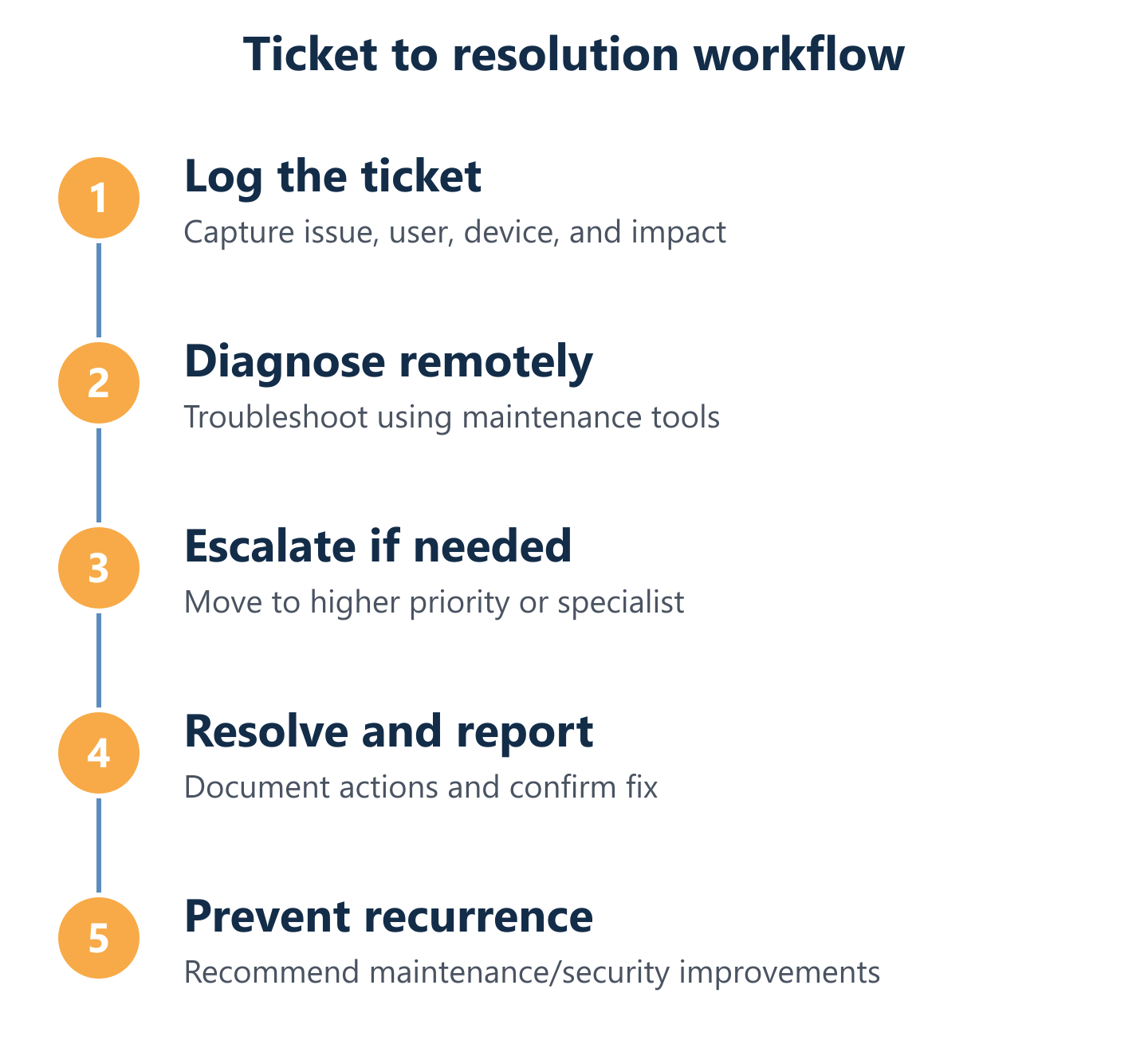
Knowing that a ticket has been raised is not the same as knowing it will be resolved correctly and quickly. The process behind the response is what separates a reactive IT support company from a managed services partner. At Impulso Tecnológico, every support interaction follows a structured workflow designed to minimise idle time and provide full visibility at each stage — from the moment an incident is reported to the post-resolution report that documents what happened and what was done.
- Incident logged: The user reports the issue via the ticketing system; the ticket is categorised by severity and type.
- Initial triage: A technician reviews the ticket, gathers context, and determines whether remote resolution is viable.
- Remote diagnosis and fix: The majority of incidents are resolved remotely through a secure connection, with the user kept informed throughout.
- Escalation decision: If remote resolution is not sufficient, the ticket is escalated and an on-site visit is scheduled within the agreed response window.
- On-site intervention: A technician attends the location, resolves the issue, and performs a proactive review of the surrounding environment.
- Resolution report: A detailed report is issued documenting the incident, root cause, actions taken, and any recommendations to prevent recurrence.
- Ongoing consultancy: Clients have access to permanent technical consultancy to address questions between incidents and plan ahead.
From ticket logging to diagnosis: what happens in the first steps
Before any ticket can be resolved efficiently, the support team needs an accurate picture of the environment. Impulso Tecnológico begins every new client engagement with a complete audit covering antivirus status, backup copy integrity, server health, and the state of communications infrastructure. This baseline — combined with a full inventory of devices under maintenance — means that when an incident is reported, the technician already understands the context: which systems are in scope, what protection is in place, and where the likely failure points are. This prior knowledge dramatically reduces diagnosis time. A technician who already knows your server configuration and network topology does not spend the first twenty minutes asking basic questions — they go straight to root cause analysis.
Remote vs on-site planning: when each mode is triggered and why
Helpdesk and troubleshooting efficiency depends on matching the right support mode to the right incident type. Remote support is triggered first for the vast majority of requests: software faults, user access issues, email configuration, connectivity troubleshooting, and system performance problems. This keeps resolution times short and avoids unnecessary travel. On-site support is triggered when the fault is physical — a failed hard drive, a network switch that needs replacing, a server that will not POST — or when the complexity of the environment requires hands-on assessment. Impulso Tecnológico publishes clear response expectations: less than four business hours for server breakdowns after the incident is registered, and less than eight business hours for other workstations and devices. These thresholds give operations managers a concrete basis for planning and escalation decisions.
SLAs, escalation, and reporting: how you measure performance
An IT SLA response time commitment is only meaningful if it is measured, reported, and enforced. The escalation path defines what happens when a ticket is not resolved within the agreed window — who is notified, what the next action is, and how urgency is communicated. Without a documented escalation process, critical incidents can stall while responsibility is unclear. Impulso Tecnológico includes detailed post-resolution reports as a standard part of the service, documenting each incident, the actions taken, and any follow-up recommendations. Permanent consultancy access means clients are not left waiting for the next incident to ask a technical question. For IT managers and operations directors evaluating providers, asking to see a sample resolution report and a written escalation matrix is a straightforward way to assess whether a provider's process is real or aspirational.
Choosing the right provider in Majadahonda: pros, cons, and security
Selecting an IT support company in Majadahonda is a decision that affects daily operations, data security, and budget predictability for months or years. The right provider is not simply the cheapest or the nearest — it is the one whose service model, security posture, and commercial terms align with how your business actually operates. For SMEs with between 3 and 150 users, the critical factors are response time reliability, the depth of security included in the base service, and whether the provider can scale with your growth without requiring a full contract renegotiation.
- Response time transparency: Ask for published SLA figures, not verbal assurances. Confirm whether response time means first contact or actual resolution.
- Security depth: A provider that installs antivirus and considers security done is not sufficient. Look for firewall management, backup verification, access controls, and patch discipline.
- Proactive vs reactive posture: Providers who only respond to incidents cost more in the long run. Preventive IT maintenance reduces failure frequency and protects uptime.
- Contract flexibility: Fixed monthly packages suit stable environments; hourly packages suit variable workloads. Avoid providers who only offer one rigid model.
- Local on-site capability: Confirm that on-site coverage in Majadahonda is genuinely available within the stated response window, not subcontracted to an unknown third party.
- Reporting and accountability: Regular reports and post-resolution documentation are the minimum standard for a managed services relationship.
- Scalability: Your provider should be able to support you at 20 users and at 120 users without a fundamental change in service quality.
Impulso Tecnológico is structured around this exact profile — combining preventative maintenance, multi-layer security thinking, and flexible commercial models for organisations across the Madrid region and beyond. You can find a similar approach applied to neighbouring areas in our IT support service for Alcobendas businesses and our IT support coverage in Aranjuez.
Remote vs on-site support: trade-offs and best-fit scenarios
Remote-only support works well for organisations where most users work on standard workstations, incidents are predominantly software-related, and the physical infrastructure is stable and well-documented. The advantages are speed and cost: a remote session can begin within minutes, and there is no travel overhead. The limitation is physical access — hardware failures, cabling faults, and on-site security installations cannot be resolved remotely. Mixed remote and on-site coverage is the practical standard for most SMEs: remote support handles the daily volume efficiently, while on-site visits are reserved for situations that genuinely require physical presence. The key question to ask any provider is how quickly they can have a technician on-site in Majadahonda when it is needed, and whether that commitment is written into the contract.
Security included in IT Support: layered protection, firewall guidance, and backups
Cybersecurity is not a separate product to be bolted on after the support contract is signed — it is a discipline that should run through every layer of IT support. Patch management, endpoint protection, backup verification, firewall configuration, and access control are all part of keeping a business environment secure. Impulso Tecnológico works with leading security technologies including Sophos, Fortinet, and Veeam, and includes security software configuration and antivirus installation as part of the managed service. Backup systems are configured and verified — not just installed — because an untested backup is not a backup. Firewall installation and network access controls are included where required, and the security posture is adapted to the client's industry, risk profile, and regulatory obligations including GDPR. For a deeper look at how preventative care reduces security exposure over time, our article on preventive IT maintenance for businesses covers the methodology in detail.
Decision checklist: response times, escalation, reporting, and commercial model fit
When evaluating IT support options for your Majadahonda office, use these four criteria as a practical filter before committing to any provider. First, response times: are they published, specific, and differentiated by incident severity? Second, escalation: is there a documented path that defines who acts when a ticket exceeds its SLA, and how urgency is communicated? Third, reporting: does the provider issue post-resolution documentation, and can you access a summary of open and closed tickets at any point? Fourth, commercial model fit: does the pricing structure match your incident volume and budget predictability needs — fixed monthly, hourly, or full outsourcing? A provider that scores well on all four criteria is one that has built a service designed to be accountable, not just available. For context on how this model applies across the wider Madrid region, see our IT support service in San Fernando de Henares.
Getting IT support right in Majadahonda starts with a clear picture of your environment: how many devices, what mix of remote and on-site needs, and which security gaps require immediate attention. Impulso Tecnológico can align a support package to those specifics — whether that means a flat-rate managed service, a pre-purchased hours model, or a fully outsourced IT department. Share your device count and coverage requirements, and we will confirm the SLAs, escalation process, and security scope that apply before you make any commitment.