
IT Support in Las Rozas de Madrid covers helpdesk assistance, incident resolution, proactive maintenance, and security management for business systems—delivered remotely or on-site, under defined service levels that keep operations running and costs predictable.
Most SMEs in Las Rozas don't lose productivity because of a single catastrophic failure. They lose it incrementally: a server that restarts unexpectedly, a backup that hasn't run in weeks, an antivirus configuration nobody has reviewed since installation. These are the gaps that compound into real business risk. A structured IT Support service addresses them before they escalate—starting with a thorough audit of the actual state of your systems, not a generic checklist. At Impulso Tecnológico, we've spent over 25 years working with companies across Madrid and beyond, and the pattern is consistent: businesses that move from reactive break-fix to a managed support model recover faster, spend less on emergency interventions, and give their staff a reliable environment to work in. For companies in Las Rozas de Madrid specifically, that means having a support partner who can respond remotely within minutes and be on-site when the situation demands it.
IT Support in Las Rozas: what it includes and who it is for
IT Support Las Rozas de Madrid is not a single service—it is a layered model that combines reactive assistance (fixing what breaks) with proactive maintenance (preventing what could break). For SMEs operating in Las Rozas, the practical scope typically spans user helpdesk, device and server maintenance, network monitoring, security configuration, and backup verification. The starting point at Impulso Tecnológico is always a real, complete audit of the client's environment: antivirus status, backup integrity, server condition, and communications infrastructure. From that baseline, we build a maintained inventory and structure the support contract around the actual device count and operational risk profile of the business.
| Support area | Reactive (break-fix) | Managed IT Support |
|---|---|---|
| Helpdesk access | On request, billed per incident | Unlimited remote support included |
| Maintenance | Only when something fails | Scheduled and proactive |
| Backup monitoring | Not included | Regular verification and alerts |
| Security configuration | Ad hoc | Embedded in service standard |
| Cost structure | Variable, unpredictable | Fixed monthly or hourly package |
| Reporting | None | Detailed post-intervention reports |
Core services: helpdesk, troubleshooting, and user assistance
The helpdesk is the operational front line of any IT Support contract. For businesses in Las Rozas, this means a defined channel where staff can report PC issues, server errors, email problems, Wi-Fi connectivity failures, and application faults—and receive a tracked, prioritised response rather than an informal reply. At Impulso Tecnológico, helpdesk requests are handled through our remote maintenance system, which allows technicians to connect directly to affected devices and resolve the majority of incidents without requiring a physical visit. This reduces resolution time significantly and keeps staff productive. User assistance also extends to guidance on business applications, access permissions, and configuration queries—so the helpdesk functions as a genuine technical resource, not just a fault-logging system. Every interaction is documented, contributing to the incident history used for trend analysis and preventive action.
Maintenance scope: devices, servers, networks, and business applications
Proactive maintenance is what separates a managed IT Support service from a simple repair contract. The scope covers the full device estate—workstations, laptops, servers, and network equipment—as well as the software layer: antivirus posture, patch status, backup job verification, and application health. At Impulso Tecnológico, each intervention includes a review of adjacent systems to identify risks that were not the original cause of the ticket. This prevents the common situation where fixing one issue exposes another. For businesses in Las Rozas operating on Microsoft 365 or Azure environments, maintenance also encompasses identity management, licence reviews, and cloud backup verification. The maintained inventory created during onboarding is updated continuously, giving both the client and the support team an accurate picture of the environment at all times—essential for planning, budgeting, and incident response.
Best-fit clients: SMEs with 3 to 150 PCs/users, with or without internal IT
Impulso Tecnológico's managed IT support model is designed for organisations with between 3 and 150 PCs or users—a range that covers most SMEs in Las Rozas de Madrid, from small professional services firms to mid-sized industrial or logistics operations. The service works equally well for companies with no internal IT function (where we act as the complete IT department) and for those with an existing IT coordinator who needs specialist depth or additional capacity. The on-site versus remote balance is calibrated to the client's operational risk tolerance: businesses where server downtime causes immediate production loss need faster on-site response commitments, while office environments with resilient cloud infrastructure may be well served by a primarily remote model with scheduled visits. This is assessed during the initial audit and confirmed in the contract, so there are no ambiguous commitments. For similar deployments in the wider Madrid area, our approach to IT maintenance for businesses follows the same structured methodology.

Helpdesk and incident management: from ticket to resolution
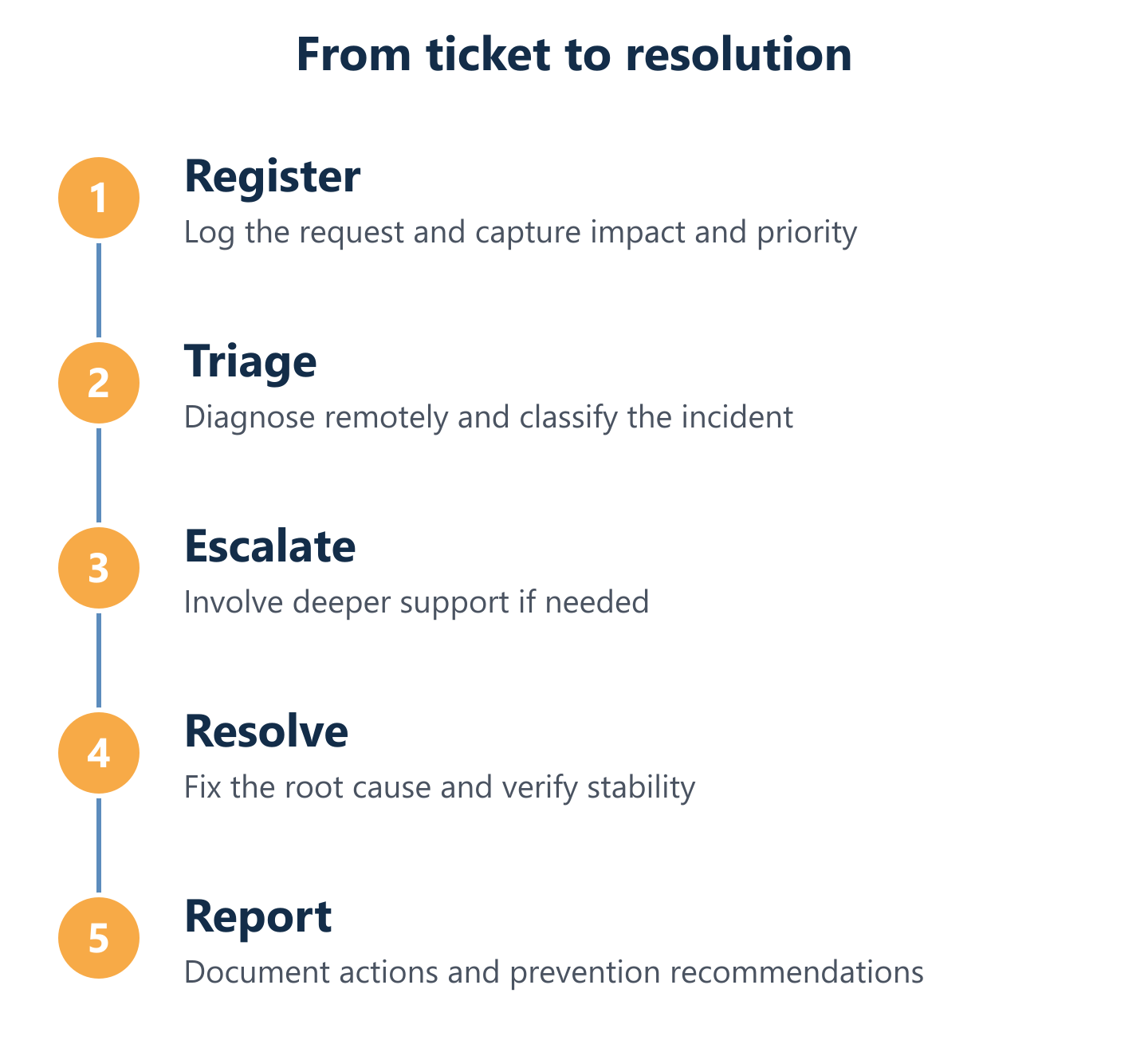
Incident management quality is determined by process consistency, not by the technical skill of individual engineers. A well-structured support operation handles the same incident type the same way every time—logging it correctly, assigning the right priority, escalating when necessary, and closing with documented outcomes. At Impulso Tecnológico, we structure support around service levels and operational transparency. Every intervention generates a detailed report covering what was found, what was done, and what was identified as a risk to address next. Critically, we also review adjacent systems during each visit or remote session—so a printer fault that leads a technician to discover an unmonitored backup failure is not left unresolved. This systemic approach prevents the accumulation of small, unaddressed issues that collectively degrade system reliability. The result is a support record that gives management genuine visibility into IT health, not just a list of closed tickets.
- Incident registration: The user reports the issue via the agreed channel; the ticket is created with device, user, and symptom data captured at the point of contact.
- Triage and prioritisation: The incident is categorised by impact and urgency—server or critical infrastructure failures receive the highest priority and trigger the fastest response commitment.
- Remote diagnosis: A technician connects remotely to assess the issue; the majority of incidents are resolved at this stage without requiring an on-site visit.
- Escalation (if required): Issues that cannot be resolved remotely, or that require specialist input, are escalated with full context passed to the next technical level—no repeated diagnosis for the client.
- On-site intervention: Where physical presence is needed, response times are governed by the SLA tier in the contract (under 4 hours for server breakdowns, under 8 business hours for other devices).
- System review: During each intervention, adjacent systems are checked to identify secondary risks before they become incidents.
- Closure and reporting: The ticket is closed with a documented summary of actions taken, changes made, and recommendations for prevention—shared with the client contact.
How tickets are handled: channels, categorisation, and priority levels
Effective ticket management starts with consistent data capture at the point of registration. When a user reports an issue—whether by phone, email, or ticketing portal—the record must include the affected device, the user, the symptom, and the business impact. This information drives the categorisation decision: a server that is unresponsive during business hours is not the same priority as a single workstation with a slow application. At Impulso Tecnológico, priority levels are defined in the contract and applied consistently, so clients always know what response to expect for a given type of incident. Ticket closure is equally important: a ticket closed without documented resolution notes contributes nothing to the incident history and makes repeat incidents harder to prevent. Every closed ticket in our system carries a record of what was done and what was observed—forming the foundation for monthly reporting and trend analysis.
Escalation and quality control: prevent repeat incidents and hidden risks
Escalation is not a failure of first-line support—it is a quality control mechanism. When an incident exceeds the diagnostic or resolution capability of the initial technician, or when it reveals a deeper infrastructure issue, escalation rules determine how quickly and completely the case moves to a specialist. At Impulso Tecnológico, escalation paths are defined before the contract starts, not improvised under pressure. This matters particularly for incidents involving security misconfigurations, storage failures, or network anomalies—situations where delayed escalation can significantly increase the business impact. Quality control also operates in the other direction: our practice of reviewing adjacent systems during every intervention is specifically designed to surface hidden risks before they generate their own tickets. A technician resolving a connectivity issue who also identifies an antivirus definition that has not updated in three weeks has prevented a future incident, not just closed a current one.
Operational reporting: incident summaries and maintenance outcomes
Reporting is where IT Support becomes a management tool rather than just a cost centre. After each significant intervention, Impulso Tecnológico provides a detailed report covering what was found, what actions were taken, what changed in the configuration, and what risks were identified for follow-up. At the periodic level—monthly or quarterly depending on the contract—this data is aggregated into an overview of incident volume by category, resolution times against SLA targets, maintenance actions completed, and open recommendations. For business owners and operations managers in Las Rozas, this reporting provides the evidence base for IT investment decisions: whether to replace ageing hardware, upgrade a server, or extend a security configuration. It also creates accountability on both sides—the client can see whether the support service is delivering against its commitments, and the support team has a structured record of the environment's evolution over time.
SLAs, coverage, and security continuity for Las Rozas businesses
Choosing a managed IT support provider without reviewing the SLA terms is the single most common mistake SMEs make when outsourcing their IT. Response time commitments, coverage hours, and the scope of what is included in the flat rate versus what is billed additionally all need to be explicit before the contract is signed. For businesses in Las Rozas de Madrid, the practical question is whether the provider can actually deliver on-site within the stated window—not just whether the SLA document says they can.
At Impulso Tecnológico, our maintenance contracts are structured around clear service levels with defined response expectations, and security is not an optional add-on—it is embedded in the standard service:
- Server breakdown response: On-site support within under 4 hours of incident registration, for clients on the appropriate plan tier.
- Other device incidents: On-site response within under 8 business hours of registration.
- Remote support: Unlimited remote assistance included in flat-rate plans, accessible during business hours (09:00–17:00 CET, Monday to Friday).
- Antivirus and endpoint protection: Configuration and monitoring included as standard—not left to the client to manage.
- Backup verification: Regular checks that backup jobs are completing successfully and that recovery is possible—not just that the software is installed.
- Network and access administration: Internet access controls, email security settings, and user access permissions maintained in line with security best practice.
- Flexible contract structures: Options include hourly packages, monthly hour rates, and flat-rate models with variants for on-site visit frequency.
- GDPR-aligned security posture: Security configurations are maintained in accordance with regulatory requirements, reducing compliance risk for the client.
This approach is consistent with how we deliver preventive IT maintenance across our client base—security and continuity are built into the service model, not bolted on after an incident.
SLAs and response expectations: what to ask before signing
Before committing to any IT Support contract in Las Rozas de Madrid, ask the provider to specify response times in writing for at least two scenarios: a server or critical infrastructure failure, and a standard workstation incident. Vague commitments such as "we respond as quickly as possible" are not SLAs—they are descriptions of intent with no contractual weight. At Impulso Tecnológico, server breakdowns trigger an on-site response target of under 4 hours from incident registration; other computer incidents are covered within under 8 business hours. These figures apply within the coverage model of the chosen plan and are confirmed during the quotation process based on the client's location, device count, and selected service tier. Also ask whether remote resolution attempts are made before dispatching an engineer—this affects both speed and cost, and a provider with strong remote capabilities will resolve the majority of incidents without a physical visit.
Remote support vs on-site visits: choosing the right balance
Remote IT support handles the majority of business incidents faster than any on-site visit can—connection is near-instant, diagnosis begins immediately, and resolution often follows within the same session. For businesses in Las Rozas de Madrid, this means that a well-configured remote support model should be the default, with on-site visits reserved for hardware failures, physical installations, or situations where remote access is not possible. Impulso Tecnológico uses a dedicated remote maintenance system that allows technicians to connect securely to client devices, run diagnostics, apply fixes, and verify outcomes—all without requiring the user to do anything beyond granting access. On-site support is included in specific flat-rate plan variants and is also available as a pay-per-visit or hourly on-site option depending on the contract structure. For companies comparing support models across Madrid, our IT support in Alcobendas service uses the same hybrid approach.
Security and continuity: backups, access settings, and risk prevention
Security continuity means that the protections keeping your business data safe are actively maintained—not just installed and forgotten. At Impulso Tecnológico, security configuration is part of the standard IT Support service, not a separate engagement. This covers antivirus deployment and definition currency, backup job monitoring with verified recoverability, network access controls, internet filtering, and email security settings. For clients on Microsoft 365 or Azure, identity and access management is included in the scope. The practical difference this makes is significant: a business whose backup has silently failed for six weeks has no disaster recovery capability, regardless of what the software dashboard shows. Regular verification—not just monitoring—is the standard we apply. For organisations that want to understand the full security dimension of managed IT support, our wider guidance on IT maintenance for businesses covers the security layer in detail.
The right IT Support model for your business in Las Rozas de Madrid depends on three variables: how many devices and users need covering, how quickly your operations are affected when systems go down, and how much IT management capacity you have internally. Getting those three factors right determines whether a flat-rate plan with unlimited remote support is sufficient, or whether you need a higher-tier model with committed on-site response. Impulso Tecnológico will confirm the specific SLA parameters, pricing structure, and coverage scope for your setup during the quotation process—so you start the contract knowing exactly what you are getting.