

IT support in Girona covers helpdesk assistance, remote and on-site technical intervention, preventative maintenance, and security management for businesses of all sizes. A qualified provider resolves day-to-day incidents, protects your infrastructure, and keeps systems running without unexpected downtime.
Many Girona-based businesses still rely on ad-hoc repair services—calling someone only when something breaks. That reactive model creates a predictable pattern: longer downtime, higher costs per incident, and no visibility into what might fail next. The alternative is structured IT support that combines a responsive helpdesk for users, remote diagnosis tools, scheduled on-site visits, and continuous monitoring to catch problems before they escalate.
At Impulso Tecnológico, we work with companies across Spain and Portugal as a Managed Services Provider (MSP) with over 25 years of experience. Our approach to IT support in Girona is built around proactive prevention, fixed monthly costs, and a service model that adapts to your actual environment—whether you have five workstations or a multi-site network. The result is fewer surprises, faster recovery, and a technology partner that communicates clearly at every step.
What IT Support Girona should include (helpdesk, remote & on-site)
The term "IT support" is used loosely—sometimes it means a technician who fixes a broken laptop, sometimes it means a full managed service covering every device, user, and security layer in your organisation. For businesses in Girona evaluating their options, the distinction matters enormously. True IT support combines three operational layers: a helpdesk that handles user-facing incidents and requests, remote support tools that diagnose and resolve the majority of issues without a site visit, and on-site intervention for hardware replacements, cabling, network configuration, or anything that cannot be resolved remotely.
Impulso Tecnológico operates as an IT consultancy and MSP, delivering remote assistance as the first line of response and on-site support across Spain when physical intervention is required. Service is available during business hours (09:00–17:00 CET, Monday to Friday) in Spanish and English, which covers the working day for virtually all Girona-based SMEs. The table below compares the three main support models available in the market:
| Support model | Coverage | Response speed | Cost structure | Best suited for |
|---|---|---|---|---|
| Break-fix (ad hoc) | On request only | Variable, no SLA | Per-incident billing | Occasional, low-complexity needs |
| Remote helpdesk only | Software and user issues | Fast (same session) | Monthly subscription or hours | Remote-first teams, cloud environments |
| Managed IT support (MSP) | Helpdesk + remote + on-site + security + monitoring | Defined SLA per priority | Fixed monthly per device | SMEs needing predictable, comprehensive cover |
Helpdesk vs. break-fix: what changes for your business
A helpdesk service handles the continuous flow of user requests—password resets, software configuration, printer errors, connectivity problems, and device setup—before they become operational blockers. Break-fix, by contrast, only activates when something has already failed. The practical difference for a Girona SME is this: with a helpdesk, your staff have a defined channel to report problems and receive guidance, which reduces the time they spend trying to resolve IT issues themselves. With break-fix, every incident starts from zero, with no prior knowledge of your environment, no documentation, and no accountability for resolution time. Businesses that switch from break-fix to a managed helpdesk model typically see a measurable reduction in the number of repeat incidents, because issues are logged, tracked, and followed up—not just patched and forgotten. Impulso Tecnológico's helpdesk model covers troubleshooting, configuration, and user guidance as part of a structured support service, not as extras billed separately.
Remote support workflow: triage, diagnosis, and resolution
When an incident is reported, the first action is always remote: a technician connects to the affected device or system, replicates the problem, and works through a structured diagnostic sequence. Remote support resolves the vast majority of business IT incidents—software faults, configuration errors, user access issues, cloud service problems—without any delay waiting for a physical visit. The workflow follows a clear path: intake (ticket created with priority assigned), triage (technician reviews symptoms and gathers context), diagnosis (root cause identified), resolution (fix applied and verified with the user), and closure (ticket documented for future reference). Impulso Tecnológico uses this remote-first model as standard, which means faster resolution times and lower disruption for Girona-based clients. On-site intervention is escalated when the issue involves physical hardware, structured cabling, network equipment installation, or anything that genuinely requires a technician on location.
On-site support scope: devices, networking, and infrastructure
On-site IT support covers the physical layer of your technology environment: workstations and laptops, servers, network switches and access points, cabling infrastructure, printers, and peripheral devices. It also includes structured cabling installations for data networks, voice communications, and fibre optic connections—work that cannot be performed remotely by definition. When an on-site visit is scheduled, the technician arrives with prior knowledge of your environment (documented during onboarding), which eliminates the time typically wasted on discovery. Impulso Tecnológico also delivers access control systems, video surveillance installation using Verkada technology, and air quality monitoring solutions as part of its broader infrastructure offering—services that complement IT support and are managed through the same provider relationship. Clear escalation rules ensure that when a remote session identifies a hardware fault or network issue requiring physical intervention, the transition to on-site is communicated promptly and handled without the client needing to chase updates.

How to choose the right IT Support provider in Girona
Choosing an IT support provider is not simply a matter of finding the cheapest option or the nearest office. The decision affects your operational resilience, your data security, and the productivity of every person in your organisation who depends on technology to do their job. Before committing to a provider, work through these evaluation steps:
- Verify service scope: Confirm that the provider covers helpdesk, remote support, and on-site intervention—not just one of the three. Ask specifically what is excluded.
- Check SLA definitions: A credible provider will define response times by priority level (critical, high, normal) and commit to them contractually. Vague promises about "fast response" are not SLAs.
- Assess security coverage: IT support and security are inseparable. Ask whether antivirus management, patch deployment, firewall configuration, and backup monitoring are included or billed separately.
- Understand the pricing model: Fixed monthly per-device pricing gives you cost predictability. Per-incident billing can escalate quickly during a difficult month. Know which model you are signing up for.
- Evaluate technology partnerships: Providers certified by recognised vendors—Sophos, Fortinet, Microsoft, Cisco, Veeam—implement solutions with manufacturer backing, which reduces implementation risk and improves support quality.
- Ask about onboarding and documentation: A provider who does not document your environment thoroughly during onboarding will struggle to support it effectively. Good onboarding is a signal of operational maturity.
Impulso Tecnológico offers fixed monthly pricing per device, which includes both unlimited remote and on-site technical assistance and the infrastructure services that surround it—structured cabling, cloud-based data backup, and network security. Working with certified partners such as Sophos, Fortinet, Veeam, Microsoft, Cisco, and Aruba means solutions are implemented correctly from the start.
Decision checklist: SLA, response times, and escalation rules
An SLA (Service Level Agreement) is the contractual backbone of any managed IT support relationship. It defines how quickly a provider must respond to and resolve incidents at each priority level—typically: critical (system down, affecting all users), high (significant impact on a team or process), and normal (individual user issue or non-urgent request). Before signing with any provider, confirm that the SLA distinguishes between response time (when a technician begins working on the issue) and resolution time (when the issue is fixed), because these are very different commitments. Also verify the escalation path: what happens if a critical issue is not resolved within the agreed window? Who do you contact, and what is the next step? Impulso Tecnológico's managed services model is built around SLA-based operations, including continuous monitoring, preventive maintenance, and scheduled updates—so many potential incidents are intercepted before they trigger an SLA clock at all.
Security coverage criteria: antivirus, patching, backups, and network protection
Business IT security is not a separate product—it is a layer that must be embedded in every aspect of IT support. When evaluating providers, check whether security coverage includes: endpoint protection (antivirus and anti-malware managed centrally, not left to individual users to update); patch management (operating system and application updates deployed on a defined schedule, not ad hoc); backup reliability (automatic, monitored backups with tested restore procedures, not just a backup that runs silently and is never verified); and network security (firewall configuration, access controls, and traffic monitoring). Impulso Tecnológico implements security solutions using Sophos for endpoint protection, Fortinet for firewall and network security, and Veeam for backup and disaster recovery—a combination that covers the three most common vectors of business IT incidents. GDPR compliance is also addressed as part of the data protection layer, which is particularly relevant for Girona businesses handling personal data. For a deeper look at how regular maintenance underpins security, our guide to computer maintenance best practices covers the technical detail.
Pricing models: per-device plans vs. ad-hoc repairs (pros and cons)
Two pricing models dominate the IT support market for SMEs: fixed monthly per-device plans and ad-hoc (break-fix) billing. Each has genuine advantages depending on your situation. Per-device monthly plans give you cost predictability—you know exactly what IT support will cost each month regardless of how many incidents occur. This model also aligns the provider's incentives with yours: the fewer incidents, the better for both parties, which drives proactive maintenance. Ad-hoc billing is lower cost in months with no incidents, but costs spike unpredictably when problems cluster—and they often do, because IT failures are rarely isolated events. For businesses with more than five devices and any dependency on email, cloud services, or networked systems, the per-device model almost always delivers better value over a 12-month period. Impulso Tecnológico's monthly per-device pricing includes unlimited remote and on-site assistance, which removes the hesitation some businesses feel about "calling too often" and encourages early reporting of small issues before they become serious ones.
Incident handling and onboarding: from first ticket to steady operations
The quality of an IT support service is most visible in two moments: how it handles a crisis, and how it sets up the relationship from the start. Incident handling and onboarding are not administrative formalities—they are the operational foundation that determines whether support actually works when you need it.
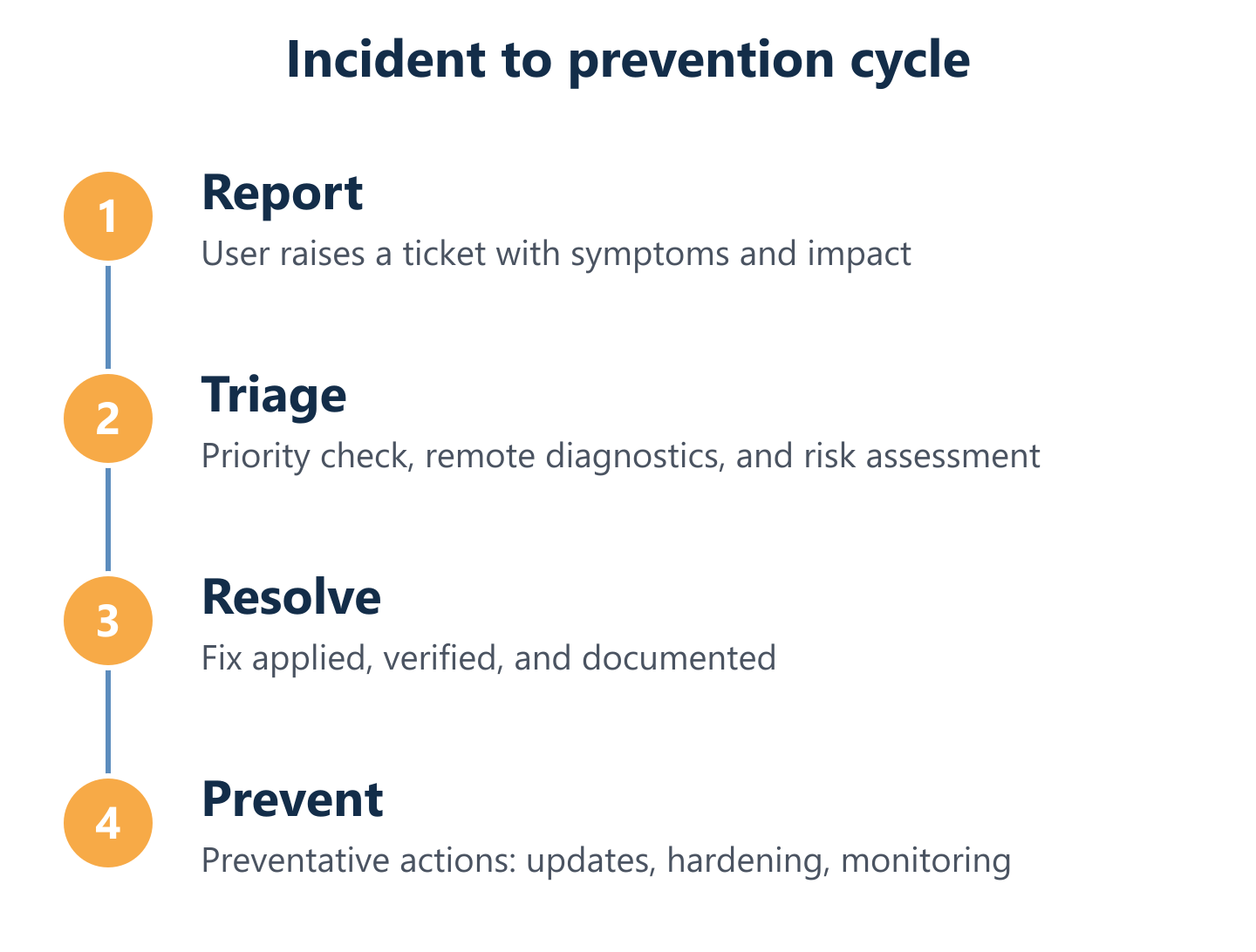
A well-run incident cycle follows a consistent structure regardless of the severity of the issue:
- Intake: The incident is reported through a defined channel (ticket, phone, or email) and immediately assigned a priority level based on business impact.
- Triage: A technician reviews the symptoms, asks targeted questions, and determines whether remote resolution is possible or on-site intervention is needed.
- Resolution: The fix is applied, tested, and confirmed with the affected user before the ticket is closed.
- Documentation: Every incident is logged with root cause, actions taken, and any follow-up required—building an institutional knowledge base of your environment.
- Preventative follow-up: Recurring incidents trigger a review to identify whether a systemic fix (configuration change, hardware replacement, policy update) can prevent repetition.
Impulso Tecnológico's model is built around proactive prevention rather than reactive firefighting. By centralising IT services under a single managed operations model, Girona-based clients benefit from fast, clear communication at every stage—and a support team that already knows their environment before the first critical incident occurs. Our approach to IT support in other Spanish cities, such as our IT support service in Barcelona, follows the same structured methodology.
Triage and response: how urgent issues like email down or malware are handled
Critical incidents—email service failure, suspected malware infection, server unavailability—require a different response rhythm than routine support requests. When a high-priority ticket arrives, triage must happen within minutes, not hours. The technician's first task is to establish scope: is this affecting one user or the entire organisation? Is data at risk? Is the issue still active or has it self-resolved? These questions determine whether the response is a remote session, an emergency on-site visit, or a security containment procedure. For malware incidents specifically, the priority is isolation before remediation—disconnecting the affected device from the network to prevent lateral spread, then working through a structured clean-up and verification process. Impulso Tecnológico's incident lifecycle—report, triage, resolve, verify, and document—ensures that urgent issues are not just patched quickly but understood fully, so the same incident does not recur two weeks later.
Preventative support: monitoring, patching cadence, and configuration hardening
Reactive support resolves incidents after they happen. Preventative support reduces the number of incidents that happen in the first place. The three pillars of preventative IT support are monitoring, patching, and configuration hardening. Monitoring means continuous visibility into the health of your systems—CPU load, disk usage, backup job status, network performance, and security event logs—so anomalies are detected before they cause downtime. Patching means deploying operating system and application updates on a defined schedule, closing the security vulnerabilities that attackers exploit most frequently. Configuration hardening means reviewing and tightening system settings—disabling unnecessary services, enforcing password policies, restricting administrative access—to reduce the attack surface of your environment. Impulso Tecnológico's managed services include all three as standard, with monitoring tools running continuously and maintenance windows scheduled to minimise disruption to working hours. For businesses looking to understand the full scope of what preventative work involves, our detailed guide on computer maintenance for businesses provides a practical framework.
Onboarding steps: inventory, access setup, and first-week stabilisation
A smooth transition to a new IT support provider depends almost entirely on the quality of onboarding. Rushed onboarding—where the provider starts taking tickets before they understand your environment—leads to slower resolution times and avoidable mistakes. A structured onboarding process covers four areas: first, a complete inventory of devices, users, and software licences, so the support team knows exactly what they are responsible for; second, access setup, including remote management agent deployment, admin credentials, and documentation of network topology; third, a security baseline review, identifying any immediate vulnerabilities (unpatched systems, weak passwords, missing backups) that need addressing before routine support begins; and fourth, a first-week stabilisation period, during which the provider monitors the environment closely, resolves any inherited issues, and establishes the communication cadences that will govern the ongoing relationship. Impulso Tecnológico's onboarding aligns support priorities with your business priorities from day one, rather than applying a generic template.
Fewer surprises, faster recovery, and a technology partner who knows your environment before things go wrong—that is what structured IT support in Girona delivers. Whether your priority is reducing downtime, strengthening security, or simply having a reliable team to call when something breaks, the right managed IT support provider combines helpdesk responsiveness, proactive maintenance, and clear communication into a single, predictable service. If you are ready to move beyond ad-hoc repairs and build a more resilient IT operation, the next step is a conversation about your current environment and what a tailored support model would look like for your business.