

IT support in Cuenca covers computer repair, network setup, virus removal, data backup, and managed IT services—delivered in plain English with defined response times and transparent pricing, either remotely or on-site depending on your needs.
Businesses and residents in Cuenca face the same technology pressures as anywhere else: slow systems that kill productivity, unreliable Wi-Fi that interrupts critical work, and security threats that grow more sophisticated each year. The difference between a minor inconvenience and a serious operational disruption often comes down to how quickly and thoroughly the problem is addressed. Impulso Tecnológico brings over 25 years of managed IT services experience to clients across Spain and internationally, combining structured diagnostic processes with enterprise-grade security tools and flexible service models. Whether you need a one-off fix or a fully managed IT department, the goal is the same: a working, secure, and predictable technology environment that lets you focus on what you actually do.
IT Support Cuenca in English: services for expats and locals
Finding reliable IT support in Cuenca that communicates clearly in English is a genuine challenge for expats, international businesses, and local companies working with English-speaking partners. The requirement goes beyond language: it means structured service commitments, documented processes, and a provider who understands both the technical environment and the business context. Impulso Tecnológico operates as a Managed Services Provider with presence across Spain and remote support capability across Europe, Asia, and the Americas—meaning clients in Cuenca access the same quality of service as organisations in major business centres.
Support is available both remotely and on-site, covering several operating environments: home offices, small business networks, multi-site corporate infrastructures, and everything in between. Response targets are defined by service level agreements rather than best-effort promises.
| Support Type | Delivery Method | Typical Response Target | Best Suited For |
|---|---|---|---|
| Standard IT requests | Remote or on-site | Under 8 hours | General troubleshooting, software issues, connectivity problems |
| Business-critical / server issues | Remote or on-site | Under 4 hours | Server failures, network outages, security incidents |
| Proactive managed services | Remote monitoring + scheduled on-site | Continuous monitoring | Businesses wanting prevention over reaction |
| Full IT outsourcing | Remote + on-site as required | Per agreed SLA | Companies without an internal IT department |
What we support: PCs, laptops, printers, and business endpoints
Every support interaction at Impulso Tecnológico is conducted in plain English—no technical jargon unless you want it, and no vague explanations that leave you uncertain about what was actually done or why. This matters particularly for expats and international teams in Cuenca who need to make informed decisions about their technology without relying on translation or guesswork.
In terms of devices, support covers Windows and macOS desktops and laptops, business printers and multifunction devices, mobile endpoints, and server environments. We maintain detailed inventories of managed devices, which means we know the configuration history of each machine before we start diagnosing a problem—reducing resolution time and preventing recurring issues. For businesses, this endpoint visibility is a core part of the managed IT services model rather than an optional extra.
Network help: modem, router, Wi‑Fi, and connectivity troubleshooting
Connectivity problems are among the most disruptive IT issues for both home users and businesses in Cuenca. Remote IT support handles a large proportion of network issues efficiently—router configuration, DNS settings, IP conflicts, and ISP-side diagnosis can all be addressed without an on-site visit in many cases. Where physical access is required, on-site support covers structured cabling checks, wireless access point placement and configuration, and validation of actual throughput against expected performance.
For business environments, Wi-Fi troubleshooting Cuenca engagements typically involve assessing coverage maps, channel interference, and device authentication methods. Impulso Tecnológico works with enterprise-grade networking technologies including Cisco and Aruba, ensuring that solutions are appropriate for the environment—not just a quick fix that creates a different problem next month.
Security and data protection: endpoint security, access control, and backup
Security is not a single product—it is a layered architecture. Impulso Tecnológico integrates Sophos endpoint protection, Fortinet firewalls, and Veeam backup systems as the foundation of a managed security approach. This means threats are blocked at multiple points: at the network perimeter, on individual devices, and at the data layer through verified backups and recovery procedures.
Access control is configured to enforce least-privilege principles, reducing the blast radius of any compromised account. For organisations subject to GDPR, data protection measures are aligned with regulatory requirements, including documented backup schedules and tested recovery procedures. Malware removal Cuenca requests are handled within this same framework—containment first, then cleaning, then verification—rather than as isolated one-off fixes that leave underlying vulnerabilities unaddressed.

Common IT problems we fix in Cuenca (PC, network, security)
Most IT problems that businesses and individuals in Cuenca encounter fall into recognisable categories. The difference between a provider who resolves them properly and one who applies a surface fix lies in the diagnostic rigour applied at each stage. Impulso Tecnológico uses a repeatable process that identifies root cause rather than symptoms, which is why the same problem rarely needs to be fixed twice.
The most frequent issues we address in Cuenca engagements include:
- Slow or unresponsive computers — caused by hardware degradation, software bloat, malware, or misconfigured startup environments. Diagnosis includes hardware health checks, storage performance tests, and memory analysis before any optimisation is applied.
- Network instability and Wi-Fi dropouts — stemming from ISP issues, router misconfiguration, channel congestion, or failing hardware. We validate actual connectivity performance, not just whether a device shows as connected.
- Virus and malware infections — ranging from adware that degrades performance to ransomware that threatens business continuity. Containment, full system scanning, and post-remediation verification are all part of the process.
- Data loss and backup failures — often discovered only when recovery is needed. We audit existing backup configurations, test restore procedures, and implement reliable alternatives where gaps exist.
- Email, Microsoft 365, and cloud access problems — including account lockouts, synchronisation failures, and licence configuration issues that prevent staff from working.
For businesses using our managed IT services in Cuenca, many of these issues are caught through proactive monitoring before they cause visible disruption—which is a measurably different outcome from reactive-only support.
Slow PC and hardware failures: diagnosis, tests, and safe performance tuning
A slow computer is rarely just a slow computer. Before any optimisation is applied, a proper diagnosis covers storage health (checking for failing sectors or near-capacity drives), RAM performance under load, CPU thermal behaviour, and startup process analysis. Impulso Tecnológico runs structured hardware health checks as part of every performance engagement, which means we identify whether a machine needs cleaning and tuning or whether it needs a hardware component replaced before the problem escalates to a full failure.
Safe performance tuning does not involve disabling security features or removing legitimate system processes to gain speed. Instead, it focuses on removing genuine bloat, correcting misconfigured services, and ensuring the operating system and drivers are current. The result is a system that performs reliably within its hardware specifications—and a documented baseline for future comparison.
Wi‑Fi dropouts and router issues: validation steps and stable configuration
Intermittent Wi-Fi is one of the most frustrating IT problems to diagnose because the symptoms are inconsistent. Effective troubleshooting starts by separating the variables: is the issue with the ISP connection, the router or modem, the wireless access point, or a specific device? Impulso Tecnológico uses structured validation steps—testing wired connectivity first, then isolating wireless performance, then checking individual device behaviour—to pinpoint the actual failure point rather than guessing.
For business environments, Wi-Fi troubleshooting in Cuenca often reveals configuration issues such as incorrect channel selection, outdated firmware, or authentication mismatches that cause periodic drops. Once the root cause is confirmed, configuration changes are documented and tested under realistic load conditions to verify stability before the engagement is closed.
Malware removal and security hardening: confirmation, patching, and safer habits
Malware removal is not complete when a scan shows zero threats. A thorough remediation process includes containment (isolating the affected system to prevent spread), full scanning with enterprise-grade tools such as Sophos, manual review of persistence mechanisms and startup entries, and verification that no secondary payloads remain active. Only after these steps is a system considered clean.
Security hardening follows remediation: applying outstanding patches, reviewing browser extensions and installed software, enabling appropriate firewall rules, and confirming that backup systems are intact and unaffected. Impulso Tecnológico also provides practical guidance on safer habits—password management, phishing recognition, and software update discipline—because the most effective security layer is an informed user. For businesses, this is integrated into the broader managed security framework rather than delivered as a one-off lecture.
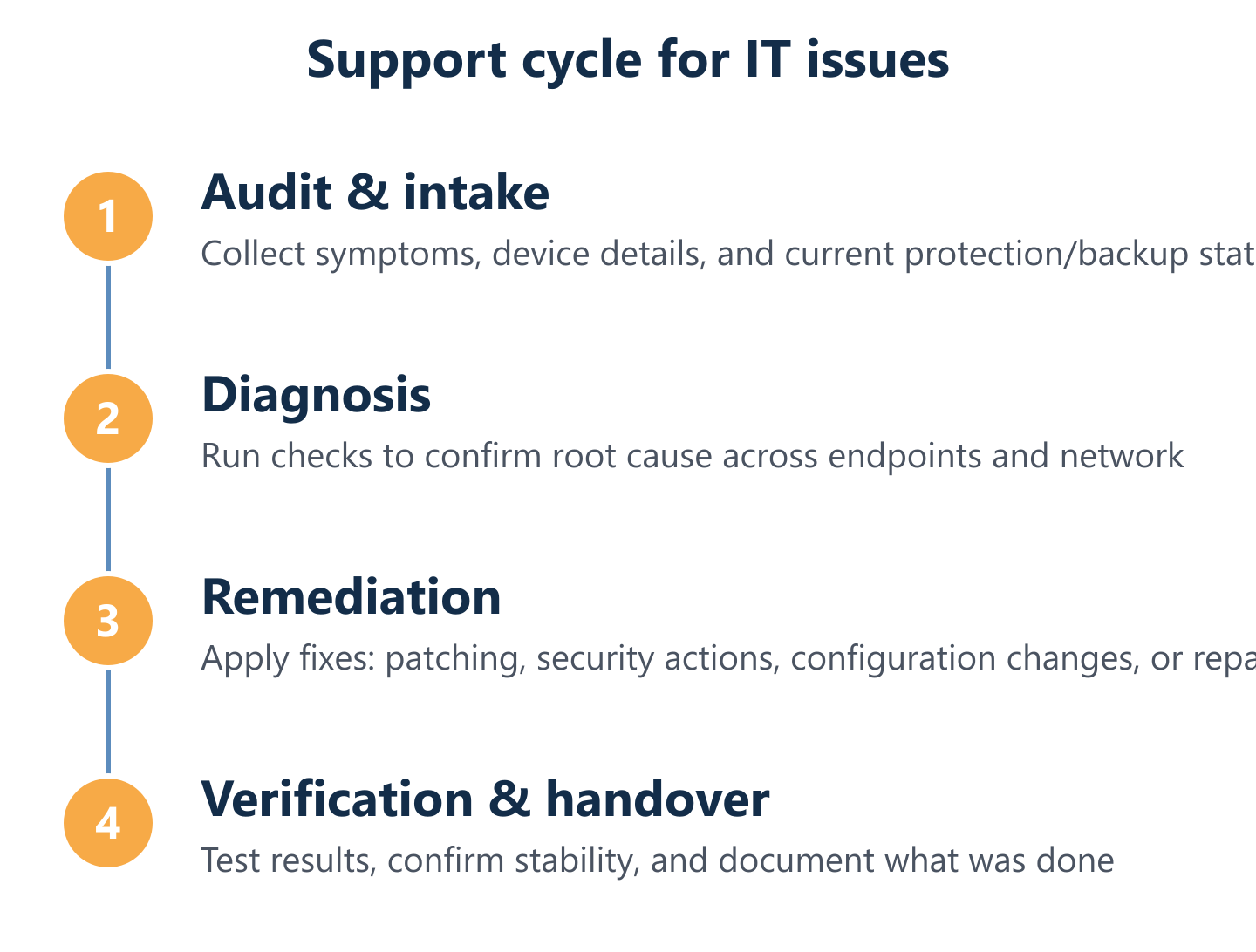
Our process: from diagnosis to a working solution
Structured process is what separates managed IT support from ad hoc troubleshooting. Every engagement with Impulso Tecnológico follows a documented workflow that begins before the first fix is applied and ends with verified outcomes and recorded documentation—not just a verbal confirmation that things seem better.
Key elements of our support process include:
- Initial audit: Every new client relationship starts with a thorough review covering antivirus status, backup configuration, desktop and server environments, and network infrastructure. This creates a baseline and surfaces hidden risks before they become incidents.
- Device inventory management: We maintain detailed records of all managed endpoints, including configuration history, installed software, and hardware specifications. This means we arrive at every support interaction already informed about the environment.
- Proactive reviews during support interactions: While resolving a reported issue, our engineers check adjacent systems for early warning signs—catching problems that have not yet generated a ticket.
- Enterprise-grade security integration: Sophos endpoint protection, Fortinet firewalls, and Veeam backup systems are deployed and maintained as part of the managed service, not sold separately as optional add-ons.
- Patch and update management: Operating system and application patches are applied on a structured schedule, reducing the attack surface and maintaining performance stability.
- Documented outcomes: Every resolved incident is recorded with root cause, actions taken, and recommendations—providing continuity across support interactions and a clear audit trail.
- Clear communication throughout: Status updates in plain English, no unexplained delays, and a defined escalation path if an issue requires additional expertise.
This approach is consistent whether a client uses our IT helpdesk in Cuenca for occasional reactive support or relies on us as their complete IT department through a full outsourcing arrangement.
Step-by-step diagnosis: gather symptoms, run checks, and confirm root cause
Diagnosis begins with gathering accurate symptom information: when did the problem start, what changed recently, which users or devices are affected, and what error messages have appeared. This context shapes which checks are run first and prevents wasted time on irrelevant tests. The initial audit covers antivirus status, backup integrity, desktop and server performance metrics, and network connectivity—giving a complete picture of the environment rather than a narrow view of the reported symptom.
From there, targeted checks confirm or rule out specific root causes. Hardware diagnostics, event log analysis, network traffic inspection, and security scan results are all reviewed before any remediation action is taken. This discipline is what prevents the common pattern of fixing the visible symptom while leaving the underlying cause in place to generate the next incident. For more detail on maintaining healthy systems between support engagements, our complete guide to computer maintenance covers preventative practices in depth.
Remediation and verification: fixes, tests, and "ready to work" validation
Remediation follows a structured sequence: the confirmed root cause is addressed first, then secondary issues identified during diagnosis, then preventative measures to reduce recurrence risk. For software problems this means patching, configuration correction, and software repair or reinstallation. For hardware issues it means component replacement or load-balancing adjustments. For security incidents it means the full containment-clean-verify sequence described in the malware removal section.
Verification is not optional. Before a support interaction is closed, the specific problem reported by the client is tested under realistic conditions—not just checked in isolation. Performance benchmarks are compared against the documented baseline, backup systems are confirmed as operational, and any security tools are verified as active and correctly configured. The client receives a plain-English summary of what was found, what was done, and any recommended next steps. This "ready to work" validation is a standard part of every engagement, not an upgrade.
Service models in Cuenca: fixed price all inclusive, hourly reactive, or full outsourcing
Business IT outsourcing in Cuenca is not a single product—it is a spectrum of engagement models, and the right choice depends on the size, complexity, and risk tolerance of the organisation. Impulso Tecnológico offers three clearly defined options.
The Fixed Price All Inclusive model provides unlimited remote and on-site support hours within agreed SLAs (under 8 hours for standard requests, under 4 hours for server or business-critical issues), proactive monitoring, patch management, and security maintenance for a predictable monthly fee. This eliminates budget uncertainty and aligns the provider's incentives with preventing problems rather than billing for them.
The hourly reactive model suits organisations with lower support volumes or those supplementing an existing internal IT team. Support is delivered on demand, billed by time, with the same diagnostic rigour and documentation standards.
Full IT outsourcing positions Impulso Tecnológico as the client's complete IT department—handling strategy, procurement, infrastructure, security, and day-to-day support under a single service agreement. The exact scope is defined by customer requirements and documented in the service contract. Similar structured approaches are in place for our clients in IT support in Ciudad Real and IT support in La Coruña.
IT support in Cuenca works best when it is built on clear commitments, documented processes, and a provider who understands both the technology and the business context. Whether you need a single issue resolved, a recurring managed service, or a complete outsourced IT function, the starting point is a conversation about your current environment and what you actually need. Contact Impulso Tecnológico to request a quote, and we will recommend the service model that fits your situation—with no obligation and no technical jargon.