
Businesses in Coslada looking for IT support need a provider that combines fast remote assistance with defined on-site response times, clear service levels, and proactive maintenance — not just break-fix calls. Impulso Tecnológico delivers exactly that, covering everything from helpdesk tickets to server recovery.
Most IT problems that disrupt office operations — a workstation that won't boot, a corrupted user profile, a failed backup, or a network outage — share one root cause: the absence of structured, preventative support. Without a clear support plan, small issues escalate into costly downtime. Impulso Tecnológico addresses this by starting every engagement with a full audit of your systems — antivirus status, backup copies, server and communications condition — and building a support model around what your IT estate actually needs. The result is fewer interruptions, faster resolution when incidents do occur, and a measurably safer environment for your team to work in.
IT Support in Coslada: what we cover
Searching for IT support in Coslada typically signals a specific need: reliable, day-to-day assistance for office IT, with the confidence that someone will respond quickly when something breaks. The scope of that support, however, varies significantly between providers. At Impulso Tecnológico, our managed IT support service covers the full stack of what a business office depends on — from individual workstations and laptops to servers, communications infrastructure, and cloud platforms such as Microsoft 365.
The table below outlines the core support areas and what you should expect from a structured service:
| Support Area | What It Covers | Impulso Tecnológico Approach |
|---|---|---|
| Helpdesk & Troubleshooting | PCs, laptops, printers, user accounts, software errors | Unlimited remote support included in contract; ticket-based tracking |
| Server Support | Server availability, OS updates, hardware alerts | On-site response under 4 hours after breakdown is registered |
| Endpoint & Device Management | Antivirus, patching, inventory, configuration | Initial full audit + ongoing preventative maintenance per visit |
| Network & Communications | LAN, Wi-Fi, firewall, connectivity issues | Security recommendations and vulnerability management included |
| Cloud & Microsoft 365 | Email, licences, OneDrive, Teams, identity management | Configuration, support, and licence management as part of service |
| Backup & Recovery | Backup verification, disaster recovery planning | Backup status checked at every intervention; Veeam-based solutions available |
Helpdesk scope: tickets, troubleshooting, and resolution
A helpdesk service is only as useful as the range of issues it can resolve without escalation. For most office environments in Coslada, the daily ticket queue includes workstation errors, printer connectivity problems, user account lockouts, slow performance, software installation requests, and Microsoft 365 configuration issues. Impulso Tecnológico's helpdesk covers all of these under a structured ticketing system that logs each request, assigns priority, and tracks resolution — giving you full visibility of open and closed incidents. Support is available in both Spanish and English, which matters for internationally active businesses operating from the Madrid corridor. Every ticket is an opportunity not just to fix the immediate problem but to identify whether a pattern exists that preventative maintenance could eliminate.
Remote vs on-site support for office IT in Coslada
The majority of IT incidents — estimated at around 70–80% in typical SME environments — can be resolved remotely using secure remote access tools, without any need for a physical visit. Impulso Tecnológico provides unlimited remote support as a standard component of its maintenance contracts, meaning your team can raise a ticket and receive assistance without waiting for an engineer to travel. For issues that genuinely require physical intervention — hardware failure, network cabling, server room access — on-site response targets are defined contractually: under 4 business hours for server-level incidents and under 8 business hours for other devices, measured from the moment the breakdown is registered. This hybrid model keeps response times fast and costs predictable, which is exactly what businesses in the Coslada and wider Madrid area need from a managed IT support partner.
Endpoint, server, and communications support basics
Keeping endpoints, servers, and communications infrastructure in good health requires more than patching when problems appear. Impulso Tecnológico applies a multi-layered approach: security software is configured on operating systems, antivirus protection is verified and maintained, backup copies are checked at every intervention, and network security recommendations — including firewall configuration and vulnerability management — are applied as part of the standard service. Technology partners including Sophos and Fortinet underpin the endpoint and network security layer, while Veeam supports backup and disaster recovery scenarios. During every on-site visit, the engineer reviews the broader system — not just the reported fault — to catch degrading components before they cause unplanned downtime. This preventative posture is what separates managed IT support from reactive break-fix contracts.

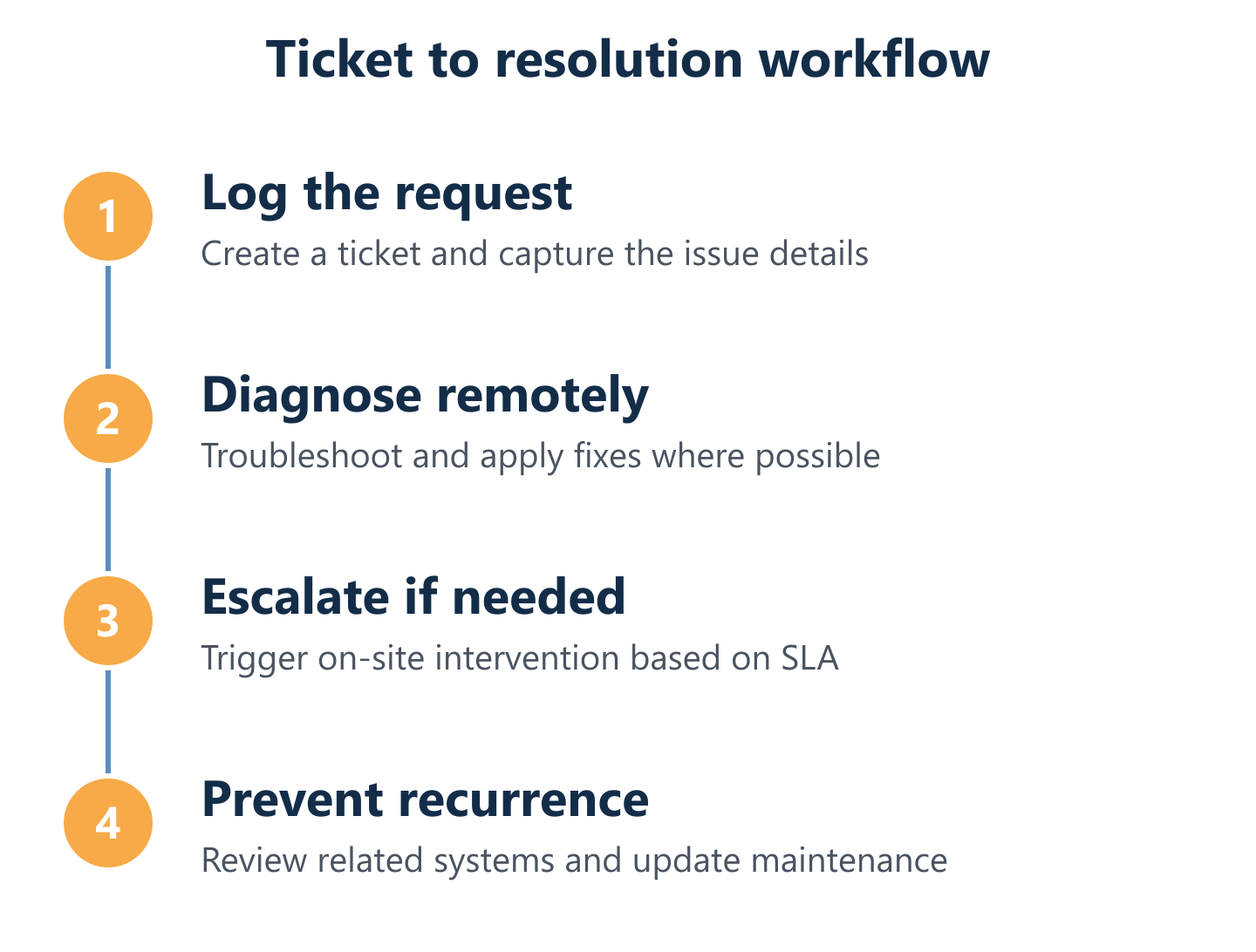
How our IT support works (from ticket to resolution)
Understanding the workflow behind a support service is the fastest way to judge whether it will actually reduce your downtime. Many providers describe what they cover but not how they operate. At Impulso Tecnológico, the process is structured from day one and built around transparency at every stage.
- Initial audit: Before any contract begins, we conduct a full assessment of your IT environment — antivirus status, backup copies, server and communications condition — and build a complete inventory of the devices to be maintained. This removes blind spots immediately.
- Ticket submission: Users raise requests via the agreed channel (phone, email, or remote support tool). Each request is logged, timestamped, and assigned a priority level based on business impact.
- Remote triage and resolution: The majority of incidents are resolved remotely through our secure remote maintenance system, with no waiting for an on-site visit. Unlimited remote support is included in the contract.
- On-site escalation: When remote resolution is not possible, an engineer is dispatched with contractual response targets: under 4 business hours for server issues, under 8 business hours for other covered devices.
- Preventative review: During every intervention — remote or on-site — the broader system is reviewed to identify risks before they become incidents, reducing the total volume of future tickets.
- Reporting and communication: Clients receive clear updates throughout. Ticket status, resolution notes, and recurring patterns are communicated in plain language, in Spanish or English as required.
From request to ticket: channels, prioritisation, and tracking
Before Impulso Tecnológico handles a single support ticket, it conducts a complete audit of the systems to be maintained. This is not a formality — it is the foundation of accurate prioritisation. Without knowing the real state of your antivirus configuration, backup schedule, server health, and network topology, a helpdesk cannot correctly triage incoming requests or predict where the next failure is likely to occur. The audit produces a verified inventory of covered devices and a baseline assessment of risks. From that point, every incoming request is logged with context: which device, which user, what impact on operations. Priority is assigned based on business criticality — a downed server is not treated the same as a slow printer — and the ticket remains tracked until resolution is confirmed by the client.
Resolution and prevention: fixes plus preventative review
Resolving the ticket in front of you is only half the job. Impulso Tecnológico's maintenance model includes a preventative review at every intervention: when an engineer connects remotely or visits on-site, they check the wider system — not just the reported fault. This means reviewing backup status, checking for pending security updates, and flagging any hardware showing early signs of degradation. The remote maintenance system used for unlimited support sessions is also the tool through which proactive checks are run between incidents, ensuring that the state of your IT environment is continuously monitored rather than only examined when something breaks. This approach is what allows Impulso Tecnológico to resolve thousands of IT tickets annually while keeping recurring incident rates low for clients on structured maintenance plans.
Service levels and contractual options that match your IT estate
On-site response targets only have value when they are contractually defined and triggered by a clear event — specifically, the moment a breakdown is formally registered. Impulso Tecnológico structures its service levels around this principle: under 4 business hours for server incidents, under 8 business hours for other covered devices. These targets are not aspirational; they are part of the contractual agreement. Beyond response times, the service level framework covers what is included in each plan tier — whether unlimited remote support hours apply, how many on-site visits are scheduled per period, and whether technical project work (such as network migrations or office relocations) falls within scope or is handled separately. This clarity prevents the ambiguity that often leads to disputes between businesses and their IT providers. For a more detailed breakdown of what different plan structures typically cost and include, our IT Maintenance Price guide covers the key variables to evaluate.
Response times, SLAs, and how to choose the right plan
An SLA is only as useful as the specificity behind it. Vague commitments like "we respond quickly" or "we prioritise your business" are not measurable and cannot be held to account. When evaluating IT support options for your Coslada office, the following signals indicate a provider that takes accountability seriously:
- Defined response time targets by incident type: Server failures and full outages should carry shorter response windows than single-device issues. Ask for the exact figures in writing.
- Escalation paths: What happens if the first-line remote team cannot resolve the issue? A clear escalation path to on-site intervention — with its own time target — is non-negotiable for business-critical environments.
- Scope of coverage: Confirm exactly which devices, platforms, and locations are covered. Microsoft 365 support, backup verification, and network security should be explicitly listed, not implied.
- Measurable satisfaction and ticket volume: Providers who track client satisfaction and can report on annual ticket volumes demonstrate operational maturity. Impulso Tecnológico resolves thousands of IT tickets per year and measures client satisfaction systematically.
- Technology partner certifications: Support quality is partly determined by the tools and vendor relationships behind it. Impulso Tecnológico works with certified partners including Sophos, Fortinet, Veeam, Microsoft, Cisco, and Aruba — giving clients access to enterprise-grade tooling regardless of company size.
- Language and communication standards: For businesses with international staff or operations, support available in both Spanish and English removes a common friction point.
- Contractual flexibility: Rigid long-term contracts with no adjustment mechanism are a risk. Look for providers that offer plan options — hourly, monthly fixed, or flat-rate — and can scale as your IT estate changes.
Response times and SLA expectations for Coslada businesses
The benchmark response times that Coslada businesses should expect from a structured IT support contract are straightforward: remote support should begin within the same business day for standard issues, and on-site intervention for server-level incidents should occur within 4 business hours of the breakdown being registered. For other covered devices, 8 business hours is the standard target. These figures are not arbitrary — they reflect the operational reality that a downed server affects the entire organisation, while a single faulty workstation, though disruptive, allows work to continue via other means. When reviewing a provider's SLA, also ask about escalation paths: what triggers a priority upgrade, who authorises it, and how the client is kept informed throughout. Providers that cannot answer these questions clearly are unlikely to meet their stated targets consistently. You can compare how similar SLA structures apply in nearby locations by reviewing our IT Support in Madrid service page.
Pros and cons: hourly vs monthly fixed vs flat-rate models
Choosing the right contract model is a financial and operational decision. Each structure has a different risk profile:
- Hourly packages: Best suited to businesses with low and unpredictable IT needs. You pay only for time used, but costs can spike during incidents, and there is no incentive for the provider to invest in prevention.
- Monthly fixed packages: Provide cost predictability and typically include a defined scope — a set number of remote support hours, scheduled on-site visits, and specific device coverage. Good for SMEs with stable IT environments.
- Flat-rate models: Include unlimited remote assistance and defined on-site visits within the monthly fee. This aligns the provider's incentive with prevention: fewer incidents mean lower operational cost for both parties. Impulso Tecnológico offers this model, with Microsoft 365 support, device management, and security maintenance included depending on the chosen plan tier.
Before signing any contract, confirm explicitly what is covered: helpdesk access, device count, Microsoft 365 support, backup verification, and whether security tools (antivirus, firewall management) are included or billed separately.
Security and reporting: what "good support" looks like in practice
Security is not a separate service — it is embedded in how good IT support operates day to day. At Impulso Tecnológico, every maintenance contract includes layered protection as standard: operating system security configuration, antivirus deployment and verification, backup copy management, and network security recommendations including firewall setup and vulnerability management. The technology partners behind these layers — Sophos for endpoint protection, Fortinet for network security, Veeam for backup and recovery — are certified vendors, not generic tools. On the reporting side, clients should expect regular updates on the state of their IT environment: which devices are at risk, which patches are pending, and what the backup status shows. Transparent reporting is what converts reactive support into a managed service that genuinely reduces business risk. For businesses that want to understand the preventative maintenance model in more depth, our guide to preventive IT maintenance explains the methodology and its business impact.
Fewer interruptions and faster recovery do not happen by accident — they are the result of a support model built around your real systems, not a generic template. If your current IT support leaves you uncertain about response times, security coverage, or what happens when a server goes down, that uncertainty is the problem to solve first. Impulso Tecnológico offers a structured assessment of your IT environment as the starting point: a clear picture of where you stand, what your risks are, and which service level matches your operational needs. Contact us to book your initial IT assessment for your Coslada office.