

IT Support Cordoba covers remote helpdesk, onsite assistance, device and infrastructure troubleshooting, and proactive maintenance—delivered under structured SLAs with guaranteed response times. It is the operational backbone that keeps systems available, secure and predictable for businesses of any size.
Most companies in Cordoba don't struggle to find a technician for one-off fixes; they struggle to find a partner who manages their IT environment consistently, prevents issues before they escalate and gives management clear visibility into what's happening. Unplanned downtime, outdated security configurations and unpredictable IT costs are the real problems—and they compound over time when support is reactive rather than structured.
At Impulso Tecnológico, we address this with a managed support model built around an initial audit of your environment, fixed-price all-inclusive packages and contractually defined response times. The result is fewer interruptions, a stronger security posture and IT costs that are genuinely predictable month to month.
IT Support Cordoba: what we cover (and what "support" means)
The term "IT support" is used loosely enough that two providers can describe fundamentally different services with the same words. Before comparing options, it's worth establishing what a complete support offering actually includes. At its core, IT support in Cordoba should cover three layers: reactive helpdesk (resolving incidents and user requests as they arise), proactive management (monitoring, patching, asset tracking and regular reviews), and physical intervention capability (onsite visits for hardware, cabling or infrastructure tasks that can't be resolved remotely).
Impulso Tecnológico structures its IT managed services around all three layers. Every engagement begins with a thorough audit covering antivirus protection, backup systems, desktops, servers and communications infrastructure. That baseline feeds directly into the support model, so SLAs are set against a real picture of the environment—not a generic template.
| Support component | Reactive-only provider | Managed support provider (Impulso Tecnológico) |
|---|---|---|
| Helpdesk / incident resolution | Yes (on request) | Yes (structured ticketing, defined channels) |
| Proactive monitoring | Rarely included | Continuous remote monitoring and management |
| Asset inventory | Not standard | Hardware specs, software versions, patch status |
| Onsite visits | Billed separately, ad hoc | Included when required (hardware, networks, infrastructure) |
| Security and backup alignment | Out of scope | Integrated (Sophos, Fortinet, Veeam) |
| Pricing model | Time and materials | Fixed-price, all-inclusive monthly packages |
| SLA guarantees | Best effort | Contractually defined response and resolution times |
Helpdesk coverage: incidents, requests and user support
The helpdesk is the front door of any IT support service—and the quality of that front door determines how quickly your team gets back to productive work. A properly structured helpdesk handles three distinct ticket types: incidents (something has broken or stopped working), service requests (a user needs access, a device needs configuring, software needs installing) and queries (how-to questions or guidance requests).
For businesses seeking IT support for SMEs in Cordoba, the helpdesk must be accessible through multiple channels—phone, email and ticketing portal—and must log every interaction for traceability. Impulso Tecnológico's helpdesk workflow routes each ticket by priority and category from first contact, ensuring that critical incidents don't queue behind routine requests. Across our managed client base, we resolve approximately 4,000 IT tickets annually, which gives our technicians pattern recognition that accelerates resolution for common issues.
Device and infrastructure troubleshooting (endpoints, servers, networks)
Endpoint issues—laptops failing to connect, software conflicts, corrupted profiles—account for the majority of day-to-day support volume. But the incidents with the highest business impact tend to sit at the infrastructure layer: server availability, network connectivity and security appliance behaviour. Effective IT support in Cordoba must cover both.
Impulso Tecnológico's technicians are trained across the full stack: Windows and macOS endpoints, Windows Server environments, Cisco and Aruba network infrastructure, and Fortinet and Sophos security appliances. When a ticket arrives, the technician assigned has the context from the asset inventory—hardware specifications, software versions, current patch status and recent configuration changes—so diagnosis starts from a position of knowledge rather than guesswork. For issues that require physical access, our onsite capability in Cordoba means hardware replacements, network recabling or switch configuration can be handled without delays.
Proactive maintenance: monitoring, reviews and risk reduction
Reactive support resolves problems; proactive maintenance prevents them. Remote monitoring and management (RMM) tools give Impulso Tecnológico continuous visibility into system health—CPU and memory utilisation, disk capacity trends, backup job status, patch compliance and security alert feeds. When a threshold is breached or an anomaly detected, our team investigates before the issue surfaces as a user-reported incident.
Beyond automated monitoring, we conduct regular system reviews to identify emerging risks: end-of-life software, expired certificates, security configuration drift and hardware approaching end of useful life. These reviews feed into a structured maintenance calendar, ensuring that patching, firmware updates and configuration hardening happen on a predictable schedule rather than in response to a crisis. For businesses managing IT security and backup support, this proactive layer is what separates a managed service from a break-fix arrangement.

Response, resolution and escalation: SLAs explained in plain English
"We respond quickly" is not a service level agreement. A real SLA defines response time (how fast a technician acknowledges the ticket), resolution target (how long the fix should take), escalation triggers (what happens when first-contact resolution fails) and reporting cadence (how often you receive visibility into performance). Without these four elements, you're relying on goodwill rather than contractual accountability.
Impulso Tecnológico's business IT support SLAs are defined contractually and structured around incident priority:
- Priority classification at intake: Every ticket is categorised on arrival—critical (server down, security breach, business-wide outage), high (significant user group affected), standard (individual user issue or service request).
- Guaranteed response times: Under four hours for critical server issues; under eight hours for standard requests during business hours (Monday to Friday, 09:00–17:00 CET).
- First-contact resolution attempt: Remote diagnosis and resolution is attempted immediately for all ticket types; most endpoint and software issues are resolved at this stage.
- Escalation trigger: If remote resolution is not achievable within the defined window, the ticket escalates to a senior technician or triggers an onsite visit, depending on the nature of the fault.
- Resolution confirmation and closure: Tickets are only closed with user or manager confirmation; no auto-closure without acknowledgement.
- Reporting cycle: Regular service reports covering ticket volume, resolution rates, open items and trend analysis are provided to IT leads and management stakeholders.
This structure gives operations managers and IT leads a clear picture of service performance—and a basis for continuous improvement rather than anecdotal feedback.
How response times work for urgent incidents vs standard requests
Response time and resolution time are different measurements, and conflating them is a common source of frustration in IT support contracts. Response time is the commitment to acknowledge and begin working on a ticket; resolution time is the target for full restoration of service. Both must be defined per priority tier.
For Impulso Tecnológico's IT support clients in Cordoba, the contractual model sets a response time of under four hours for critical incidents—typically server failures, network outages or security events affecting business operations—and under eight hours for standard requests such as user access issues, software faults or configuration changes. These windows apply during standard business hours. For organisations that need faster coverage for critical systems, the onboarding assessment identifies which assets require tighter SLA treatment and structures the plan accordingly.
Escalation and ownership: what happens after first contact
First-contact resolution is the goal, but not every issue resolves at the helpdesk tier. A mature escalation model defines exactly what happens next—and who owns the ticket at each stage—so issues don't stall in ambiguity.
At Impulso Tecnológico, escalation follows a clear path: if a technician cannot resolve an issue remotely within the defined response window, the ticket moves to a senior engineer with deeper infrastructure or security expertise. If the fault requires physical access—hardware replacement, network reconfiguration or complex server work—an onsite visit is scheduled without requiring the client to raise a separate request. Throughout the escalation chain, ticket ownership remains with the original technician, who coordinates the resolution and keeps the client informed. This single-ownership model eliminates the "it's been passed to another team" experience that erodes trust in IT support relationships.
Service reporting: visibility for managers and IT leads
Service reporting transforms IT support from an invisible cost centre into a measurable business function. For managers and IT leads, the key metrics are ticket volume by category (to identify recurring problems), resolution rates against SLA targets (to verify contractual performance), open and ageing tickets (to flag risks before they escalate) and trend data (to inform infrastructure investment decisions).
Impulso Tecnológico provides regular operational reports to client stakeholders, covering solved ticket volume, SLA adherence and service feedback. These reports serve two purposes: accountability (confirming that contracted commitments are being met) and continuous improvement (identifying patterns that warrant proactive action, such as a device category generating disproportionate incident volume). For businesses that have previously operated without structured IT managed services, this reporting layer often reveals systemic issues that had been absorbed as "normal" operational friction—and that can be addressed systematically once visible.
Tools, onboarding and choosing the right support plan in Cordoba
Selecting an IT support provider is not simply a matter of comparing hourly rates. The quality of the onboarding process, the tools used to manage your environment and the structure of the support plan determine whether you get measurable outcomes or just a phone number to call when things break.
When evaluating IT support options in Cordoba, the following criteria should guide your decision:
- Audit-first approach: Does the provider assess your current environment before quoting? Without a baseline audit, SLAs are set blind.
- Fixed-price vs time-and-materials: All-inclusive monthly packages eliminate budget surprises; time-and-materials billing creates incentives misaligned with fast resolution.
- Remote vs onsite capability: Remote-only providers cannot handle hardware failures, network cabling or physical infrastructure tasks—confirm onsite coverage is included.
- Security and backup integration: IT support that doesn't address security posture and backup health is incomplete; these are not optional add-ons for SMEs.
- Tooling transparency: Ask which platforms are used for ticketing, monitoring and asset management, and whether they integrate with tools you already use.
- Contractual flexibility: Rigid multi-year contracts with penalty clauses are a red flag; a confident provider offers terms that reflect service quality rather than lock-in.
- Reporting and visibility: Regular service reports should be a standard deliverable, not an optional extra.
Impulso Tecnológico's approach to IT support for SMEs in Cordoba starts with a structured audit before any contract is signed, ensuring that the support plan reflects the real environment rather than a generic template.
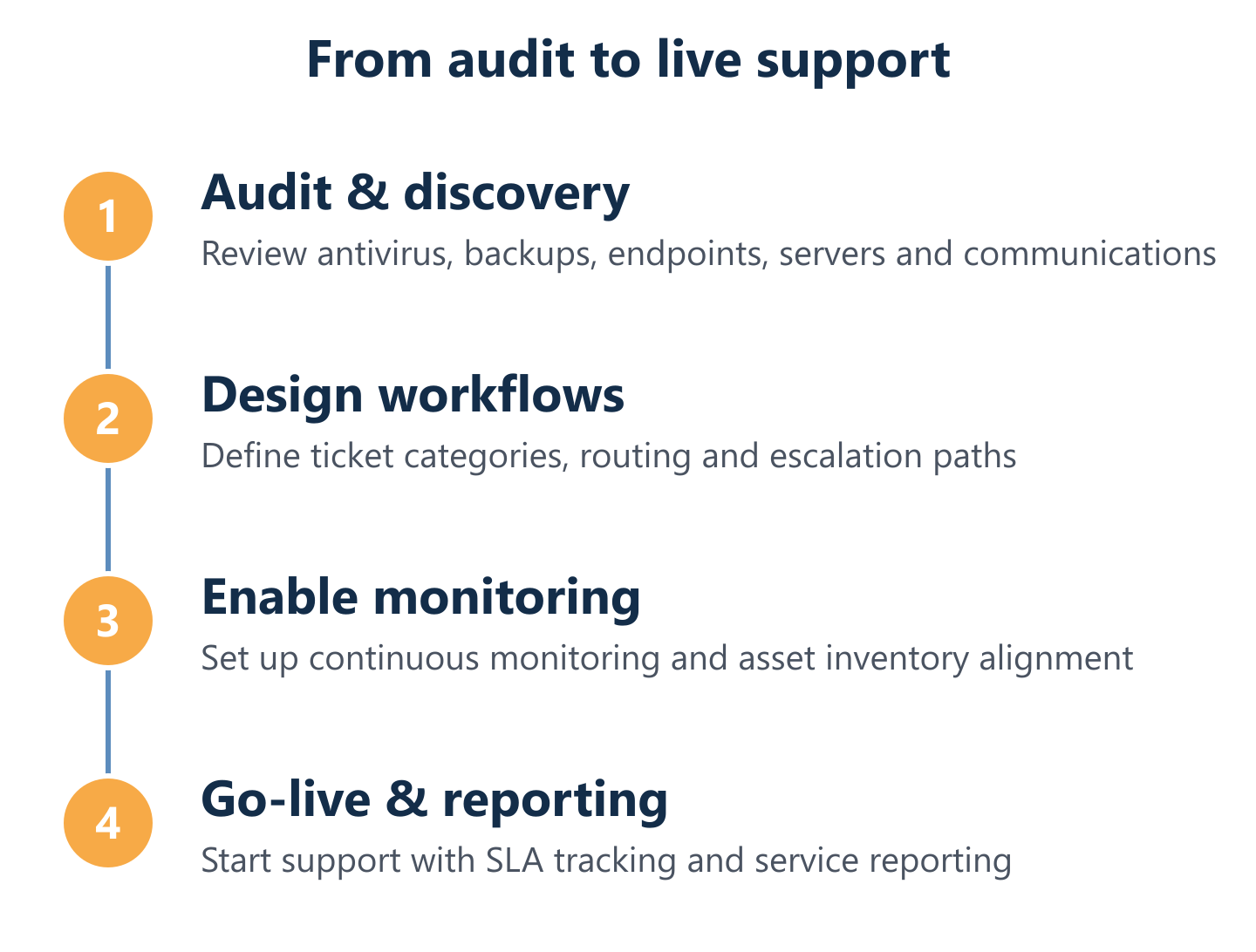
Onboarding cycle: audit, discovery, workflow design and go-live readiness
Onboarding is where most IT support relationships succeed or fail. A rushed onboarding—where a provider simply takes over an unknown environment—leads to misclassified tickets, missed escalation triggers and SLAs that can't be met because the infrastructure wasn't properly understood.
Impulso Tecnológico's onboarding cycle follows four stages. First, the environment audit: a comprehensive review of antivirus protection, backup systems, desktops, servers and communications infrastructure, producing a documented asset inventory with hardware specifications, software versions and security patch status. Second, workflow design: defining ticket categories, priority rules, escalation paths and communication channels based on the client's operational profile. Third, knowledge base build: capturing environment-specific documentation so any technician on the team can support the client effectively. Fourth, go-live readiness check: verifying that monitoring tools are active, alerting thresholds are calibrated and the helpdesk ticketing workflow is tested end-to-end before the service goes live.
Integrations and automation: routing, reporting and ticket lifecycle control
The platforms used to manage IT support—whether ServiceNow, Zendesk, Freshdesk or a purpose-built ITSM tool—determine how efficiently tickets are routed, escalated and closed. A well-configured helpdesk ticketing workflow automatically categorises incoming requests, assigns them to the correct technician tier, triggers SLA countdown timers and sends status updates to end users without manual intervention.
Impulso Tecnológico integrates automation into its service delivery using tools including n8n and Make.com for workflow orchestration, enabling ticket routing rules, escalation notifications and reporting exports to run without manual steps. For clients with existing ITSM platforms, we can align our processes to their tooling rather than requiring a platform migration. This service desk integration capability is particularly valuable for larger organisations or those with internal IT teams who need a co-managed model—where Impulso Tecnológico handles defined support tiers while the internal team retains visibility and control through their existing platform.
Decision checklist: coverage, SLAs, escalation, security and cost predictability
Before signing an IT support contract in Cordoba, work through this checklist to verify that the provider's offering matches your operational requirements:
- Coverage model: Is remote support combined with onsite capability, or remote-only?
- SLA specifics: Are response and resolution times defined per priority tier and written into the contract?
- Escalation path: Is the escalation chain documented, with named ownership at each tier?
- Security alignment: Does the support plan include endpoint protection, firewall management and backup monitoring—or are these separate engagements?
- Cost structure: Is pricing fixed and all-inclusive, or does onsite work, after-hours support or additional users trigger extra charges?
- Reporting cadence: Are regular service reports included as standard, and what metrics do they cover?
- Onboarding process: Does the provider conduct an environment audit before the service starts?
For further context on what structured computer maintenance looks like in practice, our complete guide to computer maintenance covers the preventive and corrective layers that underpin a reliable IT support model.
Choosing the right IT support partner in Cordoba means more than finding someone who answers the phone. It means finding a provider who understands your environment before making commitments, structures SLAs around real operational priorities and gives you ongoing visibility into service performance. Impulso Tecnológico brings over 25 years of managed IT experience, a structured onboarding process and contractually defined response times to every engagement. If you're evaluating options or want to understand how your current environment maps to a structured support plan, the logical next step is a support assessment—a no-obligation review that produces a clear picture of your IT landscape and a recommended coverage model with measurable outcomes. You can also explore how we deliver similar managed support in other locations, such as our IT support service in Almeria and our IT support offering in Barcelona, to see the consistency of our approach across regions.