

IT support in Collado Villalba means having a dedicated team that keeps your business systems running reliably — handling incidents via remote helpdesk, responding on-site when needed, and maintaining security and backups proactively. It is not just device management; it is a managed service that acts as your external IT department.
Many businesses in Collado Villalba operate with lean internal teams or no dedicated IT staff at all. When a server goes down, a workstation fails, or a security alert fires, the cost is not just the fix — it is the hours of lost productivity and the risk of data exposure. A structured IT support service addresses this by combining a ticket-based helpdesk with defined response times, preventative maintenance cycles, and a layered security approach that stops small issues from escalating. Impulso Tecnológico has delivered managed IT services and consultancy for over 25 years, covering businesses across Spain — including clients based in the Collado Villalba area — with a model that blends remote resolution and on-site intervention under clear SLAs.
What IT Support means for businesses in Collado Villalba
Businesses searching for IT support in Collado Villalba are typically looking for one thing: a reliable partner who keeps their technology working without requiring them to become IT experts themselves. That is fundamentally different from device management software or a one-off repair service. Managed IT support covers the full operational layer — helpdesk for daily incidents, proactive monitoring to catch problems before they surface, security configuration, backup verification, and on-site response when remote resolution is not enough.
The distinction matters because many providers market endpoint management tools as IT support, when in practice they only address device configuration and patching. True managed IT support for a business in Collado Villalba means someone answers when something breaks, resolves it within agreed timeframes, and reports back on what was done and why.
| Capability | Device / Endpoint Management | Managed IT Support (MSP) |
|---|---|---|
| Helpdesk / ticket handling | Not included | Core service — remote and on-site |
| Incident response SLA | Rarely defined | Defined by contract (e.g., <4 h server, <8 h workstation) |
| Proactive monitoring | Partial (device health) | Full — systems, network, backups, security alerts |
| Security management | Endpoint policies only | Layered: firewall, endpoint, backup, access controls |
| Reporting after intervention | Logs only | Detailed post-intervention reports + consultancy |
| On-site technician | Not included | Included within agreed response windows |
Managed IT vs device management: what you actually get
Device management platforms handle provisioning, software deployment, and patch distribution across a fleet of endpoints. They are useful tools, but they do not answer the phone when a user cannot access their files or a server stops responding. Managed IT support, by contrast, positions a provider as your external IT department — handling every layer from user-facing helpdesk requests to infrastructure-level troubleshooting. At Impulso Tecnológico, this means unlimited remote assistance through a dedicated remote maintenance system, combined with on-site intervention for issues that cannot be resolved remotely. The scope covers PCs, servers, network equipment, cloud environments, and the day-to-day questions that slow teams down when left unanswered. The result is a single point of contact for all IT needs, with documented outcomes after every intervention.
Helpdesk and service desk basics: incidents, requests, escalation
A service desk operates on a clear distinction between incidents — unplanned interruptions like a server failure or ransomware alert — and service requests, such as a new user setup or a software installation. Both enter the same ticketing system, but they follow different priority queues and escalation paths. For on-site IT support in Collado Villalba, this structure matters: a server breakdown triggers a response within four business hours; a standard workstation issue is resolved within eight business hours. Escalation paths ensure that a first-line technician who cannot resolve an issue remotely hands it off to a specialist without the client needing to chase. Impulso Tecnológico resolves over 4,000 IT tickets annually across its client base, which gives its technicians pattern recognition that shortens resolution times on recurring issues.
Local coverage expectations: remote first, on-site when it matters
Remote IT support resolves the majority of day-to-day incidents — connectivity issues, software errors, user account problems, and configuration changes — without requiring a technician to travel. This keeps response times short and costs predictable. On-site support becomes necessary for hardware failures, structured cabling work, physical server intervention, or situations where a remote session simply cannot replicate what a technician needs to see and touch. For businesses in Collado Villalba, the practical expectation is a remote-first model with a guaranteed on-site escalation path. Impulso Tecnológico covers this through defined response windows in its maintenance contracts, so clients know exactly when a technician will arrive rather than waiting for an undefined callback. Proactive maintenance visits — not just reactive fixes — are also scheduled regularly to audit system health before problems develop.

Core services included in IT Support (helpdesk, security, monitoring)
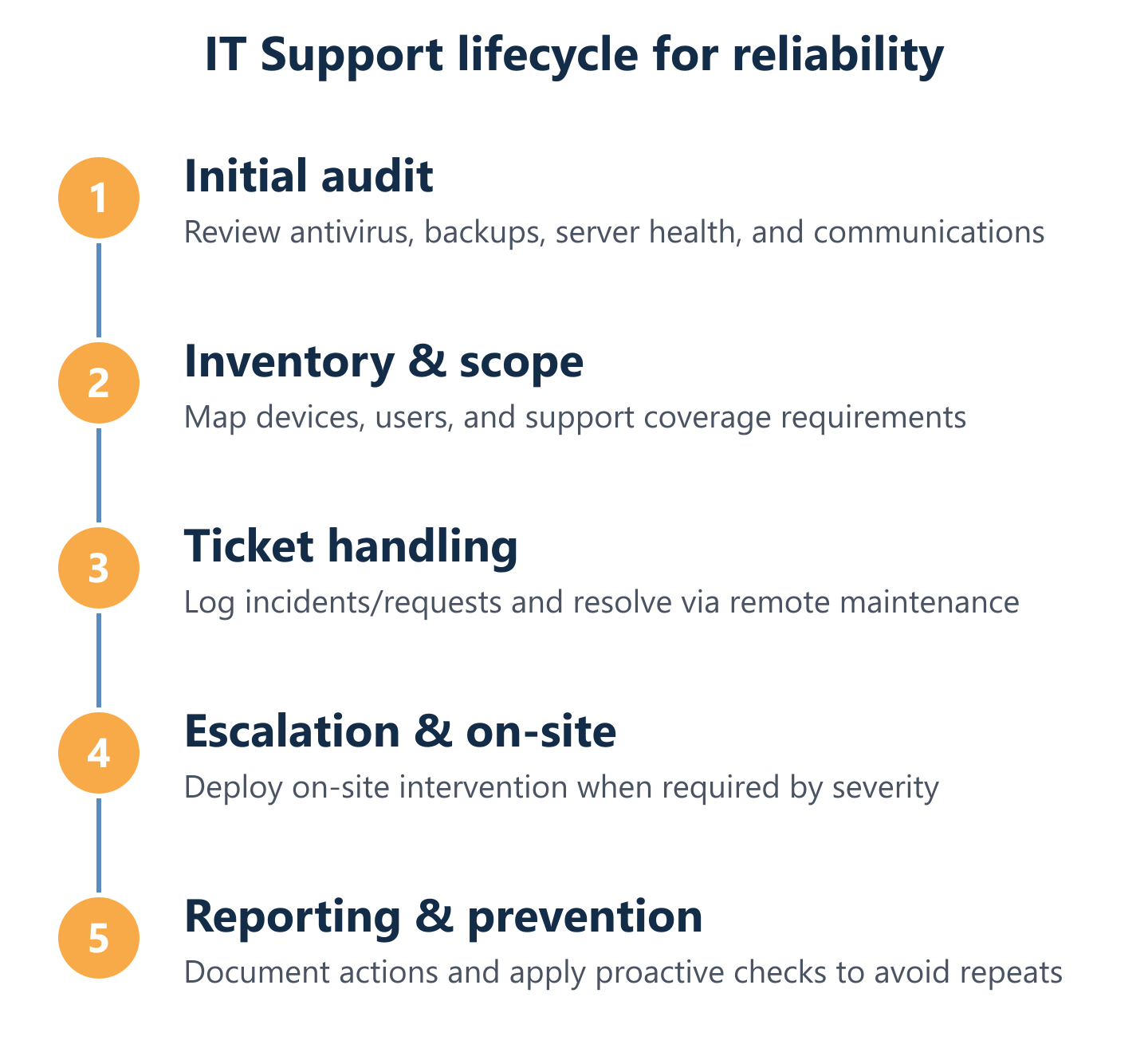
A credible managed IT support plan is not a single service — it is a structured set of components that work together to keep your business operational and secure. When Impulso Tecnológico onboards a new client, the process begins with a complete IT audit covering antivirus status, backup integrity, server condition, network configuration, and a full device inventory. From that baseline, the ongoing service is built around the following layers:
- Audit and inventory: Full assessment of all devices, software, and infrastructure before any contract begins — no assumptions, no surprises.
- Helpdesk and remote resolution: Unlimited remote assistance via a dedicated maintenance system, with ticket logging and post-intervention reports for every case.
- On-site intervention: Technician dispatch within agreed response windows for hardware failures, server incidents, and issues that cannot be resolved remotely.
- Endpoint and network security: Configuration and management of antivirus, endpoint protection, firewall rules, and access controls — using certified partners including Sophos, Fortinet, and Cisco.
- Backup verification and disaster recovery: Regular checks of backup integrity and recovery procedures, supported by Veeam and aligned with business continuity requirements.
- Patch management and preventative maintenance: Scheduled updates across operating systems, applications, and firmware to close vulnerabilities before they are exploited.
- Permanent consultancy: Direct access to technical expertise for strategic questions, not just break-fix support — so your team always has an informed answer.
This structure means that managed IT services for SMEs in Collado Villalba are not reactive by default — the goal is to prevent incidents from reaching the helpdesk in the first place.
Day-to-day support workflow: tickets, remote resolution, and reporting
Every support interaction at Impulso Tecnológico begins with a ticket — whether raised by the client, triggered by a monitoring alert, or opened by a technician during a proactive maintenance check. The ticket records the issue, the steps taken, the resolution, and the time spent. This is not administrative overhead; it is the foundation of accountability. Clients receive a detailed report after each intervention, so they know exactly what was done, what was found, and whether any follow-up action is recommended. For IT helpdesk ticketing and escalation to work effectively, the system must also flag patterns — a workstation that generates five tickets in a month is a replacement or configuration candidate, not just a repeat repair job. This data-driven approach is what separates a managed service from an ad-hoc repair contract.
Security coverage: endpoint protection, firewall strategy, secure remote access
Business IT security and backups are not optional add-ons to an IT support plan — they are the reason the plan exists. Every device on your network is a potential entry point: an unpatched workstation, a misconfigured firewall rule, or a user account with excessive permissions can each lead to a serious incident. Impulso Tecnológico addresses this through a layered approach: endpoint protection managed via Sophos or Fortinet, firewall configuration and monitoring, access control policies for internet and email, and secure remote access solutions for hybrid teams. Backup integrity is verified regularly using Veeam, and disaster recovery procedures are tested — not just documented. For businesses in Collado Villalba handling sensitive data or operating under GDPR obligations, this level of security coverage is built into the support plan from day one, not quoted as an upgrade.
Reliability foundations: backups, patching, and monitoring to prevent repeat issues
Patching is one of the most consistently neglected areas in SME IT environments — and one of the most exploited by attackers. A managed IT support plan that includes scheduled patch management across operating systems, applications, and firmware closes the majority of known vulnerability windows before they become incidents. Alongside patching, continuous monitoring of server health, network performance, and backup status allows a proactive support team to identify degradation trends early. At Impulso Tecnológico, monitoring is not a dashboard that someone checks occasionally — it feeds directly into the ticket system, so anomalies generate action automatically. This preventative layer is what keeps the annual ticket volume manageable and avoids the compounding cost of repeat failures on the same systems. For further detail on how preventative approaches compare to reactive repair, our article on preventive IT maintenance for businesses covers the methodology in depth.
How to choose the right IT Support provider in Collado Villalba
Selecting an IT support provider is a decision that affects your business continuity, data security, and operational costs for years. The market includes everything from individual freelance technicians to large national MSPs, and the right fit depends on your environment, risk tolerance, and budget. Before signing any contract, use the following criteria to evaluate providers:
- Response time commitments: Are SLAs written into the contract? Look for specific figures — for example, server incidents resolved within four business hours, workstation issues within eight.
- Onboarding process: Does the provider conduct a real audit of your systems before quoting? A provider who skips the audit is guessing at scope and will either over-charge or under-deliver.
- Security scope: Is endpoint protection, firewall management, and backup verification included, or are these quoted separately? Security should be part of the baseline, not an upgrade.
- Reporting transparency: Will you receive a report after every intervention? Can you access ticket history and system status? Transparency is a proxy for accountability.
- Plan flexibility: Can you choose between hourly packages, monthly hour allocations, or flat-rate unlimited remote coverage? Rigid contracts that do not match your usage pattern create unnecessary cost.
- Technology partnerships: Does the provider hold certifications with recognised vendors such as Microsoft, Sophos, Fortinet, or Cisco? Certified partners have access to technical support escalation paths that independent operators do not.
- Local on-site capability: For businesses in Collado Villalba, confirm that on-site response is genuinely available within the quoted timeframe — not subcontracted to an unknown third party.
Impulso Tecnológico offers a free, non-binding IT audit as the starting point for any new engagement. This gives businesses a clear picture of their current environment before committing to a plan. For a broader view of how IT maintenance pricing works, our IT maintenance pricing guide explains the variables that affect cost and how to compare quotes accurately.
Pros and cons of remote-first vs on-site support
Remote-first support resolves most incidents faster than waiting for a technician to travel, and it costs less per intervention. For software issues, user account problems, cloud configuration, and the majority of day-to-day helpdesk requests, remote resolution is entirely sufficient. The limitation appears with physical hardware failures, structured network installations, or environments where security policy restricts remote access. A remote-only provider cannot replace a failed hard drive, reconfigure a switch on the rack, or physically inspect a server room. The practical answer for most businesses in Collado Villalba is a hybrid model: remote IT support as the default channel, with a contractually guaranteed on-site escalation path for situations that require physical presence. This combines the speed and cost efficiency of remote resolution with the assurance that a technician can be on-site when it genuinely matters.
What to ask for in a quote: devices, complexity, response needs, and SLAs
A meaningful IT support quote requires specific inputs — not just a device count. Before requesting a proposal, prepare the following information: the number and type of devices (workstations, laptops, servers, network equipment); the operating systems and key business applications in use; your current backup and security setup (or lack thereof); any regulatory requirements such as GDPR that affect data handling; and your acceptable response times for different incident types. With this information, a provider can build a plan that matches your actual risk profile rather than a generic template. Also ask explicitly whether the quote includes patch management, backup verification, network administration, and user lifecycle support — these are frequently omitted from headline pricing and added as extras later. Impulso Tecnológico's audit-first approach means the quote reflects what your environment actually needs, not a standard package applied without context.
Service plan options: hourly packages, monthly hours, and flat-rate coverage
IT support contracts come in three main structures, each suited to a different usage pattern. Hourly packages work well for businesses with low and unpredictable support needs — you buy a block of hours and draw down as required, with full visibility of consumption. Monthly hour allocations provide a fixed budget with a defined capacity, suitable for businesses with moderate and fairly consistent support demand. Flat-rate plans — which include unlimited remote assistance and a set number of on-site visits — suit businesses that want complete cost predictability regardless of incident volume. Impulso Tecnológico offers all three models, so clients in Collado Villalba can match their plan to their actual environment rather than paying for capacity they do not use. For businesses considering how managed services compare to other support arrangements in the wider Madrid region, our overview of IT support in Madrid provides useful context on service structures and coverage expectations.
Reliable IT support is not about finding the cheapest provider — it is about finding one whose working method matches your business requirements. Before committing, request a structured audit, review the SLA terms in detail, and confirm that security, backups, and reporting are included rather than optional. Impulso Tecnológico starts every engagement with exactly this process: a free, non-binding assessment of your current environment, followed by a tailored proposal that aligns scope, response targets, and cost. If your business in Collado Villalba needs a dependable IT partner, the next step is a conversation about what your systems actually need.