

IT support in Castellon means having a technical partner that keeps your systems available, your users productive, and your infrastructure secure — combining remote helpdesk coverage with on-site response when hardware or critical issues demand it.
Most businesses in Castellon don't lose productivity because of one catastrophic failure. They lose it gradually: a workstation that takes too long to boot, a printer that blocks an entire department, a software update that breaks a key application, or a backup that hasn't run in weeks without anyone noticing. These are the day-to-day friction points that accumulate into real operational cost.
At Impulso Tecnológico, we approach IT support as a continuous service rather than a reactive task. Our model starts with a full audit of your systems — covering desktops, servers, antivirus, backup, and communications — and builds a structured maintenance plan around your actual environment. The result is fewer incidents, faster resolution when they do occur, and a predictable monthly cost that removes the uncertainty of ad hoc IT spending. With over 25 years of experience in managed IT services and a track record of resolving more than 4,000 IT tickets annually, we bring both the methodology and the technical depth that businesses in Castellon need to stay operational.
What IT Support Castellon should include (scope that matters)
Not every IT support contract covers the same ground. Businesses searching for IT support for SMEs in Castellon often discover — too late — that their provider handles break-fix calls but leaves proactive maintenance, device management, and security configuration out of scope. Before signing anything, it pays to map the service components against what your operation actually requires.
A properly scoped IT support service should cover four functional layers: user-facing helpdesk (incidents, requests, access issues), endpoint and device management (provisioning, updates, lifecycle), infrastructure monitoring (servers, network, backup status), and proactive maintenance (patching, configuration reviews, health checks). When any of these layers is missing, the gaps compound over time.
At Impulso Tecnológico, our IT maintenance and troubleshooting model is built around all four layers from day one. We begin every engagement with a complete inventory and status review, then align the support plan to your environment — whether you run on-premises infrastructure, cloud workloads, or a hybrid of both.
| Service Component | Reactive-Only Provider | Managed IT Support (Impulso Tecnológico) |
|---|---|---|
| User helpdesk (incidents & requests) | ✓ (on request) | ✓ Structured, SLA-backed |
| Device & endpoint management | Partial or excluded | ✓ Full lifecycle, onboarding, access |
| Proactive maintenance & patching | ✗ Usually excluded | ✓ Scheduled, documented |
| Backup & antivirus status monitoring | ✗ Excluded | ✓ Included in initial audit and ongoing |
| Resolution reporting per ticket | ✗ Rarely provided | ✓ Detailed report with each resolution |
| Security configuration review | ✗ Separate engagement | ✓ Aligned to IT criteria and industry standards |
Helpdesk vs reactive fixes: what you should expect
A helpdesk is not the same as a phone number you call when something breaks. Genuine helpdesk coverage means a structured intake process for incidents and service requests — whether a user can't access email, a printer has gone offline, a VPN connection is failing, or an application is throwing errors. Every request is logged, categorised, and tracked through to resolution.
Reactive-only providers respond when called, but offer no visibility into recurring patterns, no ownership of open tickets, and no accountability for resolution time. For businesses relying on IT support for SMEs in Castellon, this distinction matters: a helpdesk model gives you measurable service quality, while reactive fixes give you unpredictable costs and no data to improve from. Impulso Tecnológico's helpdesk operates as the single point of contact for all user-facing IT issues, with every interaction documented and feeding back into proactive improvement cycles.
Troubleshooting workflow: diagnosis, resolution, and prevention
Effective troubleshooting follows a repeatable structure: identify the symptom, isolate the root cause, apply the fix, and document what was done and why. The prevention step — reviewing whether the same issue could affect other devices or recur under similar conditions — is where most reactive providers stop short.
At Impulso Tecnológico, every support request includes a proactive review as standard. If a workstation fails due to a corrupted driver, we check whether the same driver version is deployed across other endpoints before closing the ticket. This approach, applied consistently across device and endpoint management — PCs, laptops, peripherals, onboarding workflows, and access control — is what converts individual fixes into systemic reliability. It's also what reduces the volume of repeat incidents over time, which directly lowers the cost and disruption of IT for your team in Castellon.
Updates, patching, and configuration reviews as part of support
Unpatched systems are one of the most common causes of both security incidents and operational failures. A software update left pending for three months is not a minor oversight — it is an open vector for ransomware, a source of application compatibility issues, and a compliance risk if your sector is regulated.
Proactive maintenance means patching is scheduled, tested, and documented — not deferred until something breaks. At Impulso Tecnológico, our IT maintenance approach includes operating system security updates, application patching, and periodic configuration reviews aligned to our technical criteria and your specific environment. This is particularly relevant for businesses running mixed environments: on-premises servers, Windows endpoints, and cloud services such as Microsoft 365 or Azure all have separate update cycles that need coordinating. Managed correctly, this layer of support is what keeps downtime low and prevents recurring issues from consuming your team's time.

How we handle incidents and requests (SLAs, escalation, reporting)
Service level agreements only have value when the operational logic behind them is clear. An SLA that promises "fast response" without defining what triggers a higher-priority response, how escalation works, or what documentation you receive after resolution is not a service commitment — it is a marketing phrase.
At Impulso Tecnológico, our IT helpdesk SLA structure is built around operational impact. Response and resolution targets are differentiated by issue type: standard requests carry a response target of under 8 hours, while server failures and urgent issues affecting the entire business are treated with a faster response target of under 4 hours. This tiered approach ensures that the most business-critical problems receive immediate attention without creating artificial urgency for routine tasks.
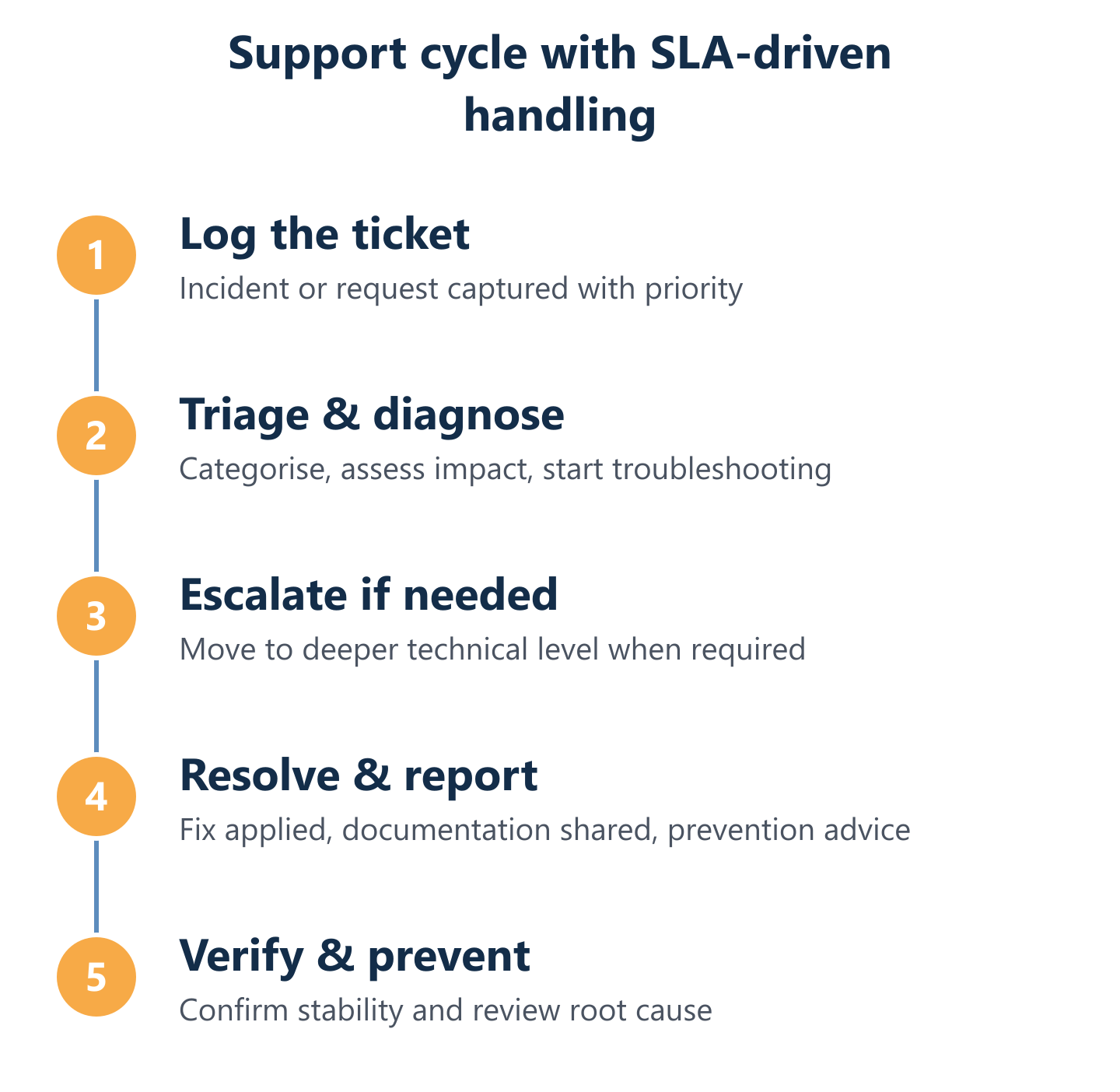
- Intake and logging: Every request is received through a defined channel, logged with a timestamp, and assigned a priority level based on business impact.
- Initial triage: A technician assesses the issue to confirm priority, identify the affected scope (single user, team, or full infrastructure), and determine whether remote resolution is viable.
- Remote resolution attempt: The majority of incidents are resolved remotely within SLA targets, reducing disruption and response time for businesses across Castellon.
- Escalation if required: Issues that cannot be resolved remotely — or that require deeper infrastructure access — are escalated to senior technical staff or trigger an on-site visit.
- Resolution and proactive review: Once resolved, the technician documents the fix, checks for related risks across the environment, and closes the ticket with a detailed report.
- Reporting and advice: Each resolved ticket generates documentation that feeds into ongoing advice and trend analysis, helping prevent recurrence.
Triage and prioritisation: how requests become tickets with outcomes
Triage is the step that separates a professional IT support operation from an ad hoc repair service. When a request arrives — whether it's a single user locked out of their account or a server that has stopped responding — the first task is to determine its actual business impact, not just its apparent urgency.
Impulso Tecnológico applies a structured prioritisation model: issues affecting a single user are handled within standard SLA windows (under 8 hours for most requests), while incidents with wider business impact — such as server failures or connectivity outages affecting multiple users — are escalated immediately with a response target of under 4 hours. This tiered system ensures that resources are allocated where the operational risk is highest, and that every request, regardless of priority, is tracked through to a documented outcome rather than a verbal confirmation that "it's been sorted".
Escalation paths: when issues move from helpdesk to deeper support
Repeated troubleshooting of the same issue is a symptom of poor escalation design. When a first-line technician attempts to resolve a problem that requires deeper infrastructure access or specialist knowledge, the result is wasted time, user frustration, and a risk of making the situation worse.
A well-designed escalation path defines clear handoff criteria: if a remote session fails to resolve the issue within a set timeframe, or if the root cause requires access to server infrastructure, network configuration, or security systems, the ticket moves to a senior technician or triggers an on-site response. At Impulso Tecnológico, our escalation model is built into the service workflow from the outset — not improvised when things get complicated. This is particularly relevant for businesses running hybrid environments where on-premises infrastructure and cloud services such as Microsoft 365 or Azure interact, as issues at the boundary between these layers require multi-discipline expertise to diagnose correctly.
Service reporting: what metrics and documentation you should receive
A resolved ticket without documentation is a missed opportunity. The report generated after each resolution should tell you what the problem was, what caused it, how it was fixed, and whether any related risks were identified during the proactive review. Over time, these reports build a picture of your IT environment's health that no single technician can hold in their head.
At Impulso Tecnológico, detailed resolution reports are standard with every closed ticket — not an optional add-on. This documentation serves two purposes: it gives your management team visibility into IT performance and cost justification, and it gives our technical team the data to identify recurring patterns and recommend preventive action. For businesses comparing remote IT support in Castellon, this reporting layer is one of the clearest differentiators between a managed service and a break-fix arrangement. Ask any prospective provider what documentation you will receive per ticket — the answer reveals a great deal about their operational maturity.
On-site vs remote IT Support Castellon: choosing the right coverage
The choice between remote and on-site IT support is not a binary one — it is a coverage design question. Most IT issues can be resolved remotely: user access problems, software configuration, email troubleshooting, cloud service issues, and the majority of application errors do not require a technician to be physically present. Remote IT support in Castellon delivers speed and scalability for these scenarios.
However, hardware failures, network infrastructure work, physical device replacements, and situations where remote access itself is compromised all require on-site presence. A support model that offers only remote coverage will leave you exposed in exactly the moments when you need help most. Equally, a model that defaults to on-site visits for issues that could be resolved in minutes remotely is inefficient and costly.
Impulso Tecnológico delivers hybrid coverage — remote for speed and scale, on-site for hardware, installations, and critical fixes — across Castellon and the surrounding area. Our support also extends to the technology environments your infrastructure runs on:
- On-premises infrastructure: Servers, local networks, physical endpoints, and storage systems supported by certified technicians with hands-on access when needed.
- Cloud environments: Microsoft 365 and Azure workloads managed remotely, including identity, email, collaboration, and backup continuity.
- Network and connectivity: Design, configuration, and troubleshooting of wired and wireless networks using Cisco, Aruba, and Fortinet technologies.
- Security layer: Endpoint protection and firewall management using Sophos and Fortinet, plus backup verification with Veeam — integrated into standard support, not sold separately.
- Hybrid environments: Support for businesses running a mix of on-premises and cloud services, where issues often arise at the integration boundary between the two.
For companies comparing on-site IT support in Castellon, the key question is not "remote or on-site?" but "does this provider have the coverage model, the technical depth, and the local presence to handle both when required?"
Remote support advantages and limits (latency, hardware, and access constraints)
Remote support resolves the majority of IT incidents faster than any on-site model can — there is no travel time, no scheduling delay, and no waiting for a technician to arrive. For software issues, user access problems, cloud service configuration, and application troubleshooting, remote access tools allow technicians to diagnose and fix problems in real time while the user watches or continues working on another device.
The limits of remote support are specific and predictable: hardware failures that prevent the device from booting, physical network cabling issues, printer or peripheral installations that require hands-on configuration, and situations where the remote access agent itself is unavailable due to a system crash or network outage. Recognising these limits in advance — and having an on-site response protocol ready — is what separates a well-designed hybrid IT support model from one that leaves businesses in Castellon waiting when the remote session simply cannot connect.
On-site support triggers: what justifies an on-site visit
Not every problem justifies dispatching a technician. Defining clear on-site triggers in your support contract prevents unnecessary visits — and ensures that when a visit is needed, it happens without debate or delay.
The scenarios that reliably require physical presence include: hardware replacement or failure (server components, storage drives, network switches), new device deployment and workstation setup, structured cabling or wireless access point installation, physical access control or security camera systems (such as Verkada deployments), and any incident where remote access to the affected system is unavailable. At Impulso Tecnológico, on-site IT support in Castellon is part of our standard service model for all-inclusive contracts — not an extra billed separately. When an on-site visit is triggered, our technicians arrive with the context of the full ticket history, the system inventory, and the resolution documentation from previous incidents, which eliminates the "explain the problem from scratch" inefficiency that plagues reactive support models.
Security basics within IT support: backups, endpoint protection, and coordination
Security does not need to be a separate contract to be effective within an IT support engagement. The fundamentals — verified backups, active endpoint protection, and coordinated incident response — belong inside your standard support scope, because they directly affect the continuity and reliability of the systems your support team is responsible for maintaining.
At Impulso Tecnológico, our IT support includes security configuration aligned to our technical criteria and your industry requirements: antivirus and endpoint protection status is reviewed during the initial audit and monitored as part of ongoing managed services for business continuity. Backup integrity is checked proactively, not discovered as missing after a failure. For businesses that need a more advanced security posture — including firewall management, threat detection, or GDPR compliance support — we extend the scope using our certified partner ecosystems (Sophos, Fortinet, Veeam) without requiring a separate provider relationship. This integrated approach is particularly relevant for SMEs in Castellon that want predictable monthly costs without managing multiple vendors for IT support and security separately. You can read more about how proactive maintenance underpins this model in our article on preventive IT maintenance for businesses.
Choosing an IT support partner in Castellon is ultimately a decision about operational risk. The right provider reduces downtime, resolves incidents faster, and prevents the issues that drain productivity before they escalate. Before committing, compare the scope of what is included, the SLA targets for different issue types, the coverage model (remote, on-site, or hybrid), and the quality of reporting you will receive. If you want IT support that protects uptime and fits your day-to-day reality — whether you are an SME looking for a complete external IT department or a larger company supplementing an internal team — Impulso Tecnológico offers a free systems audit and a tailored support plan as the starting point. You can also explore how we deliver similar structured IT support in other locations, such as our IT support service in Alicante and our managed IT support in Barcelona, to understand the consistency of our methodology across regions.