

IT support in Cantabria means having a reliable partner who keeps your systems running, resolves incidents quickly, and prevents problems before they disrupt your team. Whether you need remote helpdesk, onsite intervention, or full managed IT services, the right provider covers users, devices, networks, and security under one predictable plan.
Many organisations in Cantabria still rely on reactive IT support — calling someone only when something breaks. That model costs more in downtime than in service fees, and it leaves security gaps that grow quietly until they become serious. The alternative is a managed, proactive approach: continuous monitoring, structured ticketing, defined response times, and a team that knows your environment before an incident occurs.
At Impulso Tecnológico, we have spent more than 25 years acting as an external IT department for SMEs and larger organisations across Spain. Our Cantabria engagements follow the same methodology we apply region-wide: an initial IT audit to establish a baseline, followed by a maintenance and support plan that combines preventive actions, fast incident resolution, and layered security. The result is operational confidence — systems stay protected and available when your teams need them most.
What IT Support in Cantabria should include (and what to ask for)
Generic IT support contracts often look identical on paper but differ enormously in practice. Before committing to any provider in Cantabria, map out exactly what is in scope: which users, which devices, which applications, and which parts of the infrastructure are covered. Vague agreements lead to disputes when an incident falls into a grey area — and those disputes always happen at the worst possible moment.
Impulso Tecnológico centralises IT tasks — updates, administration, support, and maintenance — so your team never has to coordinate between multiple suppliers. Our managed services model is built around proactive maintenance and clear SLAs designed for real operational conditions, not theoretical uptime figures. The table below shows the core areas any credible IT support plan in Cantabria should address, and the questions worth asking before you sign.
| Support Area | What to expect | Key question to ask |
|---|---|---|
| Helpdesk & ticketing | Structured intake, priority classification, traceable ticket history | What are your response time commitments by priority level? |
| User devices (PCs, laptops) | Incident resolution, OS updates, configuration management | Do you manage patching and updates proactively or reactively? |
| Microsoft 365 & email | Licence management, mailbox support, Teams/SharePoint issues | Is M365 administration included or billed separately? |
| Network & connectivity | Router/switch monitoring, Wi-Fi troubleshooting, VPN access | Do you monitor the network continuously or only respond to reports? |
| Security (firewall, endpoint) | Firewall management, endpoint protection, patch compliance | Which security layers are included in the base contract? |
| Backup & recovery | Scheduled backups, tested restores, disaster recovery readiness | How often are backups tested, and what is the recovery time objective? |
| Onsite intervention | Physical visits for hardware, cabling, or complex network issues | Is onsite cover included or charged per visit? |
Helpdesk scope: tickets, channels, and priority rules
A helpdesk is only as useful as the rules behind it. Ticket channels matter — email, phone, and a self-service portal each serve different urgency levels — but priority classification is what determines whether a critical outage gets the same queue position as a forgotten password reset. Any IT support contract in Cantabria should define at minimum three priority tiers: critical (service down, business impact immediate), high (significant disruption to a team or process), and standard (individual user issue with a workaround available). Each tier needs a committed first-response time and a maximum resolution target. Without those definitions in writing, SLA disputes are inevitable. Impulso Tecnológico's helpdesk and ticketing model assigns priority at intake, not after a technician reviews the ticket, which means urgent incidents are routed correctly from the first moment of contact.
Workplace coverage: Windows, Microsoft 365, email, and user devices
Most day-to-day IT support requests in any Cantabria organisation trace back to the same short list: a PC that won't start, a Microsoft 365 licence that has lapsed, an email that won't send, or a printer that has stopped responding. These issues feel minor in isolation but accumulate into significant lost productivity across a team. Effective workplace coverage means proactive patch management for Windows endpoints, licence administration for Microsoft 365 — including Teams, SharePoint, and Exchange Online — and a clear process for device replacement or reconfiguration when hardware fails. Impulso Tecnológico handles Microsoft 365 support as part of the managed services scope, including mailbox provisioning, access control, and configuration changes, so users don't wait for a separate specialist to be engaged. Remote and onsite IT support for devices is coordinated through the same ticket system, keeping the history complete.
Infrastructure coverage: network, cabling, and VoIP/telephony support
Network issues are among the most disruptive incidents an organisation can face — and among the hardest to diagnose remotely when the root cause is physical. A complete IT support scope in Cantabria should include monitoring of switches, routers, and wireless access points, as well as the ability to intervene onsite for structured cabling faults (voice/data and fibre) when needed. VoIP and telephony transitions add another layer: organisations moving from legacy PBX systems to cloud-based communications need a provider who understands both the technical migration and the operational continuity requirements during the cutover. Impulso Tecnológico supports infrastructure needs including structured network cabling and can assist with VoIP transitions where flexible connectivity is required. Our network work draws on partnerships with Cisco and Aruba, which means the equipment we install and maintain is supported by vendor-level expertise, not generic configuration.

Remote vs onsite IT support in Cantabria: how we handle each case
Choosing between remote and onsite intervention is not a matter of preference — it is a triage decision that should be made quickly and consistently. A support model that defaults to onsite for every incident wastes time and budget; one that insists on remote-only resolution fails when the problem is physical. The right approach combines both, with clear criteria for escalation.
At Impulso Tecnológico, we combine remote and onsite assistance within a managed services model, using proactive monitoring to reduce emergencies and structured escalation to ensure urgent issues are never left waiting for the next available slot. Here is how we handle the decision in practice:
- Triage at intake: Every ticket is assessed at first contact for complexity, urgency, and whether physical access is required. This classification determines the initial response mode.
- Remote resolution attempt: For software, configuration, access, and most Microsoft 365 issues, remote support resolves the incident faster than any onsite visit. We attempt remote resolution first unless the ticket classification rules it out immediately.
- Escalation trigger: If remote resolution is not possible within the agreed time window, or if the diagnosis confirms a hardware or physical network fault, the ticket is escalated to onsite intervention without the user needing to make a separate request.
- Onsite preparation: Before any technician travels, we complete a remote diagnostic to confirm the fault, identify required parts or tools, and coordinate access with the site contact — reducing the time spent on arrival.
- Post-intervention documentation: Whether resolved remotely or onsite, every incident is closed with documented actions, root cause notes, and any follow-up recommendations recorded in the ticket system.
Decision criteria: complexity, access needs, and hardware/network constraints
The decision to go remote or onsite hinges on three factors: technical complexity, physical access requirements, and hardware or network constraints. Software misconfigurations, user account issues, Microsoft 365 errors, and most connectivity problems that originate in settings rather than cables are resolved remotely — often within minutes of the ticket being opened. Physical access becomes necessary when a device will not power on, a network switch has failed, structured cabling has a fault, or a server requires hands-on intervention. Hardware constraints — such as a replacement component that must be installed — are by definition onsite tasks. Network constraints, such as a firewall that has lost remote management access, also require physical presence. Mapping these criteria clearly at the start of a support engagement means technicians and users share the same expectations, and there is no ambiguity about who authorises an onsite visit or how quickly one can be arranged in Cantabria.
Onsite readiness: what we prepare before arrival to reduce downtime
An onsite visit that begins with diagnosis wastes the most valuable resource in IT support: time. Impulso Tecnológico's approach is to complete as much diagnostic work as possible remotely before any technician travels to a Cantabria site. This means reviewing monitoring data, checking device logs, confirming the fault scope, and — where a hardware replacement is likely — identifying and preparing the required component in advance. Site access is coordinated with the client contact before departure, so there are no delays on arrival. For network or cabling work, we confirm the physical layout and identify the affected segment remotely where tools allow. This preparation model consistently reduces the duration of onsite visits and minimises the disruption to the organisation's operations. It also means that when a technician arrives, they arrive ready to resolve, not to investigate.
Hybrid communication: keeping users informed and incidents traceable end-to-end
One of the most common complaints about IT support — remote or onsite — is that users lose visibility of what is happening with their incident. A ticket is opened, then silence. Hybrid communication means that regardless of whether an incident is being resolved remotely or requires an onsite visit, the ticket record is updated at every stage: triage, diagnosis, action taken, resolution, and closure. Users receive status notifications at key transitions, and the ticket history provides a complete audit trail that is available to both the client and the support team. Impulso Tecnológico maintains this end-to-end traceability as a standard part of the managed services model, not an optional add-on. For organisations with IT security and firewall management requirements, the same traceability applies to security-related incidents, ensuring that nothing is resolved informally or outside the documented process.
Our ticketing, escalation, and SLA approach (so incidents don't get stuck)
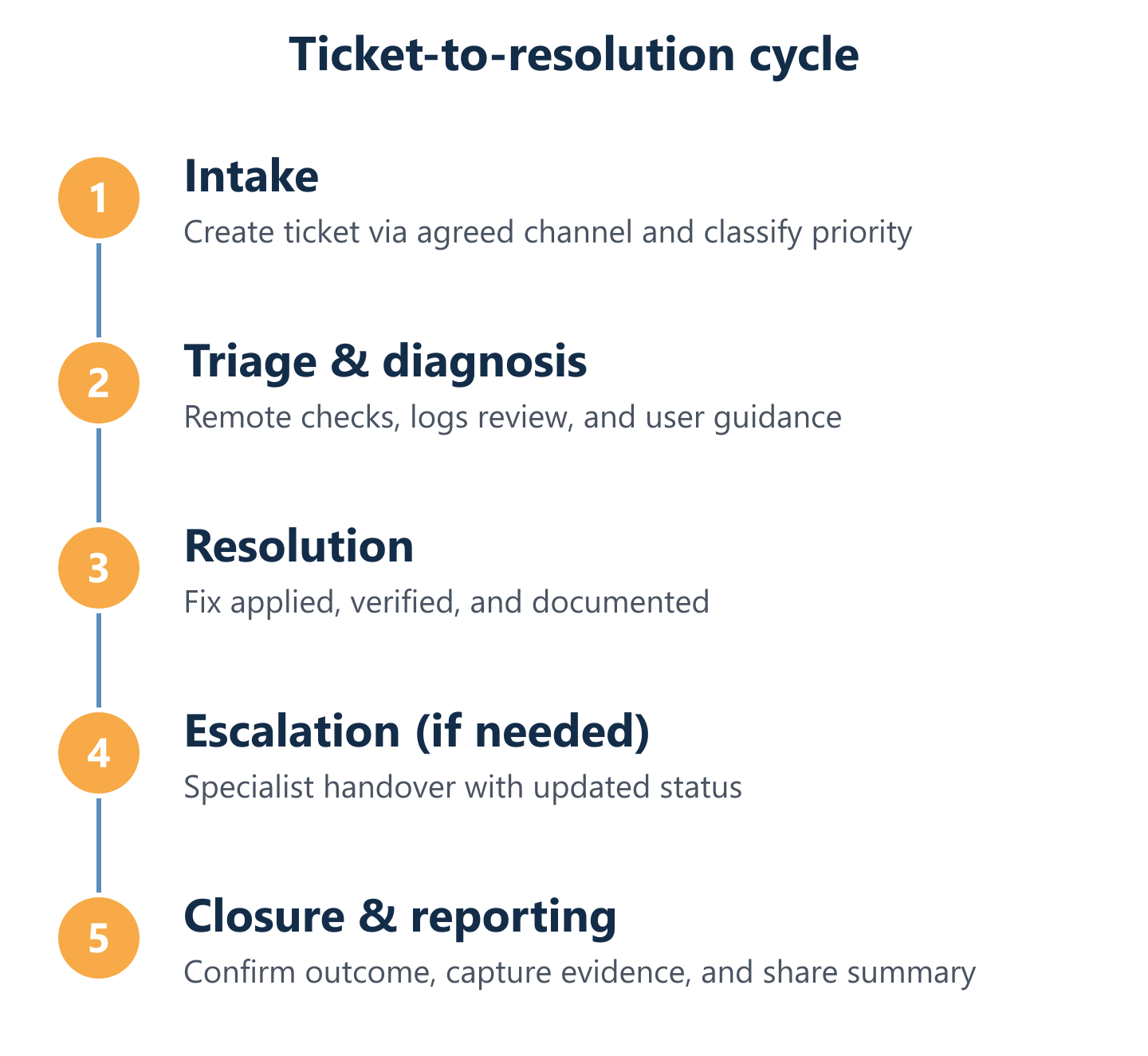
The operational backbone of any IT managed services engagement is the process that runs underneath every incident: how tickets are created, classified, assigned, escalated, and closed. Without a defined process, incidents stall — not because the technical problem is hard, but because ownership is unclear or the urgency was misread at intake.
Impulso Tecnológico structures managed, predictable monthly pricing and uses proactive monitoring and preventive maintenance to reduce the volume of emergency incidents from the outset. Our SLA framework is designed to set clear expectations from day one, not to provide a legal backstop after something goes wrong. Key elements of our approach include:
- Priority classification at intake: Every ticket receives a priority level when it is opened — not after a technician reviews it. This eliminates the queue ambiguity that causes critical incidents to wait behind routine requests.
- Defined response and resolution targets by priority: Each priority tier carries a committed first-response time and a target resolution window, agreed in the service contract.
- Single point of ownership: Each ticket has a named owner responsible for its progress. Escalation does not mean the original owner disappears — it means a specialist is brought in while the owner retains accountability.
- Proactive monitoring reducing reactive load: By detecting anomalies before they become outages, we reduce the number of high-priority tickets generated, which in turn protects SLA performance across the board.
- Monthly reporting: Clients receive a summary of ticket volumes, resolution times, SLA compliance, and any recurring patterns that warrant a preventive action — keeping the service improvement cycle visible and continuous.
- Security alignment: Patching, vulnerability management, and recovery readiness are integrated into the maintenance schedule, so security controls are maintained as part of everyday operations rather than as a separate project.
Ticketing workflow: from request to closure with evidence and documentation
A well-run ticket lifecycle has six stages, each with a clear owner and a defined output. First, intake: the request is received via the agreed channel (email, phone, or portal) and a ticket is created with a reference number immediately. Second, classification: priority and category are assigned within the first-response window. Third, diagnosis: the technician investigates the fault, documents findings, and determines the resolution path — remote or onsite. Fourth, action: the fix is applied, with all steps recorded in the ticket. Fifth, user confirmation: the user confirms the issue is resolved before the ticket is closed. Sixth, closure and documentation: the ticket is closed with a summary of the root cause, actions taken, and any follow-up recommendations. Impulso Tecnológico applies this workflow consistently, which means clients always have an auditable record of every incident and its resolution.
Escalation paths: when to involve specialists and how to keep momentum
Escalation fails when it means a ticket disappears into a different queue with no update to the user. Effective escalation means bringing in the right expertise quickly while maintaining continuity of communication and ownership. Impulso Tecnológico defines escalation triggers explicitly: if a ticket is not resolved within a defined percentage of its resolution target, it is automatically escalated to a senior technician or specialist. For security incidents — such as a suspected breach, a firewall anomaly, or a ransomware indicator — escalation to the security team is immediate, bypassing the standard queue. For complex infrastructure faults involving Cisco, Aruba, Fortinet, or Sophos environments, our certified specialists are engaged directly. The original ticket owner remains responsible for keeping the client informed throughout, so the user always has a single point of contact regardless of how many specialists are involved in the background.
SLA expectations: priority model, reporting cadence, and continuous improvement
SLA commitments are only meaningful if they are reviewed regularly and used to drive improvement. Impulso Tecnológico's SLA model defines priority levels — typically critical, high, and standard — each with a committed first-response time and a target resolution window agreed at contract start. These are not aspirational figures; they are contractual commitments reviewed in monthly reports shared with the client. The reporting cadence covers ticket volumes by priority, average response and resolution times, SLA compliance by category, and any recurring incident patterns that indicate a systemic issue requiring a preventive fix. This continuous improvement loop is what separates a managed services engagement from a break-fix arrangement: the data from last month's incidents informs this month's maintenance actions, progressively reducing the frequency and severity of disruptions. For organisations also managing IT security and firewall management, the same reporting covers security event summaries and patch compliance status.
Organisations in Cantabria that move from reactive IT support to a managed model consistently report the same outcome: fewer surprises, clearer costs, and more time for their teams to focus on core work. The starting point is straightforward — a scoping conversation and a baseline IT audit to understand your current environment, followed by a maintenance and support plan built around your actual needs. If you want IT support that feels close to your day-to-day operations, that is where we begin. You can also explore how we apply the same approach in other regions, including our IT support service in Almería and our managed IT support in Barcelona, or review our broader thinking on preventive IT maintenance for businesses.