

IT Support in Burgos covers helpdesk assistance, device and server management, network maintenance and cybersecurity controls delivered by a local or regionally based provider — either remotely or on-site — under agreed response times and service levels.
For businesses in Burgos, the core challenge is not finding someone who can fix a broken PC. It is finding a provider that keeps systems stable day to day, reduces the risk of outages and cyber incidents, and can also handle structured projects — migrations, audits, office moves — without disrupting operations. Many companies in the region rely on a single internal IT contact or a break-fix contractor, which leaves gaps in proactive maintenance, security patching and continuity planning. A properly structured IT support service closes those gaps through defined coverage, layered security controls and predictable monthly management. The result is fewer emergency incidents, faster resolution when issues do occur, and a technology environment that supports growth rather than limiting it.
What IT Support in Burgos should include (and what to ask for)
Before requesting proposals, define what you actually need covered. Many businesses in Burgos sign IT support agreements only to discover that servers, network infrastructure or business-critical applications fall outside the scope. A clear service definition lets you compare providers on equal terms and avoids costly gaps.
At Impulso Tecnológico, we approach this as an external IT department: we map your environment first, then tailor coverage to your real operational needs — balancing reliable daily helpdesk support with proactive risk reduction so that predictable operations replace reactive firefighting. With over 25 years of experience managing IT environments across Spain and internationally, we know that the most expensive IT incidents are usually the ones that a structured support model would have prevented.
| Service area | Minimum expectation | Best-practice standard |
|---|---|---|
| Helpdesk (user support) | Ticket logging and remote resolution | Defined priority levels, SLA per category, escalation path |
| Device management | Break-fix for PCs and laptops | Proactive patching, asset inventory, lifecycle planning |
| Server and infrastructure | Reactive support when issues arise | Scheduled maintenance, monitoring, capacity alerts |
| Network support | Basic connectivity troubleshooting | Firewall management, VLAN control, wireless coverage review |
| Security controls | Antivirus on endpoints | Layered defence: firewall, endpoint protection, patching, backup |
| Microsoft 365 support | Password resets and licence queries | Full tenant management, Teams, SharePoint, identity and compliance |
Core scope: helpdesk, device management and basic network support
A well-defined support scope covers every layer that your staff depends on to work. That means users (how many, where, what roles), devices (workstations, laptops, printers, mobile devices), servers (physical or virtual, on-premises or cloud), network infrastructure (switches, Wi-Fi, firewalls) and the core business applications running on top. When scoping helpdesk support, confirm whether the service covers all named users or only a subset, and whether shared devices — meeting room screens, production terminals — are included. Leaving any of these undefined creates ambiguity about who resolves the issue when something breaks. For Burgos businesses with mixed environments, a complete asset inventory at the start of the engagement is the most reliable way to avoid scope disputes later.
Security baseline: layered controls, patching and secure remote access
A security baseline is not optional in a managed IT support contract — it is the foundation that makes everything else reliable. At a minimum, your provider should deliver multi-layer network security combining firewall management, endpoint protection, email and web filtering, patch and vulnerability management, and secure remote access via VPN or equivalent. Impulso Tecnológico recommends a defence-in-depth approach: no single control is sufficient on its own. We work with certified technologies including Sophos, Fortinet and Veeam to align security controls to each client's environment. Patching schedules should be documented and applied consistently across operating systems and third-party applications — unpatched systems remain one of the most common entry points for ransomware and credential theft affecting SMEs in Spain.
Service boundaries: what is included vs handled by your internal team or third parties
Service boundaries define where your IT support provider's responsibility ends and where yours — or a third party's — begins. Ask for this in writing before signing. Typical boundaries to clarify include: bespoke application support (usually handled by the software vendor), hardware procurement (may be a separate commercial process), internet line faults (ISP responsibility, though a good provider will manage the relationship), and out-of-hours cover (confirm what is and is not included). Escalation paths should be documented: which issues go directly to the provider, which require your authorisation, and what happens when a critical incident falls outside normal working hours. Transparent documentation here prevents frustration and delays when an incident occurs at a sensitive moment.

On-site vs remote IT support: choosing the right model in Burgos
The right delivery model depends on the nature of your incidents, the physical complexity of your site and how quickly you need resolution. Remote IT support resolves the majority of software, configuration and user-account issues faster than any on-site visit — there is no travel time, and a skilled technician can connect to a system within minutes. However, hardware failures, cabling problems, server room interventions and office relocations require physical presence.
At Impulso Tecnológico, our model is built around this reality: we triage remotely first to maximise speed, and dispatch on-site when the issue genuinely requires it. Beyond break-fix, we also support structured projects — system audits, network and server migrations, office relocations — which are common needs for growing businesses in Burgos that want to improve infrastructure without disrupting day-to-day operations.
- Assess your incident profile: categorise your last 12 months of IT issues by type — software, hardware, connectivity, user error — to understand what percentage could be resolved remotely.
- Map your physical environment: multi-floor offices, warehouse environments or distributed sites increase the value of on-site capability.
- Define your tolerance for downtime: production-critical systems may justify faster on-site SLAs even for issues that could theoretically be handled remotely.
- Identify project needs: if you have planned migrations, hardware refreshes or a site move in the next 12 months, confirm the provider can execute these alongside managed support.
- Agree the hybrid model in writing: specify which incident categories trigger remote-only resolution and which automatically escalate to on-site intervention.
Decision criteria: urgency, complexity and where the problem physically sits
Remote support is the right first response for the majority of helpdesk incidents: password resets, Microsoft 365 configuration issues, software errors, VPN connectivity problems and user-account queries can all be resolved without a technician leaving the office. On-site intervention becomes necessary when the problem is physical — a failed hard drive, a network switch that needs replacing, a cabling fault, a printer that will not connect regardless of driver reinstallation, or a server that needs hands-on attention. Urgency also matters: a critical system failure affecting production may warrant immediate on-site dispatch even if a remote attempt is made first. Define these triggers in your SLA so there is no ambiguity when an incident escalates.
Hybrid delivery: remote triage plus on-site intervention for the right cases
A hybrid delivery model — remote triage followed by on-site intervention when warranted — gives Burgos businesses the best of both approaches. Remote triage reduces mean time to resolution for the majority of incidents, keeps costs predictable and allows a technician to begin diagnosis immediately. When the triage confirms a physical issue or the remote resolution attempt fails, an on-site visit is dispatched with context already gathered, making the intervention faster and more effective. This model also suits businesses with multiple locations: remote support covers distributed users efficiently, while on-site capacity is reserved for the site or issue that genuinely requires it. Confirm that your provider has local or regional on-site capacity in Burgos and Castilla y León, not just a national helpdesk with slow dispatch times.
Project capability: audits, migrations and office relocations alongside managed support
Day-to-day managed support keeps systems running, but businesses also need a provider that can execute structured projects without creating a second coordination problem. IT audits identify risks and technical debt before they become incidents. Network and server migrations modernise infrastructure in a controlled way. Office relocations require careful planning of cabling, connectivity, server room setup and user cutover — all while keeping downtime to a minimum. Impulso Tecnológico handles all of these as part of our service offering, including IT supplier management and IT budget planning for clients who want a single point of accountability. For Burgos businesses planning growth or infrastructure changes, having project capability within the same provider avoids the risk of handover failures between separate vendors.
Response times, SLAs and pricing factors for IT Support Burgos
Service level agreements are only useful when they contain specific, measurable commitments — not vague promises about "fast response". Before signing any IT support contract in Burgos, request documented SLA targets for each priority level, a clear escalation path and an explanation of how incidents are classified. Pricing should be equally transparent: a well-structured managed service agreement gives you predictable monthly costs with no unexpected call-out charges for issues within scope.
Impulso Tecnológico focuses on proactive service and preventive maintenance to reduce the frequency of emergency incidents in the first place. Our managed services approach uses clear monthly service structures so clients can plan IT expenditure without surprises. Our track record across thousands of annual solved IT tickets reflects a consistent focus on resolution quality, not just speed.
- Priority classification: confirm how P1 (critical, business-stopped), P2 (significant impact) and P3 (low impact) incidents are defined and what response and resolution targets apply to each.
- Response vs resolution: response time (when a technician begins working on the issue) and resolution time (when the issue is closed) are different metrics — ask for both.
- Escalation triggers: understand at what point an unresolved incident is escalated, to whom and within what timeframe.
- Proactive vs reactive balance: a provider focused only on ticket resolution will miss the preventive work that reduces incident volume over time.
- Monthly reporting: request a sample report showing ticket volumes, resolution times and open items — this is the clearest signal of operational transparency.
SLAs that matter: response, resolution, escalation and priority definitions
An IT service level agreement is only enforceable when it defines four things precisely: priority levels (with clear examples of what qualifies as critical vs standard), response time targets (how quickly a technician acknowledges and begins work), resolution time targets (how long before the issue is closed or a workaround is in place) and escalation steps (who takes over if the first-line technician cannot resolve within the target window). Generic claims such as "we respond quickly" or "we prioritise urgent issues" are not SLAs — they are marketing language. Ask for the actual figures in writing, and check whether the targets apply during standard working hours only or extend beyond them. For Burgos businesses, Impulso Tecnológico operates Monday to Friday, 09:00–17:00 CET, with service parameters defined per engagement.
Cost drivers: number of users, service level, device mix and project scope
IT support pricing in Burgos is driven by several variables that compound each other. User count is the primary factor: more users mean more helpdesk demand, more devices to patch and more licences to manage. Device and server complexity matters too — a business running physical servers, specialised hardware or legacy systems requires more management effort than a cloud-first environment. The service level you choose (standard helpdesk only vs full managed services including security, monitoring and Microsoft 365 support) significantly affects cost. Security requirements add a further layer: endpoint protection, firewall management and backup solutions each carry their own licensing and management overhead. Finally, any project work — migrations, audits, relocations — is typically scoped and priced separately from the monthly managed service. Request an itemised proposal so you can evaluate value at each tier.
What to expect in onboarding: audit, prioritisation and first-week stabilisation plan
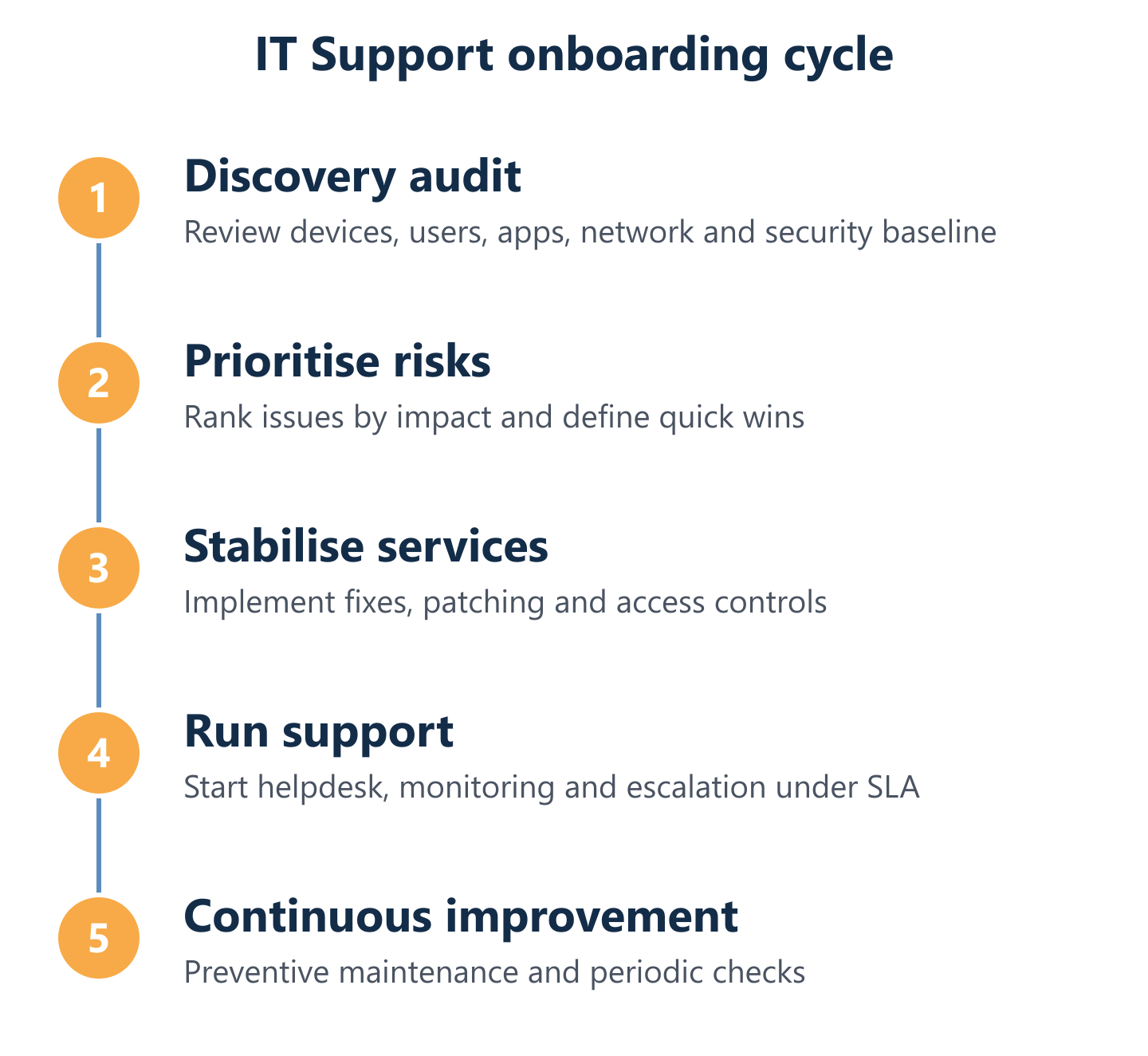
A structured onboarding process is the clearest indicator that a provider intends to deliver proactive service rather than reactive firefighting. The first step should be a system audit: documenting every device, server, network component and application in scope, along with current patch levels, security configuration and any known risks. From that audit, the provider prioritises the issues that pose the highest operational or security risk and addresses them in the first weeks of service. A stabilisation plan sets out what will be fixed, in what order and by when — giving you visibility and confidence from day one. Impulso Tecnológico applies this methodology as standard, using preventive maintenance as the foundation for reducing emergency incidents and building a stable, secure environment that supports your business rather than interrupting it.
Choosing IT support in Burgos is a commercial decision with long-term operational consequences. Use the criteria in this guide — scope definition, delivery model, SLA specifics, cost drivers and onboarding process — to request comparable proposals from shortlisted providers. The right partner will keep your systems secure, available and straightforward to manage, freeing your team to focus on the work that actually grows your business. If you would like to discuss how Impulso Tecnológico can support your Burgos operation, the next step is a no-obligation conversation about your current environment. You may also find it useful to review how we approach preventive IT maintenance for businesses, or explore our service model for nearby regions such as IT support in Cantabria and IT support in Almería.