

IT support in Badajoz means having a dedicated technical partner who resolves incidents quickly, maintains your systems proactively, and keeps your business running without depending on ad-hoc fixes. Whether you need remote IT support for daily user issues or on-site intervention for hardware and infrastructure, the right provider covers both under a single, predictable service model.
Many businesses in Badajoz operate without an internal IT team, or with limited technical capacity that cannot handle the full range of modern infrastructure demands. When a server goes down, a workstation fails, or a security alert fires, the cost of waiting for an available technician is measured in lost productivity and operational risk. The alternative is a managed IT support model: a contracted external department that monitors your environment, responds to incidents within agreed timeframes, and applies preventive maintenance before problems escalate. Impulso Tecnológico has been delivering exactly this kind of service for more than 25 years, combining remote and on-site capability to serve businesses across Spain and beyond. This guide explains what that support should include, how to compare models, and what to look for before committing to a provider.
What IT Support in Badajoz should include (so you know what to ask for)
Not every IT support offer is the same. Some providers focus on break-fix calls; others deliver a fully managed service that covers monitoring, patching, security and user support under one contract. Before requesting quotes, it helps to know which components belong in a complete offering — so you can identify gaps rather than discover them after an incident.
At Impulso Tecnológico, the approach is to act as an external IT department: a single point of contact for helpdesk requests, proactive system reviews, layered security practices and infrastructure management. This model reduces the coordination overhead that comes from managing multiple specialist vendors.
The table below maps the core components of professional IT support against what each one actually delivers in practice:
| Support Component | What It Covers | Why It Matters for SMEs |
|---|---|---|
| Helpdesk & incident management | User requests, fault logging, priority triage, resolution tracking | Reduces downtime by routing issues to the right technician quickly |
| Proactive monitoring | Server health, network availability, disk usage, security alerts | Detects problems before they affect users or cause data loss |
| Patch & update management | OS updates, firmware, application patches, vulnerability remediation | Closes known security gaps without disrupting daily operations |
| Endpoint & network security | Antivirus, firewall management, secure access, email filtering | Protects business data and prevents ransomware or intrusion incidents |
| Backup & disaster recovery | Scheduled backups, offsite/cloud copies, recovery testing | Ensures business continuity if hardware fails or data is compromised |
| On-site assistance | Hardware replacement, cabling, infrastructure changes, physical access | Essential for tasks that cannot be resolved remotely |
| IT asset & licence management | Device inventory, software licences, renewal tracking | Avoids compliance gaps and unexpected licence costs |
Helpdesk, troubleshooting and user support
A functioning helpdesk is the visible front end of any IT support contract. Users need a single, reliable channel — phone, email or ticketing portal — where they can report issues and receive a response within a defined timeframe. That timeframe is the SLA: a contractual commitment that specifies how quickly incidents are acknowledged and resolved based on their severity. Without it, "we'll get to it when we can" becomes the default, and business operations absorb the cost.
Effective IT incident management starts at the moment a ticket is raised: the issue is categorised, a priority level is assigned, and it is routed to the technician with the right skills. For most day-to-day problems — software errors, connectivity issues, account access, peripheral failures — remote resolution is both faster and more cost-efficient. Impulso Tecnológico handles the majority of user support requests remotely, with on-site escalation reserved for cases where physical access is genuinely required.
Maintenance, monitoring and patch management
Reactive support fixes problems after they happen. Proactive maintenance reduces how often they happen in the first place. Network monitoring tools track server performance, storage capacity, service availability and security events in real time, generating alerts when thresholds are crossed — before a user notices anything is wrong.
Patch management is equally critical. Unpatched operating systems and applications are the most common entry point for ransomware and other attacks. A structured patching schedule — tested and applied during low-impact windows — keeps systems current without disrupting operations. Impulso Tecnológico includes proactive reviews and monitoring as part of its managed services model, meaning clients benefit from scheduled maintenance cycles rather than waiting for something to break. For businesses without dedicated IT staff, this outsourced IT department approach is often the most practical way to maintain system health consistently across workstations, servers and network infrastructure.
Backups, endpoint security and basic continuity
Data loss and ransomware are not theoretical risks for SMEs — they are among the most common causes of operational disruption. A solid IT support contract must include a defined backup strategy: scheduled copies, at least one offsite or cloud-based destination, and periodic recovery tests to confirm the data is actually restorable. Backup without tested recovery is not a continuity plan.
Endpoint security covers the devices your staff use daily: workstations, laptops and mobile endpoints. This means active antivirus and anti-malware protection, vulnerability scanning, and controlled software installation policies. Impulso Tecnológico implements layered defences using technologies from Sophos, Fortinet and Veeam — covering firewall management, endpoint protection and backup in a coordinated way. Access control policies, including multi-factor authentication and privilege management, complete the picture by limiting the damage any single compromised account can cause. Together, these measures form the business IT security baseline that every organisation in Badajoz should have in place before anything else.

Managed IT Support vs ad-hoc help: which model fits your business
The choice between a managed support contract and calling a technician when something breaks comes down to four practical criteria: cost predictability, response speed, accountability and coverage breadth. Neither model is universally superior, but the trade-offs are significant enough that most growing businesses eventually move away from purely reactive arrangements.
Impulso Tecnológico's flat-rate maintenance and SLA helpdesk model is built specifically to address the gaps that ad-hoc support leaves open: no defined response times, no proactive monitoring, no single point of accountability when multiple systems are involved. Here is how the decision typically unfolds across those four criteria:
- Cost predictability: Managed contracts convert unpredictable repair bills into a fixed monthly cost. Ad-hoc calls are cheaper per incident when incidents are rare, but costs spike sharply after hardware failures or security events.
- Response speed: SLA-backed managed support guarantees acknowledgement and resolution windows by severity. Ad-hoc providers respond when available — which may not align with your operational urgency.
- Accountability: A managed provider owns the outcome across your entire environment. With ad-hoc help, accountability fragments: different technicians, no shared history, no continuity between calls.
- Coverage breadth: Managed services cover endpoints, networks, cloud accounts and security under one contract. Ad-hoc support typically addresses one device or one problem at a time, leaving gaps between systems.
- Proactive vs reactive posture: Managed support includes monitoring and patching that prevent incidents. Ad-hoc help, by definition, only activates after something has already failed.
Pros and cons: predictable SLAs vs reactive fixes
Managed IT support with guaranteed SLAs offers a structural advantage that reactive arrangements cannot replicate: incidents are handled within contractually defined windows, escalation paths are pre-agreed, and the provider has a financial incentive to resolve issues permanently rather than patch them temporarily. This matters most for businesses where downtime translates directly into lost revenue or customer impact.
The trade-off is a fixed monthly commitment regardless of incident volume. In months with few issues, a managed contract may feel like an overhead. In practice, however, the proactive monitoring and maintenance included in a well-structured managed service reduces incident frequency over time — so the cost-per-issue ratio improves as the relationship matures. Impulso Tecnológico's SLA helpdesk model is designed around this logic: structured escalation, resolution reporting, and continuous improvement cycles that reduce recurring incidents rather than simply closing tickets.
Coverage scope: office users, networks, cloud and devices
Ad-hoc support tends to handle what is visible and urgent: a broken workstation, a failed printer, a lost password. What it rarely covers is the broader environment those devices depend on — the network infrastructure, the cloud services, the backup jobs running in the background, or the firewall rules that have not been reviewed in two years.
A managed IT support contract should define coverage explicitly: which devices are included, whether network monitoring is in scope, how cloud accounts (Microsoft 365, Azure, or others) are managed, and who is responsible for security patching across the estate. Impulso Tecnológico centralises all of these under a single outsourced IT department model, so clients do not need to coordinate separate vendors for endpoints, networking and cloud. This is particularly relevant for businesses in Badajoz that have grown organically and accumulated a mixed environment of devices, platforms and legacy systems without a unified support structure.
Decision checklist: what to verify before signing
Before committing to any IT support contract, verify the following points explicitly — not as assumptions, but as written terms:
First, confirm that response and resolution SLAs are defined by severity level, not as a single average. A critical server outage and a non-urgent software query should not share the same response window. Second, check whether proactive monitoring and patching are included or billed separately. Third, establish whether on-site visits are covered within the contract or charged per call-out — and what the geographic scope is. Fourth, ask how escalation works: who handles issues that the first-line technician cannot resolve, and within what timeframe. Fifth, confirm what reporting you will receive: ticket volumes, resolution times, and recurring issues. The best fit depends on your internal IT capacity and risk tolerance, but these five points separate a genuine managed service from a basic break-fix arrangement dressed up in contract language.
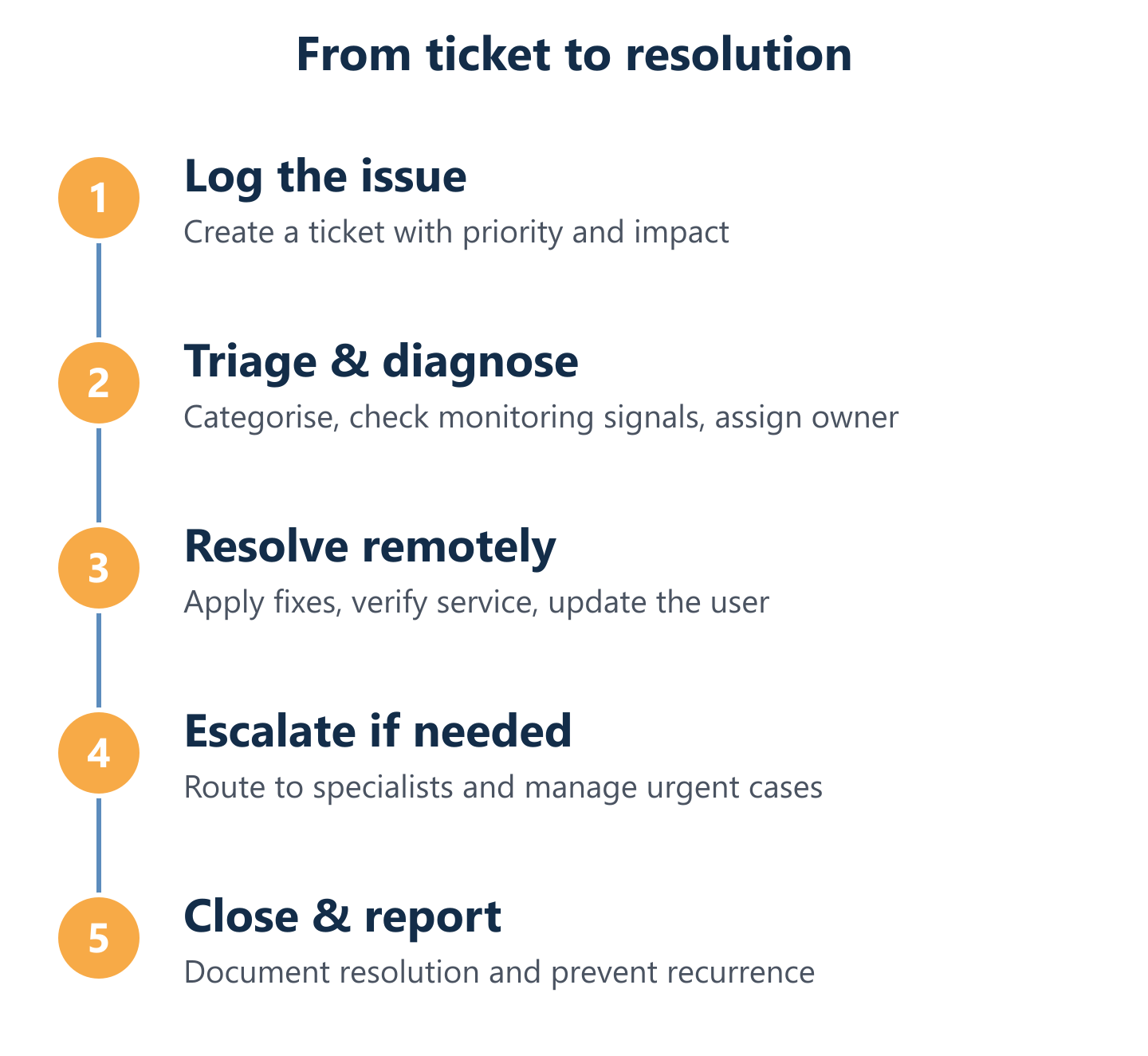
Our support process: from first contact to resolution (SLAs & escalation)
Understanding how support flows in practice — not just what is promised in a brochure — is the most reliable way to assess a provider. A well-designed process moves from incident detection or user report through triage, remote resolution attempt, on-site escalation if needed, and finally to closure and reporting. Each stage should have a defined owner and a time target.
Impulso Tecnológico's support model combines remote and on-site assistance with proactive monitoring, so incidents can be detected before users report them, or resolved quickly when they do. The key elements of a transparent support process include:
- Single point of contact: One channel for all IT issues, regardless of whether the problem is a user device, a network fault or a cloud service outage.
- Defined SLA tiers: Critical, high, medium and low priority levels, each with its own acknowledgement and resolution target.
- Remote-first resolution: The majority of incidents are resolved remotely, reducing response time and avoiding unnecessary on-site visits.
- On-site capability: When hardware replacement, cabling, or physical infrastructure access is required, on-site IT support is dispatched — not subcontracted to an unknown third party.
- Escalation paths: If a first-line technician cannot resolve an issue within the agreed window, it escalates automatically to a senior specialist, with the client informed at each stage.
- Closure and reporting: Every resolved ticket generates a record of what happened, how it was fixed, and what preventive action (if any) was taken to avoid recurrence.
- Proactive monitoring layer: Network monitoring and system health checks run continuously, generating alerts that the support team acts on before users are affected.
First contact, ticketing and priority classification
Every support interaction begins with triage: capturing the right information, assigning the correct priority, and routing the ticket to the technician best placed to resolve it. This step is more consequential than it appears. Miscategorised tickets — a critical server issue logged as low priority, or a simple password reset holding up the queue — directly increase resolution times and user frustration.
A professional SLA helpdesk uses a structured classification system: typically four priority levels based on business impact and urgency. A complete server outage affecting all users is critical; a single workstation with a non-urgent software issue is low. Each level carries a defined acknowledgement window and a resolution target. Impulso Tecnológico applies this classification from the moment a ticket is raised, ensuring that business-critical incidents receive immediate attention while routine requests are queued and handled efficiently without disrupting higher-priority work.
Remote support workflow and on-site triggers
Remote IT support is the default resolution method for the majority of business IT incidents: software errors, configuration issues, connectivity problems, user account management, and application faults can all be diagnosed and fixed without a technician physically present. This approach delivers faster response times, lower costs, and the ability to support multiple clients simultaneously.
On-site IT support is triggered when remote resolution is not technically feasible: hardware failure requiring physical replacement, structured cabling work, server room interventions, device provisioning, or infrastructure changes that need hands-on access. Impulso Tecnológico has delivered structured and fibre cabling services across Spain for more than 15 years, so on-site capability extends beyond basic device support to full infrastructure work. The decision between remote and on-site is made at the triage stage, based on the nature of the fault — not on convenience or cost avoidance — ensuring the right resource is deployed from the outset.
Escalation, resolution reporting and continuous improvement
Escalation is not a failure of the support process — it is a designed part of it. When a first-line technician reaches the boundary of their expertise or their allotted resolution window, the ticket moves to a senior specialist automatically, with the client notified of the change. This keeps stakeholders informed without requiring them to chase updates.
Resolution reporting closes the loop: each ticket should generate a record of the root cause, the action taken, and any recommended follow-up. Over time, this data reveals patterns — recurring incidents on specific devices, persistent network faults, or repeated user errors — that inform preventive maintenance priorities. Impulso Tecnológico includes this continuous improvement dimension in its managed services model, using resolution history to reduce incident frequency rather than simply maintaining a steady ticket volume. Clients receive transparent reporting on resolution times and recurring issues, which also supports IT budget planning and infrastructure investment decisions. For similar approaches to proactive IT management, see our articles on preventive IT maintenance for businesses and IT support in Almeria.
Defining your coverage needs is the practical starting point. Before selecting a provider or signing a contract, a support audit maps your current infrastructure, identifies gaps in monitoring or security, and establishes which service tier matches your operational risk profile. For businesses in Badajoz without a dedicated IT team, this step often reveals exposure that was not previously visible — unpatched systems, untested backups, or network segments with no monitoring in place. Impulso Tecnológico offers this kind of initial assessment as the basis for building a managed support plan that fits your actual environment, not a generic package. You can also explore how we approach IT support in other locations across Spain, such as our IT support service in Ciudad Real and IT support in La Coruña, to understand the consistency of our methodology across regions.