
IT Support Avila covers the technical assistance, maintenance and security services that businesses in Ávila need to keep systems running reliably. This includes help desk response, remote access troubleshooting, phishing incident handling, device support and proactive IT maintenance—delivered under defined SLAs so response times are never left to chance.
Many businesses in Ávila reach a point where reactive IT fixes are no longer enough. A server goes down on a Monday morning, a staff member clicks a suspicious link, or a new employee cannot access shared drives—and there is no structured process to resolve it quickly. The cost is not just the downtime itself, but the accumulated disruption: lost productivity, frustrated teams and avoidable security exposure.
The right IT support model replaces that uncertainty with a structured service: a defined intake process, remote-first diagnosis, on-site escalation when needed, and a proactive layer that identifies recurring issues before they become incidents. At Impulso Tecnológico, we have built this model over more than 25 years of managed IT delivery, working as an extension of our clients' teams—whether they have internal IT staff or not. The result is fewer surprises, lower operational risk and IT costs that are predictable month to month.
What IT Support Avila Can Help You With (and When to Contact Us)
Most IT problems that affect business operations fall into predictable categories: a user cannot log in, a device is behaving erratically, email is not syncing, or a shared system has gone offline. Knowing which of these warrants a quick self-service fix versus an immediate call to your IT support company in Avila is the first step to reducing downtime.
Impulso Tecnológico approaches every engagement as an extension of the client's IT team. Before any support begins, we conduct an initial audit to document the current state of antivirus, backup, desktops, servers and communications—followed by a full IT inventory of what we maintain. This baseline means that when a ticket arrives, our engineers already understand the environment, which cuts diagnosis time significantly.
Our fixed-price managed support packages are designed for day-to-day continuity: unlimited remote technical support, a defined on-site SLA for general faults, and a faster escalation path for incidents that affect the whole business. Every request includes a proactive review—we do not just resolve the symptom, we assess whether the same issue is likely to recur and advise accordingly.
| Issue Type | Typical Channel | Response Expectation | On-site Required? |
|---|---|---|---|
| Single user login / account access | Help desk ticket or call | Remote, same business day | Rarely |
| Device fault (workstation / laptop) | Help desk ticket | Remote diagnosis first; on-site per SLA | Sometimes |
| Suspected phishing or security incident | Immediate call + ticket | Priority escalation | Depends on scope |
| Partial network / server outage | Call + ticket | Urgent SLA path | Usually yes |
| Business-critical full outage | Direct call | Immediate escalation | Yes |
Common support requests: devices, accounts, and workplace productivity
The majority of day-to-day IT support requests cluster around three areas: access and accounts (password resets, multi-factor authentication issues, permission errors), devices (slow workstations, hardware faults, peripheral connectivity), and productivity tools (Microsoft 365 configuration, email sync problems, shared drive access). These are the tickets that, if handled slowly, quietly erode team output over weeks.
A well-structured help desk covers all three without requiring users to judge the severity themselves. At Impulso Tecnológico, our managed services model handles these requests remotely as standard, with engineers who already know the client's IT inventory—so there is no time lost explaining the environment from scratch on every call. For businesses running Microsoft 365 or Azure, our certified team resolves configuration issues directly within the tenant, reducing resolution time considerably.
When to escalate: partial outages vs business-critical incidents
Not every IT problem carries the same urgency, but the line between a partial outage and a business-critical incident can shift quickly. A single user losing VPN access is a help desk ticket. Five users losing access to the same system simultaneously is an escalation. A server going offline during peak hours is a critical incident that triggers a different SLA path entirely.
Impulso Tecnológico defines these thresholds in the support contract so there is no ambiguity when something goes wrong. Our SLA IT support framework distinguishes between general faults (affecting one or a few users) and urgent incidents (affecting operations across the business), with separate response and resolution targets for each. This structure means engineers prioritise correctly from the first contact, rather than treating all tickets with the same queue logic.
Service scope fit: SMEs with or without internal IT staff
One of the most common misconceptions about managed IT support is that it only suits businesses without any internal IT resource. In practice, many of Impulso Tecnológico's clients have one or two internal IT staff who need a reliable partner for overflow, specialist tasks or out-of-hours cover during holidays and absences.
For businesses with no internal IT team, we act as the full external IT department—handling everything from first-line help desk to infrastructure decisions. For those with existing staff, we integrate as a second-line resource, taking on complex troubleshooting, security management and project work. In both cases, the proactive review on each support request means we are continuously building knowledge of the environment and preventing repeat failures—not just closing tickets. This approach is consistent with how we deliver preventive IT maintenance for businesses across our client base.

How to Get Help: Call, Email, and the Ticket Process
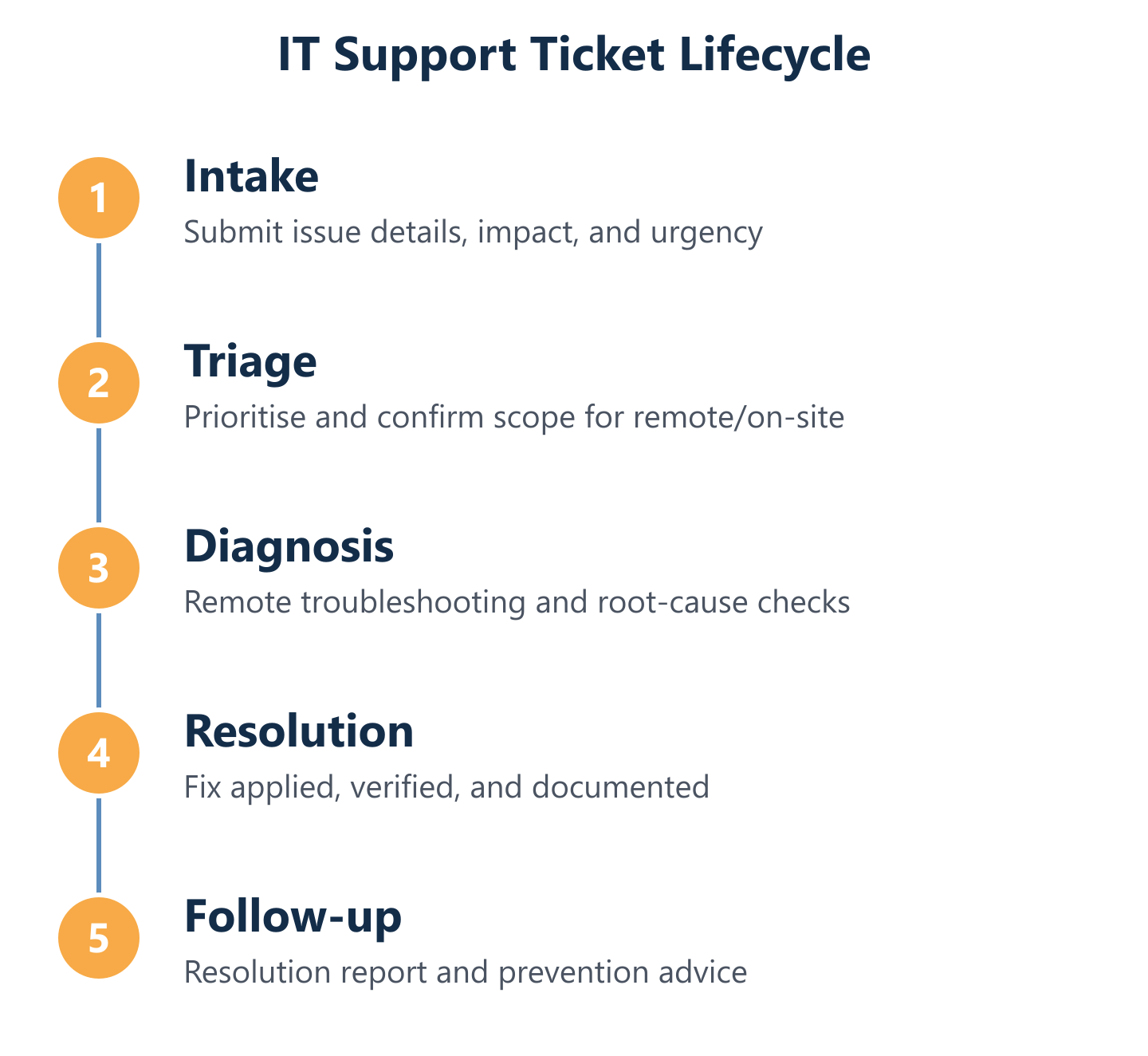
A clear helpdesk ticket process is one of the most practical differentiators between a managed services provider and ad-hoc IT support. When users know exactly how to report a problem—and what happens next—resolution times drop and frustration stays low. The process Impulso Tecnológico uses follows a structured intake-to-resolution flow that works for both minor requests and major incidents.
Before any support engagement begins, we run an initial audit and build an IT inventory. This means every ticket arrives in context: our engineers know what devices, software and configurations are in scope, so they are not starting from zero on each call. Clients access support by phone or email, and every request generates a tracked ticket with a reference number, assigned engineer and SLA clock. Remote-first diagnosis keeps resolution fast; on-site visits are triggered when remote access troubleshooting cannot resolve the issue, or when the incident scope requires physical presence.
- Initial contact: Call or email the support line; a ticket is created immediately with a reference number and priority classification.
- Intake and triage: The engineer collects the key details—what is happening, who is affected, and what the business impact is—to set the correct SLA path.
- Remote diagnosis: The engineer connects remotely to diagnose and, where possible, resolve the issue without an on-site visit.
- Escalation decision: If remote access troubleshooting does not resolve the fault, or if the incident is business-critical, an on-site visit is scheduled within the agreed SLA window.
- Resolution and proactive review: Once resolved, the engineer documents the fix, checks for underlying causes, and advises on any preventive action needed.
- Resolution report: A written summary is provided so the client has a clear record and can track recurring issues over time.
Step-by-step ticket workflow: from first contact to resolution
Every ticket at Impulso Tecnológico follows the same structured path regardless of whether it is a password reset or a server fault. The moment a user contacts support—by phone or email—a ticket is created, timestamped and assigned a priority level based on the impact described. This is not a formality: the priority level determines which SLA clock is running and which engineer picks it up first.
From intake, the ticket moves to remote diagnosis. Engineers use secure remote access tools to connect to the affected device or system, replicating the issue in real time rather than relying on user descriptions alone. If the fault is resolved remotely, the ticket is closed with a written resolution summary. If not, it escalates to on-site support within the timeframe defined in the client's SLA IT support agreement. At every stage, the ticket status is visible and traceable.
What we need from you: details that speed up diagnosis and reduce back-and-forth
The single biggest factor in slow ticket resolution is incomplete intake information. When a user reports "my computer is not working," the engineer must spend the first part of the call gathering context that could have been captured at the start. Providing three pieces of information upfront cuts that time significantly: what exactly is happening (error message, behaviour, symptoms), who and what is affected (one user, one device, or a whole team or system), and when it started and whether anything changed beforehand.
Impulso Tecnológico's support process is built around remote-first diagnosis, which means the quality of initial information directly affects how quickly an engineer can connect and act. For clients on our managed services model, the IT inventory we maintain means engineers already know the device history—so the user only needs to describe the current symptom, not the entire environment.
Service expectations: SLAs, response times, and how urgent issues are handled
SLA IT support is only meaningful when the terms are defined clearly before an incident occurs. Impulso Tecnológico specifies response and resolution targets in the support contract, distinguishing between general faults (affecting individual users or devices) and urgent incidents (affecting business operations more broadly). This prevents the common scenario where a critical outage is treated with the same priority as a routine request.
For each resolved ticket, we provide a written resolution report that documents what happened, what was done, and what preventive steps are recommended. Over time, these reports become a practical record of recurring issues and infrastructure weaknesses—turning individual fixes into ongoing service continuity. Clients can also raise technical questions as part of the service, without those conversations being billed as separate consultancy engagements. This is consistent with how we structure IT support for businesses in Almeria and other locations we serve across Spain.
Security and Productivity Support: Remote Access, Phishing, and Secure Printing
Security support and productivity support are not separate categories—they overlap constantly. A user who cannot access their VPN remotely is both a productivity problem and a potential security risk if they resort to insecure workarounds. A suspected phishing email that goes unreported for hours can become a containment incident. A print job sent to the wrong output tray can expose confidential documents. Effective IT support in Avila addresses all of these as part of a single, coherent service.
Impulso Tecnológico applies a security-by-design approach across all managed support engagements. This means security is not an add-on—it is built into the way we handle remote access, respond to incidents and advise on device configuration. We work with leading security partners including Sophos and Fortinet for endpoint and network protection, and Veeam for backup and disaster recovery. Our defence-in-depth model covers:
- Network-level protections: Firewalls, secure web filtering and email controls that stop threats before they reach endpoints.
- Endpoint protections: Antivirus, personal firewalls and spyware removal on every managed device.
- Secure access controls: VPN configuration, encryption and identity management to ensure only authorised users connect to business systems.
- Vulnerability management: Regular patch reviews and security assessments to close known gaps before they are exploited.
- Incident response: Structured containment and recovery steps for security events, including phishing incident response.
- Productivity device support: Workstation troubleshooting and secure printing workflows managed as part of the standard service scope.
Remote access troubleshooting: safe, practical recovery for Mac and Windows
Remote access failures are among the most disruptive day-to-day IT problems for hybrid and distributed teams. Whether the issue is a VPN client that will not connect, a Remote Desktop session that drops, or a Mac user who cannot reach a Windows-based shared resource, the impact is immediate: the user is blocked from working.
Impulso Tecnológico handles remote access troubleshooting for both Mac and Windows environments as standard within our managed support model. Engineers diagnose connectivity issues, credential problems, certificate errors and configuration mismatches remotely—using secure access tools that do not require the user to be technically proficient. Where the issue is a network or firewall configuration problem rather than a device fault, our infrastructure team can adjust settings directly. Recovery is documented, and if the same access issue recurs, the proactive review process flags it for a permanent fix rather than another reactive patch.
Security support: phishing awareness, containment steps, and prevention actions
Phishing remains the most common entry point for business security incidents. A single click on a malicious link can compromise credentials, install malware or give an attacker persistent access to internal systems. The critical variable is not whether a phishing attempt will arrive—it will—but how quickly it is identified, reported and contained.
Impulso Tecnológico's phishing incident response follows a structured sequence: immediate isolation of the affected account or device, credential reset, log review to assess whether the link was followed or data was transmitted, and a check for lateral movement within the network. Alongside reactive response, our managed services model includes email security controls (filtering and safe-link scanning), endpoint protection via Sophos, and user awareness guidance delivered as part of the service. Prevention and response are treated as a single capability, not two separate conversations. This mirrors the security approach we apply in locations such as IT support in La Coruña.
Secure printing and device support: reducing data exposure and fixing workflow blockers
Secure printing—where a print job is held in a queue until the user authenticates at the device—is a straightforward control that prevents confidential documents from sitting unattended in an output tray. It is also a common source of support requests when users cannot release jobs, drivers are misconfigured, or authentication methods change after a system update.
Impulso Tecnológico handles secure printing configuration and troubleshooting as part of standard device and workstation support. This includes driver installation, print queue management, authentication setup and resolving conflicts between print servers and endpoint security policies. More broadly, workstation support covers hardware faults, operating system issues, peripheral connectivity and software conflicts—the category of problems that, if left unresolved, quietly reduce individual productivity across a team. Every device fault is reviewed for underlying causes before the ticket is closed.
Choosing an IT support provider in Avila comes down to three practical questions: what is covered, how fast will they respond, and how do they handle security? A provider that answers all three with documented SLAs, a structured ticket process and a security-by-design approach removes the guesswork from IT operations. Impulso Tecnológico offers tailored managed support packages built around your environment, your team size and your risk tolerance. If you want predictable IT support with clear response expectations, the right starting point is a conversation about your current setup—and a proposal built around what you actually need. Contact us to request a tailored assessment.