

IT support in Aranjuez means having a qualified provider handle your business systems proactively — covering maintenance, security, helpdesk response, and backup health — so that technical issues are resolved quickly and do not interrupt daily operations.
For businesses operating in Aranjuez and the wider Madrid region, unreliable IT is not an abstract risk — it translates directly into lost productivity, delayed processes, and exposed data. The challenge most SMEs face is not finding someone who can fix a problem after it happens, but finding a provider who prevents most of those problems from occurring in the first place. That requires a structured approach: regular audits, patching cycles, backup verification, and a helpdesk with defined response times rather than ad-hoc interventions.
At Impulso Tecnológico, we have spent over 25 years building exactly that model for companies across Spain and beyond. Our IT support service for Aranjuez businesses combines preventative computer maintenance with responsive technical assistance — both remote and on-site — backed by clear service level agreements. The result is fewer incidents, faster resolutions when they do occur, and IT infrastructure that supports growth rather than limiting it.
What IT Support in Aranjuez should include (and why it matters)
Most businesses do not discover the gaps in their IT support until something breaks at the worst possible moment — a server failure on a deadline day, a ransomware incident with no recent backup, or a remote worker locked out of critical systems. Defining what IT support should cover before you choose a provider is the single most effective way to avoid those situations.
A complete IT support service for businesses in Aranjuez should address four pillars: day-to-day user and device support, preventative maintenance, security protection, and documented incident management with SLAs. Providers who only offer reactive helpdesk cover one quarter of the picture. Impulso Tecnológico structures its service around all four, combining proactive computer maintenance with multi-layer security and guaranteed response targets — so clients get operational continuity rather than a series of isolated fixes.
| Support Element | Reactive-Only Provider | Managed IT Support (MSP) |
|---|---|---|
| Helpdesk / incident response | Yes (on request) | Yes (with defined SLA) |
| Preventative maintenance | Rarely included | Scheduled and documented |
| Backup health verification | Not standard | Regular checks included |
| Security configuration (AV, firewall) | Ad hoc | Baseline + ongoing management |
| Post-resolution reporting | Rarely provided | Detailed report after each case |
| Systems inventory and audit | Not included | Completed at onboarding |
Core coverage: users, devices, email, and network basics
The foundation of any IT support contract is reliable coverage for the people and devices that keep your business running. This means a helpdesk that handles user issues — password resets, software faults, connectivity problems — alongside device management for workstations, laptops, and printers. Email configuration and access management are equally critical: a misconfigured mail environment or a compromised account can halt communications across an entire team.
Network basics round out the core layer: ensuring switches, routers, and wireless access points are operating correctly and that connectivity issues are diagnosed promptly. Impulso Tecnológico covers all of these through its managed services model, providing both remote IT support for fast resolution and scheduled on-site assistance for hardware-level interventions — with every interaction logged and tracked to prevent recurring incidents rather than simply closing tickets.
Preventative maintenance: audits, patching, and backup health checks
Preventative maintenance is what separates a managed IT support service from a break-fix arrangement. Regular patching of operating systems and applications closes the vulnerabilities that attackers exploit most frequently. Scheduled audits give you a current picture of your infrastructure — which devices are out of warranty, which systems are running unsupported software, and where backup jobs are failing silently.
Backup health checks deserve particular attention: a backup that has not been verified is not a backup. Impulso Tecnológico begins every new engagement with a complete audit covering antivirus status, backup copies, server health, communications infrastructure, and a full inventory of maintained computers. This baseline makes subsequent maintenance cycles faster and more targeted, and it means that when an incident does occur, recovery is measured in minutes rather than days. For businesses in Aranjuez that rely on continuous operations, this preventative layer is the most cost-effective investment in IT support available.
Security-by-design: antivirus, firewall thinking, and secure access
Security should be embedded in the support model from day one, not added as an afterthought when an incident occurs. A security-by-design approach means that endpoint protection, email security, firewall configuration, and secure remote access are all set up and maintained as part of the standard service — not sold as optional extras.
Impulso Tecnológico applies a multi-layer network security strategy across its IT support engagements: antivirus and endpoint protection (using technologies such as Sophos and Fortinet), vulnerability and patch management, controlled remote access, and backup solutions built on Veeam. Access settings for internet and email are configured in line with both market standards and client-specific requirements. Critically, every support interaction includes a review of the wider system to catch secondary issues before they escalate — and all actions are documented in detailed post-resolution reports, giving clients a clear audit trail and the information needed to make informed decisions rather than reactive ones.

How to compare IT support providers in Aranjuez
Choosing an IT support provider is a decision with long-term operational consequences. A provider who cannot meet your response targets during a server failure, or who has no structured onboarding process, will cost you more in downtime than any contract saving is worth. Use the following evaluation sequence before committing to any agreement.
- Define your coverage requirements first. List the number of users, devices, and critical systems you need covered — this determines whether you need managed coverage, fixed monthly hours, or a flat-rate remote assistance model.
- Ask for written SLA targets. Request specific response time commitments for server issues and general workstation incidents, not vague promises of "fast response".
- Assess the onboarding process. A provider who does not conduct an initial audit of your systems before starting work cannot deliver proactive maintenance — they can only react.
- Clarify the remote vs on-site balance. Understand which issues are handled remotely, when on-site visits are triggered, and what the scheduling process looks like.
- Review contract flexibility. Check whether contracts are rigid annual commitments or whether the provider adapts to your evolving needs without penalties.
- Verify technology partnerships. Providers certified by manufacturers such as Sophos, Fortinet, Microsoft, or Cisco have demonstrable technical depth — not just general IT knowledge.
Impulso Tecnológico addresses each of these points directly: structured onboarding via a complete audit, defined SLA targets for both server and workstation incidents, flexible contract options, and certifications with leading technology partners.
Remote vs on-site: when each model is the right fit
Remote IT support resolves the majority of business incidents faster than any on-site visit could — software faults, connectivity configuration, user access issues, and email problems are all addressable within minutes via a remote maintenance system. For Aranjuez businesses with distributed teams or remote workers, remote support is also the only practical model for covering users who are not in the office.
On-site support becomes necessary when hardware fails physically, when network infrastructure requires hands-on intervention, or when a complex incident cannot be fully diagnosed remotely. Impulso Tecnológico schedules on-site visits quickly after a breakdown is registered — within four business hours for server issues and within eight business hours for other computers — ensuring that hardware-level problems do not become extended outages. The right model for most SMEs is a combination: remote-first for speed, with reliable on-site escalation when the situation demands it.
SLAs and availability: what to ask to avoid surprises
Service Level Agreements are only valuable if they are specific and enforceable. Before signing any IT support contract, ask for written confirmation of three things: the maximum response time for critical incidents (server failures, full outages), the target resolution time for standard workstation issues, and the escalation path when a first-line fix does not resolve the problem.
Also clarify what "availability" means in practice. A provider operating Monday to Friday during business hours is appropriate for most SMEs — but you need to know this in advance so you can plan accordingly. Impulso Tecnológico operates from 09:00 to 17:00 CET, Monday to Friday, and publishes its SLA targets in its service conditions: four-hour on-site response for server incidents, eight business hours for other computers. This transparency allows clients to plan their own contingency measures and avoids the frustration of discovering coverage gaps after an incident has already occurred.
Pricing structure: hours packages vs unlimited remote assistance models
IT support pricing typically follows one of three models, each suited to a different operational profile. Fixed monthly hour packages work well for organisations with predictable, low-volume support needs — you pay for a defined number of hours and draw on them as required. Flat-rate managed coverage with unlimited remote assistance suits businesses where incident volume is higher or less predictable, as it converts IT support costs into a fixed monthly expense with no per-ticket charges.
A third option — outsourced IT department coverage — makes sense for organisations without any internal IT resource, where the provider effectively acts as the IT function. Impulso Tecnológico offers flexible contract structures across these models, with monthly billing that avoids large upfront commitments. The right choice depends on your current incident frequency, the criticality of your systems, and whether you have internal staff who handle first-line issues. A provider who recommends the same model to every client regardless of context is not giving you genuine advice.
Requesting IT Support Aranjuez: process, onboarding, and next steps
Understanding what happens between your first contact and the moment your systems are fully under managed support helps you set realistic expectations and prepare the right information. The process at Impulso Tecnológico follows a structured sequence designed to minimise the time between agreement and active coverage.
- Initial contact and scoping: You provide details about your organisation — number of users, devices, critical systems, and any known pain points. This shapes the service proposal.
- Complete systems audit: Before support begins, our team conducts a full review of your infrastructure — antivirus status, backup copies, server health, communications, and a complete inventory of computers to be maintained.
- Service configuration: Security software is installed and configured, access settings for internet and email are established, and the remote maintenance system is deployed across covered devices.
- SLA activation: Once onboarding is complete, your defined response targets go live — unlimited remote support for day-to-day incidents, with on-site scheduling triggered automatically for hardware-level issues.
- Ongoing reporting: After every significant intervention, you receive a detailed report covering what was resolved, what was reviewed, and any preventative actions recommended to reduce future risk.
- Permanent consultancy access: Beyond incident resolution, clients can raise technical questions at any point — so decisions about infrastructure, software, or security are informed by expert input rather than guesswork.
This model is consistent whether you are based in Aranjuez, elsewhere in the Madrid region, or operating across multiple locations. For businesses that also need IT support coverage in nearby areas, our service extends across the wider region — you can see how we approach similar engagements in our IT maintenance service for Arganda del Rey and our IT support coverage for San Fernando de Henares.
From ticket to resolution: diagnosis, fix, verification, and communication
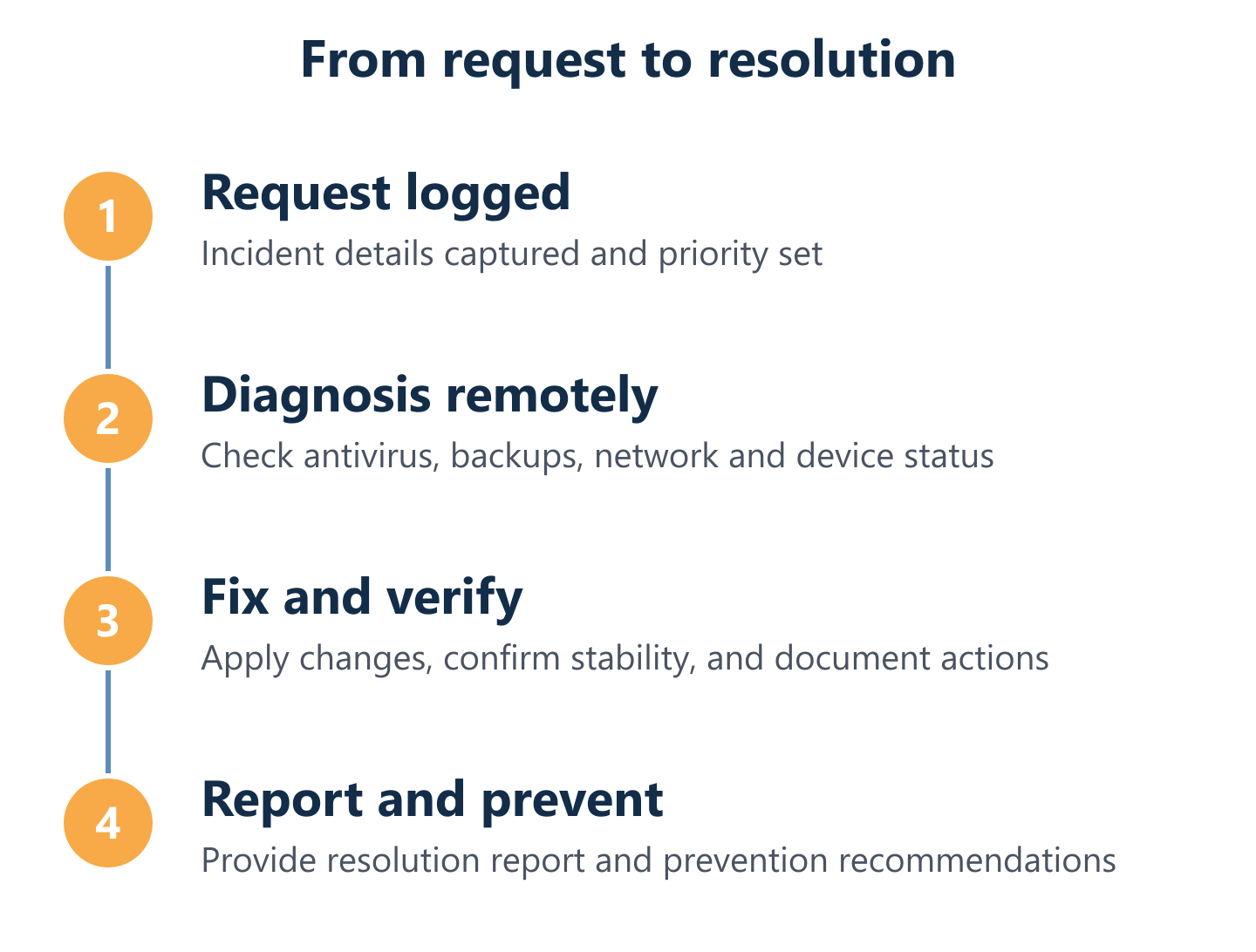
Every support interaction follows the same four-stage cycle regardless of incident type. First, diagnosis: the technician connects remotely or reviews the reported symptoms to identify the root cause — not just the visible fault. Second, fix: the issue is resolved using the most appropriate method, whether that is a remote configuration change, a patch deployment, or a scheduled on-site visit for hardware replacement.
Third, verification: before closing the ticket, the technician confirms that the fix is stable and reviews the surrounding systems for secondary issues that the original incident may have masked. This step is what prevents the same problem from recurring two weeks later. Fourth, communication: the client receives a clear summary of what was found, what was done, and what — if anything — requires further attention. At Impulso Tecnológico, this reporting step is standard practice, not an optional add-on, because informed clients make better decisions about their infrastructure.
Onboarding checklist: what you should prepare to speed up start
A well-prepared onboarding saves time on both sides and means your systems reach full managed coverage faster. Before your first session with a new IT support provider, gather the following:
A current list of all devices to be covered (workstations, laptops, servers, network equipment), including operating system versions where known. Details of any existing antivirus or endpoint protection software currently installed. Information about your backup setup — what is being backed up, how frequently, and where backups are stored (local, cloud, or both). Contact details for any third-party software vendors whose applications run on your infrastructure. Any known recurring issues or recent incidents that the new provider should be aware of from day one. Impulso Tecnológico uses this information during the initial audit to build an accurate baseline — which means the transition from your previous arrangement to managed support is smooth rather than disruptive.
What to request for a quote: users, devices, critical systems, and priorities
A precise quote requires precise inputs. When contacting Impulso Tecnológico — or any managed IT support provider — for a proposal, include the following in your initial request: the total number of users who need helpdesk coverage, the number and type of devices (workstations, laptops, servers, mobile devices), the name and version of any business-critical applications, your current backup arrangement and whether it needs to be replaced or supplemented, and any compliance requirements relevant to your sector (such as GDPR obligations for data handling).
Also indicate your priorities: is your primary concern reducing downtime, improving security, replacing an unreliable current provider, or building IT support from scratch? This context allows the provider to recommend the contract model and coverage level that genuinely fits your situation. For reference, you can also review how we structure IT support for businesses in comparable locations — our preventive IT maintenance service page outlines the full scope of what proactive coverage includes.
The difference between IT support that works and IT support that merely exists comes down to structure: defined SLAs, genuine preventative maintenance, and a provider who treats your systems as a long-term responsibility rather than a series of billable incidents. For businesses in Aranjuez, the practical starting point is a conversation about your current setup, your critical systems, and where the gaps are. From there, Impulso Tecnológico can build a service model that matches your risk level and operational requirements — and move you from uncertainty to a clear, documented support plan.