

IT support in Almeria means having a local technical partner who resolves hardware, software, network, and email issues under agreed response times—typically under 8 working hours for standard requests and under 4 hours for critical incidents—while keeping your systems proactively maintained and secure.
Most businesses in Almeria do not experience a single dramatic IT failure. They lose productivity through accumulated small disruptions: a workstation that keeps freezing, a business email that stops syncing, a network switch that drops connections intermittently. Each incident on its own seems minor, but together they erode working hours and create operational risk. The real cost is not the repair bill—it is the downtime while waiting for someone to respond.
At Impulso Tecnológico, we structure IT support around preventing those disruptions before they happen. Our model combines proactive computer maintenance, a structured helpdesk with ticketing and escalation, and measurable service levels that give your team a reliable, predictable IT environment—so you can focus on running your business rather than chasing technical fixes.
What IT Support Almeria should include for local businesses
Searching for IT support in Almeria and finding job listings is a common frustration—the market for this service is poorly documented online, which makes it harder for business owners to set realistic expectations. A professional IT support service is not simply someone who fixes computers when they break. It is a structured operational layer that keeps your technology aligned with your business needs, with defined scope, measurable outcomes, and clear accountability.
Impulso Tecnológico approaches this as an external IT department or a direct extension of your internal team, depending on what your organisation needs at any given stage. That means proactive computer maintenance, detailed resolution reporting after every intervention, and a device inventory from day one—not just reactive ticket closure.
The table below compares what a basic, reactive approach delivers versus what a structured managed IT support model should provide:
| Service element | Ad-hoc / break-fix | Managed IT support (structured) |
|---|---|---|
| Helpdesk access | Call when something breaks | Dedicated channel with ticketing and tracking |
| Response time | No commitment | SLA-defined (e.g. under 8 h standard, under 4 h critical) |
| Maintenance | None until failure | Scheduled preventive checks and patching |
| Device inventory | Not provided | Created at onboarding, kept updated |
| Resolution reporting | Verbal or none | Written report per intervention |
| Cost predictability | Variable, unpredictable | Fixed monthly fee or pre-purchased hours |
| Security coverage | Not included | Endpoint, backup, and firewall basics included |
Helpdesk vs break-fix: what you should expect day to day
A helpdesk is not a phone number you call in emergencies. It is a structured intake system where every incident—hardware fault, software crash, email delivery failure, connectivity drop—is logged, assigned, tracked, and resolved within a defined timeframe. Break-fix support, by contrast, has no tracking, no SLA, and no pattern analysis: you pay per visit and hope the problem does not recur.
For SMEs in Almeria, the practical difference is significant. With a managed helpdesk and ticketing system, your team knows exactly where to report an issue, who is handling it, and when to expect resolution. Recurring faults get flagged early, preventing unnecessary costs from repeat failures. Impulso Tecnológico's helpdesk model covers hardware, software, Microsoft 365 support, business email, and connectivity incidents—all under one agreed service scope.
Remote and on-site support: how coverage is typically structured
The majority of IT incidents—password resets, software configuration errors, email sync issues, VPN connectivity problems—can be resolved remotely in under 30 minutes when the support provider has proper remote access tools in place. Remote resolution is faster, cheaper, and less disruptive to your working day. However, hardware replacements, network cabling, server interventions, and complex infrastructure changes require a physical presence.
A well-structured IT support model for Almeria businesses combines both: remote support as the default channel for speed and efficiency, with on-site visits scheduled or dispatched when the situation demands it. Impulso Tecnológico provides both remote and on-site technical support, with on-site coverage available in Almeria and the surrounding area. The initial free audit also takes place on-site, establishing a baseline for the systems to be maintained and identifying issues that remote diagnostics alone cannot detect.
Service levels that matter: response targets and escalation paths
An IT service level agreement (SLA) is only useful if it distinguishes between incident types. A single employee who cannot open a PDF and a server outage affecting the entire office are not the same urgency, and your SLA should reflect that. Standard practice separates incidents into at least two tiers: general requests (target resolution under 8 working hours) and critical incidents affecting business-wide operations or servers (target under 4 working hours).
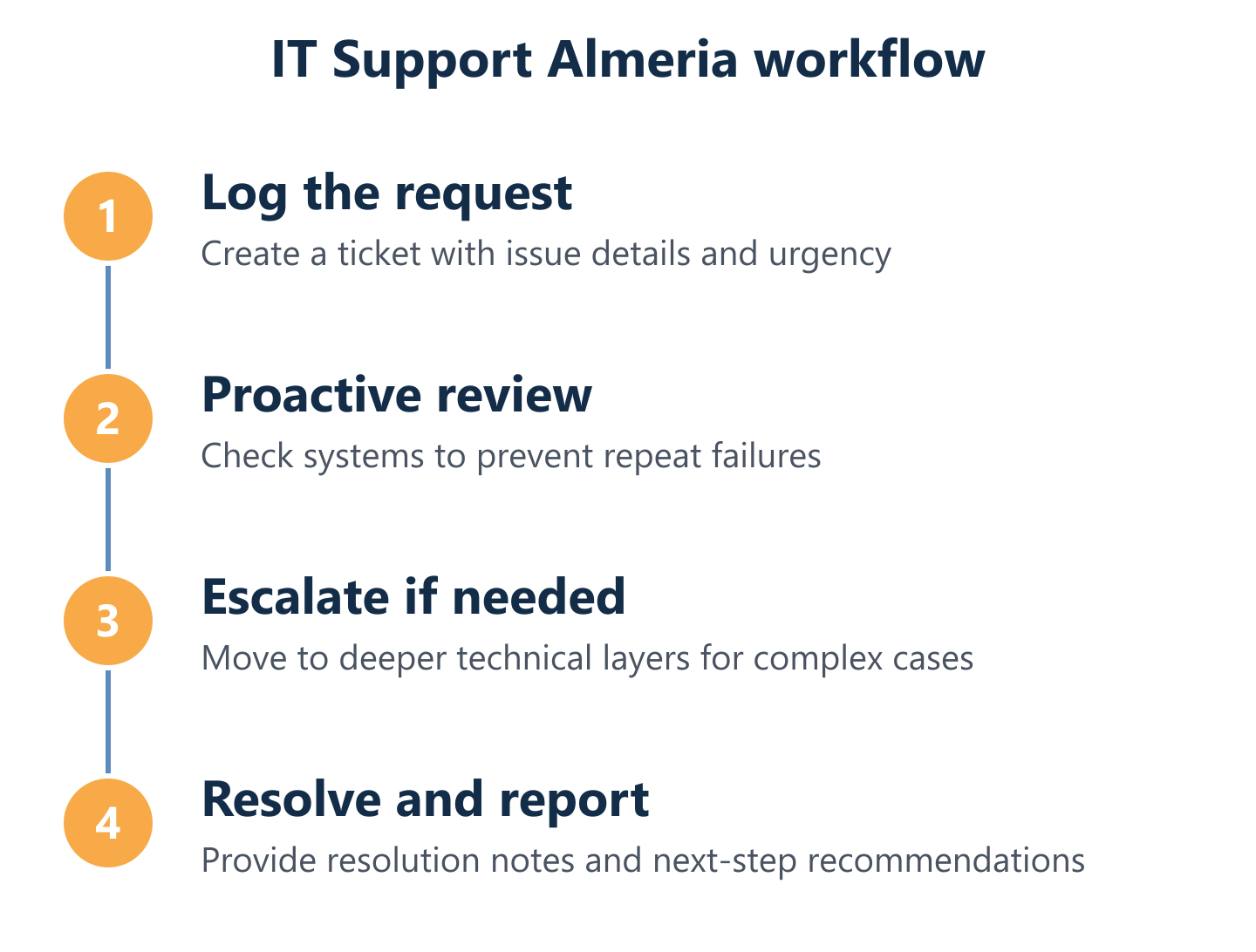
Beyond response times, the deliverables matter: after each intervention, Impulso Tecnológico provides a detailed resolution report documenting what was found, what was done, and what was recommended to prevent recurrence. Combined with a maintained device inventory, this creates an auditable record of your IT environment—useful for compliance, budgeting, and planning future upgrades. Transparent scope and clear escalation paths are what separate a professional Windows network support provider from an informal arrangement.

Support coverage in Almeria: response times and working hours
Response time claims are easy to make and difficult to verify without a written SLA. Before signing any IT support contract in Almeria, evaluate coverage using these four practical criteria:
- Define the working hours window. Confirm the exact hours during which SLAs apply. Impulso Tecnológico operates Monday to Friday, 09:00–17:00 CET—a standard business-hours model that covers the operational day for most SMEs in Spain.
- Separate urgency tiers in writing. A credible provider distinguishes between standard requests (SLA: under 8 working hours) and critical incidents—server failures or issues affecting the whole business (SLA: under 4 working hours). Vague promises of "fast response" without tier definitions are a red flag.
- Confirm escalation ownership. Ask who handles an incident if the first-line helpdesk cannot resolve it. A structured provider has a defined escalation path to second- and third-line technical support, with no gap in accountability.
- Require proactive review on every ticket. Each support request should include a preventive assessment—not just a fix—to identify whether the incident signals a wider issue. This reduces repeat failures and unnecessary costs over time.
- Ask for resolution reports as standard. Every closed ticket should generate a written report. This is the basis for accountability, pattern analysis, and transparent communication with your management team.
How to judge SLAs: under-8-hours vs under-4-hours expectations
The distinction between an 8-hour and a 4-hour SLA is not arbitrary—it maps directly to business impact. A standard request (one user cannot access a shared drive, a printer is offline) can wait up to 8 working hours without halting operations. A critical incident (email server down, firewall failure, network outage across the office) cannot: every hour of downtime has a measurable cost in lost productivity and potential data exposure.
When evaluating IT support providers in Almeria, ask them to define in writing what qualifies as "urgent." Impulso Tecnológico applies the under-4-hour target to incidents that affect the whole business or involve server-level failures—a clear, enforceable definition. Providers who offer a single flat response time for all incidents are either under-resourced or not genuinely committed to SLA performance.
What happens when the issue is bigger than a single device
Single-device failures are straightforward to handle. The more revealing test of an IT support provider is how they manage incidents that start on one machine and expand: a ransomware infection spreading across a Windows network, a misconfigured firewall rule blocking all outbound traffic, or a failed server affecting every user simultaneously.
A structured escalation path means the helpdesk does not stall when the problem exceeds first-line capability. At Impulso Tecnológico, incidents that cannot be resolved at the initial support tier are escalated to senior technical engineers with infrastructure and security expertise—including network support, firewall management (Fortinet, Sophos), and server-level diagnostics. The client receives continuous communication throughout, not silence while the team works. For outsourced IT support for SMEs, this escalation depth is what separates a genuine IT partner from a one-person operation.
Reporting and accountability: what you receive after each intervention
Resolution reports are the audit trail of your IT support relationship. After every intervention—whether remote or on-site—Impulso Tecnológico delivers a written report detailing the incident, the diagnostic steps taken, the resolution applied, and any recommendations to prevent recurrence. This is not a courtesy; it is a contractual deliverable.
Over time, these reports become a valuable operational asset. They reveal patterns (which devices fail repeatedly, which software versions cause instability, which users need additional training), inform hardware refresh cycles, and provide evidence of due diligence for compliance purposes under GDPR or sector-specific regulations. Combined with the device inventory created at onboarding, the reporting layer gives management a clear, factual picture of IT health—rather than relying on verbal updates from a technician.
How to choose the right IT support plan: pricing, security, and fit
Choosing an IT support plan is a risk management decision as much as a cost decision. The right model depends on your device count, user volume, security exposure, and how much internal IT capability you already have. Before comparing prices, clarify these selection criteria:
- Scope of coverage: Does the plan cover all devices, users, and locations—or only specific assets? Impulso Tecnológico's all-inclusive fixed-price model starts with a free computer and systems audit, producing an audit report that defines exactly what is in scope.
- Unlimited vs capped hours: All-inclusive plans with unlimited remote and on-site hours give predictable monthly costs. Hourly packs (minimum 10-hour blocks) suit businesses with lower or variable support demand.
- Security layer included: Confirm whether endpoint protection, backup, and firewall management are part of the plan or sold separately. Impulso Tecnológico integrates a multi-layer security approach using Sophos, Fortinet, Veeam, and Microsoft technologies.
- Stack compatibility: Your provider must support the platforms you actually use—Microsoft 365, Windows networks, business email, cloud environments. Generic support that cannot handle your specific stack creates gaps.
- Flexibility and exit terms: Avoid rigid multi-year contracts if your business is growing or changing. Impulso Tecnológico offers flexible contractual arrangements without locking clients into inflexible terms.
- Onboarding process: A provider who starts with an audit and inventory is investing in understanding your environment. One who starts billing immediately without assessment is not.
Plan comparison for SMEs: all-inclusive, hourly, and full outsourcing
Three plan structures cover the majority of SME needs in Almeria. The all-inclusive fixed-price model provides unlimited remote and on-site hours, proactive maintenance, a device inventory, and resolution reporting for a predictable monthly fee—best suited to businesses that want complete cost certainty and a fully managed IT environment. Hourly packs (minimum 10-hour blocks) work for organisations with lower support demand or an internal IT person who needs occasional specialist backup. Full IT outsourcing goes further: Impulso Tecnológico acts as the complete IT department, covering strategy, procurement, infrastructure, and day-to-day support.
For most SMEs comparing options, the all-inclusive model eliminates the risk of unexpected invoices and incentivises the provider to prevent incidents rather than profit from them—a structural alignment that reactive billing does not create. Similar models are available for businesses seeking IT maintenance for businesses across different regions of Spain.
Security and compliance basics included in managed IT support
Security is not an optional add-on for businesses in Almeria—GDPR compliance alone requires demonstrable controls over data access, storage, and breach response. A managed IT support plan should include, as a baseline: endpoint protection (antivirus and anti-malware managed centrally), automated backup with tested recovery procedures, and firewall management to control network perimeter traffic.
Impulso Tecnológico builds security into its IT support model using certified partner technologies: Sophos and Fortinet for endpoint and network protection, Veeam for backup and disaster recovery concepts, and Microsoft for identity and access management within Microsoft 365 environments. The initial audit covers antivirus status, backup configuration, desktop and server health, and communications infrastructure—identifying gaps before they become incidents. This layered approach means security is embedded in day-to-day operations, not bolted on after a breach.
Decision checklist: questions to ask before you sign
Before committing to any IT support provider in Almeria, run through these questions to confirm the contract will actually cover your environment:
- Does the provider support Microsoft 365 and Windows network environments specifically—not just generic IT?
- Is business email (configuration, delivery issues, spam filtering) explicitly in scope?
- What is the defined process for escalating a critical incident outside normal helpdesk hours?
- Is a device inventory created at onboarding and maintained throughout the contract?
- Are resolution reports provided after every intervention, or only on request?
- Does the plan include a free initial audit, or does assessment cost extra?
- Can the contract scale as your device count or user base grows?
For businesses already using managed IT support in other locations, keep in mind that Impulso Tecnológico provides consistent service models across Spain—including IT support in Alcobendas and IT support in La Coruña—making multi-site coordination straightforward under a single provider.
Once you have aligned scope, SLAs, and security coverage with a provider who understands your stack and your business context, IT support shifts from a reactive cost to a predictable operational investment. The starting point is always an honest assessment of your current environment. Impulso Tecnológico offers a free computer and systems audit for businesses in Almeria—covering antivirus, backup, desktops, servers, and communications—so you can make an informed decision based on the actual state of your infrastructure, not assumptions. From there, the right plan, the right SLAs, and the right security layer follow naturally.