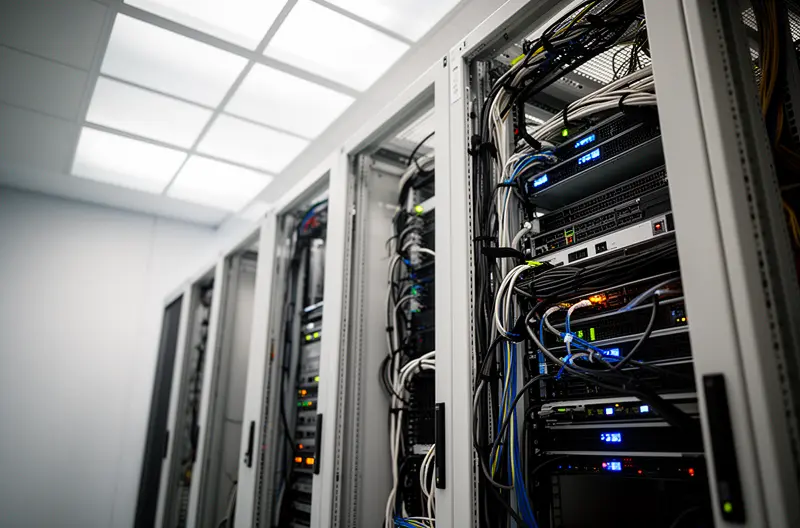

IT support in Alcobendas means having a reliable partner who keeps your computers, servers, and business systems running without interruption — handling incidents remotely or on-site, with defined response times and clear service expectations.
For most businesses in Alcobendas, IT problems don't announce themselves. A server goes down at the worst moment, a user can't access critical files, or a security patch has been missed for weeks without anyone noticing. The cost isn't just the fix — it's the hours of lost productivity while waiting for someone to respond. What companies in the area actually need is a structured IT support service that combines proactive maintenance with fast incident resolution, backed by formal SLAs so there are no ambiguities about what happens when something goes wrong. At Impulso Tecnológico, we operate as an external IT department for businesses across the Madrid area, including Alcobendas, covering everything from day-to-day helpdesk requests to server maintenance, endpoint protection, and cloud management — all under a single, predictable support contract.
IT Support Alcobendas: what we cover for businesses
Most businesses searching for IT support in Alcobendas aren't looking for a data centre or a one-off technician — they need a dependable partner who understands their systems, responds quickly when something breaks, and prevents problems before they escalate. That's the scope we define from day one.
At Impulso Tecnológico, we position ourselves as an external IT department: a team that takes ownership of your technology environment so your staff can focus on the actual business. Our support model covers computers, servers, business applications, connectivity, and user access — with structured incident handling and measurable outcomes. We track more than 4,000 IT tickets resolved annually across our client base, which reflects the operational depth behind what we do.
| Support Area | What It Covers | Delivery Mode |
|---|---|---|
| Helpdesk & Incidents | PC issues, user access, application errors, connectivity faults | Remote first, on-site if needed |
| Server Maintenance | Updates, monitoring, performance checks, hardware alerts | Remote monitoring + scheduled on-site |
| Endpoint Management | Patching, antivirus, configuration, inventory tracking | Remote (automated + manual) |
| Backup & Recovery | Backup verification, restore testing, disaster recovery planning | Remote + on-site for physical media |
| Network & Connectivity | Router, switch, Wi-Fi, firewall configuration and fault resolution | Remote diagnosis + on-site intervention |
| Reporting & Documentation | Post-incident reports, system inventory, audit records | Delivered after every intervention |
Helpdesk support: incidents, requests, and user assistance
The helpdesk is where IT support becomes tangible for employees. When a user can't log in, an application crashes, or a printer stops responding, the clock starts immediately — every minute of blocked productivity is a direct operational cost. Our helpdesk for businesses in Alcobendas handles the full spectrum of day-to-day requests: PC troubleshooting, password resets, software errors, email configuration, peripheral faults, and access issues across business systems. Requests are logged, prioritised, and tracked through our remote maintenance system, which allows our technicians to connect to affected devices quickly without waiting for a site visit. For managed IT support clients, this service is available within contracted hours and covered under the agreed service level agreement, so there are no surprise charges and no ambiguity about who handles what.
Endpoint and server maintenance: stability, updates, and backups
Reactive support alone isn't enough to keep a business running reliably. Unpatched systems, missed backup failures, and unchecked server performance are the silent causes of most serious IT incidents. Our maintenance approach for SMEs — typically covering companies with between 3 and 150 PCs — starts with a complete audit of the existing environment: antivirus status, backup integrity, server health, and communications infrastructure. From that baseline, we build a structured maintenance schedule that includes operating system and software patching, antivirus updates, backup verification, and performance monitoring. Critically, every time we attend an incident, we also review adjacent systems to catch anything that might cause a secondary failure — a practice that significantly reduces repeat incidents and unnecessary costs for our clients across the Madrid area, including Alcobendas.
Documentation and reporting: what you receive after each intervention
Transparency after an incident is not optional — it's part of the service. After every intervention, whether remote or on-site, Impulso Tecnológico provides a detailed report covering what was found, what was done, and what was checked beyond the original fault. This documentation serves multiple purposes: it gives IT managers and business owners a clear record of system health over time, it supports internal audits and compliance requirements, and it creates an escalation trail if a recurring issue needs to be addressed at a deeper infrastructure level. For companies without an internal IT team, these reports also act as a running inventory of the technology environment — something that proves invaluable when planning upgrades, renewals, or security reviews. Clear records mean fewer surprises and faster decisions.

Managed IT services vs. break/fix: choosing the right model
Choosing between managed IT support and a break/fix arrangement comes down to three variables: how much downtime your business can absorb, how predictable you need your IT costs to be, and how seriously you take your current security posture. Neither model is inherently wrong — but the wrong choice for your situation creates real operational and financial risk.
- Assess your downtime tolerance. If a server outage for four or more hours would cause significant revenue loss or contractual failure, a reactive break/fix model is structurally incompatible with your risk profile.
- Calculate your real IT cost baseline. Break/fix fees are unpredictable by definition — a single major incident can cost more than several months of a managed support contract.
- Audit your current security exposure. Managed IT support includes ongoing patching, antivirus oversight, and backup verification; break/fix does not. If vulnerabilities go unpatched between incidents, your exposure compounds silently.
- Review your staffing situation. Companies without internal IT staff are particularly exposed under break/fix models — there is no one monitoring systems between incidents.
- Match the contract to your growth trajectory. Managed support scales with your device count and user base; break/fix does not adapt proactively as your environment grows.
At Impulso Tecnológico, we offer both models and hybrid structures, but our recommendation for most SMEs in Alcobendas is a managed support contract — because the combination of proactive maintenance, multi-layer security controls, and predictable monthly costs delivers better operational outcomes than waiting for something to break.
Pros and cons: predictability, cost control, and downtime risk
Managed IT support converts unpredictable IT expenditure into a fixed monthly cost per device or per support package. The financial benefit is straightforward: you know what you're spending, and you're not exposed to emergency call-out rates at the worst possible moment. Beyond cost predictability, the operational benefit is equally significant — proactive monitoring catches issues before they become outages, and regular maintenance keeps systems in a stable, secure state. The downside of managed support is that it requires a minimum commitment and a structured onboarding process (including an initial audit). For businesses with very low IT complexity and infrequent incidents, the monthly cost may feel disproportionate — though this calculation often changes after the first serious unplanned incident under a break/fix arrangement.
Security and maintenance coverage: layered protection and vulnerability management
Break/fix IT support has a structural security problem: nothing happens between incidents. Systems go unpatched, backup jobs fail silently, and firewall rules go stale — all without anyone noticing until something breaks or a breach occurs. Managed IT support addresses this directly through layered protection: firewalls, endpoint antivirus, spam and web content filtering, and intrusion detection/prevention running continuously, not just after a call is logged. At Impulso Tecnológico, we implement and maintain this security stack using Sophos and Fortinet technologies, combined with Veeam for backup and recovery. Vulnerability management — identifying and remediating weaknesses before they are exploited — is built into the service, not treated as an optional extra. For businesses handling sensitive data or operating under GDPR obligations, this ongoing security posture is not a luxury; it is a compliance requirement.
Contract structures: hourly packages, monthly hours, and flat-rate options
Flexibility in contract structure is one of the practical differentiators that matters most to SMEs. Impulso Tecnológico offers three main models to match different operational profiles. Hourly packages suit businesses with occasional, low-frequency IT needs — you purchase a block of hours and draw them down as incidents arise. Monthly hours contracts provide a defined allocation of support time each month, with rollover or top-up options depending on the plan. Flat-rate contracts are the most comprehensive: they include unlimited remote assistance hours and a defined number of on-site visits per month, giving businesses complete cost certainty regardless of incident volume. This last model is particularly well-suited to companies in Alcobendas that want the full benefits of managed IT support for SMEs — predictable costs, proactive maintenance, and fast response — without the administrative overhead of tracking hours per ticket.
Response times, SLAs and local delivery in Alcobendas
A service level agreement is only as useful as the commitments it contains. Vague SLAs that promise "best efforts" or "timely response" without defined timeframes give businesses no real protection when an incident occurs. The SLA framework we apply at Impulso Tecnológico is built around concrete, measurable targets that reflect the operational reality of businesses in Alcobendas and the wider Madrid area.
- Server breakdown response: On-site attendance within less than 4 hours of incident registration — because server downtime affects every user simultaneously and cannot wait for a next-day slot.
- Workstation and PC incidents: On-site support within less than 8 business hours after registration, with remote diagnosis initiated immediately upon logging.
- Remote support initiation: Most incidents are triaged and addressed remotely first through our dedicated remote maintenance system, reducing resolution time significantly for software and configuration faults.
- Post-resolution review: After every attended incident, our technicians check adjacent systems to identify any secondary risks — preventing follow-on failures that would otherwise generate a second support call.
- Reporting cadence: Detailed intervention reports are provided after each visit or remote session, giving clients a documented record of what was found, resolved, and reviewed.
- Escalation path: Incidents that cannot be resolved at first contact are escalated to senior technical staff with full context, avoiding the frustration of repeating the problem description at each tier.
For businesses comparing providers, these are the specific commitments to request in writing before signing any IT support contract.
SLAs that matter: response targets, resolution goals, and communication cadence
Not all SLA metrics carry equal weight. Response time — how quickly a technician acknowledges and begins working on an incident — is the most immediately visible commitment, but resolution time and communication cadence matter just as much for operational continuity. A well-structured SLA for IT support in Alcobendas should specify: the maximum time from incident registration to first contact; the target resolution time by incident category (server, workstation, network, application); the escalation trigger — when and how an unresolved incident moves to a higher technical tier; and how the client is kept informed throughout. At Impulso Tecnológico, these parameters are defined in the contract before work begins, so there is no ambiguity about expectations on either side. This is what separates a managed IT support agreement from an informal arrangement.
Remote vs. on-site support workflow: when each is used and why
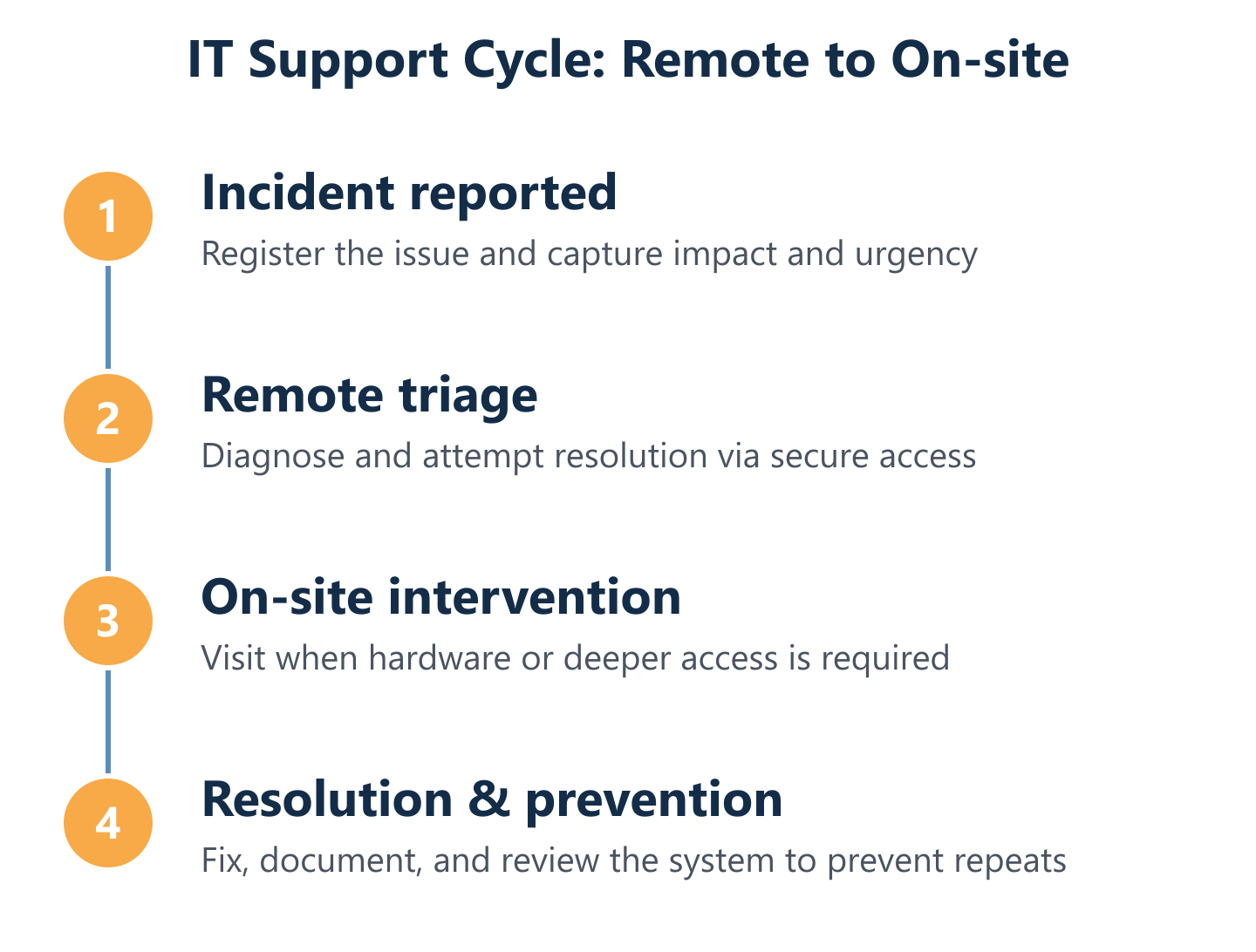
Remote IT support resolves the majority of business IT incidents faster than any on-site visit could — because the technician connects to the affected system within minutes of the call being logged, without travel time. Software faults, configuration errors, user access issues, application crashes, and most network problems can be diagnosed and fixed remotely through our secure remote maintenance system. On-site support is deployed when the fault is physical (hardware failure, cabling, device replacement), when the remote connection itself is unavailable due to the nature of the incident, or when the complexity of the environment requires hands-on investigation. The workflow is sequential by design: remote triage first, on-site escalation only when necessary. This approach reduces resolution time for the majority of incidents while ensuring physical presence is available when it genuinely adds value.
On-site timeframes and incident registration: what happens after you report
The moment an incident is registered, the SLA clock starts. For Impulso Tecnológico clients in Alcobendas, the process is straightforward: the incident is logged through our support system, categorised by severity and type, and assigned to a technician immediately. Remote diagnosis begins without delay. If on-site attendance is required, the defined timeframes apply from the moment of registration — not from when a technician becomes available. This distinction matters: some providers measure response time from when they acknowledge availability, not from when the client reported the problem. Being based in and around the Madrid metropolitan area means our teams can reach Alcobendas within the committed timeframes without the delays that affect providers operating from more distant locations. For neighbouring areas, we apply the same structured approach — as detailed in our IT support service for San Sebastián de los Reyes.
Selecting the right IT support model for your business in Alcobendas is a decision with direct consequences for operational continuity, security exposure, and cost predictability. Whether you need a structured managed IT support contract with defined SLAs, a flexible hourly arrangement, or a flat-rate package that covers both remote and on-site assistance, the starting point is always the same: a clear audit of your current environment and an honest assessment of your risk tolerance. Impulso Tecnológico has been delivering IT maintenance and support to businesses across Spain for more than 25 years — the same framework, rigour, and response commitments apply to every client in Alcobendas. If you want to understand what a support contract would look like for your specific setup, the next step is a no-obligation initial assessment. You can also explore how we approach preventive IT maintenance for businesses or review our IT maintenance and security service for a broader picture of what ongoing support covers.