

IT maintenance in Torrejon de Ardoz covers the ongoing management of your computers, servers, networks, and security systems to keep operations running without interruption. A structured managed IT services plan combines preventive monitoring, fast incident response, and documented reporting—so problems are resolved before they cost you productivity.
Businesses in Torrejon de Ardoz operate in a competitive environment where a single server failure or a security breach can halt an entire team for hours. Most companies have outgrown the reactive model of calling a technician only when something breaks, yet they lack the internal headcount to manage IT proactively. The gap between those two positions is exactly where managed IT support delivers measurable value: systems are audited from day one, risks are identified before they escalate, and every incident is handled with a defined response window rather than an open-ended wait. Impulso Tecnológico provides this model for SMEs ranging from three to 150 users, acting as an external IT department or as a structured extension of an existing internal team—covering everything from computer maintenance and network security to backup and disaster recovery under a single IT maintenance contract.
What "IT Maintenance Torrejon de Ardoz" includes for local businesses
The phrase "IT maintenance" is used loosely—sometimes it means a technician who formats laptops when asked, and sometimes it means a fully managed service with guaranteed response times, monthly reporting, and proactive security management. For businesses in Torrejon de Ardoz, the difference between those two interpretations directly affects operational continuity and data protection obligations under GDPR.
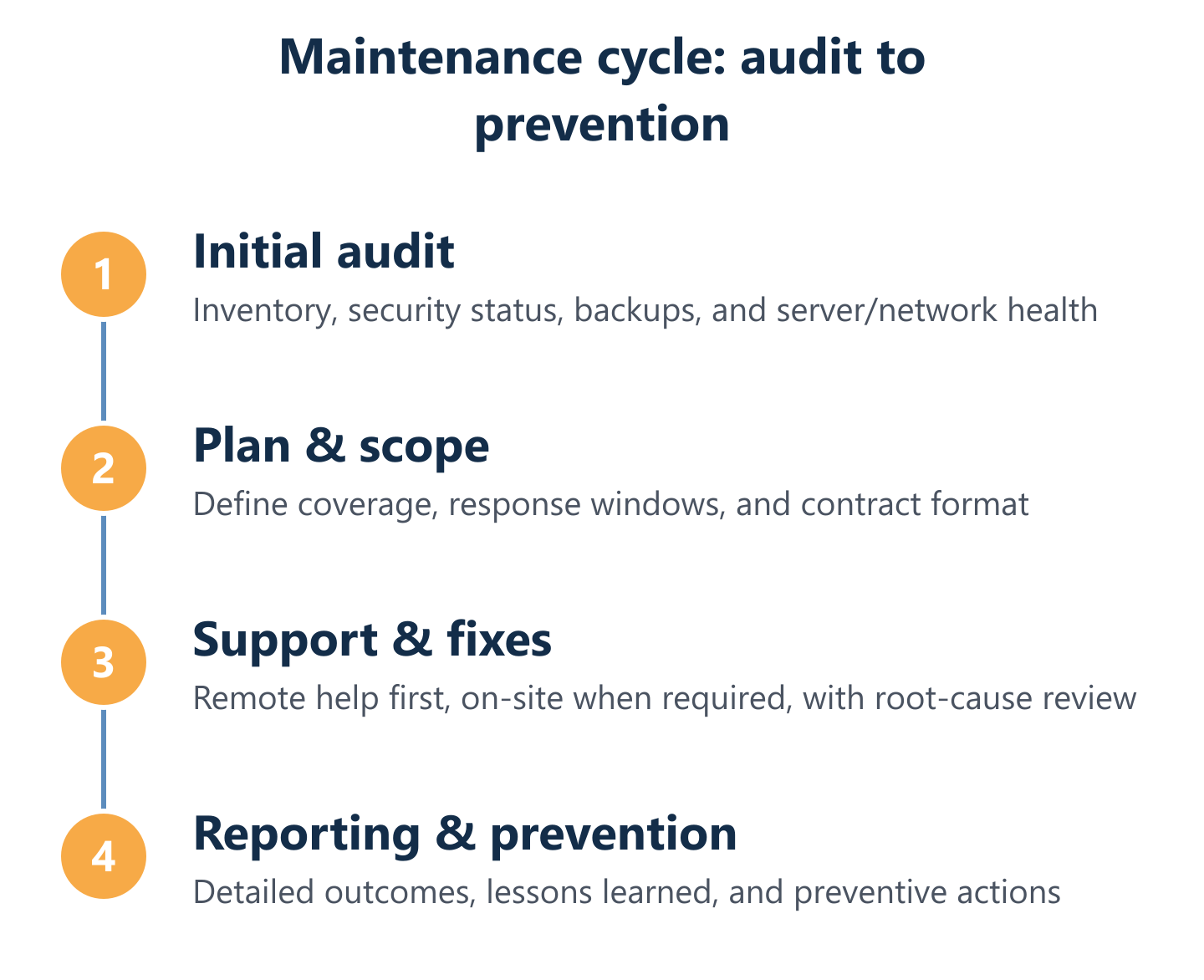
A properly scoped IT maintenance engagement starts with a complete audit of the existing environment: antivirus status, backup integrity, server health, network configuration, and a full inventory of devices under management. From that baseline, the provider defines what is covered, at what frequency, and under what service levels. Impulso Tecnológico operates as an external IT department or as a reinforcement layer for companies that already have internal IT staff—covering SMEs with three to 150 PCs or users, with or without a dedicated IT function on site.
| Scope area | Reactive-only model | Managed IT services model |
|---|---|---|
| Endpoint maintenance | Fixed when reported broken | Monitored, patched, and inventoried continuously |
| Server management | Attended on request | Health checks, updates, and <4 h on-site response for failures |
| Network security | Firewall installed once, rarely reviewed | Multi-layer: firewall, endpoint protection, patch management, access control |
| Backup and recovery | Manual or unverified | Scheduled, tested, and documented with recovery procedures |
| Reporting | None or verbal | Detailed written reports per intervention and periodic summaries |
| Contract format | Pay-per-incident | Hourly packages, monthly rates, or flat-rate plans |
Core components: endpoints, servers, networks, and access management
A managed IT maintenance contract for a Torrejon de Ardoz office typically covers four interconnected layers. First, endpoints—desktops, laptops, and workstations—require regular software updates, antivirus configuration, and hardware health checks. Second, servers (physical or virtual) need scheduled maintenance, capacity monitoring, and a defined escalation path when failures occur. Third, the network infrastructure—switches, routers, wireless access points, and cabling—must be documented, secured, and kept current with firmware updates. Fourth, access management covers user accounts, internet permissions, and email security settings, which are often overlooked until a breach occurs. Impulso Tecnológico works with technologies including Cisco, Aruba, and Fortinet to maintain network security and access control, and uses WatchGuard firewalls to manage inbound and outbound traffic across client environments.
Preventive actions that reduce idle time and recurring failures
Preventive computer maintenance is not a scheduled visit where a technician checks a few boxes—it is a structured programme of monitoring, patch deployment, and risk assessment that runs continuously in the background. When a workstation's disk health degrades, a proactive system flags it before the drive fails and data is lost. When a security patch is released for a critical vulnerability, it is tested and deployed before attackers can exploit it. Impulso Tecnológico's approach includes configuring security software for operating systems, managing antivirus and backup protection, and reviewing the broader environment every time a support incident is resolved—so a single call does not fix one problem while leaving five others undetected. This cycle of continuous improvement is what separates managed IT support from break-fix arrangements.
Service levels and response windows for remote and on-site support
Service level agreements turn vague promises into measurable commitments. Impulso Tecnológico defines response windows by incident type: server failures are attended on-site in under four hours from the moment the incident is registered; other computer-related issues receive on-site response within eight business hours. Remote IT support is available for issues that do not require physical presence, resolving a large proportion of incidents without the delay of travel. Every intervention generates a detailed written report covering the solution applied, the root cause identified, and any secondary risks observed during the visit. These reports form a maintenance history that helps clients track recurring issues, justify IT investment decisions, and demonstrate due diligence in the event of a regulatory audit—a practical benefit for any business handling personal data under GDPR.

Preventive vs corrective support: what you get in each model
Choosing between a purely corrective support model and a preventive managed IT services plan is essentially a question of when you want to pay: before a problem occurs or after it has already cost you productivity, data, or reputation. Corrective support is cheaper on paper until the first serious incident—a ransomware attack, a failed server with no tested backup, or a network outage during a critical deadline. Preventive maintenance distributes that risk across time, replacing unpredictable emergency costs with a controlled monthly investment.
Impulso Tecnológico structures its service to combine both approaches, because even the best-maintained environment will occasionally require corrective intervention. The difference is that when a corrective action is needed, the environment is already documented, the backup is verified, and the technician arrives knowing the system's history rather than starting from scratch. After every corrective intervention, the team reviews the rest of the environment to prevent secondary failures—a step that is absent from most break-fix arrangements.
- Baseline audit: Establish the current state of all systems before any maintenance work begins—no assumptions, no surprises.
- Preventive cycle: Schedule patching, health checks, antivirus updates, and backup verification at defined intervals.
- Continuous monitoring: Detect anomalies (disk health, unusual traffic, failed backup jobs) before they become incidents.
- Corrective response: When an incident occurs, respond within the agreed SLA window with full system context already available.
- Post-incident review: Document the root cause, apply security adjustments, and update the maintenance record to prevent recurrence.
- Periodic reporting: Deliver written summaries that give management visibility into IT health, resolved incidents, and pending risks.
Preventive maintenance: audits, inventory, patch/vulnerability management
Preventive maintenance begins with a complete, honest audit—not a sales exercise, but a technical assessment of every device, server, and network component under scope. The output is a verified inventory that becomes the foundation for all subsequent work: patch schedules, replacement planning, and risk prioritisation. Patch and vulnerability management is particularly critical because unpatched systems remain the leading entry point for ransomware and data breaches. A structured preventive plan identifies which systems carry the highest exposure, applies updates in a tested sequence to avoid compatibility issues, and documents each change. Impulso Tecnológico includes this audit as the starting point of every IT maintenance contract, ensuring that the service is scoped to reality rather than assumptions—and that clients understand exactly what is being maintained and why.
Corrective support: incident handling, root-cause review, and follow-up
Corrective support is not simply "fixing what broke"—its value lies in the quality of the resolution and the follow-up that prevents the same incident from recurring. When a failure occurs, the first priority is restoring service within the agreed response window: under four hours on-site for server failures, under eight business hours for other devices. Once service is restored, the technician documents the root cause, the actions taken, and any secondary risks identified during the intervention. This written report is delivered to the client and added to the maintenance history. Impulso Tecnológico also uses each corrective intervention as an opportunity to review adjacent systems—because a failing component often signals stress elsewhere in the environment—and to adjust security settings if the incident revealed a configuration gap.
How security, backups, and recovery fit into both approaches
Security and backup and disaster recovery are not optional add-ons to an IT maintenance plan—they are the safety net that determines whether a corrective incident becomes a minor disruption or a business-critical crisis. In a preventive context, this means configuring endpoint protection (Impulso Tecnológico works with Sophos and Fortinet solutions), scheduling and verifying backup jobs, and testing recovery procedures before they are needed. In a corrective context, it means having a tested, recent backup available the moment a server fails or a ransomware attack encrypts files. Network security maintenance—firewalls, access controls, and patch management—reduces the probability of incidents reaching the corrective stage at all. For further detail on how corrective and preventive approaches complement each other, see our dedicated guides on corrective IT maintenance and preventive IT maintenance.
How to choose and contract IT maintenance in Torrejon de Ardoz
Selecting an IT maintenance provider is a procurement decision with long-term operational consequences. The right choice depends on matching the provider's capabilities to your environment's complexity, your team's tolerance for downtime, and your budget's predictability requirements. Before signing any IT maintenance contract, verify the following:
- Scope definition: Does the contract specify exactly which devices, servers, and network components are covered? Vague scope leads to disputes when incidents occur.
- Response time commitments: Are SLAs written into the contract, differentiated by incident type (server vs workstation, critical vs non-critical)?
- Audit before commitment: Does the provider conduct a real technical audit before pricing the service, or are they quoting based on assumptions?
- Remote and on-site coverage: Can the provider resolve issues remotely and attend on-site within a defined window when physical intervention is required?
- Security and backup inclusion: Are antivirus management, firewall configuration, and backup verification explicitly included, or treated as billable extras?
- Reporting frequency: Will you receive written reports per incident and periodic summaries, or only verbal updates?
- Contract flexibility: Can you choose between hourly packages, monthly hour rates, or a flat-rate model—or are you locked into a single rigid format?
- Scalability: Can the contract expand as your team grows from 10 to 50 users without renegotiating from scratch?
Impulso Tecnológico recommends starting with a complete technical audit before selecting a contract format. This audit identifies the actual scope, existing risks, and the level of effort required—so the pricing reflects reality and the plan aligns with your operational needs. For a detailed breakdown of how maintenance costs are structured, our guide on IT maintenance pricing covers the variables that affect your budget.
Remote vs on-site maintenance options and when each is best
Remote IT support resolves the majority of day-to-day incidents—software errors, user account issues, configuration changes, and performance problems—without the delay of travel. For a business in Torrejon de Ardoz, this means faster resolution for most tickets and lower cost per incident. On-site IT support becomes necessary when the issue involves physical hardware (a failed drive, a network switch, a printer), when remote access is unavailable because the system itself is down, or when the complexity of the environment requires hands-on diagnosis. Impulso Tecnológico uses a remote maintenance system as the first response layer, escalating to on-site intervention when the situation demands it—with defined response windows (under four hours for server failures) so clients know exactly when to expect a technician. The combination of both modalities is what makes a managed IT services plan genuinely reliable rather than theoretically efficient.
Pricing approaches: hourly packages, monthly hour rates, and flat-rate models
Three pricing formats cover most IT maintenance scenarios for SMEs. Hourly packages (vouchers of pre-purchased hours) suit businesses with low and irregular IT needs—you buy a block of hours and consume them as incidents arise, with no monthly commitment. Monthly hour rate contracts allocate a fixed number of hours per month at a reduced rate, balancing predictability with flexibility for teams whose IT activity is moderate and consistent. Flat-rate models combine unlimited remote assistance with a defined number of on-site visits per month for a fixed monthly fee—the most predictable option for businesses where IT availability directly affects revenue. Before selecting a format, a technical audit is essential: it quantifies the number of devices, the complexity of the environment, and the likely support demand, so the contract is sized correctly from the start rather than adjusted after the first invoice. If you are comparing providers across different Spanish locations, our article on IT support in Madrid provides additional context on how managed services are structured in the region.
Checklist to request a budget: SLAs, backups, security posture, and reporting
When requesting a quote from any IT maintenance provider, use this checklist to ensure the proposal covers what your business actually needs:
- Written SLA with differentiated response times by incident severity and type.
- Explicit confirmation of which devices and systems are in scope (with an inventory as an annex).
- Backup schedule, storage location, and documented recovery testing frequency.
- Security posture review: antivirus, firewall management, patch cadence, and access control policy.
- Reporting format: per-incident written reports plus periodic (monthly or quarterly) environment summaries.
- Escalation path: who to contact, through which channel, and what happens if the primary contact is unavailable.
- Contract exit terms: notice period, data handover procedure, and continuity provisions.
Any provider unable to answer these points in writing before signing is unlikely to manage your environment with the rigour your operations require.
Once scope, service levels, security coverage, and backup procedures are confirmed in writing, selecting the right IT maintenance contract becomes a straightforward decision rather than a leap of faith. The practical next step is a complete technical audit of your environment—one that identifies real risks, establishes a verified device inventory, and produces a proposal sized to your actual needs. Impulso Tecnológico offers this audit as the starting point of every engagement, so you move forward with a plan built on evidence rather than estimates. Request your audit, review the findings, and choose the contract format that matches your team's size, risk tolerance, and budget.