

IT maintenance price in the UK typically ranges from £15 to £80 per device per month for proactive managed maintenance, depending on scope, SLA response times, and whether server and security coverage is included. Per-user models run broadly from £30 to £120 per user per month when helpdesk, patching, and monitoring are bundled together.
Most businesses discover the real cost of IT maintenance only after an incident: an unpatched server, a failed backup, or a support contract that excludes on-site visits. By then, the bill is rarely predictable. The smarter approach is to define scope first—number of devices, required response times, and continuity requirements—and then match a pricing model to those inputs.
This guide breaks down what IT maintenance actually covers, how the main pricing models work, what drives costs up or down, and what to check before signing a contract. Whether you are evaluating a first outsourced maintenance agreement or benchmarking an existing one, the goal is the same: compare providers on the same terms, not just the headline monthly figure.
What "IT Maintenance" Usually Includes (and why it affects IT Maintenance Price)
IT maintenance is not a single service—it is a bundle of activities that keep systems available, secure, and performing to an agreed standard. The scope of that bundle is the single biggest factor in IT maintenance price. Two quotes that look similar on paper can cover entirely different obligations once you examine what triggers a support call, who owns patch deployment, and whether backup monitoring is included or billed separately.
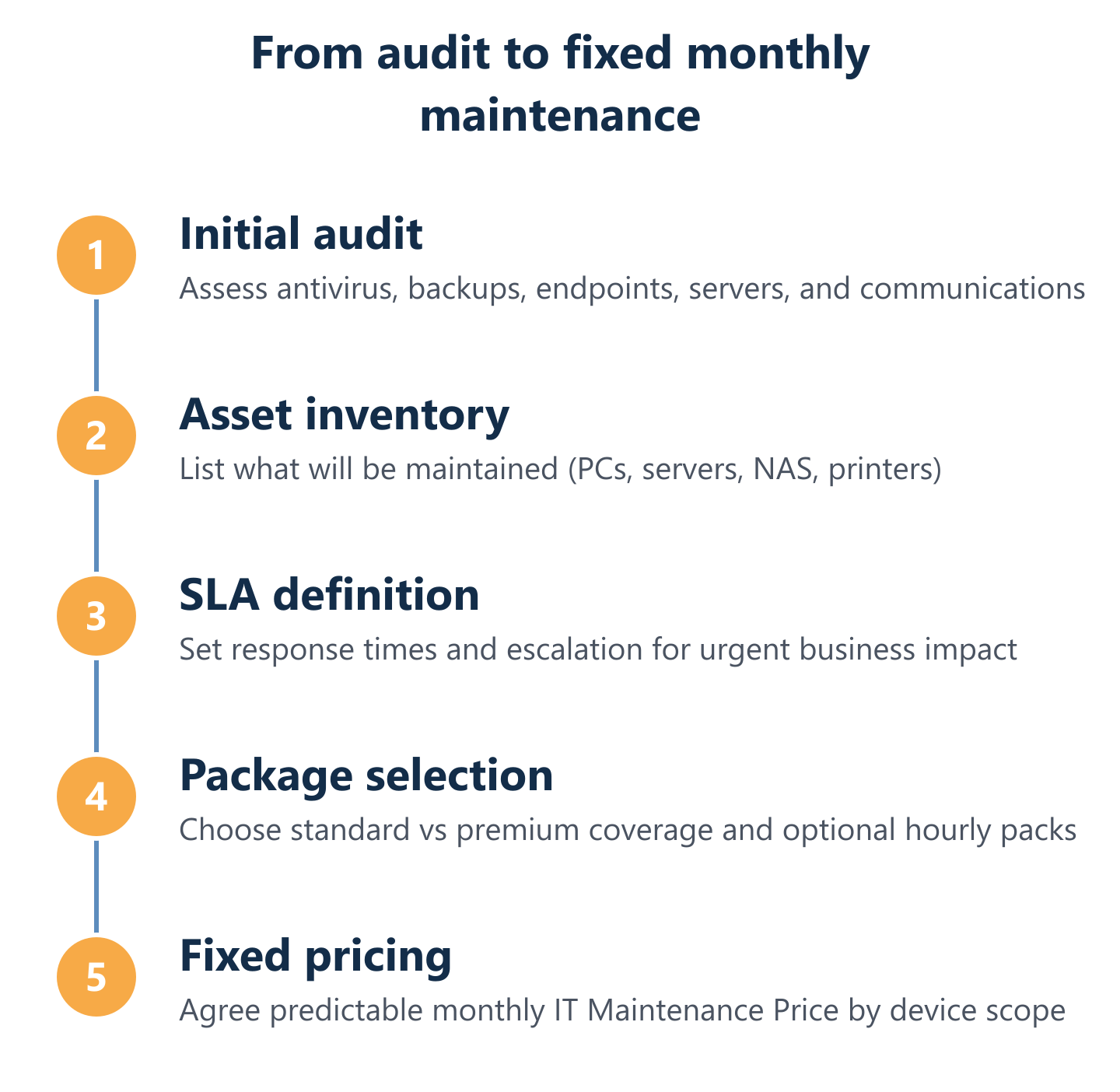
At Impulso Tecnológico, with over 25 years delivering managed IT services across Spain, Portugal, and international clients, we structure maintenance around a clear scope defined during an initial audit. That audit produces an inventory of every asset to be maintained—computers, servers, NAS devices, printers—and establishes the baseline for both the service plan and the monthly price. The result is a fixed-cost model with no ambiguity about what is and is not covered.
| Maintenance Activity | Preventive | Corrective | Typically Included in Fixed Plans |
|---|---|---|---|
| Endpoint patching & updates | ✓ | Yes | |
| System monitoring & alerting | ✓ | Yes | |
| Backup verification & DR testing | ✓ | Depends on tier | |
| Helpdesk & incident resolution | ✓ | Yes (remote); on-site varies | |
| Server fault response | ✓ | Yes, under priority SLA | |
| Security hygiene (AV, firewall checks) | ✓ | Depends on tier | |
| Configuration reviews & reporting | ✓ | Yes in proactive plans | |
| On-site engineering visits | ✓/✓ | ✓ | Included or hourly add-on |
Operational scope: preventive vs corrective maintenance
Preventive IT maintenance covers everything done before a fault occurs: scheduled patching cycles, firmware updates, performance monitoring, configuration reviews, and capacity checks. These activities reduce the probability of unplanned downtime and are the foundation of any proactive IT maintenance plan. Corrective maintenance, by contrast, is triggered by an incident—a crashed server, a failed application, or a connectivity outage—and involves diagnosing and resolving the fault under the terms of the support SLA.
The ratio of preventive to corrective activity in a contract directly affects price. Plans that invest in preventive work reduce the volume and severity of corrective incidents over time, which is why a slightly higher monthly fee for proactive maintenance typically costs less than repeated reactive call-outs. For a deeper look at how preventive strategies are structured, our guide on preventive IT maintenance for businesses covers the methodology in detail.
SLA coverage: response times for most requests and urgent business impact
The IT support SLA is the contractual commitment that defines how quickly a provider must respond to and resolve different categories of issue. Response time tiers are the most common differentiator between standard and premium maintenance packages—and a primary driver of price.
In Impulso Tecnológico's service model, the standard SLA commits to a response within eight business hours for general requests, and within four hours for server faults or incidents affecting the entire business operation. These thresholds are stated in the service conditions, not left to interpretation. When evaluating any IT maintenance contract, ask for the SLA matrix in writing: what constitutes a priority incident, what the response and resolution targets are, and what remedies apply if those targets are missed. Vague language such as "best efforts" or "as soon as possible" is not an SLA—it is an absence of one.
Core services: monitoring, patching, backups/DR, and security hygiene
Four service components consistently appear in well-structured IT maintenance contracts, and their presence or absence explains much of the price variation between providers. Continuous system monitoring detects anomalies before they escalate; endpoint patching keeps operating systems and applications current against known vulnerabilities; backup and disaster recovery ensures data can be restored within a defined recovery time objective; and security hygiene—antivirus status checks, firewall rule reviews, access control audits—reduces the attack surface across the estate.
Impulso Tecnológico integrates these layers using established technology partners including Sophos and Fortinet for endpoint and perimeter security, and Veeam for backup and DR. Each support request also triggers a proactive review to identify adjacent risks, and clients receive detailed resolution reports. This approach means security and continuity are built into the maintenance workflow, not sold as separate line items. For businesses that want to understand how corrective actions fit within this framework, our article on corrective IT maintenance provides a practical reference.

IT Maintenance Price Ranges: per user, per device, and hourly add-ons
Pricing models for IT maintenance fall into three broad structures, and the right choice depends on the composition of your IT estate, your support usage patterns, and how much cost predictability matters to the business.
- Per-device fixed monthly pricing — a flat rate per managed asset (PC, server, NAS, printer). Typical ranges in the UK market: £15–£35/device/month for standard monitoring and patching; £35–£80/device/month when helpdesk, on-site coverage, and security hygiene are included. Servers are usually priced at a premium over workstations due to criticality and SLA requirements.
- Per-user fixed monthly pricing — a flat rate per named user, covering their devices and access. Ranges broadly from £30 to £120/user/month depending on whether the plan is remote-only or includes on-site visits, and whether Microsoft 365 administration, backup, and security tools are bundled in.
- Hourly add-on packs — used for work outside the scope of the fixed plan: migrations, infrastructure projects, additional on-site engineering, or ad-hoc consultancy. Hourly rates in the UK typically run from £75 to £150/hour; block purchases (minimum ten-hour packs, for example) reduce the effective rate and provide flexibility without committing to a higher monthly tier.
- Hybrid models — a fixed monthly base covering core maintenance, with hourly packs available for reactive or project work. This is the structure Impulso Tecnológico uses: an all-inclusive fixed monthly service for proactive and corrective maintenance, with optional hourly packs for needs that fall outside the defined scope.
- Audit-first scoping — regardless of model, the most accurate starting point is an asset inventory. Impulso Tecnológico's onboarding process begins with a free audit covering antivirus status, backup configuration, desktops, servers, and communications infrastructure. The audit output determines the device count and scope, which then drives the monthly price—avoiding over- or under-scoping from day one.
Per user vs per device: which model matches your estate?
Per-user pricing works well when the estate is relatively uniform—one laptop per employee, cloud-hosted applications, and minimal on-premises infrastructure. In this model, the provider covers everything the user touches, which simplifies billing and aligns cost to headcount growth. It becomes less efficient when users have multiple devices, or when the estate includes servers, NAS units, and shared printers that are not tied to a single user.
Per-device pricing is the more transparent model for mixed estates. Each asset is inventoried, assigned a monthly rate based on its type and criticality, and maintained under a defined SLA. A ten-person office with ten workstations, one server, a NAS, and two printers has fourteen billable assets—a per-device model prices that precisely, whereas a per-user model may undercount the infrastructure load. Impulso Tecnológico uses per-device pricing for this reason: it reflects the actual maintenance workload rather than a proxy metric.
Standard vs premium maintenance packages: trade-offs in coverage and speed
Standard packages typically cover remote monitoring, scheduled patching, and helpdesk support with an eight-hour response SLA. On-site visits are either excluded or capped at a set number per month. Security tools may be available as add-ons rather than included. These plans suit businesses with low downtime sensitivity and stable, well-documented environments.
Premium packages add faster SLA tiers (four hours or less for critical incidents), unlimited remote and on-site hours within the service model, integrated backup and DR monitoring, security hygiene checks, and detailed monthly reporting. The price difference between standard and premium is often 40–60% per device, but the value calculation changes when you factor in the cost of a single unplanned outage—lost productivity, emergency call-out rates, and potential data loss. For businesses with compliance requirements or revenue-critical systems, the premium tier is rarely optional. Hourly add-on packs complement both tiers for project work that sits outside the recurring maintenance scope.
Sample monthly cost scenarios using device and SLA assumptions
Three illustrative scenarios show how device count and SLA scope translate into monthly IT maintenance price estimates:
| Scenario | Estate | SLA Tier | Estimated Monthly Range (UK) |
|---|---|---|---|
| Small office | 10 PCs, 1 server, 1 NAS | Standard (8h response) | £400–£750/month |
| Mid-size business | 30 PCs, 3 servers, 2 NAS, 4 printers | Premium (4h server SLA) | £1,800–£3,200/month |
| Multi-site SME | 60 PCs, 5 servers, cloud + on-premises | Premium + security stack | £3,500–£6,000/month |
These ranges assume fixed monthly computer support pricing with proactive maintenance included. Actual figures depend on geography, provider, and the specific tools deployed. An initial audit remains the most reliable way to move from a range to an accurate quote.
How to Choose the Right IT Maintenance Provider (and avoid hidden fees)
Selecting an IT maintenance provider on price alone is the fastest route to a contract that underdelivers. The right framework compares providers on scope, SLA transparency, methodology, and measurable outcomes—not just the monthly headline figure.
Impulso Tecnológico's approach illustrates what a structured selection process should validate. Onboarding begins with a free audit that documents the current state of all relevant systems: antivirus, backup, desktops, servers, and communications. That audit produces an asset inventory and a written report, which becomes the foundation of the maintenance plan. Every subsequent support request triggers a proactive review—not just a fix—to identify adjacent risks before they escalate. Clients receive detailed resolution reports after each intervention, creating an auditable record of service delivery.
With over 4,000 IT tickets resolved annually and operations spanning Spain, Portugal, and remote support across Europe, Asia, and the Americas, Impulso Tecnológico has the operational depth to maintain consistent service quality across complex, multi-site environments.
- Verify scope in writing: every asset type covered (PCs, servers, NAS, printers) should be listed explicitly in the contract.
- Confirm SLA metrics: response time, resolution time, and escalation paths for each incident category must be defined numerically.
- Check security coverage: ask whether endpoint protection, firewall monitoring, and patch cadence are included or billed separately.
- Validate backup and DR: confirm who owns backup verification, what the recovery time objective is, and whether DR testing is scheduled.
- Assess reporting quality: monthly reports should show ticket volume, resolution times, patch status, and backup success rates—not just a summary email.
- Understand the onboarding process: a provider that starts without an audit is pricing blind; that risk transfers to you.
Cost drivers that move IT Maintenance Price up or down
Seven factors consistently explain why two businesses of similar size receive materially different IT maintenance quotes. Understanding them lets you challenge a quote intelligently rather than simply accepting or rejecting it.
First, device count and asset complexity: more devices, or a mix of legacy and modern hardware, increases the maintenance workload. Second, server criticality: servers require faster SLA tiers and more skilled engineers, which commands a premium. Third, security stack depth: integrating endpoint protection, firewall management, and vulnerability scanning adds cost but reduces risk. Fourth, backup and DR scope: the more granular the recovery point objective, the higher the storage and monitoring overhead. Fifth, on-site requirements: remote-only plans cost less; regular on-site visits add travel and engineer time. Sixth, number of locations: multi-site estates require coordination overhead. Seventh, environment health at onboarding: a poorly documented or outdated environment requires remediation work before stable maintenance is possible, which affects the initial price.
Hidden fees checklist: travel, out-of-scope work, and extra licensing assumptions
Hidden fees in IT maintenance contracts follow predictable patterns. Before signing, work through this checklist:
- Travel and on-site charges: is on-site support included in the monthly fee, or billed per visit? What is the mileage or call-out rate?
- Out-of-hours work: does the SLA apply only during business hours? What is the rate for evening or weekend incidents?
- Project and migration work: is infrastructure work (server migrations, network changes, new device deployments) included or excluded? If excluded, what is the hourly rate?
- Software licensing: does the quote assume you already hold licences for security tools, backup software, or remote management platforms? If the provider supplies these, confirm whether the cost is bundled or added separately.
- Minimum contract terms: are there penalties for early termination? Month-to-month flexibility costs more but avoids lock-in risk.
- Scope creep clauses: if you add devices or users mid-contract, how is pricing adjusted? A transparent contract specifies the per-unit rate for additions.
Questions to ask before you sign: scope, SLAs, reporting, and onboarding
Five questions separate a well-structured IT maintenance contract from a vague one. Ask them before you sign:
- What is the exact asset scope? Request a written list of every device type covered and the per-unit rate. If the provider cannot produce this, the contract is not ready.
- What are the SLA response and resolution times by incident category? Get numerical commitments, not qualitative descriptions. Confirm whether these apply to remote support only or include on-site response.
- How is SLA performance reported? Monthly reports should include ticket volumes, average response and resolution times, and any SLA breaches. Ask to see a sample report.
- What does onboarding look like? A provider that begins with an audit and produces an asset inventory is operating to a professional standard. One that starts billing without documenting the environment is a risk.
- What is the escalation path for a business-critical incident? Know the name or role of the escalation contact, the communication channel, and the maximum escalation time before a senior engineer is engaged.
IT maintenance price is only meaningful when it is attached to a defined scope, a measurable SLA, and a clear picture of what happens when something goes wrong. The businesses that get the best value from their maintenance contracts are those that start with an audit, compare providers on the same asset coverage and response time commitments, and treat the monthly fee as a risk management investment rather than a commodity cost. If you are ready to move from a price range to an accurate quote for your specific environment, the logical next step is a scope assessment—so the figure you receive reflects your actual estate, not a generic assumption.