

IT maintenance for businesses in Madrid covers the ongoing management of computers, servers, networks and security tools to prevent failures, protect data and keep employees productive. It combines proactive monitoring, regular patching, backup management and structured support — delivered remotely or on-site depending on the incident.
Most Madrid companies experience the same pattern: systems are left unattended until something breaks, and by then the cost — in downtime, lost data or emergency callouts — far exceeds what a structured maintenance plan would have cost. The break-fix model is reactive by design, and reactive means unpredictable. A properly scoped IT maintenance service changes that dynamic entirely. It starts with a thorough audit of your environment, establishes clear response commitments, and builds a continuous cycle of monitoring, patching and reporting that reduces incidents before they affect operations. At Impulso Tecnológico, we have delivered this model to businesses across Madrid and beyond for over 25 years, adapting each engagement to the real complexity of the client's infrastructure rather than applying a generic template.
What IT Maintenance in Madrid Means for Your Business
IT maintenance is not a single task — it is a continuous service that keeps your technology aligned with your operational needs. For Madrid businesses, this means managing everything from individual workstations and servers to network infrastructure, security software and user access controls, on an ongoing basis rather than only when something goes wrong.
The distinction between a reactive and a preventive approach is significant in practice. Reactive support addresses failures after they occur; preventive maintenance identifies and resolves risks before they become incidents. Both are necessary, but the balance between them determines how reliable your IT environment actually is.
At Impulso Tecnológico, every engagement begins with a complete audit covering antivirus status, backup integrity, server and communications health, and a full inventory of devices to be maintained. This baseline makes it possible to tailor the service to your real environment rather than a theoretical one.
| Criterion | Reactive (Break-Fix) | Preventive (Managed Maintenance) |
|---|---|---|
| When action is taken | After a failure occurs | Before a failure develops |
| Cost predictability | Variable, often high per incident | Fixed monthly or flat-rate contract |
| Downtime impact | High — unplanned interruptions | Low — issues caught early |
| Reporting | None or ad hoc | Regular reports per intervention |
| Compliance readiness | Inconsistent | Built into the service methodology |
Beyond break-fix: preventive vs reactive maintenance
Preventive maintenance reduces downtime by addressing risks before they become incidents. This includes scheduled patching, configuration reviews, antivirus updates, backup verification and periodic health checks on servers and network equipment. When these tasks are performed consistently, the number of unplanned failures drops measurably — and so does the cost per incident.
Reactive support remains necessary: hardware fails, users encounter errors, and unforeseen issues arise. The key difference is that in a well-structured maintenance plan, reactive interventions are handled within defined response windows rather than on a best-effort basis. At Impulso Tecnológico, every corrective action is followed by a review of the broader system to prevent secondary failures — turning each incident into an opportunity to strengthen the environment.
Typical scope: endpoints, servers, networks and user support
A complete IT maintenance scope covers far more than fixing broken computers. Endpoints — laptops, desktops and mobile devices — require regular patching, antivirus management and configuration control. Servers need health monitoring, storage management and scheduled maintenance windows. Network infrastructure, including switches, routers and wireless access points, requires firmware updates, access policy reviews and performance checks.
User support is the most visible layer: handling helpdesk tickets, resolving connectivity issues, managing email and access permissions, and assisting with day-to-day technical questions. Structured support means tickets are logged, prioritised and resolved within agreed timeframes — not handled informally. For Madrid businesses operating across multiple sites or with remote workers, this structured approach to user support is particularly valuable for maintaining consistent productivity.
How a maintenance plan adapts to your real environment
A maintenance plan should match your device count, IT complexity and required availability — not a standard package designed for an average client. A company with 10 workstations and a single server has different needs from one with 80 users, multiple sites and a hybrid cloud infrastructure.
Impulso Tecnológico targets businesses with approximately 3 to 150 PCs and users, and adapts the service model accordingly. Relevant variables include the technical proficiency of end users (which affects support volume), the criticality of specific systems (which determines response time requirements), and whether the business has internal IT staff who need a specialist partner rather than full outsourcing. Flexible contract structures — hourly packages, monthly hour rates or flat-rate plans — allow the service to scale with the business without locking clients into rigid, oversized commitments.

Core Services Included in a Business IT Maintenance Plan
Understanding exactly what is included in a managed IT maintenance plan prevents misaligned expectations and gaps in coverage. The following outlines the core components that a structured plan should deliver, based on Impulso Tecnológico's operational methodology:
- Initial systems audit: A complete review of antivirus status, backup integrity, server and communications health, and a full device inventory — establishing the baseline for all subsequent work.
- Unlimited remote support: Ongoing assistance through a dedicated remote maintenance system, covering user issues, configuration changes and software troubleshooting without consuming a ticket quota.
- On-site intervention: Physical presence at your Madrid premises when remote resolution is not sufficient, with defined response targets by incident type.
- Proactive monitoring: Continuous oversight of systems to detect anomalies, performance degradation and security events before they escalate.
- Patching and updates: Scheduled application of operating system and software patches across endpoints and servers to close vulnerabilities.
- Backup and antivirus management: Configuration, verification and reporting on backup copies and endpoint security tools.
- Network administration: Management of internet access policies, email configuration and network access settings.
- Detailed reporting: Written documentation of each intervention, solution applied and recommendations for further improvement.
- Permanent consultancy: Access to technical expertise for questions, planning and configuration decisions between incidents.
This methodology ensures maintenance is not limited to troubleshooting — it builds a progressively more resilient IT environment with each engagement cycle.
Support desk and technician levels: how tickets are handled
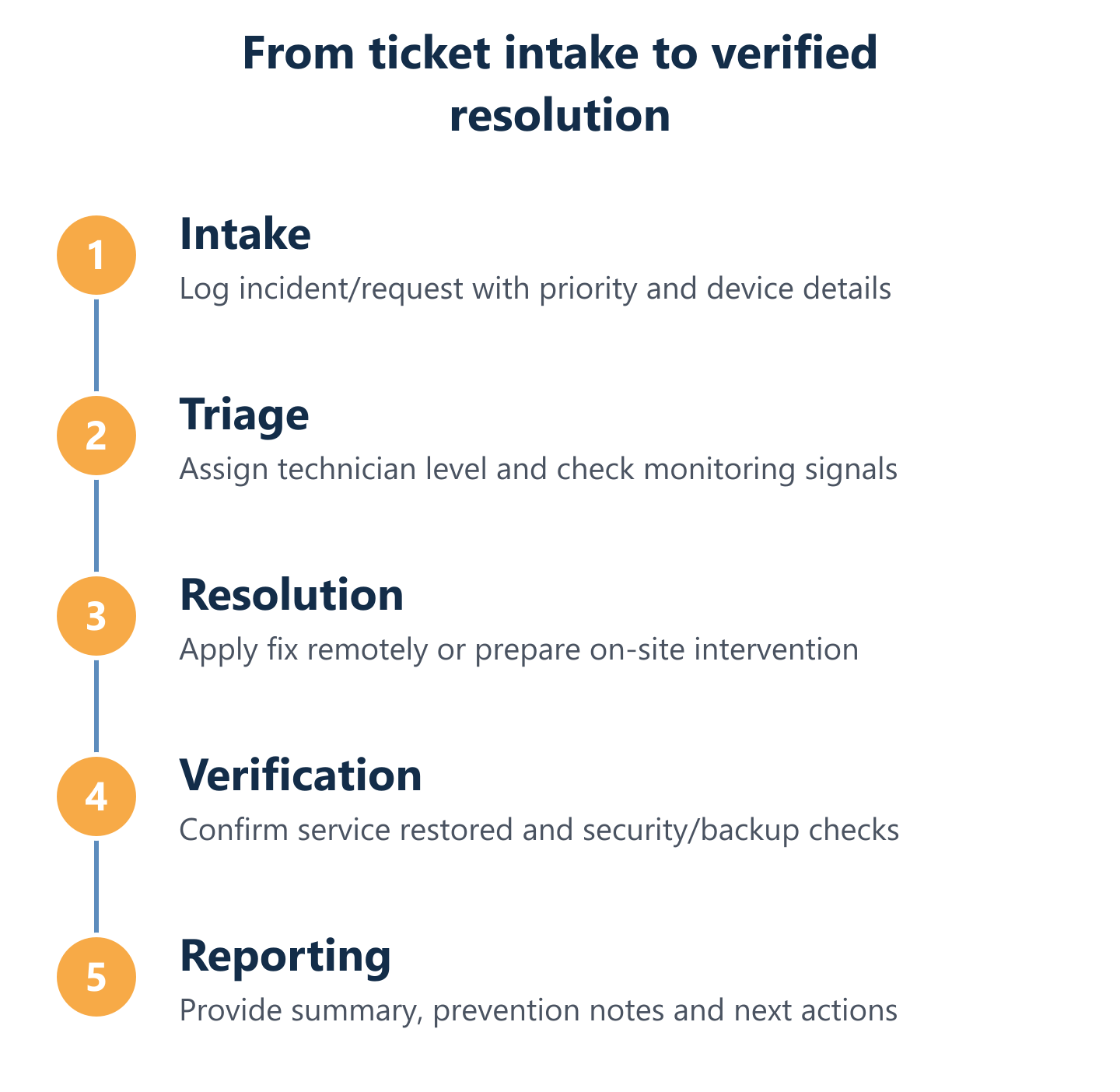
A structured support desk assigns tickets to the appropriate technician level based on complexity, preventing both under-resourced responses and unnecessary escalation costs. Level 1 handles common user issues — password resets, connectivity problems, application errors — with fast resolution times. Level 2 covers more complex configuration issues, server-side problems and security events. Level 3 involves specialist engineers for infrastructure, network architecture or vendor-specific escalations.
At Impulso Tecnológico, this escalation path is built into the service model, ensuring that a Madrid business receives the right expertise for each incident without needing to manage multiple vendor relationships. Every ticket is logged, tracked and closed with documented resolution notes, providing a clear audit trail and enabling trend analysis to reduce recurring issues over time.
Proactive monitoring, patching and incident prevention
Proactive IT monitoring means watching system health, performance metrics and security indicators continuously — not waiting for a user to report a problem. When a server's disk utilisation approaches a critical threshold, or when an endpoint stops receiving antivirus updates, the monitoring system flags the issue for resolution before it causes an outage.
Patching is one of the highest-impact preventive measures available. Unpatched operating systems and applications are the most common entry point for ransomware and other security incidents. A disciplined patching schedule, combined with configuration checks aligned to security standards, significantly reduces the attack surface. Impulso Tecnológico applies security and configuration adaptations based on market standards and client-specific requirements, and reviews the broader system after every intervention to prevent secondary failures — a practice that turns routine maintenance into continuous improvement.
Backups, endpoint security and network administration essentials
Backup management is not simply scheduling a nightly copy — it requires verifying that backups complete successfully, that restore procedures work, and that retention policies meet both operational and regulatory requirements. A backup that has never been tested is not a backup. Impulso Tecnológico uses Veeam for backup and disaster recovery, providing verifiable restore points and clear documentation of backup status in every maintenance report.
Endpoint security covers antivirus deployment, configuration and update verification across all managed devices, using technologies such as Sophos for endpoint protection. Network administration includes managing access controls, internet and email policies, and firewall rules — areas where misconfigurations frequently introduce both security vulnerabilities and compliance gaps. Together, these three components form the operational foundation of GDPR-compliant IT support, ensuring that data protection obligations are reflected in day-to-day technical practice rather than treated as a separate compliance exercise.
Service Level Expectations and How to Get a Quote
Service levels define what you can actually hold your provider accountable for. Before signing any IT maintenance contract, Madrid businesses should verify specific response commitments rather than accepting general assurances of "fast" or "priority" support.
Impulso Tecnológico publishes clear response targets: less than 4 hours for server incidents and less than 8 business hours for workstation issues, measured from the moment a breakdown is registered. These targets apply to on-site interventions; remote support through the dedicated maintenance system is available on an ongoing basis within contracted hours.
Contract options are structured to match different usage patterns and budgets:
- Hourly packages: Suitable for businesses with low or unpredictable support volume that want cost control without a monthly commitment.
- Monthly hour rates: A fixed allocation of hours per month, covering both remote and on-site work, with clear visibility of consumption.
- Flat-rate maintenance: Unlimited remote and on-site support within the agreed scope, with a fixed monthly fee and no surprise costs — the preferred model for businesses that want full predictability.
For a detailed breakdown of IT maintenance pricing structures and what each model typically covers, see our guide to IT maintenance pricing for businesses. Choosing the right model depends on your device count, incident frequency and whether you have internal IT staff to handle first-line issues.
On-site vs remote support: choosing the right model in Madrid
Remote support resolves the majority of day-to-day IT issues without requiring a physical visit — software errors, configuration changes, user access problems and monitoring alerts can all be handled efficiently through a remote maintenance system. For Madrid businesses, this means faster resolution times and lower cost per incident for routine work.
On-site support becomes necessary when hardware fails, when network infrastructure requires physical intervention, or when a complex incident cannot be diagnosed remotely. The critical factor is not choosing between the two models but ensuring that the transition from remote to on-site is governed by a clear escalation process with defined response times. Impulso Tecnológico operates a remote-first model with structured on-site response for incidents that require physical presence, covering the Madrid metropolitan area and surrounding regions. If you are also evaluating providers in other Spanish cities, our IT support service in Barcelona follows the same methodology.
Service levels, escalation and reporting you can verify
Verifiable service levels go beyond response time commitments. They include a documented escalation process — specifying which technician level handles which incident type, how escalation is triggered and what communication the client receives at each stage. They also include periodic oversight reports that summarise incidents resolved, systems checked, patches applied and any open recommendations.
Impulso Tecnológico provides detailed reports for every intervention, covering the solution applied and any follow-up actions identified. This documentation serves two purposes: it gives clients transparent visibility of what has been done, and it creates an evidence base for compliance audits — particularly relevant for GDPR obligations around data security and incident response. When evaluating any managed IT services provider, ask specifically for a sample report and a written escalation matrix before committing to a contract. You can also explore how our preventive IT maintenance methodology structures these reporting cycles in practice.
What to include in your quote request (scope, devices, priorities)
A well-prepared quote request produces a more accurate proposal and avoids scope gaps after the contract starts. Before contacting a provider, gather the following information:
— Total number of devices to be maintained (workstations, laptops, servers, network equipment).
— Operating systems and key business applications in use.
— Current backup and antivirus setup, including any known gaps.
— Whether you have internal IT staff and, if so, what they currently handle.
— Your most critical systems and the maximum acceptable downtime for each.
— Any compliance requirements, including GDPR obligations relevant to your sector.
— Preferred contract model (hourly, monthly hours or flat-rate) and budget range.
Providing this information upfront allows Impulso Tecnológico to propose a plan matched to your real environment rather than a generic package. For businesses comparing options across contract structures, our detailed guide to corrective IT maintenance explains how reactive and preventive elements are typically priced and combined.
Fewer interruptions and clearer accountability start with a maintenance scope that is defined before an incident occurs, not negotiated during one. Madrid businesses that align their IT maintenance plan with measurable service levels, a structured escalation process and transparent reporting gain something more valuable than technical support — they gain operational predictability. If your current IT setup relies on ad hoc fixes or informal arrangements, the gap between where you are and where you need to be is smaller than it might seem. A structured engagement with the right managed IT services partner can close it quickly and sustainably.