

Computer maintenance is the set of regular hardware, software, security, and backup tasks that keep machines performing reliably, reduce unplanned downtime, and extend equipment lifespan. Performed consistently, it prevents the majority of common IT failures before they affect operations.
Most IT problems that interrupt working days are not sudden or unpredictable—they build up over time through neglected updates, accumulated dust, unchecked storage, or lapsed security configurations. A keyboard that overheats, a server that runs out of disk space, or an endpoint without current antivirus definitions: each of these is a maintenance failure, not bad luck. The practical answer is a structured upkeep plan that assigns clear tasks to defined frequencies, documents what was done, and escalates issues before they become incidents. For businesses without dedicated internal IT staff, that plan is most reliably delivered by a managed service provider with defined response times and a proactive monitoring model—so that computers and servers stay available, secure, and productive every working day.
What Computer Maintenance includes (and why it matters)
Computer maintenance spans four interconnected disciplines: hardware care, software and storage upkeep, security hygiene, and backup and recovery planning. Treating any one of these in isolation leaves gaps that the others cannot compensate for. A machine with clean hardware but outdated software is still a security liability; a system with current antivirus but no verified backup is still a continuity risk.
For businesses, the value of maintenance is measured in operational terms: fewer unplanned interruptions, lower repair costs, predictable performance, and a security posture that satisfies both internal standards and regulatory requirements such as GDPR. At Impulso Tecnológico, maintenance is structured around real operational needs—proactive monitoring, rapid intervention, and clear reporting—so that covered devices remain available, secure, and trustworthy throughout the working week.
| Maintenance area | Primary risk addressed | Business outcome | Typical frequency |
|---|---|---|---|
| Hardware cleaning & cooling | Overheating, component failure | Extended equipment lifespan | Quarterly / bi-annual |
| Software updates & patch management | Vulnerabilities, compatibility issues | Reduced attack surface | Weekly / monthly |
| Storage optimisation (HDD/SSD) | Performance degradation, disk errors | Consistent speed and reliability | Monthly |
| Malware scan schedule | Infection, data breach | Protected endpoints and data | Weekly / on-demand |
| Backup and recovery planning | Data loss, prolonged downtime | Rapid recovery, business continuity | Daily / tested quarterly |
Hardware, software, and security: the full scope
Hardware care addresses the physical layer: dust accumulation inside cases restricts airflow and raises component temperatures, accelerating wear on CPUs, GPUs, and storage drives. Cleaning internal components, checking cooling fans, inspecting cable connections, and verifying that ports are free of debris are tasks that take minutes but prevent failures that can take days to resolve. Beyond cleaning, hardware maintenance includes checking for loose RAM modules, reviewing power supply health, and ensuring that thermal paste on processors is not degraded—particularly on machines older than three years. Laptops require additional attention to battery health and hinge integrity. Software maintenance covers operating system and application updates, driver currency, startup programme management, and the removal of unused applications that consume resources and expand the attack surface. Security maintenance ties both layers together through endpoint protection configuration, firewall rules, access credential reviews, and a consistent malware scan schedule.
Business outcomes: uptime, productivity, and risk reduction
The business case for computer performance optimisation is straightforward: every hour a critical workstation or server is unavailable has a measurable cost in lost productivity, delayed deliveries, or missed client commitments. Storage and software upkeep directly reduce the two most common causes of performance degradation—fragmented or near-full storage on HDDs, and bloated startup processes that slow boot times and application response. On the security side, unpatched software is consistently the primary entry point for ransomware and credential theft. A structured software update policy, combined with regular malware scans and endpoint protection managed through solutions such as Sophos, significantly reduces the probability of a successful attack. When maintenance is delivered as a managed service with defined SLAs and continuous remote monitoring, businesses gain predictability: they know what is being done, when, and what the outcome was—rather than reacting to failures after the fact.
Common failure points that maintenance prevents
The failure points that maintenance consistently prevents fall into three categories. First, hardware failures caused by heat: a server room without adequate cooling, or a workstation whose fan has been clogged with dust for eighteen months, will fail—the only variable is when. Second, security incidents caused by configuration drift: antivirus definitions that have not updated, firewall rules that were modified during a project and never reviewed, or user accounts with excessive permissions that were never revoked. Third, data loss caused by backup gaps: backups that are scheduled but never tested, or that cover some systems but not others. Backup and recovery planning based on the 3-2-1 principle—three copies of data, on two different media, with one stored off-site or in the cloud—is the minimum standard for any business that cannot afford to lose operational data. Each of these failure points is preventable with a consistent, documented maintenance routine.

A practical maintenance schedule by frequency
A maintenance schedule only works if it assigns tasks to specific frequencies, names who is responsible, and records that each task was completed. The four-tier model—daily, weekly, monthly, quarterly—maps naturally to the risk profile of each task type: high-frequency, low-effort tasks prevent drift, while lower-frequency, higher-effort tasks address deeper system health.
At Impulso Tecnológico, maintenance cadence is aligned with service levels and incident types. Remote monitoring runs continuously, scheduled reviews are documented, and outcomes for covered devices are logged so that clients have a clear record of what was done and when. This approach means that if an incident occurs, the maintenance history is available immediately—reducing diagnosis time and supporting faster resolution.
- Daily: Automated health checks, backup job verification, and security alert review via remote monitoring tools.
- Weekly: Full malware scan, operating system and application update checks, review of disk space thresholds and event logs.
- Monthly: Storage maintenance (disk cleanup, SSD health via S.M.A.R.T. data, HDD error checking), startup programme audit, and driver currency review.
- Quarterly: Physical hardware inspection and cleaning, backup recovery test, firewall and access control review, and software licence audit.
- Ad hoc / event-driven: Post-incident review, pre-deployment checks before new software rollouts, and configuration validation after any infrastructure change.
Daily and weekly tasks: quick wins that prevent drift
Daily and weekly maintenance tasks are the foundation of preventative IT maintenance because they catch problems at the earliest stage, when resolution is cheapest. Daily tasks should be automated wherever possible: backup job status checks, security alert monitoring, and disk space threshold alerts require no manual intervention if the right tooling is in place. Weekly tasks require a brief human review: confirming that operating system updates have been applied, running a full malware scan on endpoints, and checking event logs for warning-level entries that may indicate emerging hardware or software issues. For businesses running Microsoft 365, weekly checks should also include a review of email security reports and any flagged phishing attempts. The discipline here is consistency—a weekly scan that runs on 48 out of 52 weeks is not a weekly scan; it is an irregular one with gaps that an attacker or a failing drive can exploit.
Monthly and quarterly tasks: deeper checks and verification
Monthly tasks address the slower-moving risks that daily and weekly routines do not catch. Storage maintenance is the most important: on HDDs, this means running a disk error check (chkdsk on Windows) and reviewing fragmentation levels—defragmentation remains relevant for spinning disks but must never be applied to SSDs, where it causes unnecessary write cycles and accelerates wear. For SSDs, monthly maintenance means checking S.M.A.R.T. health data, ensuring the drive has at least 10–15% free space to maintain write performance, and confirming that the manufacturer's optimisation tool (or Windows' built-in "Optimise Drives" function) has run its scheduled TRIM pass. Monthly tasks also include auditing startup programmes, removing unused applications, and reviewing user account permissions. Quarterly tasks go deeper: physical cleaning of internal components, a full backup recovery test (not just a backup job confirmation), a firewall rule review, and a software licence audit to identify unused seats or expired subscriptions.
How to measure completion: evidence, logs, and reporting
A maintenance task that has no evidence of completion is, from a risk management perspective, a task that may not have been done. Every maintenance cycle should produce a log entry or report: the date, the device or system, the task performed, the outcome, and any follow-up actions identified. For businesses subject to GDPR or sector-specific compliance requirements, this documentation is not optional—it demonstrates due diligence in protecting systems that process personal data. Risk-based prioritisation determines which devices and systems are logged with the highest rigour: servers, devices handling financial or personal data, and any system whose failure would halt operations should be treated as critical, with more frequent checks and faster escalation thresholds. At Impulso Tecnológico, clients receive detailed reports after repairs or interventions, and ongoing consultancy to address questions arising from those reports—so that maintenance records are useful documents, not just compliance artefacts.
How IT Consulting delivers Computer Maintenance as a service
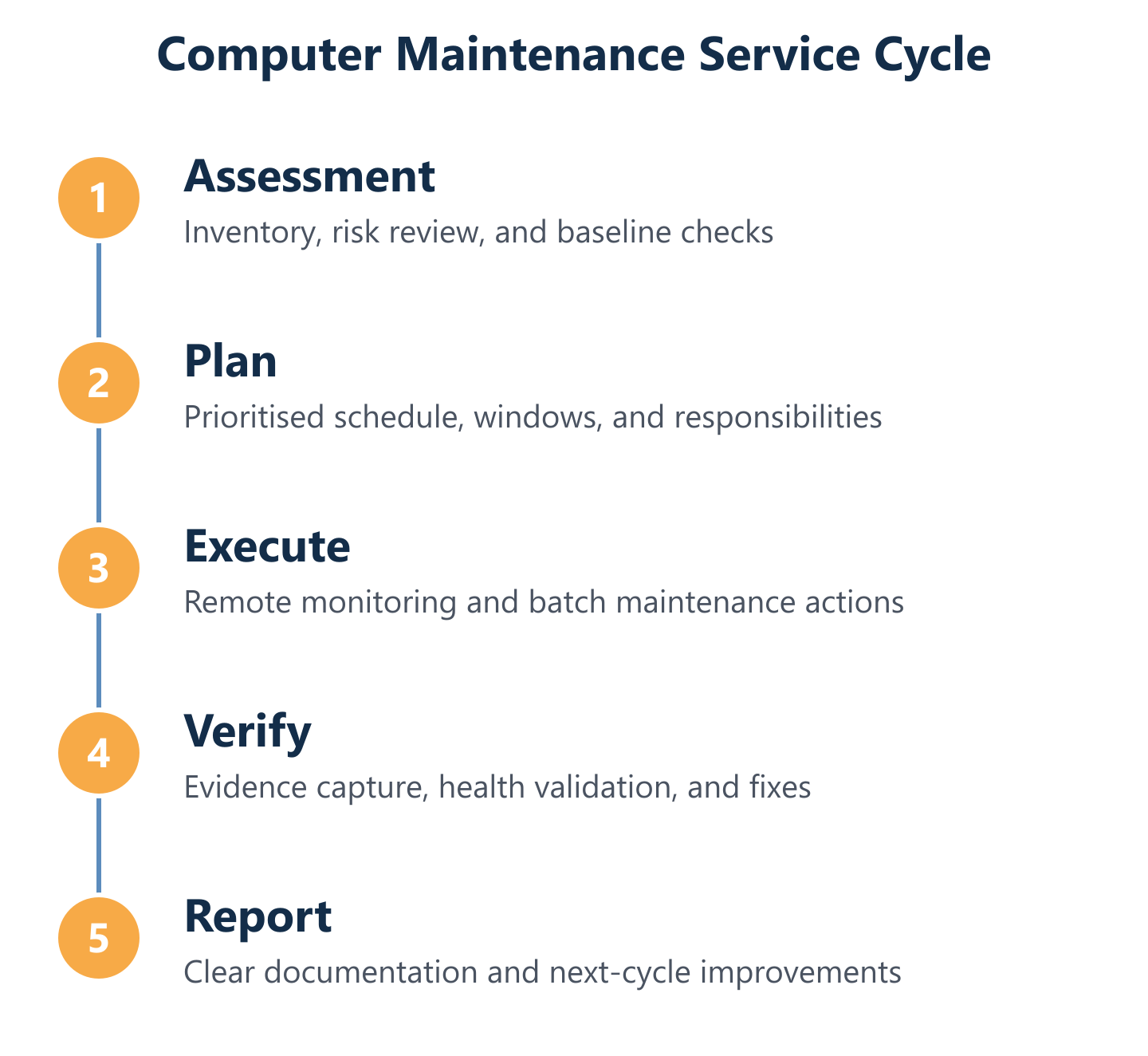
Translating a maintenance checklist into a reliable service requires more than a list of tasks—it requires a structured lifecycle: assessment, plan, batch execution, verification, and documentation. Without that structure, maintenance becomes reactive, inconsistent, and impossible to audit.
With over 25 years of experience, Impulso Tecnológico acts as an external IT department or complements an existing internal team, delivering maintenance with defined response times, unlimited remote support options, and GDPR-oriented configuration practices. The service is designed for businesses that need predictability: they know what is being monitored, what will be done and when, and what the outcome was.
- Structured onboarding: Every engagement begins with a complete infrastructure audit—inventory of devices, antivirus coverage, backup integrity, server health, and network communications—before any maintenance plan is agreed.
- Defined response times: Critical server incidents receive on-site response within four hours; other devices within eight business hours. Remote support is available for covered devices without hour caps in flat-rate agreements.
- Flexible contract formats: Hourly packages, monthly hour rates, or flat-rate agreements with unrestricted remote assistance—chosen based on device count, user technical level, response requirements, and budget.
- Security embedded by default: Endpoint protection configuration (using solutions such as Sophos), backup setup, and access controls for internet and email are included as standard, not optional add-ons.
- Documented outcomes: Detailed reports are provided after every repair or intervention, with ongoing consultancy to address follow-up questions and technical decisions.
- Holistic incident response: When an intervention occurs, the wider system is reviewed to identify and prevent secondary issues—reducing the risk of cascading failures and unnecessary costs.
Assessment to plan: inventory, risk, and maintenance priorities
The assessment phase is where maintenance plans succeed or fail. Without an accurate inventory of what exists—device models, operating system versions, storage types, antivirus status, backup coverage, and network topology—any maintenance plan is built on assumptions. At Impulso Tecnológico, the initial audit is comprehensive and real: it covers every device to be maintained, identifies gaps in security configuration, checks backup integrity rather than just confirming that a backup job is scheduled, and reviews server health metrics. From that baseline, a prioritised maintenance plan is built. Prioritisation follows risk: servers and devices handling critical data or processes are assigned the most rigorous maintenance cadence and the fastest response SLAs. Devices with ageing hardware, near end-of-life operating systems, or known performance issues are flagged for early attention. This approach ensures that the first maintenance cycle addresses the highest-impact risks rather than working through a generic checklist in alphabetical order. For businesses that have never had a formal IT audit, this initial assessment frequently uncovers issues—such as backups that have been silently failing, or endpoints running without current antivirus definitions—that would otherwise remain invisible until they cause an incident.
Execution model: remote monitoring, on-site response, and change control
Execution in a managed maintenance model operates on two tracks simultaneously: continuous remote monitoring that catches issues as they emerge, and scheduled maintenance windows in which planned tasks are carried out in a controlled manner. Remote monitoring—covering disk health, CPU and memory utilisation, backup job status, security alerts, and connectivity—provides the early-warning layer that prevents small issues from becoming incidents. Scheduled maintenance windows allow updates, configuration changes, and deeper checks to be performed without disrupting working hours. Change control matters here: every change to a system configuration should be logged, approved where appropriate, and reversible if it causes an unexpected issue. At Impulso Tecnológico, this discipline is applied consistently—when an intervention is made, the wider system is reviewed to prevent secondary damage, and the change is documented so that the next engineer who works on that device has a complete picture. This is particularly important in environments where multiple technicians may work on the same infrastructure over time.
Reporting and continuous improvement: what you get after each cycle
A maintenance cycle that produces no output is a missed opportunity for improvement. After each intervention or scheduled review, clients of Impulso Tecnológico receive a detailed report covering what was found, what was done, and what follow-up actions are recommended. Over time, these reports build a maintenance history that serves multiple purposes: it supports compliance documentation, informs hardware replacement planning, and identifies recurring issues that may indicate a deeper infrastructure problem. The consultancy dimension of the service means that clients are not left to interpret technical reports alone—questions are answered, options are explained, and decisions are made with full information. This continuous improvement loop is what distinguishes a managed maintenance service from a break-fix model: rather than waiting for something to fail and then repairing it, the service evolves the maintenance plan based on observed patterns, changing device inventory, and updated risk priorities. Businesses operating across multiple locations—such as those served by our preventive IT maintenance service or our local teams providing IT support in Barcelona—benefit from a consistent reporting framework applied across all covered sites.
Computer maintenance is most effective when it stops being a reactive task and becomes a predictable, documented routine. The businesses that experience the fewest IT disruptions are not those with the newest hardware—they are the ones with the most consistent maintenance discipline. Whether you manage IT internally or need an external partner to handle it entirely, the starting point is the same: a clear picture of what you have, a plan that matches your risk profile, and a reporting structure that proves the work is being done. If your current maintenance approach has gaps—or if you have never had a formal audit of your IT environment—Impulso Tecnológico can help you build a plan that fits your operations, your budget, and your compliance requirements. For businesses in specific locations, our local IT support teams in La Coruña and Ciudad Real are ready to carry out on-site assessments and deliver maintenance with defined response times.