

Bilbao IT support covers the full range of services that keep business systems operational: helpdesk assistance, device and server maintenance, network management, security upkeep, and backup monitoring — all structured around defined response times so disruptions are resolved before they affect productivity.
For many businesses in Bilbao, the real challenge is not finding someone who can fix a broken computer — it is finding a partner who prevents the break in the first place. Reactive IT support creates unpredictable costs and downtime spikes; proactive managed support replaces that pattern with scheduled maintenance, continuous monitoring, and documented incident handling. Impulso Tecnológico delivers computer support in Bilbao through a model that combines unlimited remote assistance with SLA-backed on-site visits, covering everything from desktops and servers to Wi-Fi infrastructure and cloud environments. The result for clients is measurable: fewer interruptions, faster resolution when incidents do occur, and a predictable monthly IT budget instead of emergency call-out surprises.
What Bilbao IT Support typically includes (and what to expect)
Not all IT support contracts cover the same ground. Before signing with any provider, it is worth mapping what a comprehensive service should deliver — and where gaps tend to appear in lower-cost or purely reactive arrangements.
At its core, Bilbao IT support should encompass four operational areas: helpdesk and incident resolution, device and infrastructure management, security and endpoint protection, and backup and continuity assurance. A provider that covers only one or two of these areas leaves your business exposed in the others.
Impulso Tecnológico structures its computer support in Bilbao as a controlled, preventive service. Every support request triggers a proactive system review — not just a fix-and-close approach — which means technicians assess whether the incident signals a broader issue before closing the ticket. Unlimited remote support is included, and on-site assistance is governed by clear SLA commitments rather than best-effort scheduling.
| Service Area | Reactive-Only Support | Managed / Proactive Support |
|---|---|---|
| Helpdesk & Troubleshooting | On request, no documentation standard | Structured intake, resolution reports, follow-up |
| Device & Server Maintenance | Break-fix only | Scheduled reviews, inventory management, updates |
| Network Management | Ad hoc, when reported | Continuous monitoring, wired and Wi-Fi coverage |
| Security & Endpoint Protection | Antivirus install, no ongoing governance | Layered security stack, firewall, compliance alignment |
| Backup & Continuity | Manual or unmonitored backups | Automated replication, restore testing, monitoring |
| Response Time Commitment | No formal SLA | SLA-defined: e.g. 4 hours for server faults |
Helpdesk vs managed IT: defining the service boundaries
A helpdesk handles inbound requests: a user reports a problem, a technician resolves it, and the ticket closes. That model works for isolated incidents but does not address the underlying patterns that cause repeated failures. Managed IT support extends the scope — the provider takes ongoing responsibility for system health, not just individual tickets.
The practical difference shows in documentation. A managed service provider issues detailed resolution reports for every incident, capturing root cause, actions taken, and any recommended preventive steps. Impulso Tecnológico applies this approach to its IT helpdesk services, ensuring that each resolved ticket contributes to a growing knowledge base of your environment rather than disappearing into a call log. This is the foundation for reducing recurring incidents over time.
Device, server and network support: desktops, servers, Wi-Fi and wired links
Proactive maintenance starts with knowing exactly what you are responsible for. An initial audit of all desktops, servers and network equipment — including antivirus status, backup configuration and operating system patch levels — establishes a baseline inventory. From that point, scheduled reviews keep systems current and flag risks before they become failures.
For network infrastructure specifically, Impulso Tecnológico works with technologies from Cisco, Aruba and Fortinet to design, install and maintain both wired and wireless environments. This matters particularly for businesses with multiple workspaces or high-density Wi-Fi requirements. Network and server maintenance is not a separate add-on in the managed model — it is built into the service cycle, with technicians reviewing connectivity and server performance as part of every scheduled visit or remote session.
Backups and continuity: replication, restore readiness and monitoring
A backup that has never been tested for restore is not a reliable backup. This distinction matters enormously when a server failure or ransomware incident forces a real recovery scenario. Effective continuity support means automated replication to a secure destination, regular restore verification, and active monitoring to catch backup failures before they go unnoticed.
Impulso Tecnológico implements remote backup solutions using Veeam, replicating critical data to centralised environments. In a national rollout across more than fifteen Spanish provinces, this approach contributed to system availability above 99.5% across distributed office locations. The same operational discipline applies to Bilbao clients: backup integrity is monitored continuously, and restore readiness is validated rather than assumed. This level of continuity assurance is what separates genuine business IT security support from a basic file-copy arrangement.

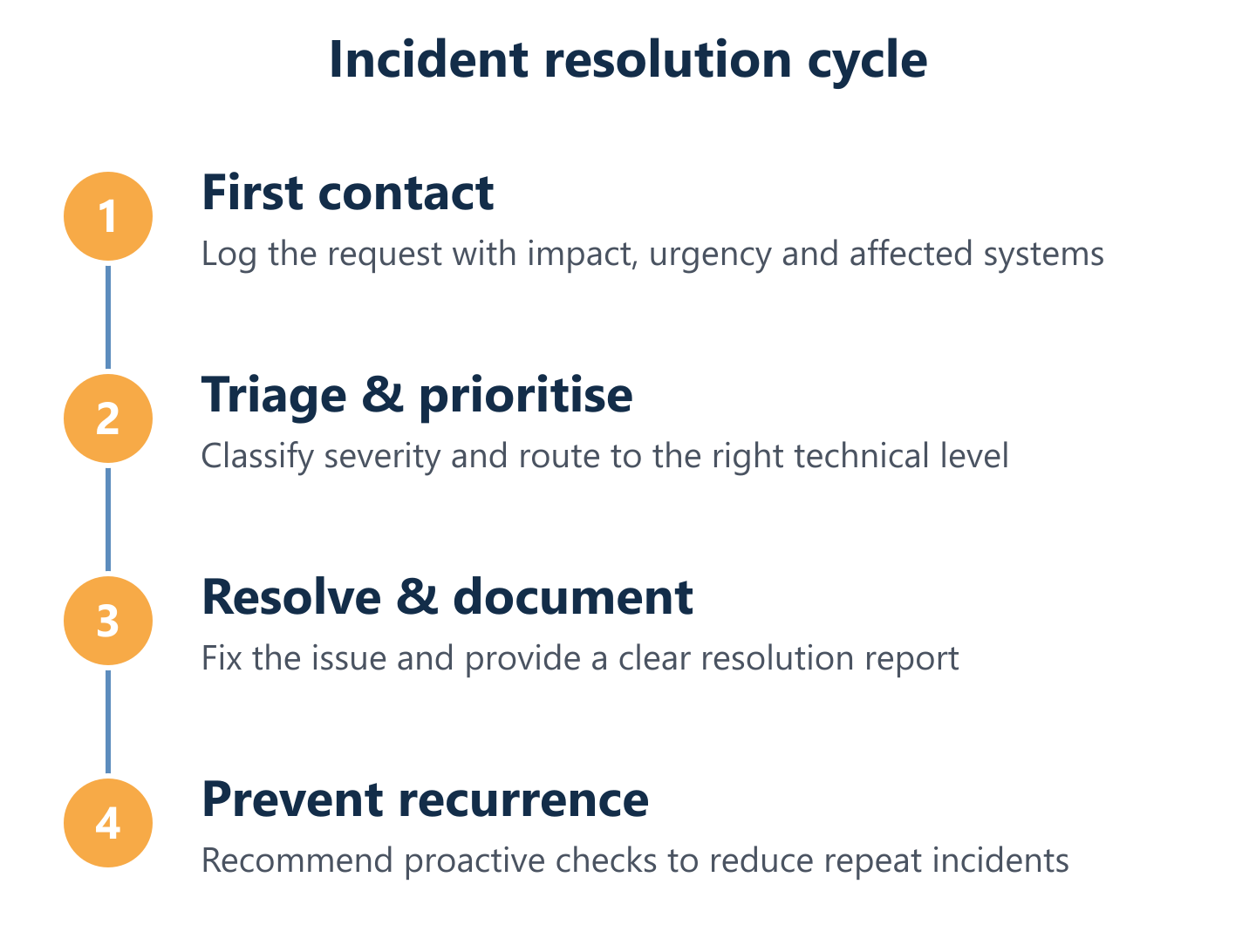
How IT Support works: from first contact to incident resolution
Understanding how a provider manages an incident from first contact to closure tells you more about service quality than any marketing claim. A well-structured process reduces resolution time, prevents escalation delays and ensures nothing falls through the cracks — particularly when multiple systems or sites are affected.
Impulso Tecnológico runs its support operations through a defined workflow that combines proactive review with every request, rapid escalation for complex issues, and continuity-focused execution at every stage. The goal is not simply to close tickets quickly, but to close them correctly — with documented root cause analysis and a clear view of whether the incident signals a wider risk.
- First contact and intake: the user or system alert is received via the agreed channel; impact, urgency and affected systems are captured immediately.
- Classification and prioritisation: the incident is categorised by severity — server or critical infrastructure faults receive a 4-hour response SLA; other requests are handled within 8 working hours.
- Remote diagnosis: the technician connects remotely to assess the issue, resolving it directly where possible without requiring an on-site visit.
- Proactive system review: alongside the specific fix, the technician reviews adjacent systems to identify any related risks or degraded components.
- Escalation if required: incidents involving network infrastructure, security breaches or server-level failures are escalated to specialist engineers with the relevant certifications.
- On-site intervention: where remote resolution is not sufficient, an on-site visit is scheduled within the SLA window.
- Resolution report and follow-up: a documented report is issued covering root cause, actions taken, and any recommended preventive measures to avoid recurrence.
Triage and prioritisation: how incidents are classified and handled
Effective triage is the difference between a support team that manages workload intelligently and one that simply responds in the order calls arrive. When a server goes down, it should not wait behind a password reset request. Structured intake captures four key data points immediately: the business impact (how many users or processes are affected), the urgency (how quickly the situation will worsen), the specific systems involved, and the user context (technical level, location, available access).
With this information, incidents are assigned a priority tier that determines the response SLA. For Impulso Tecnológico's Bilbao computer support clients, server faults and critical infrastructure issues carry a 4-hour response commitment; general faults and standard requests are addressed within 8 working hours. This structure ensures that high-impact incidents receive immediate attention while routine requests are handled efficiently without creating bottlenecks.
Escalation paths: when server, network or security issues need deeper action
Not every incident can be resolved at first-line support level, and a good escalation path is what separates a competent MSP from one that leaves clients waiting while a junior technician struggles with a problem outside their expertise. Clear escalation routes — defined by incident type, not just by elapsed time — ensure that server failures, network outages and security incidents reach the right specialist without unnecessary delay.
Impulso Tecnológico maintains a multidisciplinary technical team with certifications across Sophos, Fortinet, Veeam, Microsoft and Cisco. When an incident involves firewall configuration, active security threats or complex server environments, it is routed directly to engineers with the appropriate depth of knowledge. This prevents the common failure mode where a ticket bounces between generalist technicians while business operations remain disrupted.
Post-resolution follow-up: prevention steps and clear communication
Closing a ticket without a follow-up report is a missed opportunity to prevent the next incident. Post-resolution communication serves two functions: it confirms to the client that the issue has been fully addressed, and it documents the root cause in a way that informs future maintenance decisions.
Impulso Tecnológico issues a detailed resolution report for every incident, covering what happened, what was done, and what preventive steps are recommended. Where the root cause points to a systemic risk — an outdated server configuration, an unmonitored backup failure, or a network segment with insufficient redundancy — the report includes a specific advisory. This continuous feedback loop is what enables the service to evolve from reactive IT service level agreement compliance into genuine, long-term risk reduction for the client's IT environment.
Choosing the right Bilbao IT Support provider: SLAs, security and cost
Selecting an IT support provider on price alone is a reliable way to accumulate hidden costs later. The variables that actually determine value are measurable: how fast will they respond, what security standards do they apply, and does their pricing model align with how your business actually uses IT?
Impulso Tecnológico differentiates through an all-inclusive computer support model that removes ambiguity from the commercial relationship. The service begins with an initial audit covering antivirus, backups, desktops, servers and communications — establishing a documented baseline before any SLA clock starts. Inventory management is maintained throughout the contract, so the provider always has an accurate picture of your environment.
When evaluating any Bilbao IT support provider, use the following criteria as your shortlist filter:
- SLA specificity: are response times defined per incident type (server fault vs general request), or is there a single vague commitment?
- Security stack: does the provider deploy enterprise-grade tools (e.g. Sophos, Fortinet, Veeam) or rely on consumer-grade antivirus?
- Proactive vs reactive model: does the contract include scheduled maintenance and system reviews, or only incident response?
- Pricing transparency: is the monthly cost all-inclusive, or are on-site visits, after-hours calls and hardware support billed separately?
- Onboarding process: does the provider conduct an initial audit and build an inventory, or do they start support without a baseline?
- Scalability: can the service model adapt as your device count, user base or security requirements grow?
- References and track record: can the provider demonstrate measurable outcomes from comparable clients — resolution times, availability figures, incident volume?
SLAs and response times: what to request before signing
An IT service level agreement is only useful if it specifies response targets by incident category. A contract that promises "fast response" without defining what that means in hours — and for which types of fault — gives you no basis for holding the provider accountable.
Before signing, request written SLA commitments that distinguish at minimum between critical faults (server down, network outage, security incident) and standard requests (software issues, user access problems, peripheral failures). Impulso Tecnológico's all-inclusive Bilbao support model commits to a 4-hour response for general faults and server issues, and 8 working hours for other requests. These figures should be the baseline for any comparison. Also confirm whether SLA times refer to initial response (acknowledgement) or to active resolution — the distinction matters significantly when a server failure is affecting your entire operation.
Security and compliance considerations: protecting endpoints, networks and backups
Business IT security support is not a separate service layer — it should be embedded in every aspect of the support contract. Endpoint protection, firewall governance, backup integrity and access control are all components of a secure IT environment, and each one requires active management rather than a one-time configuration.
Impulso Tecnológico applies a layered security approach using Sophos for endpoint protection, Fortinet for firewall and network security, and Veeam for backup and disaster recovery. For clients operating under GDPR obligations — which applies to virtually every business handling personal data in Spain — the security configuration is aligned to compliance requirements from the outset. This means access controls, encryption standards and data retention policies are addressed as part of the managed service, not treated as optional extras. Clients in regulated sectors such as healthcare, education and financial services benefit particularly from this integrated approach to outsourced IT department security governance.
Cost factors and pricing models: budgeting predictability and scope alignment
IT support pricing typically follows one of three models: per-user (a fixed monthly fee per employee covered), per-device (a fee per managed endpoint), or all-inclusive flat-rate (a single monthly figure covering all users, devices and services within a defined scope). Each model has different implications for cost predictability and scope clarity.
Per-user and per-device models can create incentives for providers to limit service scope, since additional coverage costs more. An all-inclusive flat-rate model — such as the one Impulso Tecnológico offers for computer support in Bilbao — aligns provider and client interests: the provider is motivated to prevent incidents because reactive work is absorbed within the fixed fee. For businesses seeking to replace unpredictable IT expenditure with controlled monthly budgeting, the flat-rate model offers the clearest financial visibility. Always verify exactly what is included: on-site visits, hardware support, security tools and cloud licence management should be explicitly listed in the contract scope.
Selecting a Bilbao IT support provider is a commercial decision with direct operational consequences. The right starting point is a structured assessment of your current environment: device count, server configuration, security posture, backup status and the frequency of incidents your team currently absorbs. With that baseline in place, you can match a support model — remote-only, hybrid, or fully managed on-site — to your actual risk profile and budget. Impulso Tecnológico offers a non-binding initial audit to define the optimal plan, giving you a documented picture of your IT environment before any contract is signed. For businesses in the Basque Country looking for dependable, proactive support with measurable service commitments, that audit is the logical first step. You may also find it useful to review how similar managed IT approaches have been structured for IT support in Cantabria or IT support in Barcelona, where comparable service models are applied across different regional business environments. If you are evaluating providers across northern Spain, our IT support in La Coruña page covers the same framework in another major business hub.