

Affordable IT support means managed services with predictable monthly costs, defined SLAs, and proactive security—not simply the lowest hourly rate. It covers helpdesk, monitoring, endpoint protection, and backups, so incidents are prevented rather than just fixed after the fact.
Most businesses that describe their IT costs as unpredictable share a common root cause: they are paying reactively. A failed server, a ransomware incident, or a misconfigured firewall each arrives as an unbudgeted emergency. The alternative is a structured managed services model where scope, response times, and security baselines are agreed upfront, and monthly fees reflect actual coverage rather than guesswork.
At Impulso Tecnológico, we have spent over 25 years helping organisations move from that reactive cycle to a stable, controlled IT environment. Our managed services combine proactive monitoring, expert human analysis, and security fundamentals—including firewall installation and ongoing management—so that the cost of IT support becomes a known line in the budget, not a variable that spikes after every incident. The result is fewer disruptions, faster recovery when issues do occur, and a clearer picture of what you are paying for and why.
What "Affordable IT Support" should include (and what it shouldn't)
The word "affordable" in IT support is frequently used to mean low price rather than controlled cost. Those are different things. A low hourly rate with no defined scope can produce a higher annual bill than a fixed monthly contract that prevents incidents in the first place. Genuine affordability is measured by outcomes: reduced downtime, predictable monthly spend, and a security posture that does not collapse under routine threats.
Impulso Tecnológico frames affordability around practical managed services with SLA-based support and flexible monthly contracts. That means costs are controlled before an invoice arrives, not negotiated after an incident. The foundation of that model is proactive monitoring combined with expert human analysis—particularly around network security, where a correctly configured and regularly reviewed firewall reduces the volume of incidents that would otherwise generate reactive support tickets.
| Criterion | Genuinely affordable IT support | Cheap but risky IT support |
|---|---|---|
| Pricing model | Fixed monthly fee per user or device, clearly scoped | Hourly or ad hoc billing with no cap |
| SLA clarity | Defined response and resolution times per priority | Vague "best effort" or no written SLA |
| Security baseline | Endpoint protection, firewall management, and backups included | Security sold as optional add-ons |
| Monitoring | Proactive, continuous monitoring with alerts before failure | Reactive only—support begins after the user reports a problem |
| Onboarding | Structured discovery, asset inventory, and configuration baseline | No formal handover; engineer learns the environment on the job |
| Escalation path | Named escalation contacts and defined ownership at each tier | Single point of contact with no backup |
Core inclusions: helpdesk, monitoring, and device/user support
Affordability is not about the lowest rate per hour—it is about the fewest incidents per year. A support plan that includes a responsive helpdesk, continuous system monitoring, and per-user or per-device coverage directly reduces the frequency and severity of outages. Impulso Tecnológico handles over 4,000 IT tickets annually across its client base, and the consistent finding is that organisations with proactive monitoring in place generate fewer critical tickets than those relying on user-reported faults. Core inclusions should cover remote IT support for day-to-day user issues, automated alerts for system anomalies, patch and update management, and a clear process for escalating unresolved tickets—so nothing sits in a queue without an owner.
Security essentials: endpoint protection, firewall hygiene, and recovery readiness
Security is not a premium add-on to affordable IT support—it is the mechanism that keeps support costs down. A single ransomware event or data breach costs far more to recover from than a year of managed endpoint protection. Every credible support plan should include endpoint protection (antivirus and EDR), firewall installation and ongoing management, and a tested backup and disaster recovery process. Impulso Tecnológico works with Sophos, Fortinet, and Veeam across these layers, and our firewall work covers everything from initial configuration—zones, least-privilege policies, NAT, and logging—through to regular policy reviews and firmware updates. A logistics client supported under this model recorded zero successful intrusions over a three-year period, demonstrating the operational value of getting these fundamentals right from the start.
What to exclude: ad hoc-only coverage, vague SLAs, and missing onboarding
Three patterns consistently inflate the real cost of IT support. First, ad hoc-only coverage: paying per incident means there is no financial incentive for the provider to prevent incidents, and no budget certainty for you. Second, vague SLAs: phrases like "we aim to respond quickly" or "tailor-made packages" without published response and resolution targets make it impossible to hold a provider accountable. Third, missing onboarding: if a new provider does not conduct a structured discovery—mapping assets, documenting configurations, and establishing a security baseline—they will spend their first months learning your environment at your expense. When evaluating providers, ask for a written SLA with priority definitions, a sample onboarding timeline, and a clear list of what is included in the monthly fee before signing anything.

Managed IT vs helpdesk vs ad hoc support: which model fits you?
Choosing the right service model is a decision about risk tolerance and cost structure, not just price. The three main options—managed IT, helpdesk, and ad hoc support—differ significantly in how they handle prevention, response, and long-term cost control. Understanding where each model performs well, and where it breaks down, is the most practical way to match a service to your organisation's size, stack, and risk profile.
- Assess your incident frequency. If your team logs more than a handful of IT issues per month, reactive models will cost more in lost productivity than a managed contract.
- Map your stack. Environments running Microsoft 365, cloud workloads, and on-premises networks need a provider with cross-platform expertise—not just a helpdesk that handles password resets.
- Evaluate your security exposure. Organisations handling personal data, financial records, or regulated information need proactive monitoring and firewall management, not just break-fix support.
- Check your internal IT capacity. If you have no in-house IT staff, a fully managed model removes the knowledge gap entirely. If you have a small internal team, co-managed IT may be the right fit.
- Calculate total cost of ownership. Add the cost of downtime, emergency call-out fees, and security incidents to any ad hoc quote before comparing it against a fixed managed services contract.
Impulso Tecnológico's approach serves as a practical benchmark here: proactive monitoring combined with expert human analysis, underpinned by security foundations such as perimeter protection and ongoing firewall management. That combination reduces preventable incidents over time, which is where the real cost saving in managed IT is realised. For businesses comparing IT maintenance pricing models, our IT Maintenance Price guide provides a detailed breakdown of how costs are structured across different service tiers.
Managed IT: proactive monitoring, policy reviews, and incident prevention
Managed IT is the only model that treats prevention as a deliverable. Rather than waiting for a user to report a fault, a managed services provider monitors systems continuously, applies patches before vulnerabilities are exploited, and reviews security policies on a scheduled basis. Impulso Tecnológico's managed services include regular firewall policy reviews, threat-intelligence updates, performance optimisation, and monitoring for anomalous traffic patterns and configuration drift. The practical effect is that many potential incidents are resolved before they become visible to end users. For organisations operating across multiple sites or with remote workers, this level of network security management is not optional—it is the baseline that keeps operations stable and IT costs predictable month to month.
Helpdesk: ticket handling and user/device troubleshooting with limited prevention
A helpdesk model delivers responsive support for user-reported issues: password resets, software faults, device problems, and Microsoft 365 support queries. It is a well-defined, cost-controlled service for organisations that already have a stable, well-documented IT environment and some internal capacity to manage infrastructure. The limitation is that helpdesk services are inherently reactive. Without proactive monitoring running alongside ticket handling, issues accumulate quietly until they reach a threshold that forces an emergency response. For small businesses with a straightforward stack and low incident rates, a helpdesk-led model can be entirely appropriate—provided the provider also offers a clear escalation path and covers the security essentials that a pure helpdesk contract might otherwise omit.
Ad hoc: project-based fixes and why it can create "surprise costs"
Ad hoc IT support appears affordable on a single invoice. Over a financial year, it rarely is. Without a fixed contract, every incident is billed at the provider's standard rate, and there is no incentive to resolve root causes rather than symptoms. A server that fails three times in a year generates three call-out fees; a managed contract would have flagged the underlying hardware degradation during routine monitoring and scheduled a planned replacement. Ad hoc support also tends to produce documentation gaps—each engineer who attends a site may not have access to previous configuration notes, leading to repeated diagnostic time billed to the client. For project-specific work, such as a one-off firewall installation or a Microsoft 365 migration, ad hoc engagement is reasonable. As a primary IT support model for ongoing operations, it consistently produces the "surprise costs" that make IT budgeting unreliable.
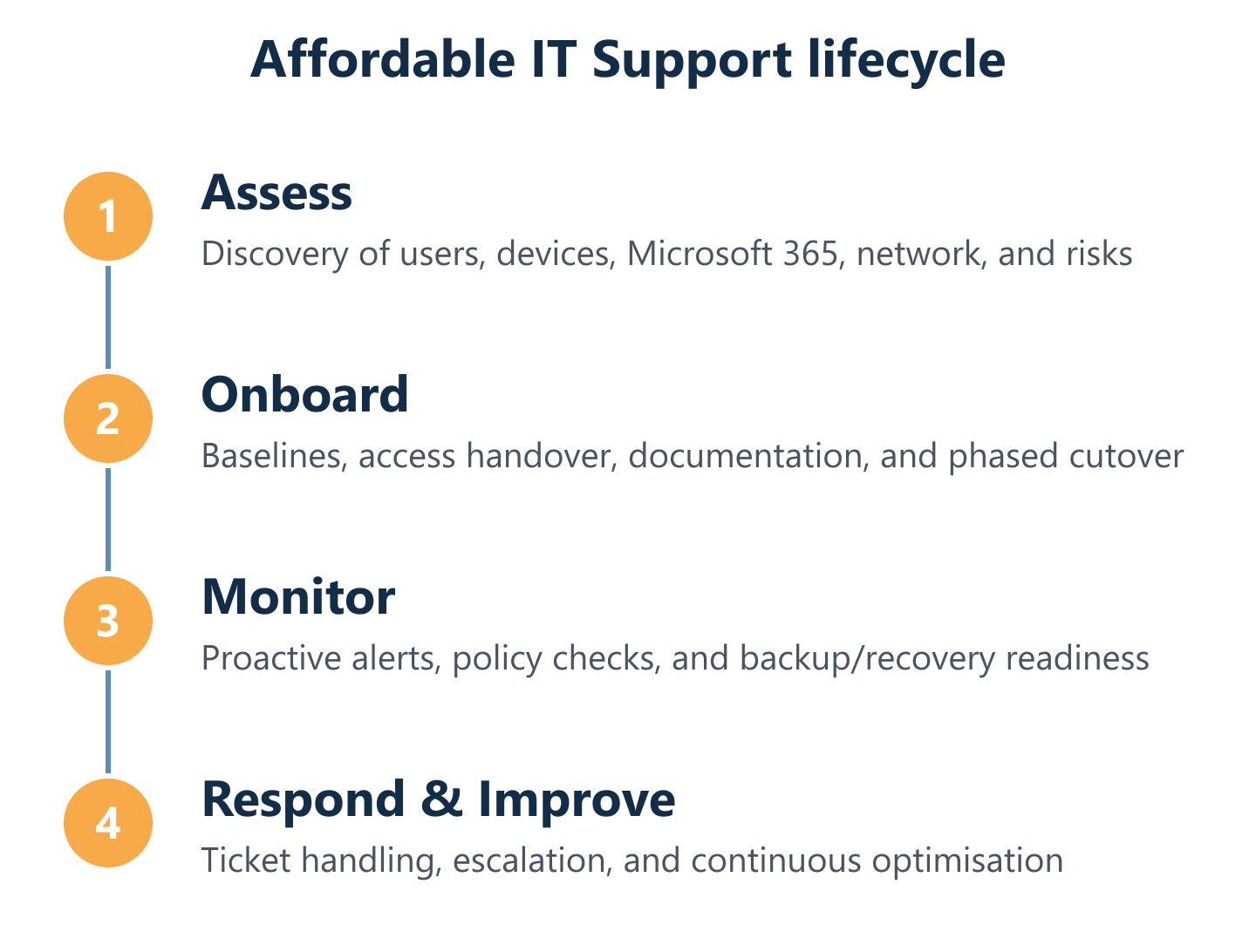
Response times, onboarding, and pricing tiers for Affordable IT Support
Three questions determine whether an IT support contract will deliver on its affordability promise in practice: How quickly will someone respond when something breaks? How will the transition from your current provider be managed? And what exactly is included at the price you are quoted? Providers that answer all three clearly—in writing, before you sign—are the ones worth evaluating seriously.
- Response time transparency: A credible SLA states response targets by priority level (e.g., critical system down vs. minor user inconvenience), not a single average figure that blends all ticket types.
- Resolution ownership: Know who owns a ticket from first response to closure, and what the escalation path looks like if the first-line engineer cannot resolve it.
- Onboarding timeline: A structured onboarding should include asset discovery, configuration documentation, security baseline review, and a phased cutover—typically completed within two to four weeks for a mid-sized organisation.
- Tier inclusions in writing: Each pricing tier should list covered hours, number of users or devices, included security services (endpoint protection, firewall management, backup), and what triggers an out-of-scope charge.
- Predictable monthly costs: Fixed per-user or per-device pricing removes billing uncertainty. Variable or consumption-based models reintroduce the unpredictability that managed IT is supposed to eliminate.
- Security scope per tier: Confirm whether firewall installation and management, endpoint protection, and backup monitoring are included or sold separately at each tier.
Impulso Tecnológico's SLA-based managed services and flexible monthly contracts are designed around exactly these criteria. Our onboarding process begins with a thorough assessment of the client's environment—mapping network entry points, reviewing traffic patterns, and documenting existing configurations—before any changes are made. This is the same methodology we apply to firewall work for organisations ranging from around 50 users to enterprises exceeding 10,000 users.
Simple SLAs: response, resolution targets, and escalation paths
An SLA is only useful if it distinguishes between priority levels and assigns clear ownership at each stage. A well-structured SLA for affordable IT support should define at minimum three priority tiers: critical (complete system or service outage), high (significant impact on a team or process), and standard (individual user issue or non-urgent request). For each tier, the SLA should state a maximum response time, a target resolution time, and the escalation path if the first-line response does not resolve the issue within the target window. Impulso Tecnológico's managed services operate within defined SLA parameters, with remote IT support available during business hours and a named escalation route for unresolved tickets—so clients always know who is responsible and what the next step is.
Onboarding and switching without downtime: a practical checklist
Switching IT providers is one of the most common reasons organisations tolerate a poor service longer than they should. A structured onboarding process removes that barrier. The following checklist reflects the approach Impulso Tecnológico uses when taking on a new client:
- Discovery and asset inventory: Document all devices, users, software licences, and network configurations before any changes are made.
- Security baseline review: Assess current firewall rules, endpoint protection status, backup schedules, and access controls.
- Configuration documentation: Record all critical settings so the new provider can support the environment from day one without reverse-engineering it.
- Parallel running period: Where possible, run old and new support arrangements in parallel for a short period to catch gaps before full cutover.
- Phased cutover: Migrate services in stages—starting with lower-risk systems—to contain the impact of any unexpected issues.
- Post-cutover review: Confirm all monitoring, alerting, and escalation paths are active and tested within the first week.
Pricing options: tiers that explain what's included (not just "tailor-made")
Transparent pricing tiers serve two purposes: they help buyers compare options fairly, and they force providers to be specific about scope. A useful tier structure for affordable IT support maps directly to inclusions rather than vague descriptors. As a practical reference point, a foundational tier typically covers remote helpdesk support during business hours, basic endpoint monitoring, and Microsoft 365 support for a fixed number of users. A mid-tier adds proactive monitoring, patch management, and included security services such as endpoint protection and backup management. A comprehensive tier incorporates firewall installation and management, network security management, advanced threat monitoring, and on-site support. Each tier should state covered hours, the number of users or devices included, and which security services are bundled versus charged separately. For a detailed view of how IT maintenance pricing is structured across different service levels, see our IT Maintenance Price guide.
Choosing an IT support provider on price alone is the most reliable way to end up with unpredictable costs. The providers worth shortlisting are those that can show you a written SLA with priority definitions, a structured onboarding timeline, and a pricing tier that lists every included service before you commit. If you want IT that stays secure and operational without surprise bills, compare providers by scope, SLAs, onboarding quality, and transparent tier inclusions. Impulso Tecnológico offers a free initial assessment to map your environment and identify where your current setup carries the most risk—a practical starting point before any contract decision. You can also explore our preventive IT maintenance and corrective IT maintenance guides for a fuller picture of how proactive and reactive support models work in practice.