

A professional access control systems installer evaluates your site, designs a system matched to your access logic, installs and commissions all hardware and software, validates credential workflows and audit trails, then hands over documented, tested infrastructure—with a clear support route for what comes after.
Most businesses searching for a security access control installer already know they need to restrict and log who enters which areas. The harder question is whether the installer they choose will treat the project as a one-off hardware fit or as a long-term security investment. The difference shows up fast: a system that was never properly commissioned produces incomplete audit logs, fails integrations with visitor management or video surveillance, and leaves your team without the training to manage credentials day to day. Choosing the right access control system integrator means demanding evidence of end-to-end delivery—from site survey through to handover documentation and an agreed support model—not just a competitive price per door reader.
What an Access Control Systems Installer Does (and Doesn't)
The term "installer" covers several service depths. At one end, some providers fit readers and controllers, hand you a login, and leave. At the other, a qualified access control system integrator conducts a structured site survey, designs access zones and permission levels, selects and installs hardware, configures the management software, validates every integration point, and delivers documented, trained-up infrastructure. The gap between these two outcomes is significant—and it becomes visible the first time you need an audit trail for an incident investigation or try to connect the system with your visitor management platform.
At Impulso Tecnológico, access control installation is treated as part of a wider security and infrastructure strategy. That means aligning the system with network security, protected user access paths, and the continuity needs of each organisation—not just fitting hardware to doors. This managed services discipline ensures the system remains dependable after go-live, not just on commissioning day.
| Installer scope area | Basic provider | Professional integrator |
|---|---|---|
| Site survey and risk assessment | Informal walkthrough | Structured evaluation of zones, vulnerabilities, and access levels |
| System design | Standard template | Custom design matched to access logic and compliance requirements |
| Commissioning and validation | Basic power-on test | Full credential workflow, integration, and audit trail validation |
| Handover documentation | Minimal or none | As-built drawings, configuration records, user training |
| Ongoing support | Ad hoc, reactive | SLA-backed, with remote and on-site options |
| Integration with IT/security stack | Not in scope | Visitor management, video surveillance, network security alignment |
End-to-end delivery: from survey to handover
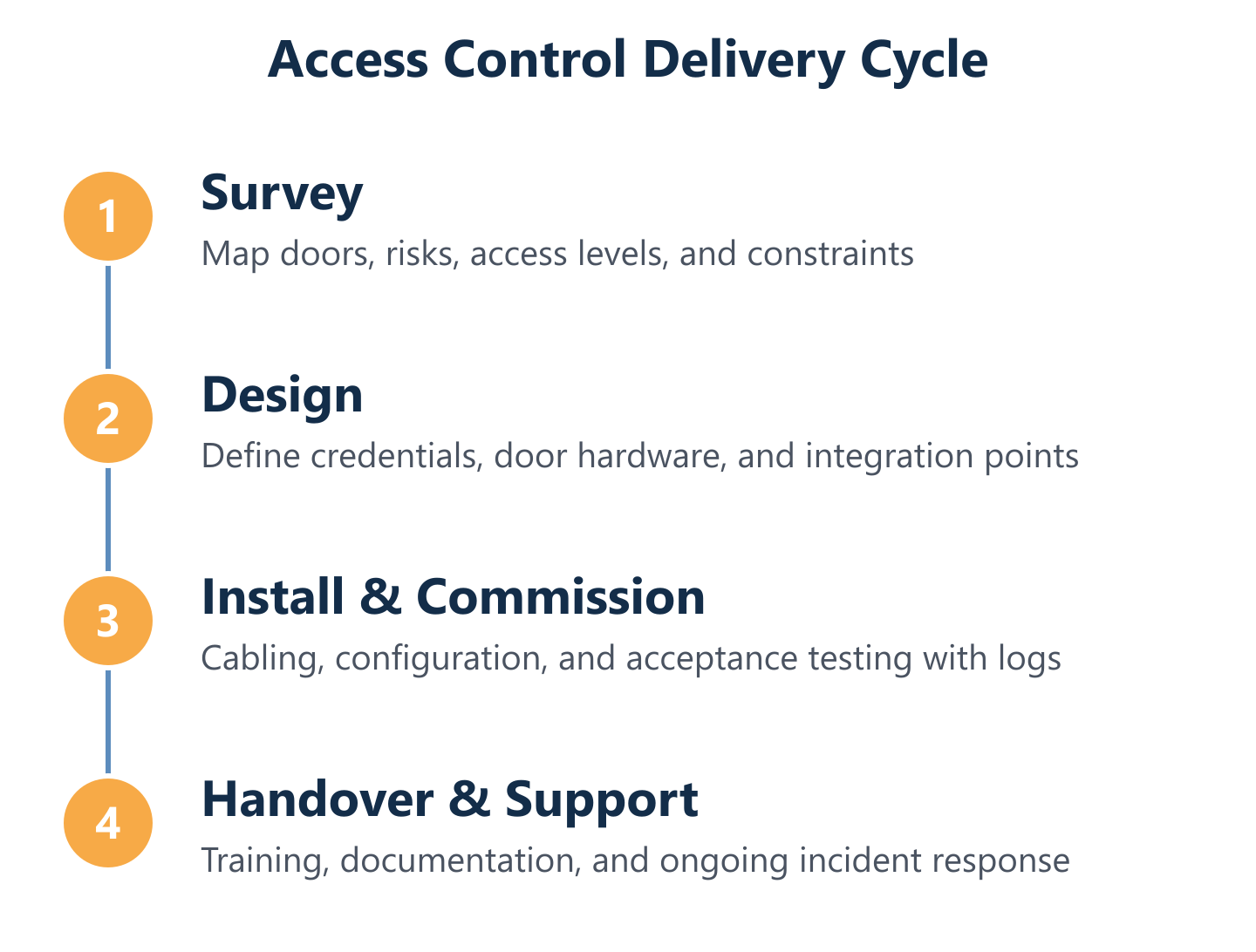
A credible installer's scope begins well before any hardware arrives on site. The process should open with a structured site survey: mapping access zones, identifying vulnerable entry points, defining user groups and permission levels, and confirming cabling routes and server or controller placement. From that survey, a formal access design is produced—specifying device types, credential methods, and software configuration. Installation then follows a tested sequence: structured cabling or wireless infrastructure, controller and reader fitting, software deployment, and network integration. The project closes with a formal commissioning stage and a handover pack that includes as-built documentation, administrator training, and agreed escalation paths. Any installer who skips or compresses these steps creates technical debt that surfaces later as integration failures or audit gaps.
Commissioning and validation: credentials, doors, and logs
Access control system commissioning is the stage most often underestimated by buyers—and most often cut short by installers under time pressure. A thorough commissioning process validates that every credential type (card, key fob, mobile app, keypad PIN) behaves correctly at every door, that permission levels enforce the intended access logic, and that the access control audit trail records events accurately and completely. Integration points must also be tested before sign-off: if the system connects to visitor management, video surveillance, or an HR directory, those data flows need live validation—not just a theoretical check. Incomplete commissioning is the primary reason businesses discover audit trail gaps during an incident review rather than during acceptance testing.
Ongoing support: troubleshooting, updates, and audit readiness
Avoiding providers who only fit readers without security, network, and operational continuity planning is not just good advice—it is a procurement requirement. Access control systems require firmware updates, credential lifecycle management (joiners, movers, leavers), periodic access reviews, and a clear incident response path. Without these, a system that was correctly installed on day one drifts into a security liability. Impulso Tecnológico's approach—drawing on over 25 years of managed IT services experience and a track record of resolving thousands of IT incidents annually—means support after installation is structured, not ad hoc. Remote troubleshooting is available for software and configuration issues, with on-site response for hardware faults, ensuring audit readiness is maintained continuously rather than scrambled together before an inspection.

How to Choose the Right Installer (Decision Checklist)
Selecting a security access control installer on price alone is one of the most reliable ways to fund a second installation within three years. The criteria that matter are compliance capability, integration depth, documentation standards, SLA clarity, and evidence of operational maturity in live environments. Impulso Tecnológico's IT services perspective adds a further dimension: demand security-focused commissioning that treats the access system as part of your wider security posture—not a standalone hardware project. That means reliable network connectivity underpinning the system, protected access management workflows, and a support model that keeps the system dependable after go-live.
Use the following evaluation sequence when shortlisting candidates:
- Verify compliance knowledge: Confirm the installer understands local, national, and sector-specific regulatory requirements relevant to your premises and data handling obligations.
- Assess integration capability: Ask for documented evidence of integrations with visitor management, video surveillance, and HR or identity platforms—not just claims.
- Review commissioning methodology: Request a written commissioning plan that includes credential validation, audit trail testing, and integration sign-off criteria.
- Examine documentation standards: Require as-built drawings, configuration records, and a user training plan as contractual deliverables.
- Clarify SLA terms: Establish response and resolution times for hardware faults, software issues, and credential emergencies before signing.
- Check operational references: Ask for examples of live deployments of comparable size and complexity, including post-installation support history.
RFP-ready questions: scope, SLAs, and acceptance testing
A well-structured RFP for door access hardware selection and installation forces every candidate to respond to the same criteria, making comparison objective. Key areas to cover: the full list of access zones and doors in scope; the methodology for identifying and prioritising vulnerable entry points; the proposed access level hierarchy and how it maps to your organisational structure; the credential strategy (which types, how provisioned, how revoked); and the acceptance testing protocol that defines what "done" means before final sign-off. Also specify SLA expectations explicitly—response time for a door controller failure during business hours is a different commitment from a credential lockout, and both need agreed resolution windows. Installers who cannot answer these questions in writing should be removed from the shortlist.
Integration and interoperability: cloud/on-premise and hybrid readiness
Visitor management integration is one of the most requested capabilities in modern access control deployments—and one of the most frequently delivered poorly. A professional access control system integrator should be able to demonstrate how the access platform exchanges data with visitor management software, video surveillance systems, intrusion detection, HR directories, and identity providers. For cloud access control vs on-premise decisions, integration architecture changes significantly: cloud platforms typically offer pre-built connectors and API access, while on-premise systems may require custom middleware. Hybrid environments—where some controllers are local and management is cloud-hosted—add further complexity that the installer must plan for explicitly. Impulso Tecnológico's experience integrating network security, video surveillance, and IT infrastructure means integration readiness is evaluated at design stage, not discovered during commissioning.
Quality and governance: documentation, audit trails, and maintenance plans
Documentation is where the quality of an installation becomes measurable. A professional installer delivers as-built drawings that reflect what was actually installed (not the original design), configuration records for every controller and reader, test evidence from commissioning, and a maintenance schedule covering firmware updates, battery replacements, and periodic access reviews. The access control audit trail must be configured before handover—not left at default settings—with retention periods, alert thresholds, and export formats agreed in advance. Administrator training should cover daily credential management, report generation, and the escalation path for incidents. Installers who cannot produce these deliverables are not delivering a governed security system; they are delivering hardware with unknown operational risk attached.
Design, Costs, and After Installation: What to Expect
Once you have validated an installer's credentials and methodology, the design conversation can begin in earnest. This is where device selection, credential strategy, architecture decisions, and cost planning converge. A system designed without understanding your access logic—who needs to go where, under what conditions, with what level of audit—will require expensive rework. Impulso Tecnológico approaches this stage with a defence-in-depth mindset: access control is not isolated from the network it runs on, the video surveillance it integrates with, or the IT security policies that govern user access across the organisation. That alignment, combining on-site execution with remote support capability, means the system is designed to remain secure and operational as your organisation changes.
Key design and cost considerations to address before installation begins:
- Number of access points and zones: Each controlled door adds hardware, cabling, and licensing costs—map these accurately at survey stage.
- Credential types required: Mobile access and biometric readers carry higher unit costs than standard card readers; touchless options add further complexity.
- Architecture choice: Cloud-managed systems reduce on-site server requirements but introduce ongoing subscription costs; on-premise systems have higher upfront infrastructure spend.
- Integration depth: Connecting to visitor management, video surveillance, or HR platforms increases design and testing time—budget for this explicitly.
- Compliance requirements: GDPR obligations around biometric data or access logs may require specific configuration and legal review.
- Post-installation support model: SLA-backed managed support costs less over time than reactive break-fix, particularly for multi-site deployments.
Devices and credentials: mapping access logic to door hardware
Door hardware selection should follow access logic, not the other way around. Start by defining who needs access to each zone, under what time conditions, and with what level of audit required—then select the credential method that fits. Standard proximity cards and key fobs suit most office environments and are straightforward to provision and revoke. Keypads work well for low-traffic secondary doors where card infrastructure is disproportionate. Mobile access credentials, delivered via smartphone app, reduce physical card management and support remote provisioning—useful for multi-site or hybrid-working organisations. Touchless and biometric readers add friction-free entry for high-traffic areas or hygiene-sensitive environments but require more careful GDPR consideration. Retrofit installations must also account for existing door frames, lock types, and power availability before any hardware is specified.
Cloud vs on-premise vs hybrid: what installers must explain
The cloud access control vs on-premise decision shapes your total cost of ownership, your IT team's operational burden, and your resilience posture. Cloud-managed systems host the access controller software on vendor infrastructure, reducing the need for on-site servers and enabling remote management from any location—relevant for organisations with distributed sites or limited IT resource. On-premise systems keep all data and processing local, which suits environments with strict data sovereignty requirements or unreliable internet connectivity. Hybrid architectures—local controllers with cloud-based management—offer a middle path but require careful network design to avoid single points of failure. Your installer must explain each option's implications for data residency, internet dependency, failover behaviour, and long-term software licensing before you commit to an architecture. This is a decision that cannot be reversed cheaply after installation.
Cost drivers and ROI: planning to reduce rework and risk
The most reliable way to control access control installation costs is thorough upfront planning. Rework—caused by incorrect door hardware selection, cabling routes that conflict with building structure, or integrations that were not scoped—is consistently the largest source of budget overrun. A detailed site survey and access design document, agreed before installation begins, eliminates the majority of these surprises. After installation, the deliverables you should insist on include: administrator and end-user training delivered before handover; full as-built documentation; audit trail configuration with agreed retention and alert settings; and a documented support route for incidents, firmware updates, and credential lifecycle management. For organisations managing access control as part of a broader IT security strategy—as Impulso Tecnológico's clients do—integrating this support into an existing managed services contract reduces overhead and ensures continuity of expertise across the full technology environment. You can explore how this fits within a wider access control systems deployment across Spain and Portugal or consider how preventive IT maintenance supports long-term system reliability.
The checklist in this guide gives you a structured basis for shortlisting candidates—but shortlisting is only the start. Before signing any contract, demand written evidence of commissioning methodology, integration testing protocols, and a post-installation support model with defined response expectations. Installers who cannot provide these are transferring operational risk to you. For businesses in Spain and Portugal looking for an access control system integrator who combines security-focused installation with managed IT services discipline, Impulso Tecnológico's access control service is built around exactly these principles—from survey through to ongoing support.