

VoIP for businesses replaces traditional phone lines with internet-based calling, giving organisations multi-line capability, call routing, voicemail, and messaging through a single platform—at a lower cost per call and with far greater flexibility than analogue or ISDN systems.
Legacy telephony is expensive to scale, difficult to manage across multiple sites, and increasingly unsupported by carriers. Businesses that stay on traditional systems face rising line-rental costs, limited feature sets, and no real path to remote working or CRM integration. VoIP solves all of these problems simultaneously: calls travel over your existing data network, extensions follow users to any device, and the admin portal replaces the engineer visit. The result is a communication infrastructure that grows with the business rather than constraining it. Whether you are running a single office, a distributed team across Spain and Portugal, or a multi-site operation with centralised connectivity, the right VoIP setup reduces cost, improves call handling, and gives management the visibility they need to run operations efficiently.
What "VoIP for businesses" really means: features you should expect
VoIP for businesses is not simply "calling over the internet." A proper business-grade system is a unified communications platform: it handles inbound and outbound voice, internal extensions, call routing rules, voicemail, messaging, and often video—all managed from a central admin console and accessible from desk phones, softphones, or mobile devices.
The gap between a consumer VoIP app and a business phone system lies in the operational controls: hunt groups, IVR menus, call queues, ring strategies, and the ability to port existing numbers. Without these, a growing team cannot handle call volume professionally or give management any visibility into call performance.
Before comparing providers, map your requirements against the capability tiers below. This prevents you from paying for enterprise features you will never use, or—more commonly—choosing a low-cost plan that lacks the routing depth your operation actually needs.
| Capability tier | What it covers | Typical use case | Minimum requirement? |
|---|---|---|---|
| Core voice | Multi-line calling, hold, transfer, voicemail | Any business replacing a desk phone | Yes |
| Call routing | IVR, call queues, hunt groups, time-based rules | Teams with inbound call flows (sales, support) | Yes for most |
| Messaging | SMS, voicemail-to-email, internal chat | Customer-facing teams, remote workers | Recommended |
| Mobile extensions | Softphone apps, mobile number presentation | Field staff, hybrid teams, multi-site | Yes for distributed teams |
| Admin and analytics | Call reporting, user roles, live dashboards | Operations managers, contact centres | Recommended |
| Integrations | CRM, helpdesk, calendar, contact centre platform | Sales teams, service desks | Situational |
| Security controls | MFA, TLS/SRTP encryption, GDPR compliance | All regulated or customer-data environments | Yes |
At Impulso Tecnológico, we help organisations translate these requirements into a working design—configuring IP switchboards, mobile extensions, and routing logic so teams keep operating throughout the modernisation process, whether they are moving from analogue, digital, or a legacy IP PBX.
Core business phone system capabilities (calling, voicemail, routing)
The foundation of any business VoIP deployment is reliable multi-line calling with proper call management built in. That means simultaneous inbound calls without engaged tones, internal extension dialling, hold and transfer, and voicemail per user or per group. Beyond the basics, call routing is where business systems earn their value: the ability to define ring strategies (sequential, simultaneous, round-robin), set time-of-day rules, and push overflow calls to a queue rather than a voicemail box.
Call queue and IVR setup are particularly critical for any team handling inbound customer contact. An IVR menu routes callers to the right department without a receptionist; a properly configured queue with position announcements and callback options reduces abandonment. These are standard features in most cloud PBX platforms, but the depth of configuration—number of queue levels, routing logic, failover rules—varies significantly between providers and plans.
Messaging and productivity features (SMS, transcription, call recording)
Voicemail-to-email transcription converts missed calls into readable text delivered directly to a user's inbox—a practical feature that reduces the time spent listening to audio messages and makes follow-up faster. Most mid-tier and above business VoIP plans include this, though transcription accuracy varies by provider and language support.
SMS from a business number (rather than a personal mobile) keeps customer communications on the company platform and creates a searchable record. Check whether the plan includes SMS in the base price or charges per message, and whether there is a monthly cap—some providers restrict outbound SMS volume at lower tiers, which becomes a problem for customer-facing teams.
Call recording, where legally permitted, is valuable for quality assurance, training, and dispute resolution. Confirm whether recording is on-demand or automatic, where recordings are stored, how long they are retained, and whether accessing them requires an additional licence or storage upgrade.
Admin and visibility essentials (analytics, user roles, reporting)
A business phone system without a proper admin console creates operational blind spots. At minimum, you need the ability to add and remove users without raising a support ticket, assign roles and permissions, and pull basic call reports—total calls, missed calls, average handle time, and queue wait times.
More mature platforms provide live dashboards showing queue depth and agent availability in real time, plus historical analytics exportable to CSV or connected to a BI tool. For multi-site organisations, the ability to manage all locations from a single portal—rather than logging into separate systems per site—is a significant operational advantage.
Desk phone support matters too: not every team wants to work exclusively on a softphone. Confirm that the platform supports SIP-compatible hardware from the brands already in your environment (Cisco, Yealink, Poly, and similar), and check whether provisioning is automatic or requires manual configuration per device. Mobile extensions for business VoIP should allow staff to make and receive calls under the company number from their smartphone, without exposing their personal number to customers.

How to choose a VoIP provider: a decision framework
Choosing a VoIP provider based on a feature list alone is one of the most common—and costly—mistakes organisations make. Two providers may both advertise "IVR, call recording, and CRM integration," yet differ substantially in routing depth, admin complexity, support responsiveness, and what happens when call volume spikes. A structured decision framework forces you to compare providers on the dimensions that actually affect operations, not just the marketing checklist.
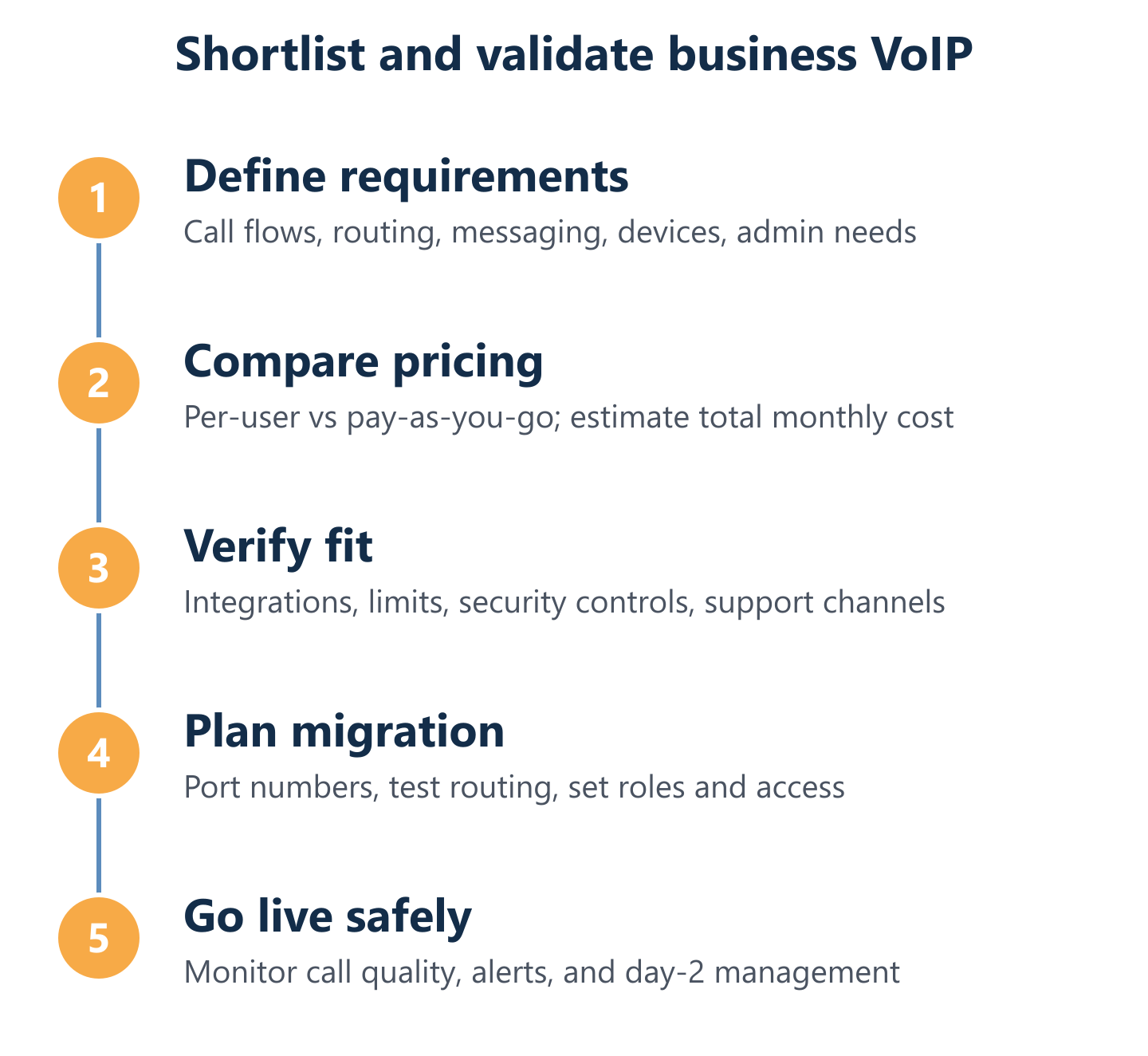
The framework below works for any organisation size, from a ten-person SME to a multi-site enterprise. Work through each phase before you shortlist, and weight the criteria according to your specific environment.
- Define your call flows first. Document inbound and outbound volumes, peak hours, routing logic (IVR depth, queue rules, overflow), and which teams need which features before you look at any provider.
- Set a total cost of ownership budget. Include per-user or per-number fees, hardware (desk phones, headsets), number porting costs, and any professional services for setup and migration.
- Audit integration requirements. List every system the phone platform must connect to—CRM, helpdesk, calendar, contact centre software—and confirm native integration or API availability before shortlisting.
- Assess admin and support overhead. Evaluate how much internal IT effort the platform requires day-to-day: provisioning, moves/adds/changes, and incident escalation paths.
- Validate reliability and security credentials. Check uptime SLAs, redundancy architecture, MFA availability, and encryption standards (TLS signalling, SRTP media).
- Test before committing. Run a pilot with real call flows, including peak load scenarios, before signing any contract.
At Impulso Tecnológico, our managed-services approach reduces the risk at every stage: we help organisations evaluate fit against their real environment, plan the migration sequence, and keep communications stable throughout the transition—whether that means running legacy and VoIP systems in parallel or phasing the rollout site by site.
Decision matrix: cost, integrations, admin effort, and usage limits
Total cost of ownership for a business VoIP system goes well beyond the headline per-user price. Factor in: number porting fees (typically a one-off charge per number), hardware costs if you are deploying desk phones, any premium add-ons (call recording storage, advanced analytics, additional IVR levels), and the internal IT time required to administer the platform ongoing.
Usage limits are a frequent source of surprise costs. Some per-user plans cap outbound minutes to specific regions, restrict SMS volume, or charge separately for international calls. Pay-as-you-go models avoid the cap problem but require careful monitoring to prevent bill shock on high-volume months. Build a simple spreadsheet: multiply your average monthly call minutes by the per-minute rate, add number fees and add-ons, and compare that total against the equivalent per-user plan across at least three providers before deciding.
Pros and cons of common deployment patterns (cloud PBX vs SIP trunk)
The SIP trunk vs VoIP phone system question comes down to where the intelligence sits. A cloud PBX (hosted VoIP) moves the switchboard logic entirely to the provider's infrastructure: you pay a monthly fee, connect IP phones or softphones, and the provider manages uptime, upgrades, and routing. A SIP trunk, by contrast, connects your on-premises IP PBX to the PSTN over the internet—you retain control of the call routing hardware but gain the cost and flexibility benefits of IP calling.
Cloud PBX suits organisations that want minimal on-site hardware, fast deployment, and predictable monthly costs. SIP trunking suits those with an existing IP PBX investment they want to extend, or with specific routing requirements that a hosted platform cannot accommodate. A hybrid approach—SIP trunks feeding an on-premises Asterisk or similar system—gives maximum control but requires more technical management. The IP PBX migration path from legacy digital switchboards typically involves running both systems in parallel during a cutover period to avoid call disruption.
Questions to ask before you switch (security, support, and migration scope)
Before committing to a provider, stress-test three areas that vendor demos rarely cover in sufficient depth.
First, security: does the platform enforce MFA for admin and user accounts by default, or is it optional? Is signalling encrypted with TLS and media with SRTP? Where is call data stored, and does the provider's data processing agreement satisfy your GDPR obligations? VoIP security with MFA and encryption is not optional for any organisation handling customer data.
Second, support: what is the escalation path when a call routing issue affects live operations? Is support available in your language and time zone, and what is the contractual response time for severity-one incidents?
Third, migration scope: can the provider port your existing numbers, including DDIs and geographic numbers from your current carrier? What is the porting timeline, and is there a parallel-run period during which both old and new systems are live? Clarifying these points before signing prevents the most common causes of VoIP project delays.
Pricing models compared: plans vs pay-as-you-go for business VoIP
VoIP pricing per user vs per minute is not simply a cost question—it is a question of how predictable your call patterns are and how much budget variability you can absorb. Neither model is universally superior; the right choice depends on headcount stability, call volume, geographic calling patterns, and whether you need a bundled feature set or prefer to pay only for what you use.
The key variables to compare across models:
- Headcount stability: Per-user plans work well when team size is consistent month to month. Pay-as-you-go suits seasonal businesses or project-based teams that scale up and down.
- Call volume and destination mix: High volumes of domestic calls favour per-user unlimited plans. Frequent international calling or low-volume outbound may cost less on a per-minute model.
- Feature bundling: Per-user plans typically bundle IVR, call queues, voicemail transcription, and analytics. Pay-as-you-go platforms often charge separately for advanced routing features.
- Contract flexibility: Many per-user plans require annual commitments for the best per-seat rate. Pay-as-you-go is usually contract-free, which reduces lock-in risk during a migration.
- Hardware costs: Neither model includes desk phones. Budget separately for SIP-compatible handsets or headsets, regardless of which pricing structure you choose.
- Hidden costs: Number porting, additional DDIs, call recording storage, and premium support tiers are frequently excluded from headline prices on both models.
At Impulso Tecnológico, we help organisations model costs realistically for their specific environment—accounting for multi-site extensions, mobile users, and desk phone deployments—and plan a migration sequence that avoids hidden operational downtime during the transition.
When per-user plans are the better fit (predictability and bundled features)
Per-user plans make the most financial sense when your headcount is stable and your team makes a consistent volume of calls each month. At a fixed monthly rate per seat—typically ranging from around £10 to £40 per user depending on the feature tier—you get a predictable line item in the IT budget with no bill surprises tied to call volume.
The bundled feature set is the other major advantage. Most per-user plans at mid-tier and above include unlimited domestic calls, IVR, call queues, voicemail transcription, call recording, and analytics within the base price. For a sales or support team that needs all of these capabilities running from day one, a per-user plan avoids the complexity of assembling a feature stack from individual add-ons. The trade-off is that you pay the full per-seat rate even for light users—administrative staff or part-time roles who make very few calls each month.
When pay-as-you-go works best (variable traffic and flexible scaling)
Pay-as-you-go VoIP pricing—charged per number per month plus per-minute rates for calls made—suits organisations where call volume fluctuates significantly or where international calling represents a large proportion of traffic. Rather than paying a flat per-user fee for unused capacity, you pay only for the numbers you need and the minutes you actually consume.
This model is particularly well suited to businesses with seasonal peaks (retail, hospitality, events), project-based teams that grow and contract, or organisations with a high proportion of outbound international calls to destinations where per-user plans charge a premium. It also works well during an IP PBX migration: you can bring up VoIP numbers incrementally without committing to a full per-seat contract while legacy lines are still active. The discipline required is monitoring: without usage alerts, a spike in call volume or an unexpected international routing issue can produce a significantly higher bill than anticipated.
How to estimate total monthly cost (numbers, minutes, add-ons, and support)
A like-for-like cost comparison between VoIP providers requires building the same bill of materials for each option. Start with the base cost: per-user monthly fee multiplied by seat count, or per-number fee multiplied by DDI count. Add outbound call costs: for per-user plans, check whether "unlimited" domestic calls include mobile numbers or only landlines. For pay-as-you-go, multiply average monthly minutes by the per-minute rate for each destination type.
Then add the items that are frequently omitted from headline comparisons: number porting fees (one-off, per number), additional DDIs beyond the included allocation, call recording storage (often charged per gigabyte or per month above a free tier), advanced analytics or wallboard licences, and any professional services for initial configuration. Finally, factor in hardware: a SIP desk phone costs between £50 and £200 per unit depending on the model, and that capital cost amortised over three years should appear in your total cost of ownership calculation alongside the monthly service fees.
Once you have mapped your call flows, matched them to the right feature tier, and modelled the true monthly cost across at least two pricing structures, shortlisting becomes straightforward. The organisations that switch VoIP systems with the least disruption are those that define requirements before they evaluate providers—not the other way around. If your environment involves multiple sites, legacy switchboard hardware, or mobile extensions that need to stay connected during a cutover, working with a managed services partner who understands both the telephony and the network layer makes the difference between a clean migration and an extended parallel-run that costs more than anticipated. Impulso Tecnológico brings that combination of telephony expertise and IT infrastructure experience to every deployment, from initial design through to ongoing support. You can also explore our guidance on switchboard installation for businesses and telephone system installation and maintenance for a fuller picture of how we approach business telephony projects.