

Cloud storage for businesses means storing, organising, and sharing company data on remote infrastructure managed by a third-party provider—accessible from any device, with controlled permissions, audit trails, and integration into existing workflows. It is not the same as backup, and choosing the wrong model creates gaps in both compliance and recovery.
Most businesses discover this distinction too late: they adopt a file-sharing platform expecting it to protect them against ransomware or accidental deletion, only to find that storage and recoverability are separate problems requiring separate solutions. The consequences range from regulatory fines under GDPR to operational paralysis when a critical file disappears and there is no restore point.
This guide gives IT decision-makers and business owners a structured framework to evaluate cloud storage for businesses: what to demand from vendors on security and compliance, how to set realistic recovery targets, and which provider profiles suit different business types—from SMBs to regulated enterprises and global teams.
What "Cloud Storage For Businesses" Really Means (and What It Isn't)
Cloud storage for businesses is infrastructure that lets organisations store, access, and share data over the internet—hosted by a provider rather than on local servers. It covers file repositories, object storage, and shared drives with permission controls. What it does not cover, by default, is automated recoverability, point-in-time restore, or disaster recovery orchestration. Those belong to cloud backup and business continuity planning.
This distinction matters directly at procurement stage. A business that purchases a cloud storage licence expecting it to handle ransomware recovery will find no versioning policy, no air-gapped copy, and no tested restore procedure. Conversely, a business that invests heavily in backup infrastructure without addressing day-to-day file access and collaboration will frustrate its teams and push them towards unsanctioned tools.
At Impulso Tecnológico, we treat storage, backup, and managed IT operations as interconnected layers rather than separate purchases. With over 25 years of experience supporting businesses across Spain, Portugal, and internationally, we act as the operational glue that ensures data is not only stored but protected, accessible, and recoverable under professional processes—aligned with GDPR obligations and SLA-backed continuity commitments.
| Capability | Cloud Storage | Cloud Backup | Cloud Computing |
|---|---|---|---|
| Primary purpose | Store, organise, share files | Recover data after loss or corruption | Run applications and workloads |
| Access model | On-demand, user-driven | Restore-on-event, IT-driven | Compute-on-demand, app-driven |
| Versioning / point-in-time | Optional (varies by provider) | Core feature | Not applicable |
| Ransomware protection | Partial (depends on retention settings) | Yes (immutable backups, air-gap options) | Not applicable |
| Typical procurement driver | Collaboration, access, compliance | Business continuity, regulatory obligation | Application scalability, infrastructure cost |
Core capabilities: storage, sync, sharing, and permissions
Cloud storage focuses on storing, organising, and sharing files and data with controlled access. The core capabilities businesses should expect include: a centralised file repository accessible from multiple devices and operating systems; real-time or near-real-time synchronisation across users; granular sharing controls (internal teams, external partners, public links with expiry); and role-based permissions that enforce least-privilege access. Enterprise-grade platforms add features such as eDiscovery, legal hold, and integration with identity providers for Single Sign-On (SSO). File sharing for enterprises goes beyond simple link generation—it requires audit trails, watermarking options, and the ability to revoke access instantly when an employee leaves or a contract ends.
Cloud storage vs cloud backup vs cloud computing: practical differences
Business backup is about recoverability after loss, corruption, or ransomware—not just availability. A cloud storage platform may retain deleted files for 30 days by default; a purpose-built backup solution retains versioned snapshots for months or years, with immutable copies that cannot be overwritten by an attacker. Cloud computing, meanwhile, is about running applications: virtual machines, databases, and services. Storage is one component within that stack, not a substitute for it. When evaluating providers, businesses should ask three separate questions: Where is our data stored and who can access it? What happens if that data is deleted or encrypted by ransomware? And which applications depend on that infrastructure to function? Conflating these three questions leads to under-specified contracts and uninsured risk.
Common business scenarios that drive requirements
The scenarios that most commonly drive cloud storage requirements in mid-sized businesses include: distributed teams needing a single source of truth for documents; regulated industries (healthcare, finance, legal) requiring audit-ready access logs and data residency controls; businesses migrating away from on-premises file servers to reduce hardware costs; and organisations that have experienced a ransomware incident and are now rebuilding with proper data protection layered in. Each scenario implies a different priority order. A distributed team weights collaboration and SSO integration first; a regulated business weights compliance certifications and data retention controls; a post-incident rebuild weights immutable backup and tested restore procedures above everything else. Identifying your primary scenario before evaluating vendors prevents over-purchasing features you will not use and under-specifying the controls you actually need.

Security, Compliance, and Data Protection Checklist
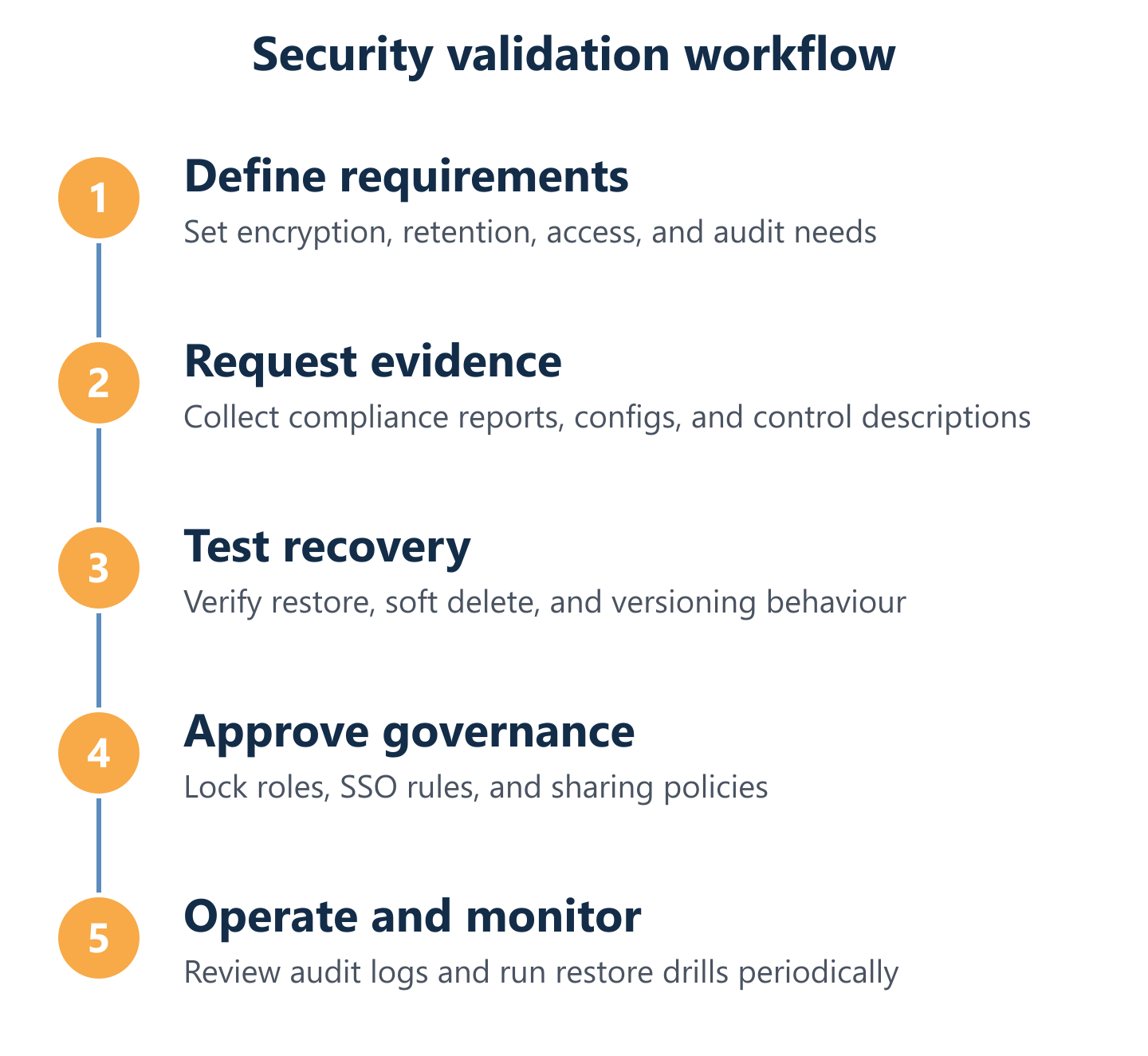
Security failures in cloud storage are rarely dramatic—they are usually the result of misconfigured permissions, absent retention policies, or untested recovery procedures. A structured cloud storage compliance checklist reduces that risk by making requirements explicit before a contract is signed.
The controls businesses should demand map directly to real risk categories: data interception (encryption in transit and at rest), unauthorised access (identity governance and MFA), accidental or malicious deletion (retention locks and soft delete), regulatory audit failure (certified compliance frameworks and exportable logs), and vendor lock-in or key dependency (customer-managed encryption keys).
At Impulso Tecnológico, our managed services model applies these controls as operational practice rather than paper policy. Working with trusted partners including Veeam for backup and recovery, and supporting Microsoft 365 and Azure environments, we help clients implement GDPR-aware data handling, managed backup with professional restore processes, and access controls that reflect actual organisational roles—not just default settings. Businesses we support across Spain and internationally benefit from a single point of accountability for storage-related risk, rather than distributing responsibility across multiple uncoordinated vendors.
- Verify encryption at rest and in transit — confirm AES-256 at rest and TLS 1.2+ in transit as a baseline requirement.
- Clarify key management — establish whether encryption keys are provider-managed, customer-managed (CMEK), or customer-held (BYOK), and what happens to keys on contract termination.
- Define retention and deletion controls — specify minimum retention periods, soft delete windows, and whether retention locks (WORM) are available for regulated data.
- Confirm versioning depth — establish how many versions are retained, for how long, and whether version history survives a ransomware event that overwrites live files.
- Audit access governance — require SSO integration, MFA enforcement, role-based access controls, and the ability to export activity logs for compliance evidence.
- Check compliance certifications — request current SOC 2 Type II, ISO 27001, and GDPR data processing agreements; for regulated sectors, verify HIPAA or sector-specific equivalents.
- Test incident response — ask vendors for their documented process when a data breach or accidental deletion is reported, including response SLAs.
Encryption and key management: what to verify with vendors
Encryption at rest and in transit is the baseline—not a differentiator. Every credible enterprise cloud storage provider encrypts data using AES-256 at rest and TLS 1.2 or higher in transit. The real differentiator is key management. Provider-managed keys are convenient but mean the provider can theoretically access your data; customer-managed encryption keys (CMEK) give your organisation control over the encryption layer, so that even the provider cannot read your files without your key. Bring Your Own Key (BYOK) goes further, allowing you to supply and rotate keys from your own hardware security module. For businesses handling sensitive personal data under GDPR, or operating in regulated sectors, CMEK or BYOK is not optional—it is the mechanism that makes data processing agreements enforceable. Pair encryption with strong access controls: SSO and access governance for cloud files, MFA enforcement, and least-privilege role assignments reduce the attack surface that encryption alone cannot address.
Retention, versioning, and deletion safeguards (soft delete, locks, recovery windows)
Data retention and deletion controls determine whether your organisation can recover from the most common data loss scenarios: accidental deletion, overwriting by ransomware, and premature purging under incorrect lifecycle policies. Soft delete retains a recoverable copy of deleted files for a configurable window—typically 30 to 180 days depending on the platform and tier. Versioning maintains a history of changes so that a file corrupted by ransomware can be rolled back to a clean state. Retention locks (WORM—Write Once Read Many) prevent any user, including administrators, from deleting or modifying data before a defined retention period expires; this is essential for regulated industries with legal hold requirements. When evaluating providers, confirm: the default soft delete window, whether it can be extended, whether versioning survives a bulk-overwrite event, and whether retention locks are available at the folder or bucket level without requiring a premium tier upgrade.
Access governance and auditability: SSO, roles, and traceable activity
Audit logs and compliance evidence are not features businesses use daily—they are features businesses desperately need when something goes wrong. SSO and access governance for cloud files means integrating your cloud storage platform with your identity provider (Azure Active Directory, Okta, or equivalent) so that access is granted and revoked centrally, not managed per-application. Role-based access controls should reflect your organisational structure: department-level read/write permissions, project-specific folders with time-limited external access, and administrator actions that require a second approver. Audit logs must capture file access, sharing events, permission changes, and deletion actions—and those logs must be exportable in a format that satisfies a GDPR data subject access request or an ISO 27001 audit. Certifications such as SOC 2 Type II confirm that a provider's internal controls have been independently tested; they do not replace your own configuration responsibilities, but they establish a credible baseline for due diligence.
Reliability and Recovery: RTO/RPO, Replication, and Operational Continuity
Reliability in cloud storage is not simply about uptime percentages in a service agreement. It is about whether your business can continue operating when data becomes unavailable—whether through provider outage, ransomware encryption, accidental deletion, or hardware failure at a regional data centre. Translating that into procurement language means specifying RTO and RPO for cloud storage before you sign a contract, not after an incident.
At Impulso Tecnológico, we integrate cloud-based backup into our managed services model precisely because storage availability and data recoverability are different problems. Our approach ensures that backups are automatic and reliable, that restore processes are professionally managed, and that monitoring covers the entire data protection chain—not just whether files are present, but whether they can actually be recovered within an acceptable timeframe. With Veeam as a key technology partner for backup and recovery, and proactive monitoring built into our SLA-backed managed services contracts, clients avoid the scenario where a backup exists on paper but has never been tested.
- Define RTO before selecting a tier: if your business cannot tolerate more than four hours of data unavailability, your storage tier and replication model must support that—standard cold storage tiers do not.
- Specify RPO in data terms: how much data can you afford to lose? One hour of transactions? One day? This determines backup frequency, not just storage class.
- Verify replication geography: confirm whether replication is within a single region, cross-region, or cross-provider, and what the failover procedure involves.
- Ask about ransomware recovery specifically: does the provider offer immutable storage or air-gapped backup copies that cannot be encrypted by an attacker with compromised credentials?
- Confirm restore testing cadence: a backup that has never been tested is not a backup—it is an assumption. Require documented restore drill results.
- Clarify incident ownership: when a restore is needed, who initiates it, who executes it, and what is the escalation path if the first restore attempt fails?
RTO/RPO requirements: turning technical terms into business outcomes
RTO and RPO for cloud storage are the two metrics that translate technical infrastructure decisions into business risk language. Recovery Time Objective (RTO) is the maximum acceptable time between a failure event and full restoration of service. Recovery Point Objective (RPO) is the maximum acceptable amount of data loss measured in time—how far back your last usable restore point can be. A business running continuous transactions may set an RPO of 15 minutes; a business with daily batch processing may accept an RPO of 24 hours. These are business decisions, not IT defaults. Once defined, RTO and RPO drive every subsequent storage decision: replication architecture, backup frequency, storage tier selection, and whether you need a hot standby or can tolerate a cold restore. Vendors such as Google Cloud publish specific SLA-backed RPO figures (e.g., 15-minute RPO with turbo replication for dual-region buckets); your contract should reference these explicitly rather than relying on general availability guarantees.
Replication, disaster recovery, and recovery after accidental deletion
Replication and disaster recovery design determine resilience across regions and failure modes. Single-region replication protects against hardware failure within a data centre but not against a regional outage or a provider-level incident. Cross-region replication adds geographic redundancy but increases latency and cost. For most business workloads, the right model is cross-region replication for critical data combined with a separate, immutable backup copy that is logically isolated from the primary storage environment—so that a ransomware attack that compromises the primary cannot reach the backup. Recovery after accidental deletion is a separate scenario: it depends on soft delete windows and versioning depth, not on replication. Businesses frequently discover that their replication is excellent but their accidental deletion recovery window expired three days before the incident was reported. Both problems require explicit policy, not provider defaults. For guidance on structuring a full cloud migration and storage architecture, our cloud solutions implementation guide covers the end-to-end planning process.
Testing and governance: restore drills, monitoring, and incident response
Operational continuity requires tested restore procedures and clear incident ownership—not just documented policies. A restore drill validates that backup files are intact, that the restore process works within the defined RTO, and that the person responsible for executing the restore knows the procedure before an incident occurs. Monitoring should cover backup job completion (did the backup run?), data integrity (is the backup file uncorrupted?), and access anomalies (are there unusual deletion or download events that might indicate a breach or insider threat?). Incident response for storage events should define: who is notified when a backup fails, what the escalation path is if a restore cannot be completed within the RTO window, and how the business communicates with affected stakeholders. At Impulso Tecnológico, resolving over 4,000 IT tickets annually across our client base, we have observed that most storage-related incidents are not caused by provider failure—they are caused by absent governance and untested recovery procedures.
Selecting cloud storage for your business is not a single decision—it is a set of interlocking requirements covering security, compliance, recovery, collaboration, and cost that must be validated against your specific operational context. Use the checklist and evaluation framework in this guide to build a shortlist of providers, then test each against your defined RTO, RPO, and compliance obligations before committing. If your organisation lacks the internal resource to run that validation process confidently, working with an experienced IT consultancy ensures that storage decisions are integrated into your broader data protection and managed services strategy—not treated as an isolated product purchase. Explore how Impulso Tecnológico approaches secure and scalable cloud services for businesses or review a real-world cloud migration success story to see these principles applied in practice.