

Cloud services for businesses encompass hosted computing, storage, managed applications, data platforms, and integration tools delivered over the internet. They replace or augment on-premises infrastructure, reducing capital expenditure while improving scalability, collaboration, and resilience across distributed teams.
The challenge most organisations face is not whether to adopt cloud services, but which combination of services genuinely fits their workloads, security obligations, and budget constraints. A company in financial services has very different compliance requirements from one in logistics or education, yet both will encounter the same common pitfalls: unclear cost models, underestimated migration complexity, and security controls that are added as an afterthought rather than built in from the start.
This guide maps the full scope of cloud services for businesses, from storage and compute through to managed platforms and analytics, then provides a structured framework for evaluating models, costs, and ongoing operations. Whether you are planning a first migration or consolidating a fragmented cloud estate, the goal is the same: a cloud environment that is secure, measurable, and aligned with how your business actually runs.
What "cloud services for businesses" includes
Most buying decisions go wrong because the scope is defined too narrowly. Organisations focus on cloud storage or email migration and overlook the broader ecosystem of services — compute, identity management, security, analytics, and workflow integration — that together determine whether a cloud environment actually supports business operations or simply replicates old problems in a new location.
At Impulso Tecnológico, every cloud engagement starts with a comprehensive IT assessment. The objective is to translate business goals — faster collaboration, reduced infrastructure overhead, GDPR compliance, business continuity — into a defined set of cloud service categories, then design a secure, measurable setup built primarily around Microsoft 365 and Azure, with proactive monitoring, backup, and day-to-day managed operations included from the outset. This prevents the common pattern of deploying cloud services and then discovering that monitoring, patching, and recovery are not covered.
| Cloud Service Category | What It Covers | Typical Business Outcome | Example Technologies |
|---|---|---|---|
| Cloud Storage & Backup | File storage, object storage, automated backup, disaster recovery | Data protection, reduced hardware dependency | Azure Blob, OneDrive, Veeam |
| Cloud Compute | Virtual machines, containers, serverless workloads | Scalable processing without capital investment | Azure Virtual Machines, Azure Kubernetes |
| Managed Business Applications | Email, collaboration, CRM, ERP, project management | Productivity, standardised workflows | Microsoft 365, Odoo, Teams |
| Data, BI & Analytics | Reporting dashboards, data warehousing, AI/ML pipelines | Faster, evidence-based decisions | Power BI, Azure Synapse |
| Security & Identity | Firewall, endpoint protection, access control, GDPR compliance | Risk reduction, regulatory adherence | Sophos, Fortinet, Azure AD |
| Integration & Automation | Workflow automation, API integration, legacy system connectors | Reduced manual effort, connected operations | n8n, Make.com, Azure Logic Apps |
Cloud service building blocks: storage, compute, and managed platforms
Storage, compute, and managed platforms form the infrastructure layer on which every other cloud service depends. Cloud storage provides scalable, redundant file and object repositories that replace physical servers and tape-based backups. Cloud compute delivers on-demand processing capacity — virtual machines, containers, or serverless functions — that scales with workload rather than with hardware procurement cycles. Managed platforms sit above both: they are pre-configured environments (databases, application runtimes, identity services) where the provider handles patching and availability, leaving your team to focus on configuration and usage. For cloud computing for enterprises, the key question at this layer is not which provider offers the most features, but which combination of storage, compute, and managed platform services maps cleanly onto your existing workloads and your team's operational capacity.
Business applications in the cloud: productivity, CRM, and workflow tools
Cloud-hosted business applications deliver the most visible day-to-day value: email, document collaboration, video conferencing, CRM, and ERP tools that previously required on-premises servers and dedicated IT resources to maintain. Microsoft 365, for example, consolidates email, Teams, SharePoint, and identity management into a single subscription, dramatically reducing the overhead of running separate systems. CRM platforms such as Salesforce or Odoo (which Impulso Tecnológico implements and supports) centralise customer data and automate sales workflows. The operational efficiency gains are real — faster onboarding of remote workers, consistent software versions across all devices, and automatic updates that remove patching burden from internal IT teams. The selection criterion at this layer is integration: each application must connect cleanly to adjacent tools and to the data layer, or productivity gains are quickly offset by manual reconciliation work.
Data and analytics: BI, reporting, and AI-ready foundations
Before selecting a data or analytics platform, three questions need clear answers: where does your data currently live, who needs access to it, and how sensitive is it? Regulated industries — healthcare, financial services, legal — face strict constraints on data residency and access logging that immediately narrow the viable options. Once those boundaries are defined, cloud BI platforms such as Power BI (integrated natively with Microsoft 365 and Azure) allow organisations to build reporting dashboards without dedicated data engineering teams. The longer-term value is an AI-ready data foundation: structured, governed data in the cloud is the prerequisite for applying machine learning to demand forecasting, anomaly detection, or customer behaviour analysis. Skipping the governance step at this stage creates technical debt that becomes expensive to unwind later. Define data sensitivity classifications and access policies before the first dataset moves to the cloud.

Cloud service models and how to evaluate them
Choosing between public, private, and hybrid cloud is not primarily a technical decision — it is a risk and governance decision. Public cloud offers the lowest entry cost and the broadest service catalogue, but it means sharing physical infrastructure with other tenants and accepting the provider's default security posture unless you configure controls explicitly. Private cloud gives greater control over data residency and network isolation, but it reintroduces capital expenditure and operational overhead. Hybrid cloud — the model most established businesses actually end up with — combines both, routing sensitive or latency-critical workloads to private or on-premises infrastructure while leveraging public cloud for scalability and collaboration tools.
At Impulso Tecnológico, the approach to cloud adoption treats reliability as an operational discipline rather than a feature of the provider. This means establishing clear SLAs before go-live, configuring proactive alerting so anomalies are caught before they become outages, and integrating GDPR-aligned security controls using certified partner technologies — Sophos for endpoint protection, Fortinet for network security, and Veeam for backup and recovery. Migration is not a one-off project; it is the start of an ongoing managed relationship. For organisations exploring this approach further, our detailed guide on cloud solutions implementation covers the full project lifecycle from assessment through to steady-state operations.
- Define your risk and compliance baseline — identify regulated data types, residency requirements, and acceptable recovery time objectives before evaluating any model.
- Map workloads to deployment models — categorise each workload by sensitivity, latency requirement, and scalability need to determine which belongs in public, private, or hybrid environments.
- Assess your internal operational capacity — public cloud shifts responsibility for patching and availability to you unless you engage a managed services provider; be honest about what your team can sustain.
- Validate SLA terms against business continuity requirements — provider uptime guarantees rarely cover all failure scenarios; confirm what is and is not included in the SLA before signing.
- Plan security integration from day one — firewall rules, identity and access management, encryption at rest and in transit, and audit logging must be configured at deployment, not retrofitted later.
Public, private, and hybrid: choosing the right balance for your workloads
Public cloud (Azure, AWS, Google Cloud) suits workloads that benefit from elastic scaling, global availability, and a broad managed-service catalogue — collaboration tools, development environments, and customer-facing applications are typical candidates. Private cloud or on-premises infrastructure remains the right choice for workloads with strict data residency requirements, very low latency needs, or regulatory constraints that prohibit shared tenancy. Hybrid cloud strategy — the most common real-world outcome — lets organisations keep sensitive data on controlled infrastructure while using public cloud for productivity, analytics, and burst capacity. The governance challenge in a hybrid model is consistency: security policies, identity management, and monitoring must span both environments without gaps. A hybrid cloud strategy that lacks unified visibility creates exactly the blind spots that security incidents exploit.
Security and risk controls to check before you commit
Cloud security failures are almost always configuration failures, not provider failures. Before committing to any hosted cloud solution, verify the following controls are in scope: encryption at rest and in transit with customer-managed keys where required; multi-factor authentication enforced across all user accounts; role-based access control with least-privilege principles; audit logging retained for a period that satisfies your regulatory obligations; and a tested incident response procedure that includes the provider's escalation path. For GDPR compliance specifically, confirm data processing agreements are in place and that data residency is restricted to approved regions. Providers that cannot produce clear documentation on these points represent an unacceptable risk regardless of their pricing. Cloud security and compliance are not optional add-ons; they are the baseline from which every other service decision should follow.
Migration and integration planning: legacy systems, data movement, and timelines
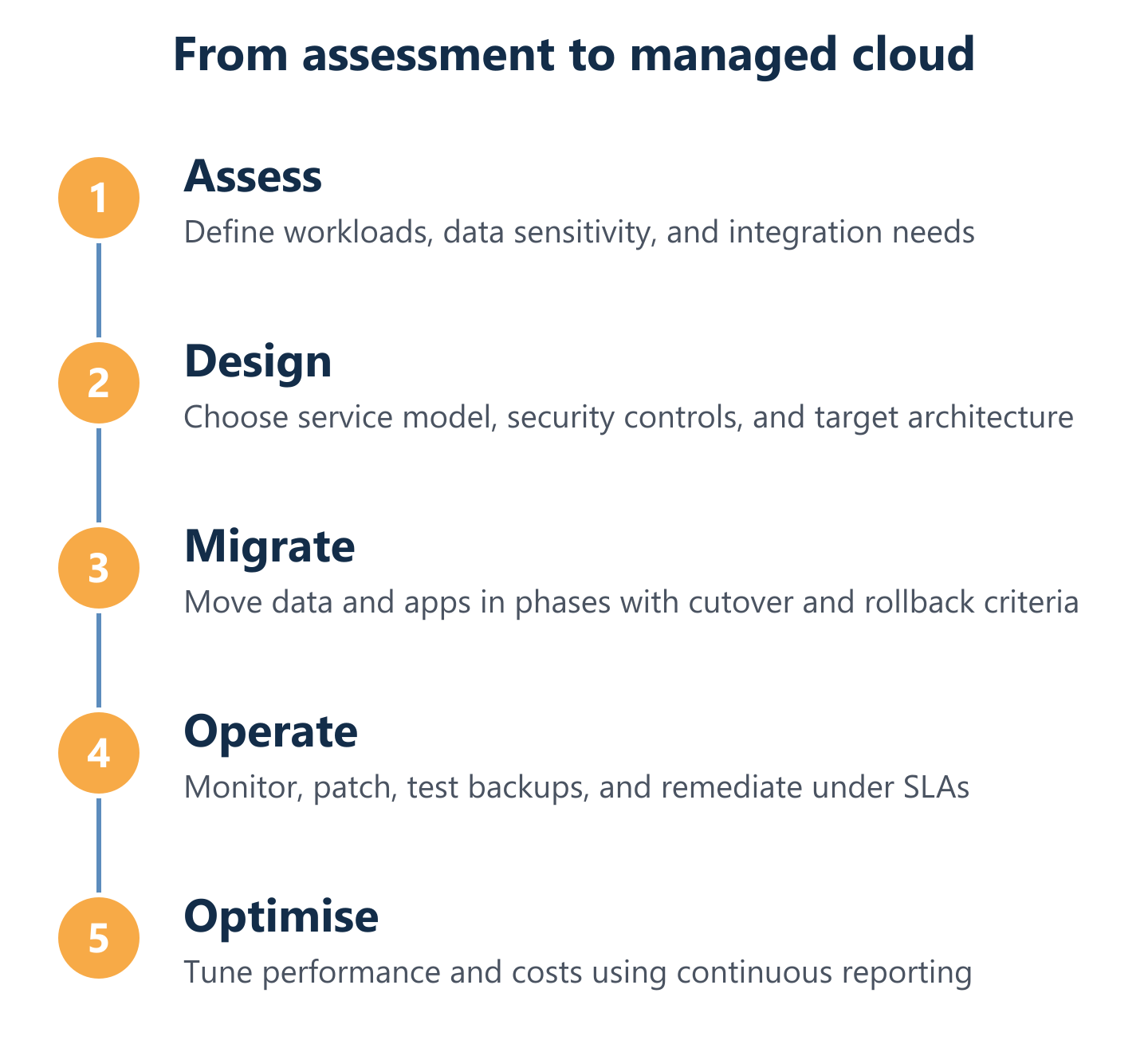
Legacy system integration is consistently the most underestimated element of cloud migration planning. Applications built on older architectures — on-premises ERP systems, custom databases, proprietary file formats — rarely connect to cloud services without middleware, API development, or data transformation work. A realistic migration timeline must account for: discovery and dependency mapping (which systems talk to which), data cleansing before migration (moving dirty data to the cloud amplifies existing problems), parallel running periods to validate that cloud services produce the same outputs as legacy systems, and user training. Organisations that skip the dependency mapping phase routinely discover mid-migration that a critical workflow relies on a system they had not planned to move. For a concrete example of how structured migration planning avoids these problems, our cloud services migration case study documents the approach in practice.
Cost, scaling, and ongoing operations for cloud success
Cloud cost models are fundamentally different from on-premises capital expenditure, and that difference catches many organisations off guard. On-premises infrastructure has high upfront costs and relatively predictable ongoing expenses. Cloud services invert this: low entry costs, but variable monthly bills that grow with usage, data transfer, additional licences, and support tiers. Without active cost governance, cloud spend can exceed the budget of the hardware it replaced within twelve to eighteen months.
Building a reliable cost model requires identifying every billable component before deployment, not after. The following factors consistently drive unexpected spend:
- Data egress fees: most providers charge for data transferred out of their platform; high-volume workloads or frequent large backups can generate significant egress costs that are absent from headline pricing.
- Storage growth: unmanaged data retention policies cause storage costs to compound; define lifecycle rules and archiving thresholds at the outset.
- Licence proliferation: Microsoft 365 licences, for example, come in multiple tiers; without governance, users accumulate higher-tier licences they do not need.
- Support tier gaps: basic support tiers from hyperscale providers offer limited response times; SLA-based managed services from a partner like Impulso Tecnológico fill this gap with guaranteed response times and proactive remediation.
- Integration and automation overhead: connecting cloud services to legacy systems or third-party platforms requires ongoing maintenance as APIs and versions change.
With over 25 years of IT consulting and managed services experience, Impulso Tecnológico structures cloud engagements around fixed monthly pricing models that make operational costs predictable, combined with proactive monitoring and backup aligned to business continuity requirements.
Cost modelling for SMBs: what to estimate before selecting a provider
A cloud cost estimate for an SMB should cover five components before any provider is selected. First, compute: how many virtual machines or container instances are needed, at what size, and for how many hours per month. Second, storage: current data volumes, projected growth rate, and how much data must be retained for compliance versus archived or deleted. Third, data transfer: estimate monthly egress volumes, particularly if the cloud environment will serve external customers or integrate with on-premises systems. Fourth, managed services and support: the cost of SLA-based managed services is often more predictable than internal IT overhead and should be included in the comparison. Fifth, licences: productivity suites, security tools, and backup software all carry per-user or per-workload fees that compound with headcount. Producing this estimate before issuing a request for proposal prevents the common outcome of selecting a provider on headline price and discovering the real cost later.
Scaling strategy: performance, resilience, and capacity planning
Scaling in the cloud is not automatic — it requires deliberate configuration of auto-scaling rules, load balancing, and capacity thresholds, plus regular review as workloads evolve. Organisations that treat cloud elasticity as a passive feature rather than an actively managed capability tend to encounter two failure modes: over-provisioning (paying for idle capacity) or under-provisioning (performance degradation during demand spikes). Resilience planning must address both compute and data: redundant availability zones for critical workloads, replication policies for storage, and tested failover procedures for key services. Capacity planning should be reviewed at least quarterly, incorporating actual usage data rather than original estimates. The hidden cost most often overlooked at this stage is not infrastructure but operational overhead — the staff time required to monitor, tune, and govern a growing cloud environment without a managed services partner absorbing that burden.
Managed cloud operations: SLAs, monitoring, backup, and continuous improvement
What happens after go-live determines whether cloud investment delivers its intended value. Managed cloud operations cover four disciplines that must be in place continuously: monitoring (real-time alerting on performance, availability, and security events), patching and configuration management (keeping systems current without disrupting production workloads), backup and recovery (tested, documented procedures with defined recovery time and recovery point objectives), and SLA governance (regular reporting against agreed service levels with clear escalation paths). Impulso Tecnológico's managed services model applies these disciplines with guaranteed response times — under four hours for critical issues — so that cloud resources, identity services, and collaboration tools remain dependable without requiring clients to build and staff an internal operations team. For organisations comparing cloud storage and backup options specifically, our guide on cloud storage for businesses covers backup architecture and security controls in detail.
Selecting cloud services for businesses is a structured process, not a product decision. Define your workload requirements, compliance obligations, and cost boundaries first. Then evaluate service models, security controls, and migration complexity against those criteria. Validate backup and recovery procedures before go-live, and ensure ongoing operations are covered by measurable SLAs — not assumed. Organisations that follow this sequence consistently achieve more predictable outcomes, lower operational risk, and cloud environments that remain fit for purpose as the business grows. If you would like a structured assessment of your current IT environment and a tailored cloud services roadmap, Impulso Tecnológico's consulting team is ready to help.