

A business telephone switchboard is a centralised system that manages all incoming and outgoing calls across a company's extensions, departments, and sites. It routes calls automatically or manually, queues them when agents are busy, and records interactions for quality control — replacing the chaos of unmanaged phone lines with a structured, measurable communications layer.
For many organisations, the problem is not a lack of phones but a lack of control: calls go unanswered, transfers are misrouted, and there is no visibility into whether agents are meeting response targets. A properly configured switchboard — whether analogue, digital, IP, or a hybrid of all three — solves these issues by centralising call logic in one system. Companies that implement structured call routing, IVR menus, and queue management consistently report fewer missed calls and faster resolution times. This guide covers every layer of that system, from how call flows work in practice to how to select, deploy, and maintain a switchboard without disrupting daily operations.
What a business telephone switchboard is (and who uses it)
A business telephone switchboard connects every phone line, extension, and communication channel in a company through a single control point. Historically, this meant a physical PBX cabinet on-site; today it can be a cloud-hosted virtual PBX, an IP system, or a hybrid that combines legacy analogue infrastructure with SIP trunk compatible switchboard capabilities. The defining function remains the same: all calls enter the system, follow programmed rules, and reach the right person or queue without requiring manual intervention for every transfer.
At Impulso Tecnológico, we work with the full spectrum — analogue, digital, and IP voice switchboards — as well as hybrid configurations that allow companies to modernise their communications without disrupting daily operations. This matters particularly for organisations with existing cabling or hardware investments they are not ready to abandon.
| Switchboard type | Infrastructure needed | Typical company fit | Key limitation |
|---|---|---|---|
| Analogue / traditional PBX | On-site cabinet, PSTN lines | Established SMEs with existing hardware | Limited remote/mobile extension support |
| Digital PBX (ISDN) | On-site cabinet, ISDN lines | Mid-size companies, pre-IP era | ISDN phase-out in most markets |
| IP / VoIP switchboard | LAN/WAN, SIP trunks or hosted provider | Multi-site, remote-first, or growing firms | Requires stable internet and QoS configuration |
| Virtual PBX (cloud-hosted) | Internet connection only | SMEs, startups, distributed teams | Less control over hardware redundancy |
| Hybrid (analogue + IP) | Existing PBX + IP gateway/SIP trunk | Companies mid-migration | Complexity of managing two environments |
Switchboard vs PBX vs VoIP: practical definitions
A switchboard centralises call control: reception, departments, extensions, and routing rules all live within one system. A PBX (Private Branch Exchange) is the hardware or software engine that powers this — it manages internal extensions and connects them to external lines. VoIP (Voice over Internet Protocol) is the transmission method: calls travel as data packets over IP networks rather than dedicated phone circuits.
In practice, most modern office telephone switchboard deployments are IP-PBX systems that use VoIP as their transport layer, often connecting to the public telephone network via SIP trunks. A SIP trunk compatible switchboard can replace multiple physical ISDN lines with a single internet-based connection, reducing line rental costs while supporting higher call volumes. The terms are often used interchangeably in vendor literature, but the distinction matters when planning infrastructure or negotiating contracts.
Typical users: reception, support desks, sales teams, and multi-site operations
Receptionists are the most visible users of a business telephone switchboard: they answer, screen, and transfer calls, and rely on live extension status to know whether a colleague is available before transferring. Support desks depend on call queue management to handle demand spikes without losing callers. Sales teams use outbound caller ID controls and call recording and call notes to document conversations and maintain continuity across the pipeline.
Multi-site operations represent a particularly strong use case. A virtual PBX enables extensions across different offices, warehouses, or countries to behave as a single system, with desk phones, softphones, or webphones all connecting through the same routing logic. Impulso Tecnológico installs IP telephone switchboards that support mobile extensions for exactly this scenario — centralised connectivity regardless of where employees are physically located.
How call flows move from caller to extension (in plain terms)
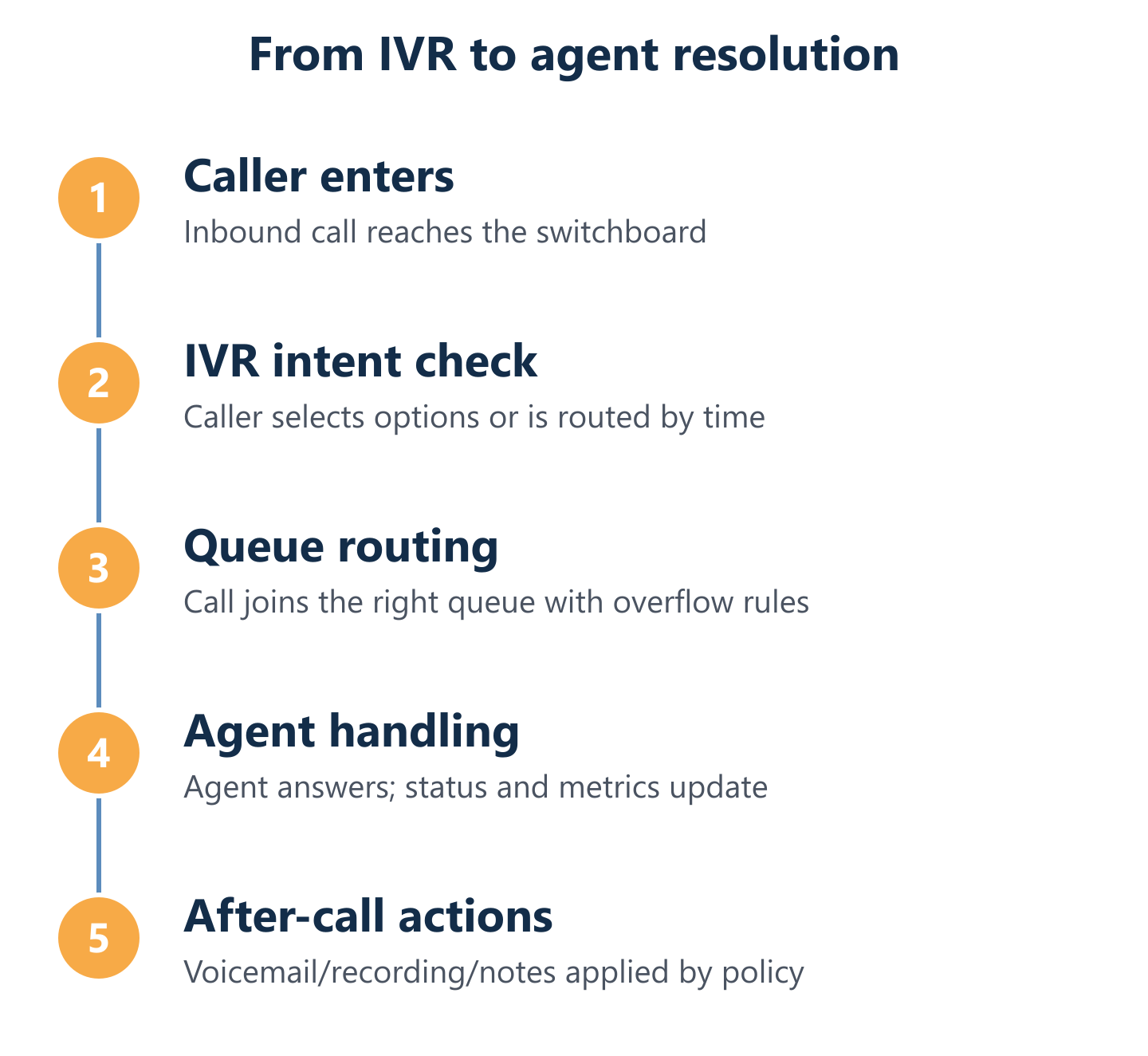
When a call arrives, the switchboard checks its routing rules in sequence. First, it identifies the dialled number and time of day. Then it applies the relevant IVR call routing logic — presenting a menu, directing to a department, or sending to a queue. If the target extension is busy, overflow rules determine whether the call waits, transfers to another agent, or routes to voicemail.
In hybrid setups, this logic can span both traditional switching and IP voice simultaneously. A caller might enter through a PSTN line, be processed by an IP-PBX, and reach an agent on a SIP softphone — all transparently. Impulso Tecnológico's migration pathway is designed around this reality: companies move toward IP telephony at a pace that suits their operations, without risking interruption to business communications. The call flow architecture is configured and tested before any legacy lines are decommissioned.

Core call-handling workflows for companies
A switchboard's value is only as good as the workflows programmed into it. Generic out-of-the-box configurations rarely match the reality of how a company actually handles calls — the departments that exist, the hours they operate, the agents available at different times of day, and the rules that apply when those agents are unavailable. Getting this right requires both technical configuration and an understanding of the business's communication patterns.
At Impulso Tecnológico, we configure and reprogram switchboards to reflect exactly these operational realities, including multi-site and mobile extension scenarios. The following phases describe the end-to-end call-handling workflow that a well-configured business telephone switchboard should support:
- Call arrival and identification: The system recognises the inbound number, applies time-of-day rules, and determines whether the call enters a live queue or an automated IVR path.
- IVR presentation (if applicable): The caller hears a greeting and menu options that route them by intent — sales, support, billing, or a specific department.
- Queue entry and wait management: If the target agent or team is busy, the caller enters a structured queue with position announcements and estimated wait times.
- Transfer to extension: The receptionist or automated system directs the call to the correct extension, with live status data confirming availability before transfer.
- Overflow and fallback: If no agent answers within a defined threshold, the call escalates — to a supervisor, a secondary queue, or a voicemail box with a personalised greeting.
- After-hours handling: Outside business hours, calls follow a separate routing path: IVR with after-hours messaging, voicemail capture, or emergency escalation to a mobile extension.
Receptionist and department routing: keeping calls human and accurate
Receptionist flows depend on accurate, real-time information. When a call arrives, the operator needs to see which extensions are free, which are on a call, and which are set to do-not-disturb — before committing to a transfer. A switchboard that surfaces live extension status eliminates the frustration of blind transfers that ring out or interrupt busy colleagues.
Department routing adds a layer of structure: calls for sales never land in the support queue, and calls for a specific branch go to that branch's extensions first. This is configured through dial plans and routing groups, not manual intervention. For companies with dedicated account managers or named contacts, direct inward dialling (DID) numbers can map individual callers to specific extensions, bypassing the general queue entirely. Impulso Tecnológico configures these routing structures as part of initial installation and adjusts them through reprogramming as the company's team or structure changes.
Queues, overflow, and transfer rules that reduce manual work
Call queue management is where many companies lose callers unnecessarily. A queue without overflow rules simply rings until the caller hangs up. A well-configured queue, by contrast, sets a maximum wait threshold, announces position and estimated wait time, and triggers a fallback action — transfer to a secondary group, callback option, or voicemail — before the caller reaches frustration point.
Overflow rules should account for multiple scenarios: all agents busy, no agents logged in, queue depth exceeding a set limit, or time-of-day boundaries. Transfer rules define whether a call can be transferred blind (without announcement) or attended (with a brief check before handoff). Reducing manual transfers is not just about convenience — it directly affects first-call resolution rates and the number of times a caller has to repeat their issue. Impulso Tecnológico's service-first approach includes configuring these rules in detail, not leaving them at factory defaults.
After-hours handling: IVR menus, voicemail greetings, and escalation
After-hours call handling is often the weakest point in a company's telephone configuration. A single generic voicemail greeting with no routing logic leaves callers with no indication of when they will be called back or whether their message has been received. A structured after-hours IVR, by contrast, can present options: leave a voicemail for a specific department, hear recorded information (opening hours, address, emergency contact), or escalate to a mobile extension for genuinely urgent calls.
Voicemail greetings should be department-specific and updated regularly to reflect holidays or temporary closures. Escalation rules — for example, routing calls from key clients to a manager's mobile after 18:00 — are configured at the switchboard level, not dependent on manual forwarding. For customer support operations, this layer of continuity is the difference between a caller who returns the next day and one who contacts a competitor. Impulso Tecnológico supports this configuration as part of its ongoing switchboard maintenance and reprogramming service.
IVR, routing, analytics, and implementation criteria
IVR design, call routing logic, and performance monitoring are not independent features — they form a single operational layer that determines whether a switchboard delivers measurable value or simply routes calls without insight. Companies that implement IVR without analytics cannot tell whether callers are dropping out of menus, which queues are consistently overloaded, or whether agents are meeting response targets.
At Impulso Tecnológico, we treat switchboards as part of the wider communications and IT environment. This means IVR configuration, routing rules, and reporting are designed together, not bolted on separately. Our multibrand service capability — covering platforms from Alcatel Lucent and Siemens to NEC Philips and Asterisk — means we can apply this approach regardless of the hardware or software a company already has in place. When evaluating or implementing a business telephone switchboard, the following criteria should drive the decision:
- IVR depth and flexibility: Can menus be structured by department, time of day, and caller intent — and updated without vendor involvement?
- Queue configuration options: Does the system support multiple queues, overflow paths, priority routing, and agent skill-based assignment?
- Real-time monitoring: Are live extension status, queue depth, and agent availability visible to supervisors from a single dashboard?
- Historical analytics: Can managers pull call data including abandoned calls, average handle time, and long-distance call volumes for cost analysis?
- Call recording controls: Is recording configurable per queue, per agent, or per call — and can it be paused for sensitive interactions?
- SIP trunk compatibility: Does the system support SIP trunk compatible switchboard connections to reduce line costs and increase scalability?
- Migration path: Can the system operate in hybrid mode during transition, protecting continuity while IP voice is rolled out progressively?
IVR design that works: menus, call intent, and queue entry points
Effective IVR call routing starts with understanding why callers are calling, not with the company's internal org chart. A menu structured around caller intent — "press 1 for a new enquiry, press 2 for an existing order, press 3 for technical support" — routes callers faster than a menu that mirrors internal departments they have never heard of. Each menu option should lead directly to a queue entry point, not to a sub-menu that adds another layer of navigation.
Dynamic routing extends this logic: calls can be routed differently based on time of day, the number dialled, or the caller's history in the system. A caller who has been waiting in a queue for more than two minutes can be offered a callback option or escalated to a priority path. IVR menus should be tested regularly — listening to the experience as a first-time caller reveals friction points that internal teams stop noticing. Impulso Tecnológico configures IVR structures as part of initial switchboard programming and adjusts them through scheduled maintenance reviews.
Monitoring and metrics: extension status, queue performance, and call review
Agent and queue analytics close the gap between a switchboard that handles calls and one that improves over time. Live extension status shows supervisors which agents are available, on a call, or logged out — enabling real-time adjustments to queue assignments without requiring agents to manually update their status. Queue performance metrics — including average wait time, abandonment rate, and calls handled per agent — identify bottlenecks before they affect service levels.
Historical call data supports cost management as well as quality: abandoned call reports highlight peak demand periods that need additional staffing, while long-distance call data enables accurate cost attribution by department. Call recording and call notes allow managers to review past interactions for training purposes or dispute resolution. Impulso Tecnológico references cHar uTile as a software solution for exhaustive control of switchboard traffic and call charging, providing detailed reporting across sites in Spain including Madrid and Barcelona.
Selection and rollout: compatibility, permissions, and migration without downtime
Rolling out a new switchboard — or migrating an existing one to IP — requires a structured approach to compatibility, permissions, and sequencing. The first step is an audit of existing infrastructure: which lines are analogue, ISDN, or SIP; what cabling standard is in place (CAT-5e minimum, CAT-6 recommended for PoE desk phones); and which extensions need to remain operational throughout the transition.
For cloud or virtual PBX deployments, administrative permissions must be established before configuration begins — including access to the dashboard, number porting authorisation, and SIP trunk credentials. For on-premise IP switchboards, network QoS settings must be configured to prioritise voice traffic and prevent packet loss. Impulso Tecnológico's migration pathway is designed to enable companies to move toward IP voice without risking interruption to business communications, combining the strengths of traditional switching with IP telephony capabilities at a pace that suits each organisation. For more detail on the installation process, our guide to switchboard installation for companies covers the full technical sequence.
A business telephone switchboard delivers measurable advantage only when its features, workflows, and rollout are aligned with how the company actually operates. IVR menus that match caller intent, queues with structured overflow rules, and analytics that surface real performance data transform a phone system into a communications asset. Impulso Tecnológico brings more than 25 years of IT and telephony experience to this process — from initial configuration and installation to ongoing maintenance, reprogramming, and migration support. Whether you are modernising an analogue system, deploying a virtual PBX, or managing a multi-site IP rollout, the right partner makes the difference between a smooth transition and a disruptive one. Explore our telephone system installation and maintenance service or learn more about VoIP for businesses to see how these services connect.