

IT services for businesses encompass the full range of technical support, infrastructure management, cybersecurity, cloud operations and governance that keep an organisation running securely and efficiently—delivered either by an external provider, an internal team, or a combination of both.
Most businesses reach a tipping point where reactive IT support—fixing problems after they occur—starts costing more than prevention. A server outage during peak trading, a ransomware incident with no tested backup, or an employee leaving without proper account deprovisioning: these are not edge cases. They are predictable failures of an unstructured IT model. The shift to managed IT services addresses this by replacing unpredictable break-fix costs with structured, proactive coverage that spans monitoring, security, cloud and user lifecycle management. At Impulso Tecnológico, we have spent over 25 years building service models that reflect this reality—resolving more than 4,000 IT tickets annually for clients across Spain, Portugal and beyond, with a service structure designed around prevention, clear response times and measurable outcomes.
What "IT services for businesses" should include (scope checklist)
A proposal that lists "IT support" without defining scope is not a proposal—it is a risk. Before signing any managed services agreement, you need to verify that every operational layer is covered: day-to-day help desk, proactive maintenance, security operations, backup and recovery, cloud management, and IT governance. Gaps in any one of these areas create exposure that eventually surfaces as downtime, data loss or compliance failure.
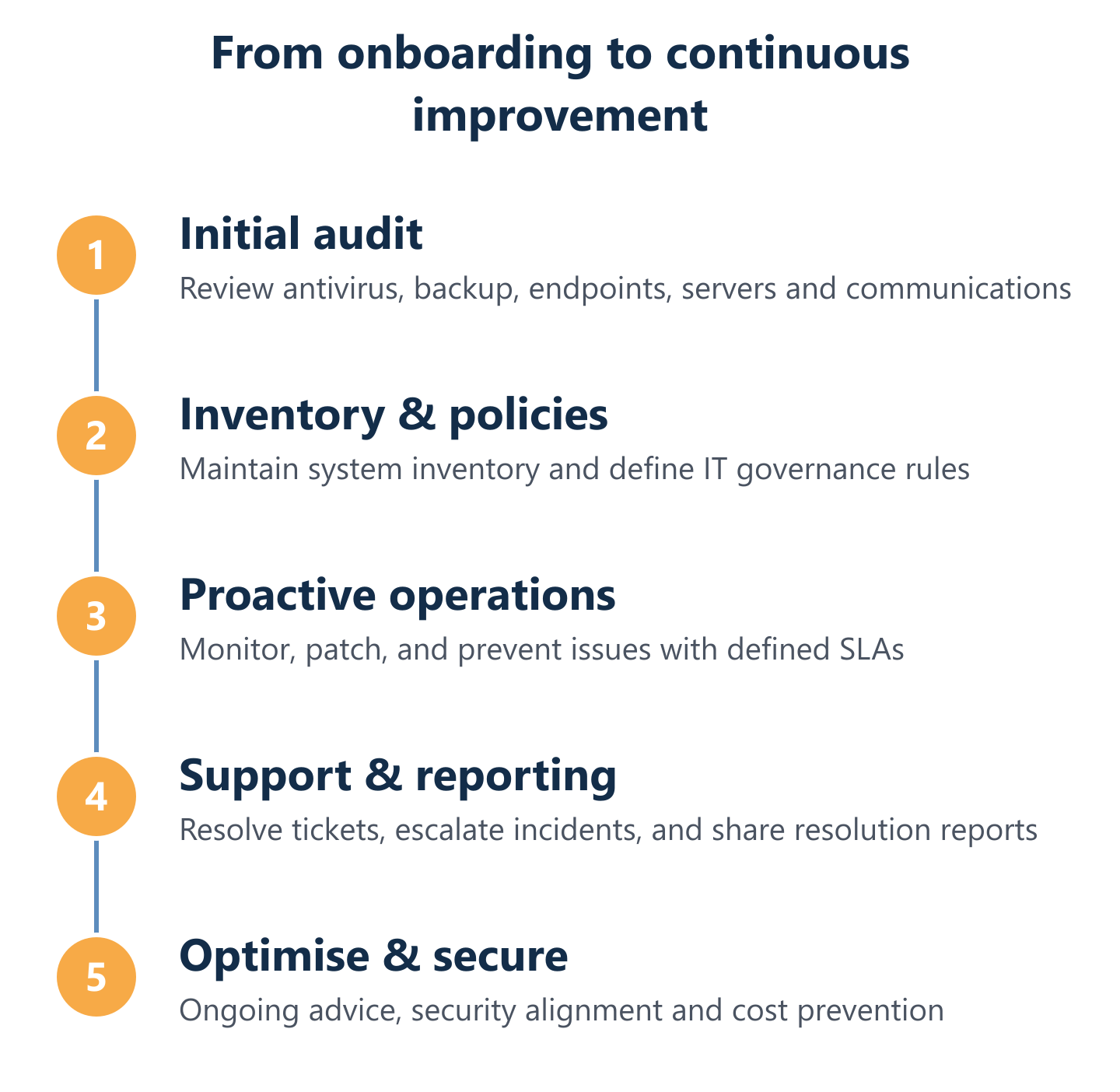
At Impulso Tecnológico, we centralise all of these layers under a single provider model, with defined SLAs, close technical assistance (remote or on-site) and structured onboarding that includes an initial audit covering antivirus, backup, desktops, servers and communications. For SMEs ranging from 3 to 150 users, the service can act as a complete external IT department or complement an existing internal team—adapting to the organisation's actual needs rather than a generic template.
| Service Layer | What to Verify in Any Proposal | Impulso Tecnológico Coverage |
|---|---|---|
| Help Desk & Support | Response times, escalation paths, remote vs on-site | Under 8 working hours (standard); under 4 hours (servers/critical) |
| Proactive Monitoring | System health checks, alerting, patch management | Continuous monitoring with proactive review on every request |
| Cybersecurity | Endpoint protection, firewall, ransomware response | Sophos, Fortinet—endpoint, network and cloud security layers |
| Backup & DR | Automation, offsite storage, restoration testing | Veeam-based backup with disaster recovery planning |
| Cloud Management | Microsoft 365/Azure licences, migration, ongoing ops | Full Microsoft 365 and Azure management including identity |
| IT Governance | User lifecycle, device inventory, IT policies | Maintained system inventory, resolution reports, ongoing advice |
Day-to-day IT support: help desk, remote/on-site coverage, escalation
The IT help desk is the operational heartbeat of any managed service. What separates a functional help desk from a frustrating one is not the channel (phone, email, chat) but the structure behind it: defined response times, clear escalation paths, and the discipline to resolve rather than defer. Impulso Tecnológico's computer support model sets response targets of under 8 working hours for standard requests and under 4 hours for server issues or critical incidents affecting the entire business. Support is delivered both remotely and on-site, with coverage available in Spanish and English during business hours (9:00–17:00 CET, Monday to Friday). Every request also triggers a proactive review to identify whether a deeper issue needs addressing—preventing repeat incidents and unnecessary costs down the line.
Proactive IT management: monitoring, patching, inventory and prevention
Reactive support handles what has already broken. Proactive IT management prevents the break from happening. This means continuous monitoring of system health, automated patch deployment, maintained hardware and software inventories, and scheduled reviews that catch degradation before it becomes failure. Impulso Tecnológico's managed service includes a maintained system inventory established during onboarding, ongoing monitoring aligned to IT security criteria and industry standards, and a proactive review embedded in every support interaction. This approach is particularly valuable for SMEs without dedicated internal IT staff, where unpatched systems and unmonitored servers are among the most common sources of avoidable downtime. The goal is not just to fix—it is to reduce the frequency and cost of incidents over time.
IT governance: policies, user accounts, device lifecycle and budgeting planning
IT governance is the layer most commonly absent from basic support contracts—and the one most likely to cause problems during audits, staff changes or insurance claims. Proper governance covers IT policy documentation, user account management (onboarding and offboarding), device lifecycle tracking, and structured IT budgeting. When an employee joins, their accounts and device access should be provisioned according to defined policies. When they leave, access should be revoked immediately and completely. Impulso Tecnológico builds this into the service model through maintained system inventories, resolution reports and ongoing advisory support. For businesses planning technology investments, this governance layer also enables accurate budgeting—replacing unpredictable capital expenditure with planned, predictable operational costs aligned to actual device counts and user needs. Explore our broader IT solutions for businesses to see how governance integrates across the full stack.

Managed vs co-managed IT services—how to choose
The choice between fully managed and co-managed IT is not about size—it is about operational maturity, internal capacity and risk tolerance. Both models are legitimate; the mistake is choosing the wrong one for your situation.
- Assess your internal IT maturity. Do you have dedicated IT staff with defined responsibilities, or does IT fall to whoever is least busy? If there is no structured internal function, fully managed is almost always the right starting point.
- Count your devices and users. Organisations with 3–150 users and no internal IT team typically benefit most from a fully managed model. Those with 50+ users and an existing IT person often find co-managed more efficient.
- Map your operational risk. Industries with compliance requirements (healthcare, finance, education) or high uptime dependencies need a provider that owns proactive monitoring and incident response—not just supplemental cover.
- Define what you want to keep in-house. Co-managed works best when internal staff retain strategic or relationship-driven IT decisions, while the provider handles day-to-day operations, security and maintenance.
- Evaluate SLA accountability. In a co-managed model, accountability boundaries must be explicit. Who owns patch management? Who responds to a security alert at 8 a.m.? Ambiguity here is where incidents escalate.
Impulso Tecnológico supports both models: acting as a complete external IT department for SMEs or complementing existing teams with structured support. In either case, the service includes transparent SLAs, resolution reporting after every interaction, and proactive reviews designed to prevent repeat issues—not just close tickets.
Decision criteria: internal IT maturity, device/users scale, and operational risk
In a fully managed IT model, the provider owns day-to-day operations: monitoring, patching, security management, help desk, and proactive maintenance. The business retains strategic direction but delegates execution entirely. This model works best when there is no internal IT function, when the device/user count is growing faster than internal capacity, or when a recent incident (ransomware, data loss, prolonged downtime) has exposed the cost of unstructured IT. The key decision criterion is operational risk: if an unplanned outage or security breach would materially disrupt revenue or reputation, fully managed IT with defined SLAs is not an overhead—it is risk mitigation with a predictable monthly cost. Impulso Tecnológico's flat-rate model is structured precisely for this scenario, covering SMEs from 3 to 150 computers with or without existing IT staff.
Pros and cons: managed coverage depth vs co-managed flexibility
Co-managed IT supplements an existing internal team rather than replacing it. The provider takes on specific workloads—security monitoring, backup management, project delivery, or peak-demand overflow—while internal staff retain ownership of day-to-day user support and strategic planning. The advantage is flexibility: you leverage external expertise without rebuilding your internal function. The risk is accountability gaps. When responsibilities are split, incidents can fall between the cracks unless escalation paths and ownership boundaries are documented in writing. Co-managed arrangements work best for organisations with a capable internal IT person who needs specialist depth (cybersecurity, cloud migration, compliance) rather than breadth. For businesses considering this route, our IT consulting services provide a structured starting point for defining those boundaries clearly.
Service clarity: SLAs, reporting, escalation, and accountability boundaries
Regardless of model, service clarity is what separates a professional managed IT relationship from an informal arrangement. SLAs must define response times by incident severity, not just average response. Reporting should be regular and readable—not just a ticket count, but a view of recurring issues, resolved root causes and system health trends. Escalation paths need to be documented: who handles a critical server failure, who communicates with the business, and what the recovery timeline commitment is. Accountability boundaries in co-managed models must be written, not assumed. Impulso Tecnológico addresses this through defined response targets (under 8 hours standard, under 4 hours critical), resolution reports delivered after every interaction, and ongoing advisory support that keeps clients informed rather than dependent. Predictable costs and transparent communication are foundational to the service model—not optional extras.
Security-first operations, backup & cloud—measuring ROI
Three service areas consistently determine whether managed IT delivers measurable business value or simply maintains the status quo: security operations, backup and disaster recovery, and cloud platform management. Each has a direct line to ROI—either through cost avoidance (preventing incidents) or productivity gain (enabling reliable, scalable operations).
- Security posture directly affects insurance premiums and compliance standing. Organisations with documented endpoint protection, firewall policies and patch management records are better positioned for cyber insurance assessments and regulatory audits.
- Downtime has a calculable cost. For most SMEs, even four hours of unplanned downtime across 20 users represents significant lost productivity and potential revenue impact—making proactive monitoring a straightforward cost-benefit decision.
- Untested backups are not backups. Recovery time depends on restoration testing, not just backup frequency. A backup that has never been tested is an assumption, not a guarantee.
- Cloud platform mismanagement inflates licence costs. Unused Microsoft 365 licences, unmanaged Azure resources and ungoverned identity access are common sources of avoidable expenditure in organisations without active cloud management.
- Measurable service performance builds trust. Impulso Tecnológico tracks resolved tickets and client satisfaction across 476 active clients, providing a performance baseline that supports continuous service improvement rather than anecdotal reporting.
The combination of proactive monitoring, human technical support and recognised technology partners—Sophos, Fortinet, Veeam, Microsoft—gives Impulso Tecnológico's clients a security and continuity baseline that would be difficult to replicate with fragmented, single-vendor contracts.
Security-first managed IT: 24/7 monitoring, incident response and compliance readiness
Ransomware protection is not a product—it is a layered operational discipline. Effective security-first managed IT combines endpoint protection, network firewall management, cloud security controls and proactive threat monitoring into a coherent defence posture. Impulso Tecnológico deploys solutions from Sophos and Fortinet across endpoint, network and cloud layers, with monitoring aligned to IT security criteria and industry standards. For compliance readiness, this means maintaining documented security policies, access controls and patch records that support GDPR obligations and cyber insurance assessments. Incident response capability matters as much as prevention: when an alert fires, the escalation path must be clear, the response time defined, and the resolution documented. Our computer services page details how these security layers integrate into the broader managed service model.
Backup & disaster recovery: automation, recovery testing and continuity planning
Disaster recovery planning starts with a question most businesses cannot answer confidently: if your primary systems went offline right now, how long would recovery take, and have you tested it? Automated backups using Veeam remove the human error risk from backup scheduling, but automation alone is insufficient. Recovery testing—actually restoring data from backup in a controlled environment—is what validates the plan. Impulso Tecnológico's backup and DR approach covers automated backup execution, encrypted storage, and restoration testing to verify that recovery time objectives are achievable in practice. Continuity planning also means documenting the steps required to restore operations across different failure scenarios: hardware failure, ransomware encryption, site-level incident. Without this documentation, even a functional backup becomes a slow, costly recovery process under pressure.
Cloud services and ROI: Microsoft 365/Google Workspace operations and value measurement
Microsoft 365 management is one of the highest-ROI components of a managed IT service—when done properly. Migration is only the beginning; ongoing management of licences, identity and access, mailbox security, SharePoint governance and Teams configuration determines whether the platform delivers its intended productivity value or becomes an ungoverned cost centre. Impulso Tecnológico provides full Microsoft 365 and Azure management, including licence optimisation, identity management and backup of cloud data. For ROI measurement, the relevant metrics are licence cost per active user, time saved through collaboration tool adoption, and reduction in email-based security incidents. Combined with proactive IT monitoring that prevents downtime, and a help desk that resolves issues within defined response windows, the service performance picture becomes concrete—resolved tickets, response times met, and systems available when employees need them.
Matching your IT service scope to the right delivery model is the first decision—and the one that determines whether technology becomes a business enabler or a recurring source of risk and cost. If your current IT arrangement leaves gaps in monitoring, security, backup or governance, those gaps will surface eventually. Impulso Tecnológico works with businesses across Spain, Portugal and internationally to close those gaps with a structured, transparent service model built around your actual needs. To understand what a tailored IT service proposal looks like for your organisation, the next step is a direct conversation with our team.